
Asp.net Core认证和授权:Cookie认证
关于asp.net core 的文章,博客园已经有很多大牛写过了。
这里我只是记录下自己在学习中的点滴和一些不懂的地方
Cookie一般是用户网站授权,当用户访问需要授权(authorization)的页面,程序会判断是否已经授权,并认证
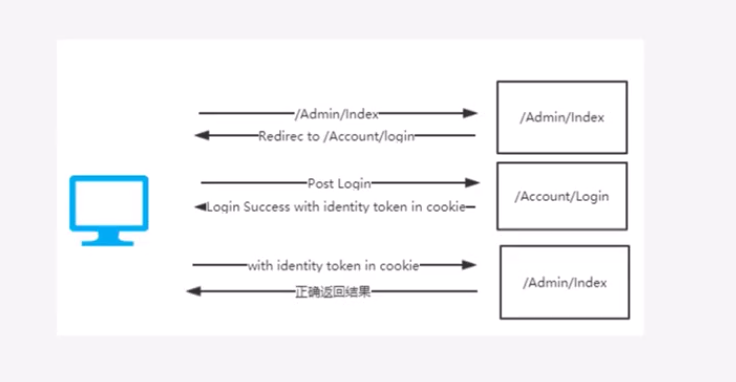
添加认证代码:
引入命名空间:Microsoft.AspNetCore.Authentication.Cookies;
添加服务
public void ConfigureServices(IServiceCollection services)

        {

            services.AddMvc().SetCompatibilityVersion(CompatibilityVersion.Version_2_2);

            services.AddAuthentication(CookieAuthenticationDefaults.AuthenticationScheme) .AddCookie();

        }
注册中间件,添加到管道
app.UseAuthentication();
注意:一定要在app.UseMvc之前添加
我们通过源码可以看到cookie的一些默认配置
// Copyright (c) .NET Foundation. All rights reserved.

// Licensed under the Apache License, Version 2.0. See License.txt in the project root for license information.

using Microsoft.AspNetCore.Http;

namespace Microsoft.AspNetCore.Authentication.Cookies

{

    /// <summary>

    /// Default values related to cookie-based authentication handler

    /// </summary>

    public static class CookieAuthenticationDefaults

    {

        /// <summary>

        /// The default value used for CookieAuthenticationOptions.AuthenticationScheme

        /// </summary>

        public const string AuthenticationScheme = "Cookies";

        /// <summary>

        /// The prefix used to provide a default CookieAuthenticationOptions.CookieName

        /// </summary>

        public static readonly string CookiePrefix = ".AspNetCore.";

        /// <summary>

        /// The default value used by CookieAuthenticationMiddleware for the

        /// CookieAuthenticationOptions.LoginPath

        /// </summary>

        public static readonly PathString LoginPath = new PathString("/Account/Login");

        /// <summary>

        /// The default value used by CookieAuthenticationMiddleware for the

        /// CookieAuthenticationOptions.LogoutPath

        /// </summary>

        public static readonly PathString LogoutPath = new PathString("/Account/Logout");

        /// <summary>

        /// The default value used by CookieAuthenticationMiddleware for the

        /// CookieAuthenticationOptions.AccessDeniedPath

        /// </summary>

        public static readonly PathString AccessDeniedPath = new PathString("/Account/AccessDenied");

        /// <summary>

        /// The default value of the CookieAuthenticationOptions.ReturnUrlParameter

        /// </summary>

        public static readonly string ReturnUrlParameter = "ReturnUrl";

    }

}
我们可以自己修改:
  services.AddAuthentication(CookieAuthenticationDefaults.AuthenticationScheme)

                .AddCookie(option =>

                {

                    option.LoginPath = "/Login"; //没有授权,跳转的url

                    option.LogoutPath = "/Login"; //退出,的url

                });
因为cookie在有效期内都是有效的,如果用户资料修改了,客户端的Cookie是不知道的
网上有人提出了解决方案,如果用户修改了资料,在数据库用一个字段记录,cookie有个事件,在每次请求都会访问
option.Events.OnValidatePrincipal = ValidatePrincipal
想添加多个可以这样写:
option.Events = new CookieAuthenticationEvents
{
OnValidatePrincipal = ValidatePrincipal,
//OnRedirectToLogin =
};
 public async Task ValidatePrincipal(CookieValidatePrincipalContext context)

        {

            var _Context = context.HttpContext.RequestServices.GetRequiredService<EFContext>();

            var s = context.HttpContext.RequestServices.GetService<EFContext>();

            var principal = context.Principal;

            var u = principal.Claims.Select(c => c.Type == "isEdit").FirstOrDefault();

            if (u)

            {

                //更新数据库状态

                //

                // 1. 验证失败 等同于 Principal = principal;

                context.RejectPrincipal();

                //登出

               await AuthenticationHttpContextExtensions.SignOutAsync(context.HttpContext, CookieAuthenticationDefaults.AuthenticationScheme);

                // 2. 验证通过,并会重新生成Cookie。

                //context.ShouldRenew = true;

            }

        }
用户登陆,网上有人这里解释的
ClaimsIdentity(身份证),Claims(身份信息)
ClaimsPrinciple (证件所有者)
这个也很恰当
https://www.cnblogs.com/dudu/p/6367303.html
  [HttpPost]

        public async Task<IActionResult> Login(string ReturnUrl, User model)

        {

            if (model.UserName=="cnblogs" && model.PassWord == "pwd")

            {

                /*

             ClaimsIdentity(身份证),Claims(身份信息)

           ClaimsPrinciple (证件所有者)

             */

                //身份信息

                var claims = new List<Claim> {

                    new Claim(ClaimTypes.Name,"sky"),

                    new Claim("Address","北京海淀"),

                };

                //身份证

                var claimsIdentity = new ClaimsIdentity(claims, CookieAuthenticationDefaults.AuthenticationScheme);

                //证件所有者

                var claimsPrinciple = new ClaimsPrincipal(claimsIdentity);

                /*

                 如果登陆选择了记住我,则将cookie持久化

                 这里默认持久化

                 */

                var properties = new AuthenticationProperties

                {

                    IsPersistent = true,

                    ExpiresUtc = DateTimeOffset.UtcNow.AddDays(),

                    //ExpiresUtc = DateTime.Now.AddDays(1)

                };

                await HttpContext.SignInAsync(CookieAuthenticationDefaults.AuthenticationScheme, claimsPrinciple, properties);

                return Redirect(ReturnUrl);

            }

            else

                return View("index");

        }
博客园的大神文章,很多。就放几个参考吧
https://www.cnblogs.com/RainingNight/p/7587194.html
https://www.cnblogs.com/tdfblog/p/7416589.html
Asp.net Core认证和授权:Cookie认证的更多相关文章
- ASP.NET Core 2.0使用Cookie认证实现SSO单点登录
之前写了一个使用ASP.NET MVC实现SSO登录的Demo,https://github.com/bidianqing/SSO.Sample,这个Demo是基于.NET Framework,.NE ...
- 关于ASP.Net Core Web及API身份认证的解决方案
6月15日,在端午节前的最后一个工作日,想起有段日子没有写过文章了,倒有些荒疏了.今借夏日蒸蒸之气,偷得浮生半日悠闲.闲话就说到这里吧,提前祝大家端午愉快(屈原听了该不高兴了:))!.NetCore自 ...
- 【ASP.NET Core】运行原理[3]:认证
本节将分析Authentication 源代码参考.NET Core 2.0.0 HttpAbstractions Security 目录 认证 AddAuthentication IAuthenti ...
- ASP.NET Core如何使用WSFederation身份认证集成ADFS
如果要在ASP.NET Core项目中使用WSFederation身份认证,首先需要在项目中引入NuGet包: Microsoft.AspNetCore.Authentication.WsFedera ...
- NET Core 2.0使用Cookie认证实现SSO单点登录
NET Core 2.0使用Cookie认证实现SSO单点登录 之前写了一个使用ASP.NET MVC实现SSO登录的Demo,https://github.com/bidianqing/SSO.Sa ...
- ASP.NET Core编程实现基本身份认证
概览 在HTTP中,基本认证(Basic access authentication,简称BA认证)是一种用来允许网页浏览器或其他客户端程序在请求资源时提供用户名和口令形式的身份凭证的一种登录验证方式 ...
- .Net Core 认证系统之Cookie认证源码解析
接着上文.Net Core 认证系统源码解析,Cookie认证算是常用的认证模式,但是目前主流都是前后端分离,有点鸡肋但是,不考虑移动端的站点或者纯管理后台网站可以使用这种认证方式.注意:基于浏览器且 ...
- .Net Core 认证组件之Cookie认证组件解析源码
接着上文.Net Core 认证系统源码解析,Cookie认证算是常用的认证模式,但是目前主流都是前后端分离,有点鸡肋但是,不考虑移动端的站点或者纯管理后台网站可以使用这种认证方式.注意:基于浏览器且 ...
- ASP.NET Core系列:JWT身份认证
1. JWT概述 JSON Web Token(JWT)是目前流行的跨域身份验证解决方案. JWT的官网地址:https://jwt.io JWT的实现方式是将用户信息存储在客户端,服务端不进行保存. ...
- Asp.Net Core 中IdentityServer4 授权中心之自定义授权模式
一.前言 上一篇我分享了一篇关于 Asp.Net Core 中IdentityServer4 授权中心之应用实战 的文章,其中有不少博友给我提了问题,其中有一个博友问我的一个场景,我给他解答的还不够完 ...
随机推荐
- [No000013A]Windows WMIC命令使用详解(附实例)
第一次执行WMIC命令时,Windows首先要安装WMIC,然后显示出WMIC的命令行提示符.在WMIC命令行提示符上,命令以交互的方式执行 执行“wmic”命令启动WMIC命令行环境.这个命令可以在 ...
- [No0000100]正则表达式匹配解析过程分析(正则表达式匹配原理)&regexbuddy使用&正则优化
常见正则表达式引擎引擎决定了正则表达式匹配方法及内部搜索过程,了解它至关重要的.目前主要流行引擎有:DFA,NFA两种引擎. 引擎 区别点 DFA Deterministic finite autom ...
- tensorflow 的tf.where详解
最近在用到数据筛选,观看代码中有tf.where()的用法,不是很常用,也不是很好理解.在这里记录一下 tf.where( condition, x=None, y=None, name=None ) ...
- CentOS-6.9安装配置JDK-7
CentOS-6.9安装配置JDK-7 安装说明 系统环境:centos-6.9安装方式:rpm安装 软件:jdk-7u79-linux-x64.rpm下载地址:http://download.ora ...
- Transfrom笔记
1.在不是以左上角为缩放点进行缩放时,其实比例不能为0,因为0将导致缩放可能出现动画效果不可控,务必选取0.1等较小值来变化
- javascript中的数字玩法,颠覆你的眼睛
1.JavaScript中的数字中有一些很奇葩的现象. 在Chrome控制台中可以自己做一下实验: 1 === 1.0 ; //true 习惯了强类型语言,如java,c,OC看到这个结论还是有点小迷 ...
- vsftpd上传文件出现553 Could not create file错误解决方法
1.确定目录权限 2.关闭selinux
- centos7上安装nagios及增加监控服务器
参考博客 http://blog.csdn.net/firstar521/article/details/52848393 当配置了linux.cfg和Windows.cfg文件,重启nagios后发 ...
- xcode工程编译错误:一般错误总结
1.Apple LLVM 8.0 Error Group /’all-product-headers.yaml’ not found 最近升级了xcode打包后出现了个BUG,记录解决的方法. 现象: ...
- mongodb操作文件
mongodb操作文件,主要是通过GridFS类.存储文件主要存放在fs中,其中的fs是数据库默认的.并且GridFS是直接与数据库打交道,与collection集合无关. ============= ...