
构建ASP.NET MVC4+EF5+EasyUI+Unity2.x注入的后台管理系统(45)-工作流设计-设计步骤
原文:构建ASP.NET MVC4+EF5+EasyUI+Unity2.x注入的后台管理系统(45)-工作流设计-设计步骤
步骤设计很重要,特别是规则的选择。
我这里分为几个规则
1.按自行选择(在起草时候自行选审批人,比较灵活)
2.按上级(无需指定,当时需要知道用户的上司是谁,可以在职位管理设置,或者在用户表直接设置)
3.按职位(选择职位,直接获得该职位的人员)
4.按部门(按部门,直接获得该部分的人员)
5.按人员(设置步骤时就指定人员)
以上用户必须和部门,职位,上级有所关联,只要做好一个其实全部都同理
表结构分析:Flow_FormStep中有IsAllCheck字段我设计这个的目的是批量审核,比如我选择了部门,那么这个步骤要全部门的人都审核通过才算通过否则其中一人审核即可
先创建一个新的表单,必须有新的表单才能设置步骤
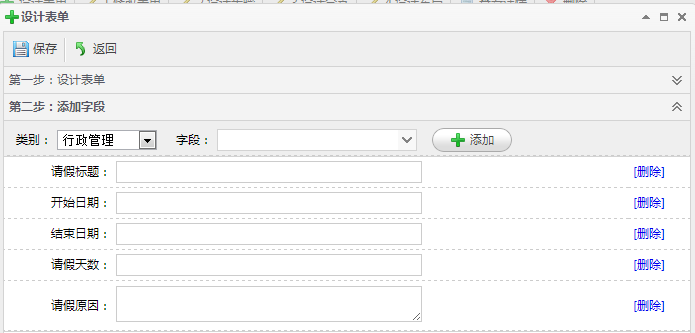

OK,新建好表单的字段之后,就可以设置步骤了
步骤设置很简单,就是一个从表关系,对应了表单的ID。从表可以直接简单看出关系,但设计其实比较有复杂,当选择组织架构,按职位,按指定人。都必须弹出窗口来进行选择,所以还要设计多3个弹出窗口,我这里只设计按人员筛选为例,因为按人员之前在权限管理的角色组管理已经实现
我这里“又”设计成了一个手风琴,具体实现如下

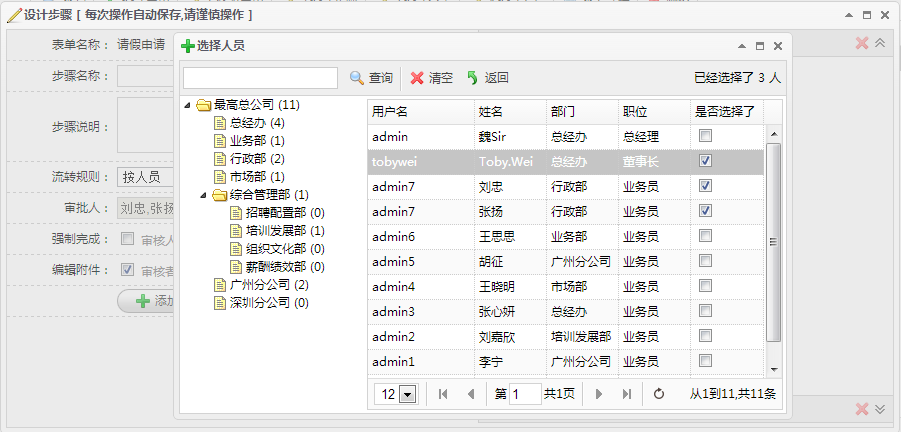
新建步骤和修改步骤=设计步骤
核心Action
[SupportFilter(ActionName = "Edit")]

        public ActionResult EditStep(string id)

        {

            ViewBag.Perm = GetPermission();

            Flow_FormModel flowFormModel = m_BLL.GetById(id);

            List<Flow_StepModel> stepList = stepBLL.GetList(ref setNoPagerDescBySort, flowFormModel.Id);//获得全部步骤

            foreach (var r in stepList)//获取步骤下面的步骤规则

            {

                r.stepRuleList = GetStepRuleListByStepId(r.Id);

            }

            flowFormModel.stepList = stepList;//获取表单关联的步骤

            ViewBag.Form = flowFormModel;

            Flow_StepModel model = new Flow_StepModel();

            model.FormId = flowFormModel.Id;

            model.IsEditAttr = true;

            return View(model);

        }

        [HttpPost]

        [SupportFilter(ActionName = "Edit")]

        public JsonResult EditStep(Flow_StepModel model)

        {

            model.Id = ResultHelper.NewId;

            if (model != null && ModelState.IsValid)

            {

                if (stepBLL.Create(ref errors, model))

                {

                    LogHandler.WriteServiceLog(GetUserId(), "Id" + model.Id + ",Name" + model.Name, "成功", "创建", "Flow_Step");

                    return Json(JsonHandler.CreateMessage(, Suggestion.InsertSucceed, model.Id));

                }

                else

                {

                    string ErrorCol = errors.Error;

                    LogHandler.WriteServiceLog(GetUserId(), "Id" + model.Id + ",Name" + model.Name + "," + ErrorCol, "失败", "创建", "Flow_Step");

                    return Json(JsonHandler.CreateMessage(, Suggestion.InsertFail + ErrorCol));

                }

            }

            else

            {

                return Json(JsonHandler.CreateMessage(, Suggestion.InsertFail));

            }

        }
Controller
完整EditStep.cshtml代码
@model App.Models.Flow.Flow_StepModel
@using App.Common;
@using App.Models.Flow;
@using App.Admin;
@using App.Models.Sys;
@{
ViewBag.Title = "创建";
Layout = "~/Views/Shared/_Index_LayoutEdit.cshtml";
List<permModel> perm = (List<permModel>)ViewBag.Perm;
if (perm == null)
{
perm = new List<permModel>();
}
Flow_FormModel formModel = (Flow_FormModel)ViewBag.Form;
}
<style>
.stepContent table td {
padding: 3px;
} .lineheight {
line-height: 20px;
}
</style>
<script type="text/javascript">
$(function () {
$(".icon-delete").click(function () {
if ($(this).next("a").attr("class") == "accordion-collapse accordion-expand") {
$(this).next("a").trigger("click");
}
});
$("#FlowRule").change(function () {
$("#Execution").val("");
$("#ExecutionName").val("");
if ($("#FlowRule").val() == "上级" || $("#FlowRule").val() == "自选") {
$("#ruleExecution").hide();
} else if ($("#FlowRule").val() == "职位") {
$("#selExc").html("审批职位");
$("#ruleExecution").show();
}
else if ($("#FlowRule").val() == "部门") {
$("#selExc").html("审批部门");
$("#ruleExecution").show();
} else if ($("#FlowRule").val() == "人员") {
$("#selExc").html("审批人员");
$("#ruleExecution").show();
}
});
$("#selExc").click(function () {
var html = $("#selExc").html()
if (html == "审批人员") {
$("#modalwindow").html("<iframe width='100%' height='100%' scrolling='no' frameborder='0'' src='/SysHelper/UserLookUp'></iframe>");
$("#modalwindow").window({ title: '选择人员', width: , height: , iconCls: 'icon-add' }).window('open');
} else if (html == "审批职位") {
$("#modalwindow").html("<iframe width='100%' height='100%' scrolling='no' frameborder='0'' src='/SysHelper/PosMulLookUp'></iframe>");
$("#modalwindow").window({ title: '选择职位', width: , height: , iconCls: 'icon-add' }).window('open');
} else if (html == "审批部门") {
$("#modalwindow").html("<iframe width='100%' height='100%' scrolling='no' frameborder='0'' src='/SysHelper/DepMulLookUp'></iframe>");
$("#modalwindow").window({ title: '选择部门', width: , height: , iconCls: 'icon-add' }).window('open');
}
});
}); var idx = @(formModel.stepList.Count());
function Create() {
if ($("form").valid()) {
$.ajax({
url: "@Url.Action("EditStep")",
type: "Post",
data: $("form").serialize(),
dataType: "json",
success: function (data) {
var stepId = data.value;
var currentIDX = idx + ;
$('#stepList').accordion('add', {
title: '第 ' + (idx + ) + ' 步',
iconCls: 'pic_244',
content: '<div class="stepContent" style="padding:5px"><table class="wid100f"><tr><td style="width:100px;" class="tr">步骤名称:</td><td>'+$("#Name").val()+'</td></tr><tr><td class="tr">步骤说明:</td><td>'+$("#Remark").val()+'</td></tr></table></div>',
tools: [{
iconCls: 'icon-delete',
handler: function (i) {
DeleteStep(stepId);
}
}]
});
idx++;
$("#Sort").val(idx);
$(".icon-delete").click(function () {
if ($(this).next("a").attr("class") == "accordion-collapse accordion-expand") {
$(this).next("a").trigger("click");
}
});
}
});
}
} function DeleteStep(stepId)
{
$.messager.confirm('提示', '你要删除当前步骤及条件吗?', function (r) {
if (r) {
$.post("@Url.Action("DeleteStep")?id=" + stepId, function (data) {//从数据库删除
if (data.type == )
{
var pp = $('#stepList').accordion('getSelected');
if (pp) {
var index = $('#stepList').accordion('getPanelIndex', pp) $('#stepList').accordion('remove', index);
idx--;
//删除后需要重新设置标题
$("#stepList .panel .panel-title").each(function (i) {
$(this).html('第 ' + (i + ) + ' 步');
})
}
$.messageBox5s('提示', data.message);
}
}, "json"); }
});
} function SetSelResult(result,resultName)
{ $("#Execution").val(result);
$("#ExecutionName").val(resultName);
}
function GetSelResult()
{
var arrayObj = new Array()
arrayObj[]= $("#Execution").val();
arrayObj[]= $("#ExecutionName").val();
return arrayObj;
}
//ifram 返回
function frameReturnByClose() {
$("#modalwindow").window('close');
}
</script>
<div id="modalwindow" class="easyui-window" data-options="modal:true,closed:true,minimizable:false,shadow:false"></div> <table style="height: 393px;">
<tr>
<td style="width: 480px; border-right: 1px #ccc solid; vertical-align: top">
@using (Html.BeginForm())
{
@Html.HiddenFor(model => model.FormId)
@Html.HiddenFor(model => model.Sort)
<table class="fromEditTable setTextWidth100" style="width: 100%">
<tbody>
<tr>
<td style="width: 100px; text-align: right;">表单名称:
</td>
<td colspan="">
@Html.DisplayFor(model => formModel.Name)
</td>
</tr>
<tr>
<td style="width: 100px; text-align: right;">
@Html.LabelFor(model => model.Name):
</td>
<td>
@Html.EditorFor(model => model.Name)
</td>
<td>@Html.ValidationMessageFor(model => model.Name)</td>
</tr>
<tr>
<td style="width: 100px; text-align: right;">
@Html.LabelFor(model => model.Remark):
</td>
<td colspan="">
@Html.TextAreaFor(model => model.Remark, new { @style = "width:330px;height:50px" })
</td> </tr> <tr>
<td style="width: 100px; text-align: right;">
@Html.LabelFor(model => model.FlowRule):
</td>
<td>
<select id="FlowRule" name="FlowRule">
<option value="自选">自行指定人</option>
<option value="上级">按上级</option>
<option value="职位">按职位</option>
<option value="部门">按部门</option>
<option value="人员">按人员</option>
</select>
</td>
<td>@Html.ValidationMessageFor(model => model.FlowRule)</td>
</tr>
<tr id="ruleExecution" style="display: none">
<td style="width: 100px; text-align: right;">
@Html.LabelFor(model => model.Execution):
</td>
<td colspan="">
@Html.HiddenFor(model => model.Execution)
<input id="ExecutionName" disabled="disabled" type="text" style="width: 200px" />
<a class="icon-add" id="selExc" href="#" ></a>
</td>
<td>@Html.ValidationMessageFor(model => model.Execution)</td>
</tr> <tr style="display:none">
<td style="width: 100px; text-align: right;">
@Html.LabelFor(model => model.IsAllCheck):
</td>
<td colspan="">
@Html.CheckBoxFor(model => model.IsAllCheck, new { @checked = "checked" })
<span class="gray">当规则或者角色被选择为多人时候,是否启用多人审核才通过</span>
</td> </tr> <tr>
<td style="width: 100px; text-align: right;">
@Html.LabelFor(model => model.CompulsoryOver):
</td>
<td colspan="">
@Html.CheckBoxFor(model => model.CompulsoryOver)
<span class="gray">审核人是否可以强制完成整个流程</span>
</td>
</tr>
<tr>
<td style="width: 100px; text-align: right;">
@Html.LabelFor(model => model.IsEditAttr):
</td>
<td colspan="">
@Html.CheckBoxFor(model => model.IsEditAttr)
<span class="gray">审核者是否可以编辑发起者的附件</span>
</td>
</tr>
<tr>
<td style="width: 100px; text-align: right;"></td>
<td colspan="">
<a href="javascript:Create()" class="easyui-linkbutton" data-options="iconCls:'icon-add'">添加步骤</a>
</td>
</tr>
</tbody>
</table>
} </td>
<td style="width: 414px;">
<div id="stepList" class="easyui-accordion" data-options="animate:false" style="width: 414px; height: 393px; overflow-y: auto; border: 0px;">
@for (int i = ; i < formModel.stepList.Count(); i++)
{
<div title="第 @(i + 1) 步" data-options="iconCls:'pic_244'
,tools: [{
iconCls: 'icon-delete',
handler: function (i) {
DeleteStep('@(@formModel.stepList[i].Id)'); }
}]">
<div class="stepContent" style="padding: 5px">
<table class="wid100f">
<tr>
<td style="width: 100px;" class="tr">步骤名称:</td>
<td>@formModel.stepList[i].Name</td>
</tr>
<tr>
<td class="tr">步骤说明:</td>
<td>@formModel.stepList[i].Remark</td>
</tr>
</table> </div>
</div>
} </div>
</td>
</tr>
</table>
代码分析,控制器中的删除,修改,直接复制代码生成器生成的即可。
ActionResult EditStep,返回Flow_Step模型的同时也返回了Flow_Form的模型。
我修改了Flow_FormModel,让他支持自己的从表关系,必须添加以下2段即可
public List<Flow_FormAttrModel> attrList { get; set; }
public List<Flow_StepModel> stepList { get; set; }
注:本节一点悬念和技术点都没有,就是一个主表和从表的关系,只不过我是换了另一种方式来显示罢了
构建ASP.NET MVC4+EF5+EasyUI+Unity2.x注入的后台管理系统(45)-工作流设计-设计步骤的更多相关文章
- 构建ASP.NET MVC4+EF5+EasyUI+Unity2.x注入的后台管理系统(1)-前言与目录(持续更新中...)
转自:http://www.cnblogs.com/ymnets/p/3424309.html 曾几何时我想写一个系列的文章,但是由于工作很忙,一直没有时间更新博客.博客园园龄都1年了,却一直都是空空 ...
- 构建ASP.NET MVC4+EF5+EasyUI+Unity2.x注入的后台管理系统(48)-工作流设计-起草新申请
原文:构建ASP.NET MVC4+EF5+EasyUI+Unity2.x注入的后台管理系统(48)-工作流设计-起草新申请 系列目录 创建新表单之后,我们就可以起草申请了,申请按照严格的表单步骤和分 ...
- 构建ASP.NET MVC4+EF5+EasyUI+Unity2.x注入的后台管理系统(47)-工作流设计-补充
原文:构建ASP.NET MVC4+EF5+EasyUI+Unity2.x注入的后台管理系统(47)-工作流设计-补充 系列目录 补充一下,有人要表单的代码,这个用代码生成器生成表Flow_Form表 ...
- 构建ASP.NET MVC4+EF5+EasyUI+Unity2.x注入的后台管理系统(46)-工作流设计-设计分支
原文:构建ASP.NET MVC4+EF5+EasyUI+Unity2.x注入的后台管理系统(46)-工作流设计-设计分支 系列目录 步骤设置完毕之后,就要设置好流转了,比如财务申请大于50000元( ...
- 构建ASP.NET MVC4+EF5+EasyUI+Unity2.x注入的后台管理系统(44)-工作流设计-设计表单
原文:构建ASP.NET MVC4+EF5+EasyUI+Unity2.x注入的后台管理系统(44)-工作流设计-设计表单 系列目录 设计表单是比较复杂的一步,完成一个表单的设计其实很漫长,主要分为四 ...
- 构建ASP.NET MVC4+EF5+EasyUI+Unity2.x注入的后台管理系统(43)-工作流设计-字段分类设计
原文:构建ASP.NET MVC4+EF5+EasyUI+Unity2.x注入的后台管理系统(43)-工作流设计-字段分类设计 系列目录 建立好42节的表之后,每个字段英文表示都是有意义的说明.先建立 ...
- 构建ASP.NET MVC4+EF5+EasyUI+Unity2.x注入的后台管理系统(42)-工作流设计01
原文:构建ASP.NET MVC4+EF5+EasyUI+Unity2.x注入的后台管理系统(42)-工作流设计01 工作流在实际应用中还是比较广泛,网络中存在很多工作流的图形化插件,可以做到拉拽的工 ...
- 构建ASP.NET MVC4+EF5+EasyUI+Unity2.x注入的后台管理系统(40)-精准在线人数统计实现-【过滤器+Cache】
原文:构建ASP.NET MVC4+EF5+EasyUI+Unity2.x注入的后台管理系统(40)-精准在线人数统计实现-[过滤器+Cache] 系列目录 上次的探讨没有任何结果,我浏览了大量的文章 ...
- 构建ASP.NET MVC4+EF5+EasyUI+Unity2.x注入的后台管理系统(41)-组织架构
原文:构建ASP.NET MVC4+EF5+EasyUI+Unity2.x注入的后台管理系统(41)-组织架构 本节开始我们要实现工作流,此工作流可以和之前的所有章节脱离关系,也可以紧密合并. 我们当 ...
随机推荐
- 如何让你的eclipse运行更快和eclipse常用快捷键
方案来之网络,已自测... 原地址:戳进来 1.在eclipse启动的时候,它总是会搜索让其运行的jre,往往就是这个搜索过程让eclipse启动变慢了.(没设置时,等2-3s出现进度条,设置后直接出 ...
- thinkphp中表有前缀名的时候申明模板的方法
$Model=new \Home\Model\Stu_activityModel; $Model=D('Stu_activity');//错误的声明不了
- StringBuilder字符串拼接类
StringBuilder StringBuilder是在using System.Text命名空间下的一个成员. 在做字符串拼接的时候,因为字符串是引用类型,新的字符串是会再内存中创建的,所以用+号 ...
- 下载安装sublime text3,打包sublime text3便携版,激活sublime text3,配置sublime text3的php环境
下载安装sublime text3: http://www.sublimetext.com/3 安装就一直下一步 打包sublime text3便携版 : 参考http://segmentfa ...
- php练习——打印半金字塔、金字塔、空心金字塔、菱形、空心菱形
半金字塔 金字塔 空心金字塔 菱形 空心菱形
- yarn源代码
Modules-------YARN consists of multiple modules. The modules are listed below as per the directory s ...
- smali 语法之try catch语句
# virtual methods .method public onClick(Landroid/view/View;)V .locals 4 .parameter "v" .p ...
- 代理服务器基本知识普及代理IP使用方法!
本文并未从专业角度进行详细讲解,而是从应用的角度出发来普及一些代理服务器的基本知识.文章明显是搜集多方资料的拼凑,而且比较老了,但往往越老的东西越接近事物的本质,更容易窥探到原理,对于刚接触的人来说, ...
- python 文件及文件夹操作
python 文件.目录操作(新增.移动.删除等) python 文件夹与文件操作 mport string, os, sys dir = '/var' print '----------- no s ...
- String、StringBuffer和StringBuilder的区别
1 String String:字符串常量,字符串长度不可变.Java中String是immutable(不可变)的. String类的包含如下定义: /** The value is used fo ...