
前端读者 | CSS三角形和饼图
@羯瑞
三角形

.triangle{width:0;height:0;border-width:50px;border-style:solid;border-color:red blue green yellow;}

.triangle_top{width:0;height: 0;border-width:50px;border-style:solid;border-color:red transparent transparent transparent;}

.triangle_right{width:0;height: 0;border-width:50px;border-style:solid;border-color:transparent blue transparent transparent;}

.triangle_bottom{width:0;height: 0;border-width:50px;border-style:solid;border-color:transparent transparent green transparent;}

.triangle_left{width:0;height: 0;border-width:50px;border-style:solid;border-color:transparent transparent transparent yellow;}
要点
- 注意各个方向边框值的边框,可以写出不同的等边三角形,等腰三角形,任意三角形...
transparent透明色,这个得必须,也可以设置成跟底色一样的颜色就可以。- 把四个边设置不同数值,你会发现CSS三角形的规律的
拓展扇形
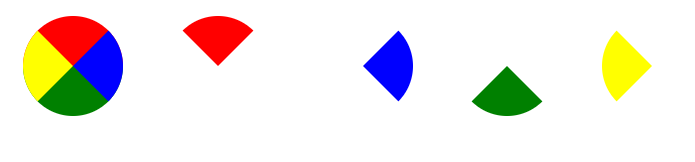
border-radius: 50px
饼图
思路
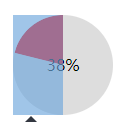
- 先建一个圆,然后分左右两块。
- 左右两块里面在包含一个半圆,然后对其做旋转处理,来匹配对应的百分比,溢出隐藏处理
注意
- 因为是左右两块,所以要注意溢出隐藏,以达到最终效果
- 注意旋转的中心点
- 如果中心区域掏空的话,注意层级问题
- 如果百分比<=50%,可以不要右边那块
- 百分比跟旋转角度的对应换算(百分比/100*360)
例子
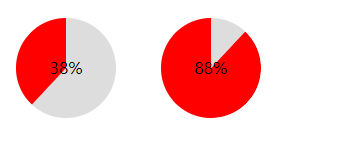
<style>

.pie38{width: 100px;height: 100px;border-radius: 50px;margin:20px;background-color: #ddd;position: relative;display: inline-block;overflow: hidden}

.pie38 .pie_content{line-height: 100px;text-align: center;position: absolute;width: 100px;height: 100px;z-index: 8}

.pie38 .pie_left{position: absolute;top:0;left:0;width: 50px;height: 100px;overflow: hidden;}

.pie38 .pie_left:after{content: '';height: 100px;width:50px;border-right:50px solid red;position:absolute;top:0;left:0;transform: rotate(-137deg);}

</style>

<div class="pie38">

	<div class="pie_content">38%</div>

	<div class="pie_left"></div>

</div>
<style>

.pie88{width: 100px;height: 100px;border-radius: 50px;margin:20px;background-color: #ddd;position: relative;display: inline-block;overflow: hidden;}

.pie88 .pie_content{line-height: 100px;text-align: center;position: absolute;width: 100px;height: 100px;z-index: 8}

.pie88 .pie_left{position: absolute;top:0;left:0;width: 50px;height: 100px;overflow: hidden;background-color: red}

.pie88 .pie_right{position: absolute;top:0;right:0;width: 50px;height: 100px;overflow: hidden;}

.pie88 .pie_right:after{content: '';height: 100px;width:50px;border-left:50px solid red;position:absolute;right:0;top:0;border-radius: 50px;transform: rotate(-137deg);}

</style>

<div class="pie88">

	<div class="pie_content">88%</div>

	<div class="pie_left"></div>

	<div class="pie_right"></div>

</div>
总结
饼图的例子,在测算结果页还是经常会用到的,可以扩展为加载框等其他形式,代码比较简单易懂,相信类似的效果,还有很多方案的,欢迎留言...
前端读者 | CSS三角形和饼图的更多相关文章
- 我的前端规范——CSS篇
相关文章 简书原文:https://www.jianshu.com/p/e87bfd27ff59 我的前端规范——开篇:http://www.cnblogs.com/shcrk/p/9271561.h ...
- 前端开发css实战:使用css制作网页中的多级菜单
前端开发css实战:使用css制作网页中的多级菜单 在日常工作中,大家都会遇到一些显示隐藏类菜单,比如页头导航.二维码显示隐藏.文本提示等等......而这些效果都是可以使用纯css实现的(而且非常简 ...
- 前端之css
前端之css 本节内容 css概述及引入 css选择器 css常用属性 1.css概述及引入 CSS概述 CSS是Cascading Style Sheets的简称,中文称为层叠样式表,用来控制网页数 ...
- WEB前端开发CSS基础样式全面总结
Web前端开发css基础样式全面总结 颜色和单位的使用 颜色 用颜色的名字表示颜色,比如:red 用16进制表示演示 比如:#FF0000 用rgb数值表示颜色,rgb(红,绿,蓝),每个值都在0-2 ...
- 前端js,css文件合并三种方式,bat命令
前端js,css文件合并三种方式,bat命令 前端js文件该如何合并三个方式如下:1. 一个大文件,所有js合并成一个大文件,所有页面都引用它.2. 各个页面大文件,各自页面合并生成自己所需js的大文 ...
- 第二篇:web之前端之css
前端之css 前端之css 本节内容 css概述及引入 css选择器 css常用属性 1.css概述及引入 CSS概述 CSS是Cascading Style Sheets的简称,中文称为层叠样式 ...
- 好程序员web前端分享css常用属性缩写
好程序员web前端分享css常用属性缩写,使用缩写可以帮助减少你CSS文件的大小,更加容易阅读.css缩写的主要规则如下: 颜色 16进制的色彩值,如果每两位的值相同,可以缩写一半,例如: #0000 ...
- 前端基础——css
前端基础——css css的内容主要包括:盒子模型.定位.单位与取值.属性.选择器.
- Python web前端 02 CSS
Python web前端 02 CSS 一.选择器 1.CSS的几种样式(CSS用来修饰.美化网页的) #建立模板 复制内容--->SETTING---> Editor -----> ...
随机推荐
- last-child 选择器
<!DOCTYPE html> <html> <head> <style> p:last-child //p的父类 的子类下最后一个,就是p兄弟层的最后 ...
- C# 中的委托和事件(详解)
C# 中的委托和事件 委托和事件在 .NET Framework 中的应用非常广泛,然而,较好地理解委托和事件对很多接触 C# 时间不长的人来说并不容易.它们就像是一道槛儿,过了这个槛的人,觉得真是太 ...
- js实现游戏转盘抽奖
<!DOCTYPE html> <html> <head> <title>js抽奖</title> <meta charset=&qu ...
- Babel 和 PostCss 的一些基本配置
Babel 是一个javascript编译器,PostCSS 是一个样式转换工具.两者都可以看作是一个转化平台,我们可以在上面使用一些插件,来达到想要的代码转化.几乎每个前端项目都要使用它们. Bab ...
- Linux目录结构nginx
alias 别名( 永久 ) 1.vim /root/.bashrc 2. alias vimens33='vim /etc/sysconfig/network-scripts/ifcfg-ens33 ...
- 持续集成之配置环境创建JOB
1.安装mvn.gitlab插件 2.配置参数构建
- redhat 7 安装oracle12.1
https://oracle-base.com/articles/12c/oracle-db-12cr1-installation-on-oracle-linux-7 一定要配置yum本地源 ...
- 【比赛】洛谷夏令营NOIP模拟赛
Day1 第一题 水题 第二题 题意:一个n*m的字符矩阵从左上到右下,经过字符形成回文串的路径数.n≤500 回文串,考虑两段往中间DP. f[k][x][y]表示走了k步,左上点横坐标为x,右下点 ...
- 【BZOJ】1610: [Usaco2008 Feb]Line连线游戏
[算法]计算几何 [题解]计算所有斜率排序去重. 实数判断相等用fabs(...)≤eps. ★斜率题一定要注意斜率不存在的情况!!! 其实我觉得这份代码可以hack的…… #include<c ...
- PHP练习4 留言板
一.要求 二.示例页面 三.网页代码及网页显示 1.denglu.php 登录页面 <!DOCTYPE html PUBLIC "-//W3C//DTD XHTML 1.0 Tran ...