
iOS,蓝牙开发!!--By帮雷
iOS的蓝牙开发大致有以下几种方式。
1 GameKit.framework
【只能存在于iOS设备之间,多用于游戏
能搜索到的demo比较多,不确切说名字了,code4app里面就有】
2 CoreBlueTooth.framework
【必须要支持蓝牙4.0,且iPhone4以上,即至少4s手机。可与第三方设备交互数据,
官方demo是Temperature Sensor 】
3 ExternalAccessory.framework
【可于第三方蓝牙设备交互,但是蓝牙设备必须经过MFI认证,需要有苹果的协议,
官方demo是 EADemo和 BTLE】
4 Multipeer Connectivity.framework
【只能用于iOS设备之间,且iOS7才引入。主要是为了共享文件,但是文件是在sandbox内
官方demo是ios7 sample】
下面详细介绍一下通过蓝牙4.0的BLE开发模式在iOS下的应用方式。
首先BLE将蓝牙设备分为了两类:
一 中央设备(Central)
二 外围设备(Peripheral)
这两个设备的交互方式如下:
首先外围设备会广播自身的信息,这时中央设备如果启用检索发现功能,就会发现广播的外围设备并得到这些外围设备的列表。
中央设备选择你需要连接的外围设备连接上。这时中央设备和外围设备交互的第一步就被打通了。
详细分析接下来的步骤如下图:
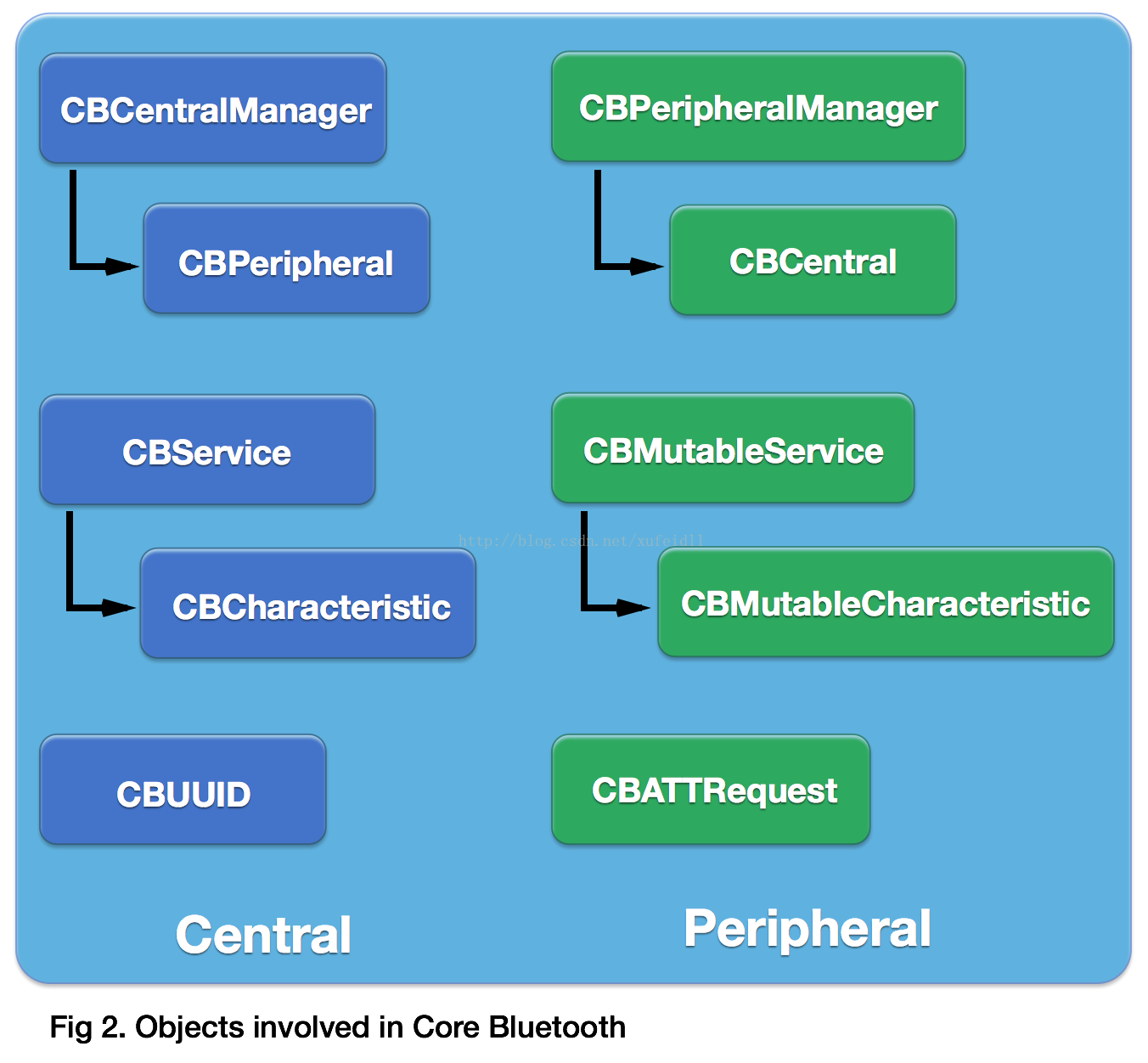
左侧为中央设备(Central),右侧为外围设备(Peripheral) 。
这里以Central连接Peripheral,并向Peripheral发送数据为例,结合代码进行分析。
步骤如下:
1 中央设备查找外围设备
扫描周围的蓝牙扫描周围的蓝牙
NSDictionary * dic = [NSDictionary dictionaryWithObjectsAndKeys:[NSNumber numberWithBool:false],CBCentralManagerScanOptionAllowDuplicatesKey, nil];
[self.cbCentralMgr scanForPeripheralsWithServices:nil options:dic];
发现一个蓝牙
- (void)centralManager:(CBCentralManager *)central didDiscoverPeripheral:(CBPeripheral *)peripheral advertisementData:(NSDictionary *)advertisementData RSSI:(NSNumber *)RSSI
{
}
2 连接你所需要连接的Peripheral,这里就是上图中的CBPeripheral对象。
[self.cbCentralMgr connectPeripheral:peripheral options:[NSDictionary dictionaryWithObject:[NSNumber numberWithBool:YES] forKey:CBConnectPeripheralOptionNotifyOnDisconnectionKey]];
当连接上某个蓝牙之后,CBCentralManager会通知代理处理
- (void)centralManager:(CBCentralManager *)central didConnectPeripheral:(CBPeripheral *)peripheral
{
}
3 查找对应的服务,查找对应服务下的CBCharacteristic。
[peripheral discoverServices:nil];
返回的蓝牙服务通知通过代理实现
- (void)peripheral:(CBPeripheral *)peripheral didDiscoverServices:(NSError *)error
{
for (CBService* service in peripheral.services){}
[peripheral discoverCharacteristics:nil forService:service];
返回的蓝牙特征值通知通过代理实现
- (void)peripheral:(CBPeripheral *)peripheral didDiscoverCharacteristicsForService:(CBService *)service error:(NSError *)error
{
for (CBCharacteristic * characteristic in service.characteristics) {
}
}
4 向对应的CBCharactieristic发送数据。发送数据和接收数据共有4种方式。
[peripheral writeValue:data forCharacteristic:characteristic type:CBCharacteristicWriteWithResponse];
这时还会触发一个代理事件
- (void)peripheral:(CBPeripheral *)peripheral didWriteValueForCharacteristic:(CBCharacteristic *)characteristic error:(NSError *)error
{
处理蓝牙发过来的数据
- (void)peripheral:(CBPeripheral *)peripheral didUpdateValueForCharacteristic:(CBCharacteristic *)characteristic error:(NSError *)error
{
}
retrievePeripheralsWithIdentifiers 使用例子
-(IBAction) Retrieve:(id)Sender
{
[self.tvLog setText:@""];
NSMutableArray * Identifiers = [NSMutableArray array];
for (CBPeripheral * peripheral in self.peripheralArray) {
[Identifiers addObject:peripheral.identifier];
}
}
iOS,蓝牙开发!!--By帮雷的更多相关文章
- iOS蓝牙开发(二)蓝牙相关基础知识
原文链接: http://liuyanwei.jumppo.com/2015/07/17/ios-BLE-1.html iOS蓝牙开发(一)蓝牙相关基础知识: 蓝牙常见名称和缩写 MFI ====== ...
- iOS 蓝牙开发资料记录
一.蓝牙基础认识: 1.iOS蓝牙开发: iOS蓝牙开发:蓝牙连接和数据读写 iOS蓝牙后台运行 iOS关于app连接已配对设备的问题(ancs协议的锅) iOS蓝牙空中 ...
- iOS蓝牙开发(4.0)详解
最近由于项目需要, 一直在研究蓝牙4.0,在这儿分享给大家, 望共同进步. 一.关于蓝牙开发的一些重要的理论概念: 1.当前ios中开发蓝牙所运用的系统库是<CoreBluetooth/Core ...
- iOS 蓝牙开发详解
目前iOS智能硬件的开发交互方式主要分为两种,一种是基于低功耗的蓝牙4.0技术(由于耗电低,也称作为BLE(Bluetooth Low Energy))对应iOS的框架为CoreBluetooth,另 ...
- iOS蓝牙开发总结-4
蓝牙开发总结 只要熟悉蓝牙的流程,和蓝牙中每一个角色的作用,其实蓝牙通讯并没有想象中的难 1.蓝牙中心CBCentralManager:一般指得是iPhone手机 2.设备(外设)CBPeripher ...
- iOS蓝牙开发
蓝牙常见名称和缩写 MFI ======= make for ipad ,iphone, itouch 专们为苹果设备制作的设备 BLE ==== buletouch low energy,蓝牙4.0 ...
- iOS蓝牙开发CoreBluetooth快速入门
在iOS开发中,实现蓝牙通信有两种方式,一种是使用传统的GameKit.framework,另一种就是使用在iOS 5中加入的CoreBluetooth.framework. 利用CoreBlueto ...
- ios蓝牙开发(五)BabyBluetooth蓝牙库介绍
BabyBluetooth 是一个最简单易用的蓝牙库,基于CoreBluetooth的封装,并兼容ios和mac osx. 特色: 基于原生CoreBluetooth框架封装的轻量级的开源库,可以帮你 ...
- ios蓝牙开发(三)ios连接外设的代码实现:手机app去读写蓝牙设备。
手机app去读写蓝牙设备....... 代码下载: 原文博客主提供Github代码连接,地址是:https://github.com/coolnameismy/demo ios连接外设的代码实现流程: ...
- iOS 蓝牙开发(二)iOS 连接外设的代码实现(转)
转载自:http://www.cocoachina.com/ios/20150917/13456.html 原文作者:刘彦玮 上一篇文章介 绍了蓝牙的技术知识,这里我们具体说明一下中心模式的应用场景. ...
随机推荐
- UI自动化,通过Xpath结合父类、同级元素,查找到唯一的元素定位
UI自动化,通过Xpath定位的总结 当页面展示的内容的html布局格式一样,只能第几个控件的绝对定位来区分时,如果后面有变更控件的顺序,就会导致找不到这个元素,维护成本较高,可以尝试用其他的方式,比 ...
- 面试题68 - II. 二叉树的最近公共祖先
<搜索树结点> <获取路径> 题目描述 给定一个二叉树, 找到该树中两个指定节点的最近公共祖先. 百度百科中最近公共祖先的定义为:"对于有根树 T 的两个结点 p.q ...
- 实验 5 :OpenFlow 协议分析和 OpenDaylight 安装
实验 5 :OpenFlow 协议分析和 OpenDaylight 安装 一.实验目的 回顾 JDK 安装配置,了解 OpenDaylight 控制的安装,以及 Mininet 如何连接: 通过抓包获 ...
- go语言 strconv.ParseInt 的实现分析
字符串与数值之间进行转换是一个高频操作,在go语言中,SDK提供 strconv.ParseInt 将字符串转换为数值,strconv.FormatInt 可以将数值转换为字符串. 1.首先看下 st ...
- T-SQL的存储过程
1.简介 存储过程可以说是一个记录集,它是由一些T-SQL语句组成的代码块,这些T-SQL语句代码像一个方法一样实现一些功能(对单表或多表的增删改查),然后再给这个代码块取一个名字,在用到这个功能的时 ...
- 关于C++11共享数据带来的死锁问题的提出与解决
举个例子,如果有一份资源,假如为list<int>资源,假设有两个线程要对该资源进行压入弹出操作,如果不进行锁的话,那么如果两个线程同时操作,那么必然乱套,得到的结果肯定不是我们想要的结果 ...
- gorm概述与快速入门
特性 全功能 ORM 关联 (Has One,Has Many,Belongs To,Many To Many,多态,单表继承) Create,Save,Update,Delete,Find 中钩子方 ...
- gin中如何自定义中间件
package main import ( "fmt" "github.com/gin-gonic/gin" ) func main() { // 新建一个没有 ...
- C++实现switch匹配字符串string(map方法)
如果语法中大量使用if...else语句会造成代码臃肿,if语句C++语法中switch...case中case只能是整形变量,这里提供了一种思路,用map方法使健与值对应,这样字符串string类型 ...
- lsof恢复误删文件
用 lsof 恢复 误删除文件实验: 先模拟一个进程: [tiger@root:/home/tiger]$ echo "hello deletede" >> test. ...