
spring security 学习三-rememberMe
功能:登录时的“记住我”功能
原理:
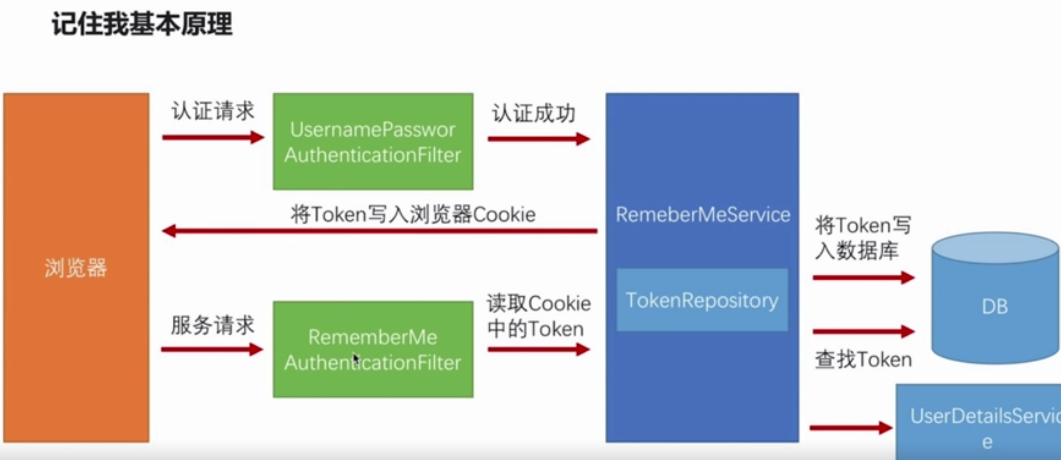
rememberMeAuthenticationFilter在security过滤器链中的位置,在请求走认证流程是,当前边的filter都不通过时,会走rememberMeAuthenticationFilter

代码:
html:
<!DOCTYPE html>

<html lang="en">

<head>

    <meta charset="UTF-8">

    <title>自定义登录页面</title>

</head>

<body>

<h2>自定义登录页面</h2>

<form action="/authentication/form" method="POST">

    <table>

        <tr>

            <td>用户名:</td>

            <td><input type="text" name="username"></td>

        </tr>

        <tr>

            <td>密码:</td>

            <td><input type="password" name="password"></td>

        </tr>

        <tr>

            <td>图形验证码:</td>

            <td>

                <input type="text" name="imageCode">

                <img src="/code/image?width=200" alt="">

            </td>

        </tr>

        <tr>

            <td colspan="2"><!-- 其中的name值 remember-me 是固定不变的,security默认 -->

                <input type="checkbox" name="remember-me" value="true">记住我

            </td>

        </tr>

        <tr>

            <td colspan="2">

                <button type="submit">登录</button>

            </td>

        </tr>

    </table>

</form>

</body>

</html>
security配置:
  @Autowired

    private DataSource dataSource;//datasource 用的是springboot默认的application.yml中的配置

    @Autowired

    private UserDetailsService userDetailsService;

  @Bean

    public PersistentTokenRepository persistentTokenRepository() {

        JdbcTokenRepositoryImpl jdbcTokenRepository = new JdbcTokenRepositoryImpl();

        jdbcTokenRepository.setDataSource(dataSource);

        //自动创建相关的token表

        jdbcTokenRepository.setCreateTableOnStartup(true);

        return jdbcTokenRepository;

    }

  @Override

    protected void configure(HttpSecurity http) throws Exception {

        //用户可自定义、亦可以使用mysecurity默认的登录页

        String loginPage = securityProperties.getBrowser().getLoginPage();

        http.formLogin()

                .loginPage("/authentication/require").loginProcessingUrl("/authentication/form")

                .successHandler(custAuthenticationSuccessHandler)

                .failureHandler(custAuthenticationFailerHandler)

                .and()

                .rememberMe()

                .tokenRepository(persistentTokenRepository())//用于将token信息存储到数据库中

                .tokenValiditySeconds(3600)

                .userDetailsService(userDetailsService)//用于登录

                .and()

                .authorizeRequests()

                .antMatchers("/authentication/require", loginPage, "/code/image").permitAll()

                .anyRequest()

                .authenticated();

        http.csrf().disable();//暂时设为disable 防止跨站请求伪造的功能

    }
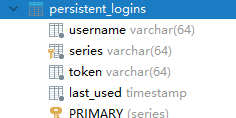
启动项目:(因配置了dbcTokenRepository.setCreateTableOnStartup(true) 所以会自动创建下表用于存储用户token信息)
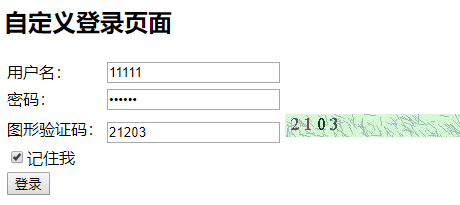
页面:点击记住我后登录
登录成功之后会在persistent_login表中插入一条数据:

重启项目,直接访问资源路径:
http://localhost:8080/user/1
不需要跳转到登录页面,直接返回具体信息
源码:
UserNamePasswordAuthenticationFilter.class文件中的attempAuthentication方法
 public Authentication attemptAuthentication(HttpServletRequest request, HttpServletResponse response) throws AuthenticationException {

        if (this.postOnly && !request.getMethod().equals("POST")) {

            throw new AuthenticationServiceException("Authentication method not supported: " + request.getMethod());

        } else {

            String username = this.obtainUsername(request);

            String password = this.obtainPassword(request);

            if (username == null) {

                username = "";

            }

            if (password == null) {

                password = "";

            }

            username = username.trim();

            UsernamePasswordAuthenticationToken authRequest = new UsernamePasswordAuthenticationToken(username, password);

            this.setDetails(request, authRequest);

            return this.getAuthenticationManager().authenticate(authRequest);

        }

    }
查看其父类:
AbstractAuthenticationProcessingFilter类,this.attempAuthentication方法使用的是子类方法,也就是usernamepasswordauthenticationFilter类中的方法(上边的)
    public void doFilter(ServletRequest req, ServletResponse res, FilterChain chain) throws IOException, ServletException {

        HttpServletRequest request = (HttpServletRequest)req;

        HttpServletResponse response = (HttpServletResponse)res;

        if (!this.requiresAuthentication(request, response)) {

            chain.doFilter(request, response);

        } else {

            if (this.logger.isDebugEnabled()) {

                this.logger.debug("Request is to process authentication");

            }

            Authentication authResult;

            try {

                authResult = this.attemptAuthentication(request, response);

                if (authResult == null) {

                    return;

                }

                this.sessionStrategy.onAuthentication(authResult, request, response);

            } catch (InternalAuthenticationServiceException var8) {

                this.logger.error("An internal error occurred while trying to authenticate the user.", var8);

                this.unsuccessfulAuthentication(request, response, var8);

                return;

            } catch (AuthenticationException var9) {

                this.unsuccessfulAuthentication(request, response, var9);

                return;

            }

            if (this.continueChainBeforeSuccessfulAuthentication) {

                chain.doFilter(request, response);

            }

            this.successfulAuthentication(request, response, chain, authResult);

        }

    }
attempauthentication方法执行完之后,回到successfulAuthentication方法(也是AbstractAuthenticationProcessingFilter类),会有remberMeService类
    protected void successfulAuthentication(HttpServletRequest request, HttpServletResponse response, FilterChain chain, Authentication authResult) throws IOException, ServletException {

        if (this.logger.isDebugEnabled()) {

            this.logger.debug("Authentication success. Updating SecurityContextHolder to contain: " + authResult);

        }

        SecurityContextHolder.getContext().setAuthentication(authResult);

        this.rememberMeServices.loginSuccess(request, response, authResult);

        if (this.eventPublisher != null) {

            this.eventPublisher.publishEvent(new InteractiveAuthenticationSuccessEvent(authResult, this.getClass()));

        }

        this.successHandler.onAuthenticationSuccess(request, response, authResult);

    }
loginSuccess方法会进入AbstractRememberMeService抽象类中:
    public final void loginSuccess(HttpServletRequest request, HttpServletResponse response, Authentication successfulAuthentication) {

        if (!this.rememberMeRequested(request, this.parameter)) {

            this.logger.debug("Remember-me login not requested.");

        } else {

            this.onLoginSuccess(request, response, successfulAuthentication);

        }

    }
onLoginSuccess方法会进入PersistentTokenBaseRememberMeService类中(AbstractRememberMEService的子类)
    protected void onLoginSuccess(HttpServletRequest request, HttpServletResponse response, Authentication successfulAuthentication) {

        String username = successfulAuthentication.getName();

        this.logger.debug("Creating new persistent login for user " + username);

        PersistentRememberMeToken persistentToken = new PersistentRememberMeToken(username, this.generateSeriesData(), this.generateTokenData(), new Date());

        try {

            this.tokenRepository.createNewToken(persistentToken);

            this.addCookie(persistentToken, request, response);

        } catch (Exception var7) {

            this.logger.error("Failed to save persistent token ", var7);

        }

    }
这里的这个tokenRepository就是在配置文件中定义的persistentTokenRepository,addCookie方法会将token写到浏览器的cookie中,等下次请求的时候回自动带着token
下一次访问会进入到RememberAuthenticationFilter过滤器中:
    public void doFilter(ServletRequest req, ServletResponse res, FilterChain chain) throws IOException, ServletException {

        HttpServletRequest request = (HttpServletRequest)req;

        HttpServletResponse response = (HttpServletResponse)res;
     //判断context中是否已经有了一个认证的Authentication对象

        if (SecurityContextHolder.getContext().getAuthentication() == null) {
       //是否可以自动登录

            Authentication rememberMeAuth = this.rememberMeServices.autoLogin(request, response);

            if (rememberMeAuth != null) {

                try {

                    rememberMeAuth = this.authenticationManager.authenticate(rememberMeAuth);

                    //将一个已经认证的authentication对象放到context中
            SecurityContextHolder.getContext().setAuthentication(rememberMeAuth);

                    this.onSuccessfulAuthentication(request, response, rememberMeAuth);

                    if (this.logger.isDebugEnabled()) {

                        this.logger.debug("SecurityContextHolder populated with remember-me token: '" + SecurityContextHolder.getContext().getAuthentication() + "'");

                    }

                    if (this.eventPublisher != null) {

                        this.eventPublisher.publishEvent(new InteractiveAuthenticationSuccessEvent(SecurityContextHolder.getContext().getAuthentication(), this.getClass()));

                    }

                    if (this.successHandler != null) {

                        this.successHandler.onAuthenticationSuccess(request, response, rememberMeAuth);

                        return;

                    }

                } catch (AuthenticationException var8) {

                    if (this.logger.isDebugEnabled()) {

                        this.logger.debug("SecurityContextHolder not populated with remember-me token, as AuthenticationManager rejected Authentication returned by RememberMeServices: '" + rememberMeAuth + "'; invalidating remember-me token", var8);

                    }

                    this.rememberMeServices.loginFail(request, response);

                    this.onUnsuccessfulAuthentication(request, response, var8);

                }

            }

            chain.doFilter(request, response);

        } else {

            if (this.logger.isDebugEnabled()) {

                this.logger.debug("SecurityContextHolder not populated with remember-me token, as it already contained: '" + SecurityContextHolder.getContext().getAuthentication() + "'");

            }

            chain.doFilter(request, response);

        }

    }
autoLogin方法会进入到AbstractRememberMeService抽象类中:
    public final Authentication autoLogin(HttpServletRequest request, HttpServletResponse response) {

        String rememberMeCookie = this.extractRememberMeCookie(request);

        if (rememberMeCookie == null) {

            return null;

        } else {

            this.logger.debug("Remember-me cookie detected");

            if (rememberMeCookie.length() == 0) {

                this.logger.debug("Cookie was empty");

                this.cancelCookie(request, response);

                return null;

            } else {

                UserDetails user = null;

                try {

                    String[] cookieTokens = this.decodeCookie(rememberMeCookie);

                    user = this.processAutoLoginCookie(cookieTokens, request, response);

                    this.userDetailsChecker.check(user);

                    this.logger.debug("Remember-me cookie accepted");

                    return this.createSuccessfulAuthentication(request, user);

                } catch (CookieTheftException var6) {

                。。。。、。。。this.cancelCookie(request, response);

                return null;

            }

        }

    }
processAutoLoginCookie方法会走实现类PersistentTokenBasedRememberMeServices类中的方法:
    protected UserDetails processAutoLoginCookie(String[] cookieTokens, HttpServletRequest request, HttpServletResponse response) {

        if (cookieTokens.length != 2) {

            throw new InvalidCookieException("Cookie token did not contain 2 tokens, but contained '" + Arrays.asList(cookieTokens) + "'");

        } else {

            String presentedSeries = cookieTokens[0];

            String presentedToken = cookieTokens[1];

            PersistentRememberMeToken token = this.tokenRepository.getTokenForSeries(presentedSeries);

            if (token == null) {

                throw new RememberMeAuthenticationException("No persistent token found for series id: " + presentedSeries);

            } else if (!presentedToken.equals(token.getTokenValue())) {

                this.tokenRepository.removeUserTokens(token.getUsername());

                throw new CookieTheftException(this.messages.getMessage("PersistentTokenBasedRememberMeServices.cookieStolen", "Invalid remember-me token (Series/token) mismatch. Implies previous cookie theft attack."));

            } else if (token.getDate().getTime() + (long)this.getTokenValiditySeconds() * 1000L < System.currentTimeMillis()) {

                throw new RememberMeAuthenticationException("Remember-me login has expired");

            } else {

                if (this.logger.isDebugEnabled()) {

                    this.logger.debug("Refreshing persistent login token for user '" + token.getUsername() + "', series '" + token.getSeries() + "'");

                }

                PersistentRememberMeToken newToken = new PersistentRememberMeToken(token.getUsername(), token.getSeries(), this.generateTokenData(), new Date());

                try {

                    this.tokenRepository.updateToken(newToken.getSeries(), newToken.getTokenValue(), newToken.getDate());

                    this.addCookie(newToken, request, response);

                } catch (Exception var9) {

                    this.logger.error("Failed to update token: ", var9);

                    throw new RememberMeAuthenticationException("Autologin failed due to data access problem");

                }

                return this.getUserDetailsService().loadUserByUsername(token.getUsername());

            }

        }

    }
spring security 学习三-rememberMe的更多相关文章
- Spring Security 解析(三) —— 个性化认证 以及 RememberMe 实现
Spring Security 解析(三) -- 个性化认证 以及 RememberMe 实现 在学习Spring Cloud 时,遇到了授权服务oauth 相关内容时,总是一知半解,因此决定先把 ...
- SpringBoot + Spring Security 学习笔记(三)实现图片验证码认证
整体实现逻辑 前端在登录页面时,自动从后台获取最新的验证码图片 服务器接收获取生成验证码请求,生成验证码和对应的图片,图片响应回前端,验证码保存一份到服务器的 session 中 前端用户登录时携带当 ...
- SpringBoot + Spring Security 学习笔记(五)实现短信验证码+登录功能
在 Spring Security 中基于表单的认证模式,默认就是密码帐号登录认证,那么对于短信验证码+登录的方式,Spring Security 没有现成的接口可以使用,所以需要自己的封装一个类似的 ...
- [转]Spring Security学习总结二
原文链接: http://www.blogjava.net/redhatlinux/archive/2008/08/20/223148.html http://www.blogjava.net/red ...
- [转]Spring Security学习总结一
[总结-含源码]Spring Security学习总结一(补命名空间配置) Posted on 2008-08-20 10:25 tangtb 阅读(43111) 评论(27) 编辑 收藏 所属分 ...
- Spring security 学习 (自助者,天助之!)
自己努力,何必要强颜欢笑的求助别人呢? 手心向下不求人! Spring security学习有进展哦: 哈哈! 1.页面都是动态生产的吧! 2.设置权限: a:pom.xml配置jar包 b:cr ...
- Spring Security(三)
Spring Security(三) 个性化用户认证流程 自定义登录页面 在配置类中指定登录页面和接收登录的 url @Configuration public class BrowserSecuri ...
- 【权限管理系统】Spring security(三)---认证过程(原理解析,demo)
在前面两节Spring security (一)架构框架-Component.Service.Filter分析和Spring Security(二)--WebSecurityConfigurer配 ...
- spring security 学习资料
spring security 学习资料 网址 Spring Security 文档参考手册中文版 https://springcloud.cc/spring-security.html
随机推荐
- Flink从socket读取数据sink到redis
package com.lin.flink.stream.customPartition; import org.apache.flink.api.common.functions.MapFuncti ...
- canvas时间粒子
<!DOCTYPE html> <html lang="en"> <head> <meta charset="UTF-8&quo ...
- 简述ArcGIS的空间连接(Spatial Join)与字段映射(Field Map)操作
插个广告,制作ArcGIS的Tool工具学习下面的教程就对了:零基础学习Python制作ArcGIS自定义工具 牢骚一下 在使用ArcMap进行空间连接操作的时候,往往会有两种特殊需求,其一是连接重叠 ...
- [Java 教程 03] 我的第一个Java程序
现在,大家应该都已经安装好jdk环境了吧!是不是已经跃跃欲试,按耐不住心中的小激动了?那我们现在就来写我们java学习生涯中的第一个java程序. 文件相关设置 为了方便后面大家的学习呢?有一点大家还 ...
- C语言中的关键字初识
C89标准定义的32个关键字 关键字 含义 void 声明函数无返回值或者无参数,声明空类型指针 char 声明字符型变量 short 声明短整型变量 int 声明整型变量 long 声明长整型变量 ...
- Javascript基础四(数组,字符,对象,日期)
第一节:数组 1.数组的概念及定义 可以存放一组数据: 当需要操作多个数据时: 2.数组的创建方式 var arr1 = [1,2,3]; //字面量方式 var arr2 ...
- 分析dwebsocket的源码过程
前言 dwebsocet 是python django的websocket库,github地址:https://github.com/duanhongyi/dwebsocket 本章是对dwebsoc ...
- zoj 2112 单点修改的主席树(树状数组套主席树)
题目大意: 区间第k大问题+单点修改 基本思路: 这个题有用整体二分,cdq分治,还有主席树+平衡树的,还有就是主席树+树状数组. 我采用的是b站电子科大大佬的主席树写法,尤其喜欢他的离散化方法,所以 ...
- BZOJ5205 [CodePlus 2018 3 月赛]白金元首与莫斯科
传送门 emm在雅礼集训的时候听到的一道题 上来就觉得是插头dp 最后果然是轮廓线状压233 我们简化一下题意. 有一个n*m的网格,每个格子是空地或障碍物,询问把每一个空地看成障碍物的情况下,用1* ...
- Windows下JDK安装步骤 + eclipse集成配置
一.JDK环境配置 1.解压到java目录下 2.路径和上面路径一致 3.配置path路径 4.查看版本 二.Eclipse配置 1.编译版本 2.运行环境 3.默认字集 4.字体大小