
Spring Security(三)
Spring Security(三)
个性化用户认证流程
自定义登录页面
在配置类中指定登录页面和接收登录的 url
@Configuration

public class BrowserSecurityConfig extends WebSecurityConfigurerAdapter {

    @Bean

    public PasswordEncoder passwordEncoder() {

        return new MyPasswordEncoder();

    }

    @Override

    protected void configure(HttpSecurity http) throws Exception {

        // 启用表单登陆

        http.formLogin()

                // 指定登录页面

                .loginPage("/imooc-signIn.html")

                // 登录页面表单提交的 action

                .loginProcessingUrl("/authentication/form")

                .and()

                // 对请求做授权

                .authorizeRequests()

                // 访问指定url时不需要身份认证(放行)

                .antMatchers("/imooc-signIn.html").permitAll()

                // 任何请求

                .anyRequest()

                // 都需要身份认证

                .authenticated()

                .and()

                .csrf().disable();

    }

}
- 在项目中新建登录页面
<!DOCTYPE html>

<html lang="en">

<head>

    <meta charset="UTF-8">

    <title>登录</title>

</head>

<body>

    <h2>标准登录页面</h2>

    <h3>表单登录</h3>

    <form action="/authentication/form" method="post">

        <table>

            <tr>

                <td>用户名:</td>

                <td><label>

                    <input type="text" name="username" />

                </label></td>

            </tr>

            <tr>

                <td>密码:</td>

                <td><label>

                    <input type="password" name="password" />

                </label>

                </td>

            </tr>

            <tr>

                <td colspan="2">

                    <button type="submit">登录</button>

                </td>

            </tr>

        </table>

    </form>

</body>

</html>
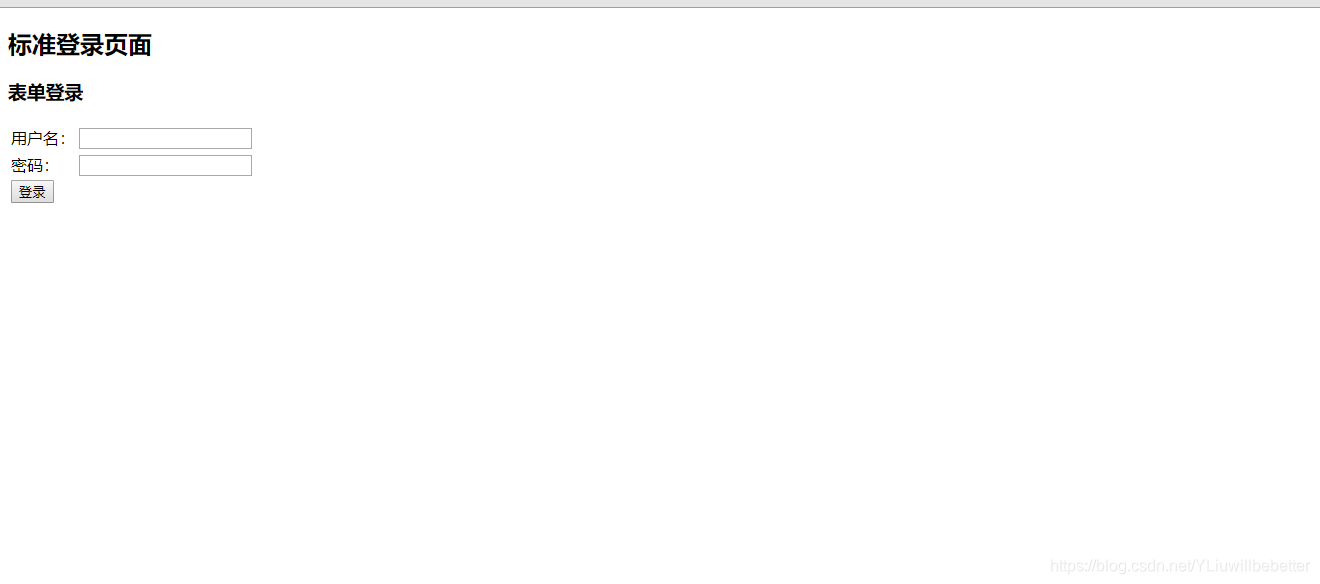
启动项目时再访问 Security 就会跳转到你自已定义的登陆页面让你登录。
- 深入定义(判断是PC端还是移动端,PC端跳转页面,移动端响应 json)
创建一个控制器,用来处理操作
@RestController

public class BrowserSecurityController {

    private static final Logger log = LoggerFactory.getLogger(BrowserSecurityController.class);

    private RequestCache requestCache = new HttpSessionRequestCache();

    private RedirectStrategy redirectStrategy = new DefaultRedirectStrategy();

    /**

     * 当需要身份验证时跳转到这里处理

     */

    @RequestMapping("/authentication/require")

    @ResponseStatus(code = HttpStatus.UNAUTHORIZED)

    public Map<String, String> requireAuthentication(final HttpServletRequest request,

                                                final HttpServletResponse response) throws IOException {

        SavedRequest savedRequest = requestCache.getRequest(request, response);

        if (null != savedRequest) {

            String target = savedRequest.getRedirectUrl();

            log.info("引发跳转的请求是 ={}", target);

            if (StringUtils.endsWithIgnoreCase(target, ".html")) {

                redirectStrategy.sendRedirect(request, response, "/imooc-signIn.html");

            }

        }

        Map<String, String> map = new HashMap<>();

        map.put("status", "401");

        map.put("msg", "error");

        map.put("content","访问的服务需要身份认证,请引导用户到登录页!" );

        return map;

    }

}
自定义登录成功处理
要做自定义登录成功处理需要实现一下 Security 的 AuthenticationSuccessHandler 接口
/**

 * 自定义登录成功处理

 */

@Configuration

public class ImoocAuthenticationSuccessHandler implements AuthenticationSuccessHandler {

	private static final Logger log = LoggerFactory.getLogger(ImoocAuthenticationSuccessHandler.class);

    private final ObjectMapper objectMapper;

    @Autowired

    public ImoocAuthenticationSuccessHandler(ObjectMapper objectMapper) {

        this.objectMapper = objectMapper;

    }

    // 参数 Authentication 是Security的核心接口之一,封装了用户登录认证信息

    // UserDetails 接口就包装到了此接口中

    @Override

    public void onAuthenticationSuccess(HttpServletRequest request,

                                        HttpServletResponse response,

                                        Authentication authentication) throws IOException, ServletException {

        log.info("登录成功");

        // 响应 json 信息

        response.setContentType("application/json;charset=utf-8");

        PrintWriter out = response.getWriter();

        out.write(objectMapper.writeValueAsString(authentication));

        out.flush();

        out.close();

    }

}
- 启动项目,访问跳转登录页面后,输入正确用户名,密码后响应信息如下:
{

  "authorities": [

    {

      "authority": "admin"

    }

  ],

  // 包含了认证请求的信息

  "details": {

    "remoteAddress": "127.0.0.1",

    "sessionId": "1126C43793FD600CA6DC74169A38F64E"

  },

  // 这里代表当前用户是否经过了身份认证,boolean表示

  "authenticated": true,

  // 这里是 我们自定义UserDetailsService接口实现类 返回的数据

  "principal": {

    "password": null,

    "username": "user",

    // 用户权限

    "authorities": [

      {

        "authority": "admin"

      }

    ],

    "accountNonExpired": true,

    "accountNonLocked": true,

    "credentialsNonExpired": true,

    "enabled": true

  },

  // 这里一般代表用户输入的密码,Security 做了处理,前台不会响应

  "credentials": null,

  // 用户名

  "name": "user"

}
自定义登录错误处理
要做自定义登录成功处理需要实现一下 Security 的 AuthenticationFailureHandler 接口
/**

 * 自定义登录失败处理

 */

@Configuration

public class ImoocAuthenticationFailureHandler implements AuthenticationFailureHandler {

	// 参数 AuthenticationException 是 Security 的一个抽象异常类

    @Override

    public void onAuthenticationFailure(HttpServletRequest request,

                                        HttpServletResponse response,

                                        AuthenticationException exception) throws IOException, ServletException {

    }

}
- 启动项目,访问跳转登录页面后,输入错误用户名,密码后响应信息如下:
{**省略堆栈信息**"localizedMessage":"坏的凭证","message":"坏的凭证","suppressed":[]}
注意:以上两个自定义登录/失败的处理,一定要在 自定义Security配置类中加入,不然不会生效!!!
加入自定义登录成功/失败处理
/**

 * Security 配置

 */

@Configuration

public class BrowserSecurityConfig extends WebSecurityConfigurerAdapter {

    @Autowired

    private SecurityProperties securityProperties;

    @Autowired

    private ImoocAuthenticationSuccessHandler imoocAuthenticationSuccessHandler;

    @Autowired

    private ImoocAuthenticationFailureHandler imoocAuthenticationFailureHandler;

    @Bean

    public PasswordEncoder passwordEncoder() {

        return new MyPasswordEncoder();

    }

    @Override

    protected void configure(HttpSecurity http) throws Exception {

        BrowserProperties browser = securityProperties.getBrowser();

        // 启用表单登陆

        http.formLogin()

                // 指定登录页面

                .loginPage("/authentication/require")

                // 登录页面表单提交的 action

                .loginProcessingUrl("/authentication/form")

                // 引入自己定义的登录成功处理配置类

                .successHandler(imoocAuthenticationSuccessHandler)

                // 引入自己定义的登录失败处理配置类

                .failureHandler(imoocAuthenticationFailureHandler)

                .and()

                // 对请求做授权

                .authorizeRequests()

                // 访问指定url时不需要身份认证(放行)

                .antMatchers("/authentication/require",

                        browser.getLoginPage()).permitAll()

                // 任何请求

                .anyRequest()

                // 都需要身份认证

                .authenticated()

                .and()

                .csrf().disable();

    }

}
以上实现了自定义成功/失败响应,但是要想PC/移动端通用,需要深化配置一下
- 改造 自定义成功处理
创建一个枚举类,用来区分 重定向,还是响应 json
public enum LoginType {

    REDIRECT, JSON;

}
让此枚举类成为 BrowserProperties 类的一个属性
public class BrowserProperties {

    /**

     * 指定默认值(如果配置了用配置的页面,没配置用默认的。)

     */

    private String loginPage = "/imooc-signIn.html";

    /**

     * 指定登录成功/失败后的响应方式

     */

    private LoginType loginType = LoginType.JSON;

    // 省略 GET/SET/toString 方法

}
改造自定义成功处理类
/**

 * 自定义登录成功处理

 */

@Configuration

// 让自定义的成功处理类 继承 Security 默认的成功处理类 SavedRequestAwareAuthenticationSuccessHandler

public class ImoocAuthenticationSuccessHandler extends SavedRequestAwareAuthenticationSuccessHandler {

    private static final Logger log = LoggerFactory.getLogger(ImoocAuthenticationSuccessHandler.class);

    private final ObjectMapper objectMapper;

    private final SecurityProperties securityProperties;

    @Autowired

    public ImoocAuthenticationSuccessHandler(ObjectMapper om, SecurityProperties sp) {

        this.objectMapper = om;

        this.securityProperties = sp;

    }

    @Override

    public void onAuthenticationSuccess(HttpServletRequest request,

                                        HttpServletResponse response,

                                        Authentication authentication) throws IOException, ServletException {

        log.info("登录成功。。。");

        // 响应 json 信息

        response.setContentType("application/json;charset=utf-8");

        PrintWriter out = response.getWriter();

        out.write(objectMapper.writeValueAsString(authentication));

        out.flush();

        out.close();

    }

}
改造自定义失败处理类
/**

 * 自定义登录失败处理

 */

@Configuration

// SimpleUrlAuthenticationFailureHandler 为 Security 默认的登录失败处理类

public class ImoocAuthenticationFailureHandler extends SimpleUrlAuthenticationFailureHandler {

    private static final Logger log = LoggerFactory.getLogger(ImoocAuthenticationSuccessHandler.class);

    private final ObjectMapper objectMapper;

    private final SecurityProperties securityProperties;

    @Autowired

    public ImoocAuthenticationFailureHandler(ObjectMapper om, SecurityProperties sp) {

        this.objectMapper = om;

        this.securityProperties = sp;

    }

    @Override

    public void onAuthenticationFailure(HttpServletRequest request,

                                        HttpServletResponse response,

                                        AuthenticationException exception) throws IOException, ServletException {

        log.info("登录失败。。。");

        // 如果配置了用 Json 响应

        if (LoginType.JSON.equals(securityProperties.getBrowser().getLoginType())) {

            // 响应状态码为 500

            response.setStatus(HttpStatus.INTERNAL_SERVER_ERROR.value());

            // 响应 json 信息

            response.setContentType("application/json;charset=utf-8");

            PrintWriter out = response.getWriter();

            out.write(objectMapper.writeValueAsString(exception));

            out.flush();

            out.close();

        } else {

            // 调用父类方法

            super.onAuthenticationFailure(request, response, exception);

        }

    }

}
由于 BrowserProperties 类中的loginType属性默认为 Json ,你可以在具体的 properties 文件中,定义一下属性。如:
imooc.security.browser.login-type=REDIRECT
这样可以测试一下是否配置成功。
测试图就不贴上了,自已耐心测试一下~
Spring Security(三)的更多相关文章
- Spring Security(三) —— 核心配置解读
摘要: 原创出处 https://www.cnkirito.moe/spring-security-3/ 「老徐」欢迎转载,保留摘要,谢谢! 3 核心配置解读 上一篇文章<Spring Secu ...
- Spring Security三种认证
Spring Security: 1.用户名+密码认证 2.手机号+短信认证 Spring Social: 1.第三方认证, QQ登录等 Spring Security OAuth: 1.把认证之后的 ...
- SpringBoot + Spring Security 学习笔记(三)实现图片验证码认证
整体实现逻辑 前端在登录页面时,自动从后台获取最新的验证码图片 服务器接收获取生成验证码请求,生成验证码和对应的图片,图片响应回前端,验证码保存一份到服务器的 session 中 前端用户登录时携带当 ...
- Spring Security(三十二):10. Core Services
Now that we have a high-level overview of the Spring Security architecture and its core classes, let ...
- Spring Security(三十):9.5 Access-Control (Authorization) in Spring Security
The main interface responsible for making access-control decisions in Spring Security is the AccessD ...
- 朱晔和你聊Spring系列S1E10:强大且复杂的Spring Security(含OAuth2三角色+三模式完整例子)
Spring Security功能多,组件抽象程度高,配置方式多样,导致了Spring Security强大且复杂的特性.Spring Security的学习成本几乎是Spring家族中最高的,Spr ...
- 【Spring Security】三、自定义数据库实现对用户信息和权限信息的管理
一 自定义表结构 这里还是用的mysql数据库,所以pom.xml文件都不用修改.这里只要新建三张表即可,user表.role表.user_role表.其中user用户表,role角色表为保存用户权限 ...
- Spring Security教程(三):自定义表结构
在上一篇博客中讲解了用Spring Security自带的默认数据库存储用户和权限的数据,但是Spring Security默认提供的表结构太过简单了,其实就算默认提供的表结构很复杂,也不一定能满足项 ...
- Spring Security 动态url权限控制(三)
一.前言 本篇文章将讲述Spring Security 动态分配url权限,未登录权限控制,登录过后根据登录用户角色授予访问url权限 基本环境 spring-boot 2.1.8 mybatis-p ...
随机推荐
- C#之简易计算器设计
在学完了C#的方法和数据类型之后,写了一个简易的计算器的界面.本次界面具备加减乘除求余等五项运算.不过存在一点缺陷就是无法判断输入数据的类型,是整数还是小数,由于目前所学知识有限,等学到以后再进行完善 ...
- 初识SQL语句
SQL(Structured Query Language ) 即结构化查询语言 SQL语言主要用于存取数据.查询数据.更新数据和管理关系数据库系统,SQL语言由IBM开发.SQL语言分为3种类型: ...
- WebDriver高级应用实例(5)
5.1对象库(UI Map) 目的:能够使用配置文件存储被测试页面上的元素的定位方式和定位表达式,做到定位数据和程序的分离.方便不具备编码能力的测试人员进行修改和配置. 被测网页的网址: http:/ ...
- 基于alpine用dockerfile创建的ssh镜像
1.下载alpine镜像 [root@docker43 ~]# docker pull alpine Using default tag: latest Trying to pull reposito ...
- flask开发的CMS管理系统
Dohoom 详细介绍 Dohoom 基于Python3 Flask +Mysql+ Redis开发的一个Web系统 可用于搭建(开发)个人网站, 企业官网.包含:相册模块,文章模块,小组模块,私信模 ...
- 【原创】关于程序卸载的一个Bug
今天解决了一个问题,程序安装目录下的某个文件不能被卸载,干净环境下不能重现,某些计算机可以重现. 解决: 这个问题里有两个文件不能被卸载 1.由程序生成的文件,如日志,即不是通过安装包安装的文件在卸载 ...
- opencv实现正交匹配追踪算法OMP
//dic: 字典矩阵: //signal :待重构信号(一次只能重构一个信号,即一个向量) //min_residual: 最小残差 //sparsity:稀疏度 //coe:重构系数 //atom ...
- .net core跨平台发布至centos7
在要发布的项目目录下输入发布命令 dotnet publish -r centos.-x64 发布成功后,文件位于xxx\bin\Debug\netcoreapp2.0\centos.7-x64\pu ...
- sql字符处理
--Description: 字符处理 --使用: 放到查询分析器里执行就可以了 --示例: select * from dbo.splitstr('12 44 45 50 56 87',' ') o ...
- 文件句柄FileDescriptor的hanle/fd两个字段分析
对于FileInputStream/FileOutputStream/RandomAccessFile,使用handle来表示底层的文件句柄 对于ServerSocket/Socket,使用fd来表示 ...