
【SpringBoot】整合Redis实战
========================9、SpringBoot2.x整合Redis实战 ================================
1、分布式缓存Redis介绍
简介:讲解为什么要用缓存和介绍什么是Redis,新手练习工具
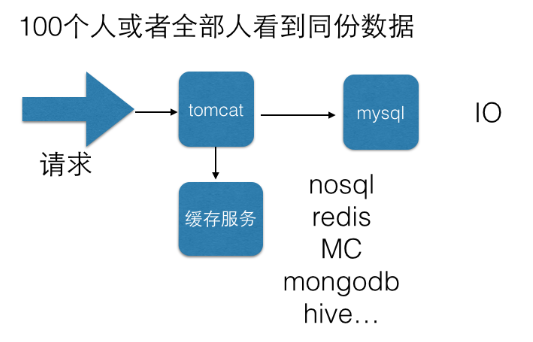
通过缓存减少数据库访问,提高访问速度
1、redis官网 https://redis.io/download
2、新手入门redis在线测试工具:http://try.redis.io/
2、源码编译安装Redis4.x
简介:使用源码安装Redis4.x和配置外网访问
1、快速安装 https://redis.io/download#installation
wget http://download.redis.io/releases/redis-4.0.9.tar.gz
tar xzf redis-4.0.9.tar.gz
cd redis-4.0.9
make
启动服务端:src/redis-server
启动客户端:src/redis-cli
2、默认是本地访问的,需要开放外网访问
1)打开redis.conf文件在NETWORK部分修改
注释掉bind 127.0.0.1可以使所有的ip访问redis
修改 protected-mode,值改为no
 查看当前占用端口
3、SpringBoot2.x整合redis实战讲解
简介:使用springboot-starter整合reids实战
1、官网:https://docs.spring.io/spring-boot/docs/2.1.0.BUILD-SNAPSHOT/reference/htmlsingle/#boot-features-redis
集群文档:https://docs.spring.io/spring-data/data-redis/docs/current/reference/html/#cluster
2、springboot整合redis相关依赖引入
<dependency>
<groupId>org.springframework.boot</groupId>
<artifactId>spring-boot-starter-data-redis</artifactId>
</dependency>
3、相关配置文件配置
#=========redis基础配置=========
spring.redis.database=0
spring.redis.host=127.0.0.1
spring.redis.port=6390
# 连接超时时间 单位 ms(毫秒)
spring.redis.timeout=3000
#=========redis线程池设置=========
# 连接池中的最大空闲连接,默认值也是8。
spring.redis.pool.max-idle=200
#连接池中的最小空闲连接,默认值也是0。
spring.redis.pool.min-idle=200
# 如果赋值为-1,则表示不限制;pool已经分配了maxActive个jedis实例,则此时pool的状态为exhausted(耗尽)。
spring.redis.pool.max-active=2000
# 等待可用连接的最大时间,单位毫秒,默认值为-1,表示永不超时
spring.redis.pool.max-wait=1000
4、常见redistemplate种类讲解和缓存实操(使用自动注入)
1、注入模板
@Autowired
private StirngRedisTemplate strTplRedis
2、类型String,List,Hash,Set,ZSet
对应的方法分别是opsForValue()、opsForList()、opsForHash()、opsForSet()、opsForZSet()
package com.atguigu.springboot.controller;

import org.json.JSONObject;

import org.springframework.beans.factory.annotation.Autowired;

import org.springframework.data.redis.core.StringRedisTemplate;

import org.springframework.web.bind.annotation.GetMapping;

import org.springframework.web.bind.annotation.RequestMapping;

import org.springframework.web.bind.annotation.RestController;

import com.atguigu.springboot.controller.domain.JsonData;

@RestController

@RequestMapping("/api/v1/redis")

public class RdisTestController {

    @Autowired

    private StringRedisTemplate redisTpl; //jdbcTemplate

    @GetMapping(value="add")

    public Object add(){

        //opsForValue : Returns the operations performed on simple values (or Strings in Redis terminology).

        redisTpl.opsForValue().set("name", "xdclass2018");

        return JsonData.buildSuccess();

    }

    @GetMapping(value="get")

    public Object get(){

        String value = redisTpl.opsForValue().get("name");

        return JsonData.buildSuccess(value);

    }

}
controller
4、Redis工具类封装讲解和实战
简介:高效开发方式 Redis工具类封装讲解和实战
1、常用客户端 https://redisdesktop.com/download
2、封装redis工具类并操作
utils用于 对象 转str str转对象
package net.xdclass.base_project.utils;

import java.io.IOException;

import org.springframework.util.StringUtils;

import com.fasterxml.jackson.databind.ObjectMapper;

public class JsonUtils {

    private static ObjectMapper objectMapper = new ObjectMapper();

    //对象转字符串

    public static <T> String obj2String(T obj){

        if (obj == null){

            return null;

        }

        try {

            return obj instanceof String ? (String) obj : objectMapper.writeValueAsString(obj);

        } catch (Exception e) {

            e.printStackTrace();

            return null;

        }

    }

    //字符串转对象

    public static <T> T string2Obj(String str,Class<T> clazz){

        if (StringUtils.isEmpty(str) || clazz == null){

            return null;

        }

        try {

            return clazz.equals(String.class)? (T) str :objectMapper.readValue(str,clazz);

        } catch (IOException e) {

            e.printStackTrace();

            return null;

        }

    }

}
utils
package net.xdclass.base_project.utils;

import org.springframework.beans.factory.annotation.Autowired;

import org.springframework.data.redis.core.StringRedisTemplate;

import org.springframework.stereotype.Component;

/**

 * 功能描述:redis工具类

 *

 * <p> 创建时间:Apr 29, 2018 10:07:30 PM </p>

 *

 *@作者 小D课堂  小D

 */

@Component

public class RedisClient {

    @Autowired

    private StringRedisTemplate redisTpl; //jdbcTemplate

    /**

     * 功能描述:设置key-value到redis中

     * @param key

     * @param value

     * @return

     */

    public boolean set(String key ,String value){

        try{

            redisTpl.opsForValue().set(key, value);

            return true;

        }catch(Exception e){

            e.printStackTrace();

            return false;

        }

    }

    /**

     * 功能描述:通过key获取缓存里面的值

     * @param key

     * @return

     */

    public String get(String key){

        return redisTpl.opsForValue().get(key);

    }

//    @Autowired

//    private StringRedisTemplate redisTemplate;

//

//

//     /**

//     * 通过字符串key获取值

//     * @param key 键

//     * @return 值

//     */

//    public String get(String key){

//        return key==null?null:redisTemplate.opsForValue().get(key);

//    }

//

//

//    /**

//     * 普通缓存放入

//     * @param key 键

//     * @param value 值

//     * @return true成功 false失败

//     */

//    public boolean set(String key,String value) {

//         try {

//            redisTemplate.opsForValue().set(key, value);

//            return true;

//        } catch (Exception e) {

//            e.printStackTrace();

//            return false;

//        }

//

//    }

//

//

//    /**

//     * 功能描述:设置某个key过期时间

//     * @param key

//     * @param time

//     * @return

//     */

//      public boolean expire(String key,long time){

//            try {

//                if(time>0){

//                    redisTemplate.expire(key, time, TimeUnit.SECONDS);

//                }

//                return true;

//            } catch (Exception e) {

//                e.printStackTrace();

//                return false;

//            }

//        }

//

//

//

//

//      /**

//       * 功能描述:根据key 获取过期时间

//       * @param key

//       * @return

//       */

//      public long getExpire(String key){

//            return redisTemplate.getExpire(key,TimeUnit.SECONDS);

//        }

//

//

//          /**

//         * 递增

//         * @param key 键

//         * @return

//         */

//        public long incr(String key, long delta){

//            return redisTemplate.opsForValue().increment(key, delta);

//        }

//

//

//        /**

//         * 递减

//         * @param key 键

//         * @param delta 要减少几

//         * @return

//         */

//        public long decr(String key, long delta){

//            return redisTemplate.opsForValue().increment(key, -delta);

//        }

//

//        //==============Map结构=====================

//

//

//        //==============List结构=====================

//

//

//

}
client
package net.xdclass.base_project.controller;

import java.util.Date;

import net.xdclass.base_project.domain.JsonData;

import net.xdclass.base_project.domain.User;

import net.xdclass.base_project.utils.JsonUtils;

import net.xdclass.base_project.utils.RedisClient;

import org.springframework.beans.factory.annotation.Autowired;

import org.springframework.data.redis.core.StringRedisTemplate;

import org.springframework.web.bind.annotation.GetMapping;

import org.springframework.web.bind.annotation.RequestMapping;

import org.springframework.web.bind.annotation.RestController;

@RestController

@RequestMapping("/api/v1/redis")

public class RdisTestController {

    @Autowired

    private StringRedisTemplate redisTpl; //jdbcTemplate

    @Autowired

    private RedisClient redis;

    @GetMapping(value="add")

    public Object add(){

        //redisTpl.opsForValue().set("name", "xdclass2018");

        redis.set("username", "xddddddd");

        return JsonData.buildSuccess();

    }

    @GetMapping(value="get")

    public Object get(){

        //String value = redisTpl.opsForValue().get("name");

        String value = redis.get("username");

        return JsonData.buildSuccess(value);

    }

    @GetMapping(value="save_user")

    public Object saveUser(){

        User user = new User(1, "abc", "11", new Date());

        String userStr = JsonUtils.obj2String(user);

        boolean flag = redis.set("base:user:11", userStr);

        return JsonData.buildSuccess(flag);

    }

    @GetMapping(value="find_user")

    public Object findUser(){

        String userStr = redis.get("base:user:11");

        User user = JsonUtils.string2Obj(userStr, User.class);

        return JsonData.buildSuccess(user);

    }

}
controller

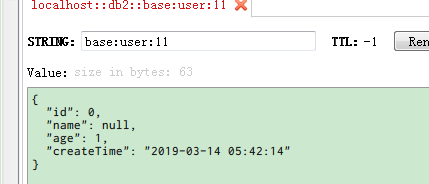
test单元测试
package base_project.base;

import net.xdclass.base_project.XdclassApplication;

import net.xdclass.base_project.domain.User;

import net.xdclass.base_project.utils.JsonUtils;

import net.xdclass.base_project.utils.RedisClient;

import org.junit.Test;

import org.junit.runner.RunWith;

import org.springframework.beans.factory.annotation.Autowired;

import org.springframework.boot.test.context.SpringBootTest;

import org.springframework.data.redis.core.StringRedisTemplate;

import org.springframework.test.context.junit4.SpringRunner;

@RunWith(SpringRunner.class)  //底层用junit  SpringJUnit4ClassRunner

@SpringBootTest(classes={XdclassApplication.class})//启动整个springboot工程

public class JsonTest {

    @Autowired

    private StringRedisTemplate strTpl;

    @Autowired

    private RedisClient redis;

    @Test

    public void testOne(){

        User u = new User();

        u.setAge(1);

        u.setPhone("22222");

        u.setPwd("0000");

        String str = JsonUtils.obj2String(u);

        strTpl.opsForValue().set("str", str);

        System.out.println(str);

    }

}
test
【SpringBoot】整合Redis实战的更多相关文章
- SpringBoot整合Redis、mybatis实战,封装RedisUtils工具类,redis缓存mybatis数据 附源码
创建SpringBoot项目 在线创建方式 网址:https://start.spring.io/ 然后创建Controller.Mapper.Service包 SpringBoot整合Redis 引 ...
- SpringBoot2.x整合Redis实战 4节课
1.分布式缓存Redis介绍 简介:讲解为什么要用缓存和介绍什么是Redis,新手练习工具 1.redis官网 https://redis.io/download 2.新手 ...
- springboot整合redis——redisTemplate的使用
一.概述 相关redis的概述,参见Nosql章节 redisTemplate的介绍,参考:http://blog.csdn.net/ruby_one/article/details/79141940 ...
- 小D课堂 - 零基础入门SpringBoot2.X到实战_第9节 SpringBoot2.x整合Redis实战_39、SpringBoot2.x整合redis实战讲解
笔记 3.SpringBoot2.x整合redis实战讲解 简介:使用springboot-starter整合reids实战 1.官网:https://docs.spring.io/spring-bo ...
- SpringBoot整合Redis、ApachSolr和SpringSession
SpringBoot整合Redis.ApachSolr和SpringSession 一.简介 SpringBoot自从问世以来,以其方便的配置受到了广大开发者的青睐.它提供了各种starter简化很多 ...
- SpringBoot整合Redis及Redis工具类撰写
SpringBoot整合Redis的博客很多,但是很多都不是我想要的结果.因为我只需要整合完成后,可以操作Redis就可以了,并不需要配合缓存相关的注解使用(如@Cacheable). ...
- SpringBoot 整合 Redis缓存
在我们的日常项目开发过程中缓存是无处不在的,因为它可以极大的提高系统的访问速度,关于缓存的框架也种类繁多,今天主要介绍的是使用现在非常流行的NoSQL数据库(Redis)来实现我们的缓存需求. Spr ...
- SpringBoot系列十:SpringBoot整合Redis
声明:本文来源于MLDN培训视频的课堂笔记,写在这里只是为了方便查阅. 1.概念:SpringBoot 整合 Redis 2.背景 Redis 的数据库的整合在 java 里面提供的官方工具包:jed ...
- springboot整合redis(注解形式)
springboot整合redis(注解形式) 准备工作 springboot通常整合redis,采用的是RedisTemplate的形式,除了这种形式以外,还有另外一种形式去整合,即采用spring ...
随机推荐
- PotPlayer安装与配置
目录 1.简介 2.安装 3.设置 基本选项设置: 播放选项设置: PotPlayer皮肤设置: 1.简介 PotPlayer一款小巧简单的视频播放软件,具有于强大的定制能力和个性化功能. 2.安装 ...
- oracle 11 g release 2 安装
1.下载Oracle 11g R2 for Windows版本 下载地址如下官方网站: http://www.oracle.com/technetwork/database/enterprise-ed ...
- Python自学:第二章 浮点数
>>>0.1 + 0.1 0.2 >>>0.2 + 0.2 0.4 >>>2 * 0.1 0.2 >>>2 * 0.2 0.4
- Cassandra集群:一,搭建一个三节点的集群
环境准备 JDK1.8 http://download.oracle.com/otn/java/jdk/8u171-b11/512cd62ec5174c3487ac17c61aaa89e8/jdk-8 ...
- 把旧系统迁移到.Net Core 2.0 日记 (20) --使用MiniProfiler for .NET
要查看页面耗时,EFCore的性能. 安装 MiniProfiler.AspNetCore.Mvc 还有 MiniProfiler.EntityFrameworkCore Install-Packa ...
- vs 设置自动缩进tab转换成空格
工具 选项 文本编辑器 如下图 选中插入空格 使用技巧: 按Ctrl+K+F组合键,可以自动进行代码对齐.
- webstorm激活教程
虽然webStorm,phpStorm以及jetbrains系列的很好用,但是每隔一段时间就需要激活一下,这样太费劲了,今天军哥给大家推荐一个永久激活的办法 此教程适用于jetbrains 的所有系列 ...
- Mybatis 搭建遇到的坑
1. <?xml version="1.0" encoding="UTF-8" ?><!DOCTYPE mapper PUBLIC " ...
- HDFS API编程
3.1常用类 3.1.1Configuration Hadoop配置文件的管理类,该类的对象封装了客户端或者服务器的配置(配置集群时,所有的xml文件根节点都是configuration ...
- 高性能场景下,HashMap的优化使用建议
1. HashMap 在JDK 7 与 JDK8 下的差别 顺便理一下HashMap.get(Object key)的几个关键步骤,作为后面讨论的基础. 1.1 获取key的HashCode并二次加工 ...