
Asp.Net任务Task和线程Thread
Task是.NET4.0加入的,跟线程池ThreadPool的功能类似,用Task开启新任务时,会从线程池中调用线程,而Thread每次实例化都会创建一个新的线程。任务(Task)是架构在线程之上的,也就是说任务最终还是要抛给线程(Thread)去执行。
任务Task和线程Thread的区别:
static void Main(string[] args)

{

    for (int i = ; i < ; i++)

    {

        new Thread(Run1).Start();

    }

    for (int i = ; i < ; i++)

    {

        Task.Run(() => { Run2(); });

    }

}

static void Run1()

{

    Console.WriteLine("Thread Id =" + Thread.CurrentThread.ManagedThreadId);

}

static void Run2()

{

    Console.WriteLine("Task调用的Thread Id =" + Thread.CurrentThread.ManagedThreadId);

}
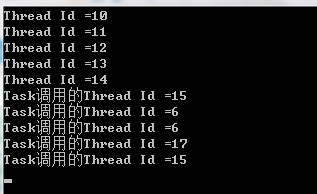
Task使用方法
创建Task有两种方式,一种是使用构造函数创建,另一种是使用 Task.Factory.StartNew 进行创建。如下代码所示
1.使用构造函数创建Task
Task t1 = new Task(MyMethod);
2.使用Task.Factory.StartNew 进行创建Task
Task t1 = Task.Factory.StartNew(MyMethod);
多任务
public void test()

    {

        Task[] tasks = new Task[];

        for (int i = ; i < ; i++)

        {

            if (i %  == )

            {

                tasks[i] = new Task(test2, (object)i);//传参,必须是obj

            }

            else

            {

                tasks[i] = new Task(test1);

            }

            tasks[i].Start();

        }

        Task.WaitAll(tasks);//等待所有线程执行完成后才会继续往下执行
     //Task.WaitAll(tasks,5000);//最多等待5秒
        Response.Write("执行完成");

    }

    private void test1()

    {

        //do

    }

    private void test2(object ourl)

    {

        //do

    }
连续任务
static void DownLoad(object str)

    {

       //下载文件

    }

    static void ReadNews(Task obj)

    {

        //读取文件

    }

    static void Main(string[] args)

    {

        Task task = new Task(DownLoad, "人民日报");

        Task task2 = task.ContinueWith(ReadNews);

        task.Start();

        //DownLoad执行完才执行ReadNews

    }
Task返回值
Task<string> t1 = Task.Factory.StartNew(() => "测试");

t1.Wait();

Console.WriteLine(t1.Result);

Console.ReadLine();

//返回值可以是任意的类型
Task线程池最大数量
这个TaskScheduler是微软开源的一个任务调度器
LimitedConcurrencyLevelTaskScheduler.cs
using System;

using System.Collections.Generic;

using System.Linq;

using System.Web;

using System.Threading.Tasks;

using System.Threading;

/// <summary>

///LimitedConcurrencyLevelTaskScheduler 的摘要说明

/// </summary>

public class LimitedConcurrencyLevelTaskScheduler : TaskScheduler

{

    // Indicates whether the current thread is processing work items.

    [ThreadStatic]

    private static bool _currentThreadIsProcessingItems;

    // The list of tasks to be executed

    private readonly LinkedList<Task> _tasks = new LinkedList<Task>(); // protected by lock(_tasks)

    // The maximum concurrency level allowed by this scheduler.

    private readonly int _maxDegreeOfParallelism;

    // Indicates whether the scheduler is currently processing work items.

    private int _delegatesQueuedOrRunning = ;

    // Creates a new instance with the specified degree of parallelism.

    public LimitedConcurrencyLevelTaskScheduler(int maxDegreeOfParallelism)

    {

        if (maxDegreeOfParallelism < ) throw new ArgumentOutOfRangeException("maxDegreeOfParallelism");

        _maxDegreeOfParallelism = maxDegreeOfParallelism;

    }

    // Queues a task to the scheduler.

    protected sealed override void QueueTask(Task task)

    {

        // Add the task to the list of tasks to be processed.  If there aren't enough

        // delegates currently queued or running to process tasks, schedule another.

        lock (_tasks)

        {

            _tasks.AddLast(task);

            if (_delegatesQueuedOrRunning < _maxDegreeOfParallelism)

            {

                ++_delegatesQueuedOrRunning;

                NotifyThreadPoolOfPendingWork();

            }

        }

    }

    // Inform the ThreadPool that there's work to be executed for this scheduler.

    private void NotifyThreadPoolOfPendingWork()

    {

        ThreadPool.UnsafeQueueUserWorkItem(_ =>

        {

            // Note that the current thread is now processing work items.

            // This is necessary to enable inlining of tasks into this thread.

            _currentThreadIsProcessingItems = true;

            try

            {

                // Process all available items in the queue.

                while (true)

                {

                    Task item;

                    lock (_tasks)

                    {

                        // When there are no more items to be processed,

                        // note that we're done processing, and get out.

                        if (_tasks.Count == )

                        {

                            --_delegatesQueuedOrRunning;

                            break;

                        }

                        // Get the next item from the queue

                        item = _tasks.First.Value;

                        _tasks.RemoveFirst();

                    }

                    // Execute the task we pulled out of the queue

                    base.TryExecuteTask(item);

                }

            }

            // We're done processing items on the current thread

            finally { _currentThreadIsProcessingItems = false; }

        }, null);

    }

    // Attempts to execute the specified task on the current thread.

    protected sealed override bool TryExecuteTaskInline(Task task, bool taskWasPreviouslyQueued)

    {

        // If this thread isn't already processing a task, we don't support inlining

        if (!_currentThreadIsProcessingItems) return false;

        // If the task was previously queued, remove it from the queue

        if (taskWasPreviouslyQueued)

            // Try to run the task.

            if (TryDequeue(task))

                return base.TryExecuteTask(task);

            else

                return false;

        else

            return base.TryExecuteTask(task);

    }

    // Attempt to remove a previously scheduled task from the scheduler.

    protected sealed override bool TryDequeue(Task task)

    {

        lock (_tasks) return _tasks.Remove(task);

    }

    // Gets the maximum concurrency level supported by this scheduler.

    public sealed override int MaximumConcurrencyLevel { get { return _maxDegreeOfParallelism; } }

    // Gets an enumerable of the tasks currently scheduled on this scheduler.

    protected sealed override IEnumerable<Task> GetScheduledTasks()

    {

        bool lockTaken = false;

        try

        {

            Monitor.TryEnter(_tasks, ref lockTaken);

            if (lockTaken) return _tasks;

            else throw new NotSupportedException();

        }

        finally

        {

            if (lockTaken) Monitor.Exit(_tasks);

        }

    }

}
使用方法
控制多线程数量,并实时输出已完成任务数量
protected void Page_Load(object sender, EventArgs e)

    {

        Response.Write("<script type=\"text/javascript\">function load(i) {document.getElementById(\"now\").innerHTML = i;}</script>");

        Response.Write("<span id='now'>0</span>/<span id='sum'>" + arr.Length + "</span>");

        Response.Flush();

        //设置最大线程数为5

        var scheduler = new LimitedConcurrencyLevelTaskScheduler();

        var Factory = new TaskFactory(scheduler);

        Task[] tasks = new Task[];

        int res = ;

        for (int i = ; i < ; i++)

        {

            Task tk = Factory.StartNew(() => downFile((object)i));

            tk.ContinueWith(t =>

            {

                res++;

                Response.Write("<script>load(" + res.ToString() + ")</script>");

                Response.Flush();

            });

            tasks[i] = tk;

        }

        Task.WaitAll(tasks);

        Response.Write("完成");

    }

    private void downFile(object oid)

    {

        string iid= (string)id;

        //do...

    }
Task使用过程中遇到的坑
使用过程中发现有的task任务不执行,经过长时间调试发现在task调用的方法里很多C#方法不可用,
例如HttpContext.Current.Request.Url、HttpContext.Current.Server.MapPath等方法不可用,真是坑
//end
Asp.Net任务Task和线程Thread的更多相关文章
- C#中假设正确使用线程Task类和Thread类
C#中使用线程Task类和Thread类小结 刚接触C#3个月左右.原先一直使用C++开发.由于公司的须要,所地採用C#开发.主要是控制设备的实时性操作,此为背景. 对于C#中的Task和Thread ...
- Activity, Service,Task, Process and Thread之间的关系
Activity, Service,Task, Process and Thread之间到底是什么关系呢? 首先我们来看下Task的定义,Google是这样定义Task的:a task is what ...
- Task.Delay() 和 Thread.Sleep() 区别
1.Thread.Sleep 是同步延迟,Task.Delay异步延迟. 2.Thread.Sleep 会阻塞线程,Task.Delay不会. 3.Thread.Sleep不能取消,Task.Dela ...
- Task C# 多线程和异步模型 TPL模型 【C#】43. TPL基础——Task初步 22 C# 第十八章 TPL 并行编程 TPL 和传统 .NET 异步编程一 Task.Delay() 和 Thread.Sleep() 区别
Task C# 多线程和异步模型 TPL模型 Task,异步,多线程简单总结 1,如何把一个异步封装为Task异步 Task.Factory.FromAsync 对老的一些异步模型封装为Task ...
- task.delay 和 thread.sleep
1.Thread.Sleep 是同步延迟. Task.Delay异步延迟. 2.Thread.Sleep 会阻塞线程,Task.Delay不会. 3.Thread.Sleep不能取消,Task.Del ...
- Lua 学习笔记(九)协同程序(线程thread)
协同程序与线程thread差不多,也就是一条执行序列,拥有自己独立的栈.局部变量和命令指针,同时又与其他协同程序共享全局变量和其他大部分东西.从概念上讲线程与协同程序的主要区别在于,一个具有多个线程的 ...
- java 线程 Thread 使用介绍,包含wait(),notifyAll() 等函数使用介绍
(原创,转载请说明出处!谢谢--http://www.cnblogs.com/linguanh/) 此文目的为了帮助大家较全面.通俗地了解线程 Thread 相关基础知识! 目录: --线程的创建: ...
- Android 线程Thread的2种实现方法
在讲解之前有以下三点要说明: 1.在Android中有两种实现线程Thread的方法: ①扩展java.long.Thread类: ②实现Runnable()接口: 2.Thread类是线程类,它有两 ...
- 线程(thread)
线程(thread): 现代操作系统引入进程概念,为了并发(行)任务 1.进程之间的这种切换代价很高 2.通信方式的代价也很大基本概念: 1.线程是比进程更小的资源单位,它是进程中的一个执行路线(分支 ...
随机推荐
- H5 唤起 APP的解决方案
H5 页面唤起APP或跳转到下载APP的某个链接地址.总结如下: 在 IOS 中, 系统版本在 8 以下时,可以监听页面的 pagehide / visibilitychange 事件. 系统版本大于 ...
- Altium Desgner软件,PCB设计中铺铜的作用
PS原文出自http://mp.weixin.qq.com/s/5mLNXzCDm1hGOXiKNE8Ddg 问1:为何要铺铜? 答:一般铺铜有几个方面原因. 1.EMC.对于大面积的地或电源铺铜,会 ...
- AE缺失Form Trapcode Form
缺失Form 下载链接: trapcode套装插件2017下载_Trapcode系列十款插件汉化版[支持AE CC 64位] - 迷你下载 下载Trapcode就可以了,应该是TC里的 去新CG下插件 ...
- 观光公交 [NOIP 2011] [思维推导]
Description 风景迷人的小城Y 市,拥有n 个美丽的景点.由于慕名而来的游客越来越多,Y 市特意安排了一辆观光公交车,为游客提供更便捷的交通服务.观光公交车在第0 分钟出现在1号景点,随后依 ...
- Perfect Service [POJ 3398]
Perfect Service 描述 网络由N个通过N-1个通信链路连接的计算机组成,使得任何两台计算机可以通过独特的路由进行通信.如果两台计算机之间存在通信链路,则称这两台计算机是相邻的.计算机的邻 ...
- 区间dp板子题:[noi1995]石子合并
非常经典的区间dp模板 对于每一个大于二的区间 我们显然都可以将它拆分成两个子序列 那么分别计算对于每个取最优值即可 #pragma GCC optimize("O2") #inc ...
- jQueryUI使用指南
jQuery UI包含了许多维持状态的小部件(Widget),因此,它与典型的 jQuery 插件使用模式略有不同.所有的 jQuery UI 小部件(Widget)使用相同的模式,所以,只要您学会使 ...
- plsql 工具怎样导出 oracle 表数据
一.双击 plsql 工具,输入登陆用户.登陆密码以及登陆数据库名称,如下图: 二.菜单 Tools --> Export Tables...,如下图: 三.进入导出界面后,可以选择单个表,进行 ...
- python之流程控制与运算符
第一:流程控制 一:if条件语句 计算机之所以能做很多自动化的任务,因为它可以自己做条件判断. 单分支语句: 单分支,单个条件 age = 20 if age >= 18: print('you ...
- Vmware下mint os的安装
在vmware 11中,mint倒是很好安装.直接读取iso文件,会自动进入一个类似WindowsPE的安装系统,直接双击开始安装就好,比较傻瓜化. 但是安装好了,字体太小,看着很不舒服,于是就倒腾V ...