
Django Template 进阶
回顾:
Variables
{{ var }} {{ dict.key }} {{ var.attr }} {{ var.method }} {{ varindex }}
Filter
{{ list | join."," }} {{ name | lower }}
Tags
{% tag xxx % } xxx {% endtag %} {% for ... %} xxx {% endfor %}
{# comment #}
配置Template引擎
TEMPLATES = [

    {

        'BACKEND': 'django.template.backends.django.DjangoTemplates',

        # 'BACKEND': 'django.template.backends.jinja2.Jinja2,

        'DIRS': [os.path.join(BASE_DIR, 'templates')]

        ,

        'APP_DIRS': True,

        'OPTIONS': {

            'context_processors': [

                'django.template.context_processors.debug',

                'django.template.context_processors.request',

                'django.contrib.auth.context_processors.auth',

                'django.contrib.messages.context_processors.messages',

            ],

        },

    },

]
获取和渲染模板
django.template.loader.get_template(template_name,using=None)
django.shortcuts.render()
Template.render(content=None,request=None)
django.template.loader.render_to_string(template_name, context=None, request=None, using=None)
其中 'APP_DIRS': True 可以向app目录下寻找模板
Context processors
Context processors 可以向HttpRequest中注入一些全局性参数
- django.contrib.auth.context_processors.auth
user
perms
- django.template.context_processors.debug
debug
sql_query
- django.template.context_processors.media
MEDIA_URL
自定义processors
1. 项目目录下新增 context_processors.py
自定义函数,第一个参数必须为 HttpRequest object,返回一个字典
def global_setting(request):

    user = {

        'name': 'alex',

        'age': 18,

        'sex': 'male'

    }

    return user
2. OPTIONS 添加路径
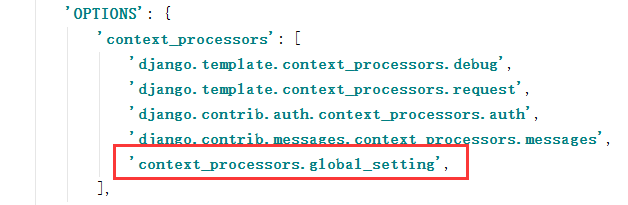
3. 前端展示
<h2>自定义context_processors</h2>

{{ name }}<br/>

{{ age }}<br/>

{{ sex }}<br/>
内置Template Tag 和 Filters
https://docs.djangoproject.com/en/1.11/ref/templates/builtins/
自定义Template Filter
Django寻找自定义filter的目录是 app_name/templatetags
新建文件 mytags.py
from django import template

register = template.Library()

@register.filter

def lower(text):

    return text.lower()

@register.filter

def question_choice_count(question):

    return question.choice_set.count()

@register.filter

def question_choice_count_add(question, num):

    return question.choice_set.count() + int(num)
前端使用,重启服务,加载标签
{% load static %}

{% load mytags %}

<body>

     <img src="{% static 'django.png' %}">

     {% if latest_question_list %}

     <ul>

     {% for question in latest_question_list %}

     <li><a href="{% url 'polls:vote' question.id %}">{{ question.question_text }}</a>

     -- {{ question | question_choice_count }} -- {{ question| question_choice_count_add:2 }}

     </li>

     {% endfor %}

     </ul>

    {% endif %}

</body>
模板扩展和包含
扩展 extends,是在继承模板,然后自定义可以设置block
包含 include,是导入一个模板片段到该位置
# mysite/templates/base.html

<html>

<head>

    <title> {% block title  %} {% endblock %}</title>

    {% include '_head_css_js.html' %}

</head>

<body>

{% include '_header.html' %}

{% block content %}

{% endblock %}

{% include '_footer.html' %}

</body>

</html>

# mysite/templates/_header.html

<div>

    This is header

</div>

# mysite/templates/_footer.html

<div>

    This is footer

</div>

#    mysite/templates/_head_css_js.html

#    mysite/templates/index.html

{% extends 'base.html' %}

{% block content %}

<h1> Index 1 </h1>

{% endblock %}
Django Template 进阶的更多相关文章
- Django【进阶篇 】
Model 到目前为止,当我们的程序涉及到数据库相关操作时,我们一般都会这么搞: 创建数据库,设计表结构和字段 使用 MySQLdb 来连接数据库,并编写数据访问层代码 业务逻辑层去调用数据访问层执行 ...
- Django web 进阶
.路由系统 .模板引擎 simple_tag .Form .Ajax请求 -简单数据 -复杂数据 内容: -作业 model xss.csrf(安全方面的内容) 分页(公共的模块) 内容复习和今日内容 ...
- Python之路【第十七篇】:Django【进阶篇 】
Python之路[第十七篇]:Django[进阶篇 ] Model 到目前为止,当我们的程序涉及到数据库相关操作时,我们一般都会这么搞: 创建数据库,设计表结构和字段 使用 MySQLdb 来连接 ...
- Python之Django【进阶篇 】
Model 到目前为止,当我们的程序涉及到数据库相关操作时,我们一般都会这么搞: 创建数据库,设计表结构和字段 使用 MySQLdb 来连接数据库,并编写数据访问层代码 业务逻辑层去调用数据访问层执行 ...
- Python之路【第十七篇】:Django【进阶篇】
Python之路[第十七篇]:Django[进阶篇 ] Model 到目前为止,当我们的程序涉及到数据库相关操作时,我们一般都会这么搞: 创建数据库,设计表结构和字段 使用 MySQLdb 来连接 ...
- Python开发【第二十二篇】:Web框架之Django【进阶】
Python开发[第二十二篇]:Web框架之Django[进阶] 猛击这里:http://www.cnblogs.com/wupeiqi/articles/5246483.html 博客园 首页 ...
- Python之路【第十七篇】:Django【进阶篇 】(转自银角大王博客)
Model 到目前为止,当我们的程序涉及到数据库相关操作时,我们一般都会这么搞: 创建数据库,设计表结构和字段 使用 MySQLdb 来连接数据库,并编写数据访问层代码 业务逻辑层去调用数据访问层执行 ...
- django template
一.模板基本元素 1.例子程序 1)urls.py中新增部分 from django.conf.urls import patterns, url, include urlpatterns = pat ...
- Django.template框架 template context (非常详细)
前面的章节我们看到如何在视图中返回HTML,但是HTML是硬编码在Python代码中的 这会导致几个问题: 1,显然,任何页面的改动会牵扯到Python代码的改动 网站的设计改动会比Python代码改 ...
随机推荐
- 彻底解决COM端口被占用(在使用中)问题的办法
今天就遇到这个问题了串口调试的时候发现usb转串口使用的是COM8而串口调试助手里面只有COM1到4,我想去该COM口发现COM1到7都在使用中,找了好多办法都不行,后面在网上找到这篇解决办法的文章, ...
- leetcode416
class Solution { public boolean canPartition(int[] nums) { int sum=0; for (int num:nums) sum+= num; ...
- python 字符串和字节数互转
在 python 中字符 是 str 类型, 字节是 bytes 类型 b = b'hello' # bytes 字节 s= 'hello' # str 字符串 可通过 type() 检查是什么类型 ...
- 安装和激活Office 2019
有条件请支持正版!相比费尽力气找一个可能不太安全的激活工具,直接买随时随地更新的Office 365确实是最好的办法.暂时没有经济实力的,可以看看这篇文章.下载OTP工具 首先到Office Tool ...
- OS模块的介绍
os,语义为操作系统,模块提供了访问多个操作系统服务的功能,可以处理文件和目录这些我们日常手动需要做的操作.os和它的子模块os.path还包括一些用于检查.构造.删除目录和文件的函数,以及一些处理路 ...
- springcloud-知识点总结(一):Eureka
1.Spring Cloud简介 Spring Cloud是一系列框架的有序集合.它利用Spring Boot的开发便利性巧妙地简化了分布式系统基础设施的开发,如服务发现注册.配置中心.消息总线.负载 ...
- 坑之mysql 字符串与数字操作
select "123"+1 = 124; select "1a23"+1 = 2; select "aa23"+1 = 1; select ...
- IBGP规划
在IBGP邻居中,使用反射器减少IBGP邻居关系是一种最常用的网络结构,在上图中AS65001中有6台路由器,其中,R1和R2是一组反射器,配置如下: R1: ! interface Loopback ...
- includes() 方法
字符串的includes()和数组中的includes()判断有没有括号里面的值,有的话为true,没有为false. 详细解析:https://blog.csdn.net/wu_xianqiang/ ...
- node.js中使用yargs来处理命令行参数
yargs库能够方便的处理命令行参数. 一.安装 yargs npm install yargs --save 二.读取命令行参数 const yargs = require('yargs'); le ...