
『现学现忘』Git基础 — 11、配置Git用户签名的方式
1、配置Git签名
(1)语法
$ git config 配置文件作用域 user.name '用户名'

$ git config 配置文件作用域 user.email '邮箱地址'
示例如下:
| 配置 user.name和user.email |
|---|
$ git config --global user.name ‘your_name' |
$ git config --global user.email ‘your_email@domain.com' |
注意:这个email一定是有效的,是你能够收得到邮件的email。
(2)配置系统用户签名
可在任意目录下运行创建命令:git config --system
L@DESKTOP-T2AI2SU MINGW64 /j/git-repository/learngit

$ git config --system user.name 'tang_s'

L@DESKTOP-T2AI2SU MINGW64 /j/git-repository/learngit

$ git config --system user.email 'tang_s@126.com'
提示:在Git中,没有提示就是最好的提示。
系统用户注册信息会写在本地Git的安装目录下,...\etc\gitconfig文件中。
L@DESKTOP-T2AI2SU MINGW64 /j/git-repository/learngit

$ cat /f/DevInstall/Git/GitforWindows/etc/gitconfig

[diff "astextplain"]

        textconv = astextplain

[filter "lfs"]

        clean = git-lfs clean -- %f

        smudge = git-lfs smudge -- %f

        process = git-lfs filter-process

        required = true

[http]

        sslBackend = openssl

        sslCAInfo = F:/DevInstall/Git/GitforWindows/mingw64/ssl/certs/ca-bundle.crt

[core]

        autocrlf = true

        fscache = true

        symlinks = false

[credential]

        helper = manager

[user]

        name = tang_s

        email = tang_s@126.com
提示:之前的Git版本中,
gitconfig文件是在,Git安装目录下mingw64目录中的etc/gitconfig。
(3)配置全局用户签名
可在任意目录下运行创建命令:git config --global
# 在任何位置执行都可以

# 执行这个配置表示你这台机器上所有的Git仓库都会使用这个配置,

# 当然也可以对某个仓库指定不同的用户名和Email地址(本地用户)。

L@DESKTOP-T2AI2SU MINGW64 /j/git-repository/learngit

$ git config --global user.name 'sun_wk'

L@DESKTOP-T2AI2SU MINGW64 /j/git-repository/learngit

$ git config --global user.email 'sun_wk@126.com'
全局用户注册的信息,会写到当前用户目录下.gitconfig文件中。
L@DESKTOP-T2AI2SU MINGW64 /j/git-repository/learngit

$ cat /c/Users/L/.gitconfig

[user]

        name = sun_wk

        email = sun_wk@126.com
(4)配置本地用户签名
本地库用户只能在当前的本地库目录下运行该命令:
# 注意如果是配置local配置文件签名,可以省略--local参数

$ git config --local user.name 'sha_hs'

$ git config --local user.email 'sha_hs@126.com'
注意:
执行上边命令,要在一个仓库中执行,否则会提示你:
fatal: --local can only be used inside a git repository还有
--local选项只能在Git仓库中使用。
演示:
# 此时learngit目录不是一个本地Git仓库

L@DESKTOP-T2AI2SU MINGW64 /j/git-repository/learngit

$ git config --local user.name ''

fatal: --local can only be used inside a git repository

# 初始化learngit目录为Git本地仓库

L@DESKTOP-T2AI2SU MINGW64 /j/git-repository/learngit

$ git init

Initialized empty Git repository in J:/git-repository/learngit/.git/

L@DESKTOP-T2AI2SU MINGW64 /j/git-repository/learngit (master)

# 配置本地用户签名

L@DESKTOP-T2AI2SU MINGW64 /j/git-repository/learngit (master)

$ git config --local user.name 'sha_hs'

L@DESKTOP-T2AI2SU MINGW64 /j/git-repository/learngit (master)

$ git config --local user.email 'sha_hs@126.com'
本地用户注册信息,会写到当前版本库目录下的.git目录中的config文件中。
L@DESKTOP-T2AI2SU MINGW64 /j/git-repository/learngit (master)

$ cat .git/config

[core]

        repositoryformatversion = 0

        filemode = false

        bare = false

        logallrefupdates = true

        symlinks = false

        ignorecase = true

[user]

        name = sha_hs

        email = sha_hs@126.com
注意:
- 签名设置的用户名和邮箱,主要作用就是区分不同开发人员的身份。
- 这里设置的签名和登录远程库,也就是代码托管中心的账号、密码没有任何关系。
- Email地址没有要求和用户名一致,甚至Email地址不存在都没事。
- 但是在实际工作中,这个Email一定是有效的,是你能够收得到邮件的Email。
2、查看三个配置文件的用户签名
通过命令的方式查看三个配置文件的用户签名。
(1)语法
- 执行
git config命令,来查看各作用域配置文件中的配置信息。(这个命令在任何路径下都能执行) - 只执行
git config命令,会显示git config命令所有的可用参数。 - 执行
git config --list命令,查看当前系统中Git的所有配置,三个配置文件所有的配置都显示出来。 - 查看指定指定配置文件的内容:
执行语句 说明 $ git config --list --local查看项目/仓库级别的配置文件信息 $ git config --list --global查看用户级别配置文件信息 $ git config --list --system查看系统级别配置文件信息
(2)查看项目/仓库级别的配置文件信息(local)
需要进入到一个仓库中,执行$ git config --list --local命令,才能显示该仓库的配置信息。否则会出现提示fatal: --local can only be used inside a git repository,--local选项只能在Git仓库中使用。
L@DESKTOP-T2AI2SU MINGW64 /j/git-repository

$ git config --list --local

fatal: --local can only be used inside a git repository

L@DESKTOP-T2AI2SU MINGW64 /j/git-repository

$ cd learngit/

L@DESKTOP-T2AI2SU MINGW64 /j/git-repository/learngit (master)

$ git config --list --local

core.repositoryformatversion=0

core.filemode=false

core.bare=false

core.logallrefupdates=true

core.symlinks=false

core.ignorecase=true

user.name=sha_hs

user.email=sha_hs@126.com
提示:
执行$ git config --list --local命令时, Git会读取仓库中.git目录下的.git/config配置文件,该文件含有当前仓库的配置信息。
# 查看.git目录

L@DESKTOP-T2AI2SU MINGW64 /j/git-repository/learngit (master)

$ ll .git/

total 7

-rw-r--r-- 1 L 197121 176  4月  2 22:43 config

-rw-r--r-- 1 L 197121  73  4月  2 22:41 description

-rw-r--r-- 1 L 197121  23  4月  2 22:41 HEAD

drwxr-xr-x 1 L 197121   0  4月  2 22:41 hooks/

drwxr-xr-x 1 L 197121   0  4月  2 22:41 info/

drwxr-xr-x 1 L 197121   0  4月  2 22:41 objects/

drwxr-xr-x 1 L 197121   0  4月  2 22:41 refs/

# 查看.git/config文件中的内容

L@DESKTOP-T2AI2SU MINGW64 /j/git-repository/learngit (master)

$ cat .git/config

[core]

     repositoryformatversion = 0

     filemode = false

     bare = false

     logallrefupdates = true

     symlinks = false

     ignorecase = true

[user]

     name = sha_hs

     email = sha_hs@126.com
(3)查看用户/全局级别的配置文件信息(global)
在任何位置执行$ git config --list --global命令即可。
# 任何目录下执行都可以

L@DESKTOP-T2AI2SU MINGW64 /j/git-repository/learngit (master)

$ git config --list --global

user.name=sun_wk

user.email=sun_wk@126.com
注意:
如果我们是新安装的Git,还没有配置过
global作用域内的配置信息,global级别的配置文件是没有的,只有我们配置一次global级别的配置信息,配置文件才会生成。
fatal: unable to read config file 'C:/Users/L/.gitconfig': No such file or directory:提示你无法读取配置文件'C:/Users/L/.gitconfig':没有此类文件或目录。

提示:
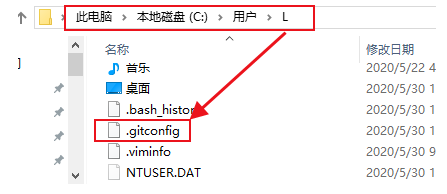
当我们配置过
global作用域中的信息后,C:/Users/L/中的.gitconfig文件出现了。
执行
git config --list --global命令后,查看的就是C:/Users/L/.gitconfig文件中的内容。
(4)查看系统级别的配置文件信息(system)
在任何位置执行$ git config --list --system命令即可。
演示:
L@DESKTOP-T2AI2SU MINGW64 /j/git-repository

$ git config --list --system

diff.astextplain.textconv=astextplain

filter.lfs.clean=git-lfs clean -- %f

filter.lfs.smudge=git-lfs smudge -- %f

filter.lfs.process=git-lfs filter-process

filter.lfs.required=true

http.sslbackend=openssl

http.sslcainfo=F:/DevInstall/Git/GitforWindows/mingw64/ssl/certs/ca-bundle.crt

core.autocrlf=true

core.fscache=true

core.symlinks=false

credential.helper=manager

user.name=tang_s

user.email=tang_s@126.com
提示:
该命令读取的配置文件所在的位置是,Git安装目录下的
etc目录中的gitconfig文件。查看
gitconfig文件中的内容,与上边显示的内容是对应的。
(5)查看当前系统中Git的所有配置信息
执行git config --list命令,查看当前系统中Git的所有配置,上面三个配置文件所有的配置都显示出来。
示例:
# 如果没有再本地仓库中执行该命令,只显示系统用户和全局用户配置文件中的信息

L@DESKTOP-T2AI2SU MINGW64 /j/git-repository

$ git config --list

diff.astextplain.textconv=astextplain

filter.lfs.clean=git-lfs clean -- %f

filter.lfs.smudge=git-lfs smudge -- %f

filter.lfs.process=git-lfs filter-process

filter.lfs.required=true

http.sslbackend=openssl

http.sslcainfo=F:/DevInstall/Git/GitforWindows/mingw64/ssl/certs/ca-bundle.crt

core.autocrlf=true

core.fscache=true

core.symlinks=false

credential.helper=manager

user.name=tang_s    # 系统用户签名

user.email=tang_s@126.com

user.name=sun_wk	# 全局用户签名

user.email=sun_wk@126.com

# 如果在本地仓库中执行该命令,三种用户配置文件的信息都会显示出来

L@DESKTOP-T2AI2SU MINGW64 /j/git-repository

$ cd learngit/

L@DESKTOP-T2AI2SU MINGW64 /j/git-repository/learngit (master)

$ git config --list

diff.astextplain.textconv=astextplain

filter.lfs.clean=git-lfs clean -- %f

filter.lfs.smudge=git-lfs smudge -- %f

filter.lfs.process=git-lfs filter-process

filter.lfs.required=true

http.sslbackend=openssl

http.sslcainfo=F:/DevInstall/Git/GitforWindows/mingw64/ssl/certs/ca-bundle.crt

core.autocrlf=true

core.fscache=true

core.symlinks=false

credential.helper=manager

user.name=tang_s    # 系统用户签名

user.email=tang_s@126.com

user.name=sun_wk  	# 全局用户签名

user.email=sun_wk@126.com

core.repositoryformatversion=0

core.filemode=false

core.bare=false

core.logallrefupdates=true

core.symlinks=false

core.ignorecase=true

user.name=sha_hs	# 本地用户签名

user.email=sha_hs@126.com
3、总结
- 在本地Git的安装目录下,
etc\gitconfig文件:是对登陆该操作系统的所有用户都普遍适用的配置。若使用git config命令时加上--system选项,读写的就是这个文件中的内容。 - 当前操作系统用户目录下
.gitconfig文件:该配置文件只适用于该用户,该用户可以配置Git用户签名等信息到这个配置文件中,是对这台计算机上所有的Git仓库适用。若使用git config命令时加上--global选项,读写的就是这个文件中的内容。 - Git本地仓库中
.git/config文件:当前项目的Git本地仓库中的配置文件,文件中的配置仅仅针对当前项目仓库有效。
提示:每一个级别的配置都会覆盖上层的相同配置。(
local覆盖global覆盖system)
『现学现忘』Git基础 — 11、配置Git用户签名的方式的更多相关文章
- 『现学现忘』Docker基础 — 11、Docker安装的问题补充
目录 1.问题复现 2.解决冲突 3.重新安装docker-ce-selinux 4.安装Docker-ce 5.总结 通过yum安装Docker的时候,安装20版本的Docker没有出现问题,在安装 ...
- 『学了就忘』Linux基础 — 11、通过setup工具配置Linux系统IP地址
目录 1.setup命令介绍 2.使用setup命令配置IP (1)执行setup命令 (2)进入图形化配置界面 (3)选择配置IP还是DNS (4)选择要配置的网卡 (5)进入IP地址配置页面 (6 ...
- 『现学现忘』Git基础 — 10、配置Git用户签名说明
目录 1.为什么要创建用户签名 2.为什么要在Git中配置这些信息 3.创建用户签名的方式 4.总结 1.为什么要创建用户签名 作为版本控制系统的客户端,每台客户机对版本库的所有提交操作,都需要注明操 ...
- 『现学现忘』Git基础 — 12、Git用户签名(补充)
目录 1.修改用户签名 2.取消用户签名 3.用户签名的优先级 4.总结本文用到的Git命令 1.修改用户签名 其实很简单,就是重新执行git config命令,换个用户名和邮箱地址就可以了,新配置的 ...
- Git 基础 —— 安装 配置 别名 对象
Git 基础学习系列 Git 基础 -- 安装 配置 别名 对象 Git 基础 -- 常用命令 Git 基础 -- 常见使用场景 Git基础 -- Github 的使用 Git 安装 Git下载地址 ...
- 『现学现忘』Git基础 — 13、Git的基础操作
目录 1.Git最基础的使用方式 (1)初始化本地版本库 (2)查看文件的状态 (3)把文件添加到暂存区 (4)把暂存区的内容提交到本地版本库 2.总结本文用到的Git命令 1.Git最基础的使用方式 ...
- 『现学现忘』Git基础 — 18、Git对象的总结
目录 1.Git操作最基本的流程 2.工作目录中文件的状态 3.Git效率说明 提示:前面三篇文章已经分别的对blob对象.tree对象.commit对象进行了详细的说明,这篇文章我们总结一下,Git ...
- 『现学现忘』Git基础 — 21、git diff命令
目录 1.git diff 命令说明 2.比较工作区与暂存区中文件的差别 3.比较暂存区与本地库中文件的差别 4.总结git diff命令常见用法 5.总结 1.git diff 命令说明 在comm ...
- 『现学现忘』Git基础 — 22、Git中文件重命名
目录 1.用学过的命令进行文件重命名 2.使用git mv命令进行文件重命名 我们这篇文章来说说在Git中如何进行文件重命名. 提示一下,下面所说明的是对已经被Git管理的文件进行重命名,未被Git追 ...
随机推荐
- ubuntu忘记密码,用root修改Ubuntu密码
今天突发奇想,想改一下ubuntu的用户名,仅仅修改了/etc/passwd中的用户名. 改完后没有用命令修改密码,直接reboot了. 结果悲剧了,登不进去了. 赶紧百度一下,结果发现,本宝宝看不懂 ...
- MSF基本使用
MSF 链接数据库 linux查找文件 find / -name dabase.yml 链接数据库 db_connect -y path/database.yml db_status 查询数据库链接状 ...
- VS2022 安装.NET 3.5/.NET 4/.NET 4.5/.NET 4.5.1目标包的方法
最近重装了系统,就装了一个Visual Studio 2022,发现之前的老项目打不开了,需要下载目标包,但是在Visual Studio Installer 里面无法安装 .NET 3.5/.NET ...
- 题解0005:数的划分(洛谷P1025)
题目描述:将整数 n 分成 k 份,每份不能为空,颠倒顺序的被看成一种分法. 题目链接:https://www.luogu.com.cn/problem/P1025 题目思路:深搜剪枝,规定搜索的下一 ...
- [USACO08OPEN]牛的街区Cow Neighborhoods
题目描述: luogu 题解: 技巧题. 曼哈顿距离:$|x1-x2|+|y1-y2|$ 切比雪夫距离:$\max(|x1-x2|,|y1-y2|)$ 曼哈顿距离转切比雪夫距离:$(x,y)-> ...
- 数据库上云实践:使用Ora2pg进行数据库迁移
目录 概述 重要 前置条件 配置环境 Win环境配置 linux环境配置 定义ORACLE_HOME环境变量 Ora2Pg使用方法 配置文件ora2pg_table.conf 配置文件解释:Oracl ...
- git-learningmeiy
什么是版本控制-版本迭代: 版本控制(Revision control)是一种在开发的过程中用于管理我们对文件.目录或工程等内容的修改历史,方便查看更改历史记录,备份以便恢复以前的版本的软件工程技术. ...
- Linux下安装jdk-7u67-linux-x64.rpm
1.新建一个jdk的安装目录,我这里是在/usr/下新建了java目录,我是使用WinSCP创建的文件夹,把 jdk-7u80-linux-x64.tar.gz压缩包从本地Windows系统中拖到Li ...
- python 基础数据类型汇总
数据类型小结(各数据类型常用操作) 一.数字/整型int int()强行转化数字 二.bool类型False&True bool()强行转化布尔类型. 0,None,及各个空的字符类型为Fal ...
- 学习GlusterFS(八)
GlusterFS集群创建 一.简介 GlusterFS概述 Glusterfs是一个开源的分布式文件系统,是Scale存储的核心,能够处理千数量级的客户端.在传统的解决 方案中Glusterfs能够 ...