
React components render order All In One
React components render order All In One
components render order / components lifecycle
DOM tree render order
React diff
React fiber
当父组件进行重新渲染操作时,即使子组件的props或state没有做出任何改变,也会同样进行重新渲染
当子组件进行重新渲染操作时,只有子组件会同样进行重新渲染
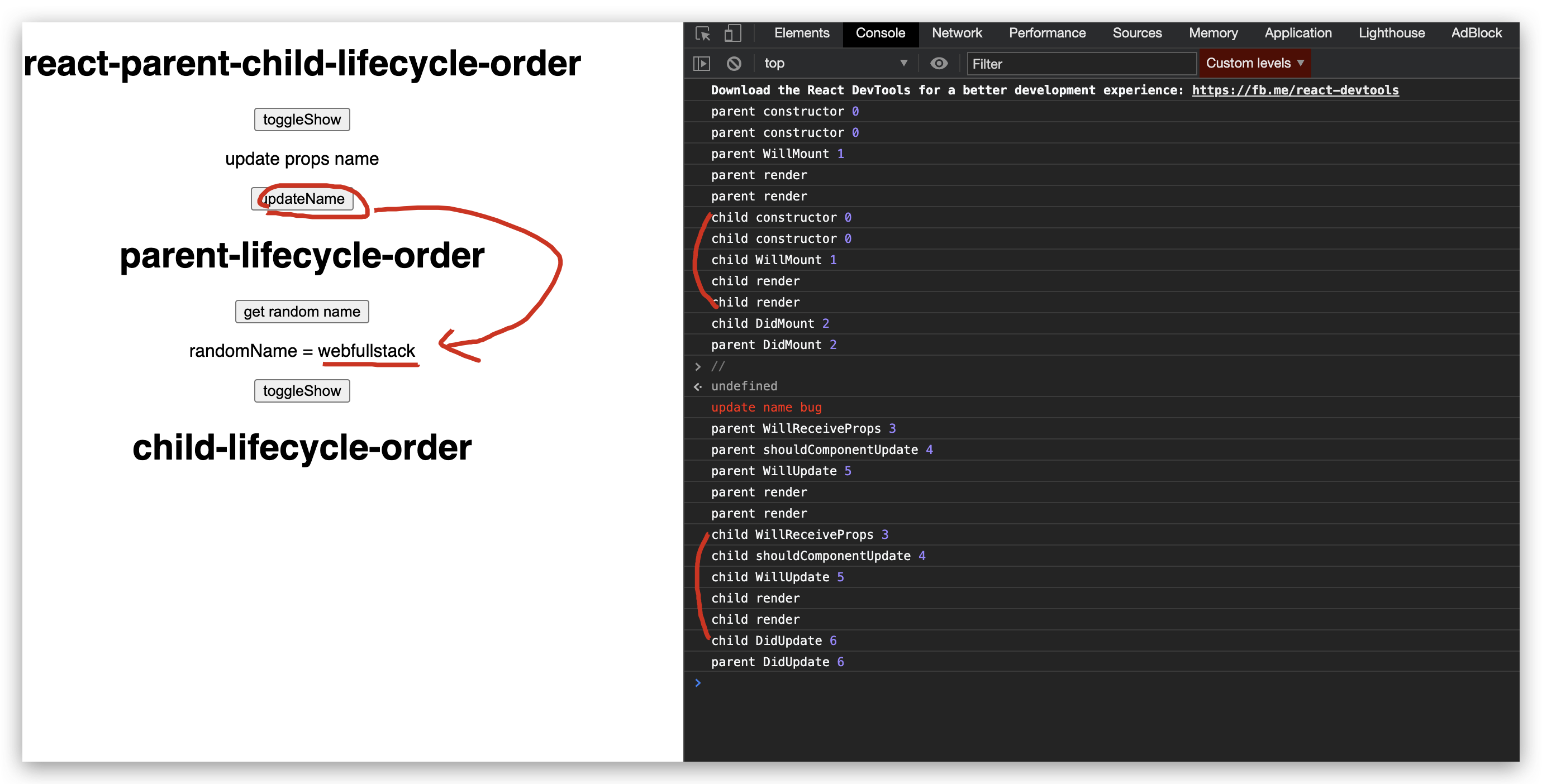
parent component change props
import Parent from "./components/parent";

export default function App() {

  const [name, setName] = useState(`xgqfrms`);

  const [show, setShow] = useState(true);

  const toggleShow = () => {

    setShow(!show);

  };

  const updateName = () => {

    setName(`webfullstack`);

  };

  useEffect(() => {

    // Update the document title using the browser API

    let flag = true;

    if (flag) {

      document.title = `react hooks ${show}`;

    }

    // cancel promise

    return () => (flag = false);

  }, [show]);

  return (

    <div className="App">

      <h1>react-parent-child-lifecycle-order</h1>

      <button onClick={toggleShow}>toggleShow</button>

      <p>update props name</p>

      <button onClick={updateName}>updateName</button>

      {show && <Parent name={name}/>}

    </div>

  );

}
parent component change state
import React, { Component } from "react";

import Child from "./child";

import log from "../utils/log";

class Parent extends Component {

  constructor(props) {

    super();

    this.state = {

      show: true,

      randomName: props.name,// "xgqfrms"

    };

    this.toggleShow = this.toggleShow.bind(this);

    log(`parent constructor`, 0);

  }

  getRandomName = () => {

    const randomName = Math.random() > 0.5 ? `abc` : `xyz`;

    this.setState({

      randomName,

    });

  };

  toggleShow = () => {

    const { show } = this.state;

    this.setState({

      show: !show

    });

  };

  componentWillMount() {

    log(`parent WillMount`, 1);

  }

  // UNSAFE_componentWillMount() {

  //   log(`parent UNSAFE_WillMount`, 1);

  // }

  componentDidMount() {

    log(`parent DidMount`, 2);

  }

  componentWillReceiveProps() {

    log(`parent WillReceiveProps`, 3);

  }

  // UNSAFE_componentWillReceiveProps() {

  //   log(`parent UNSAFE_WillReceiveProps`, 3);

  // }

  shouldComponentUpdate() {

    log(`parent shouldComponentUpdate`, 4);

    return true;

    // return true or false;

  }

  componentWillUpdate() {

    log(`parent WillUpdate`, 5);

  }

  // UNSAFE_componentWillUpdate() {

  //   log(`parent UNSAFE_WillUpdate`, 5);

  // }

  componentDidUpdate() {

    log(`parent DidUpdate`, 6);

  }

  componentWillUnmount() {

    log(`\n\nparent WillUnmount`, 7);

  }

  componentDidCatch(err) {

    log(`parent DidCatch`, err);

  }

  render() {

    log(`parent render`);

    const {

      show,

      randomName,

    } = this.state;

    return (

      <div className="parent">

        <h1>parent-lifecycle-order</h1>

        <button onClick={this.getRandomName}>get random name</button>

        <p>randomName = {randomName}</p>

        <button onClick={this.toggleShow}>toggleShow</button>

        {show && <Child />}

      </div>

    );

  }

}

export default Parent;
child component change state
demos
https://codesandbox.io/s/react-parent-child-lifecycle-order-update-parent-state-render-render-2559w
refs
https://stackoverflow.com/questions/44654982/in-which-order-are-parent-child-components-rendered
https://scotch.io/courses/getting-started-with-react/parent-child-component-communication
xgqfrms 2012-2020
www.cnblogs.com 发布文章使用:只允许注册用户才可以访问!
React components render order All In One的更多相关文章
- [React] Recompose: Theme React Components Live with Context
SASS Bootstrap allows us to configure theme or branding variables that affect all components (e.g. P ...
- [React] Styling React Components With Aphrodite
Aphrodite is a library styling React components. You get all the benefits of inline styles (encapsul ...
- [React] Extracting Private React Components
we leverage private components to break our render function into more manageable pieces without leak ...
- Rendering React components to the document body
React一个比较好用的功能是其简单的API,一个组件可以简单到一个return了组件结构的render函数.除了一个简单的函数之外,我们还有了一段有用且可复用的代码片段. 问题 不过有时候可能会受到 ...
- React Components Template
React Components Template "use strict"; /** * * @author xgqfrms * @license MIT * @copyrigh ...
- [React] Create and import React components with Markdown using MDXC
In this lesson I demonstrate how to use the library MDXC to create and import React components with ...
- React Components之间的通信方式了解下
先来几个术语: 官方 我的说法 对应代码 React element React元素 let element=<span>A爆了</span> Component 组件 cla ...
- [Poi] Use Markdown as React Components by Adding a Webpack Loader to Poi
Poi ships with many webpack loaders included, but you may run into scenarios where you'll need to cu ...
- [Recompose] Create Stream Behaviors to Push Props in React Components with mapPropsStream
Rather than using Components to push streams into other Components, mapPropsStream allows you to cre ...
随机推荐
- Enabling Session Persistence 粘性会话
NGINX Docs | HTTP Load Balancing https://docs.nginx.com/nginx/admin-guide/load-balancer/http-load-ba ...
- 使用“2”个参数调用“SetData”时发生异常:“程序集“
使用"2"个参数调用"SetData"时发生异常:"程序集"Microsoft.VisualStudio.ProjectSystem.VS. ...
- Okio Okio源码分析
概述 Okio 作为 Okhttp 底层 io 库,它补充了 java.io 和 java.nio 的不足,使访问.存储和处理数据更加容易.Okio 的特点如下: okio 是一个由 square 公 ...
- [BJOI2016]水晶 做题心得
[BJOI2016]水晶 做题心得 这是一个写了我两小时的傻逼题.写这个题浪费了一堆时间后,我才意识到我码力又不行了.于是整理起了实现技巧,开始练码力. 思路 不难.首先把 \((x,y,z)\) 变 ...
- LOJ10131暗的连锁
题目描述 原题来自:POJ 3417 Dark 是一张无向图,图中有 N 个节点和两类边,一类边被称为主要边,而另一类被称为附加边.Dark 有 N–1 条主要边,并且 Dark 的任意两个节点之间都 ...
- loj10170
在 n×n 的棋盘上放 k 个国王,国王可攻击相邻的 8 个格子,求使它们无法互相攻击的方案总数. -------------------------------------------------- ...
- Java 执行过程中的内存模型
一.前言 本文的主要工作:尝试以时间顺序追踪一遍 Java 执行的整个过程,以及展示 JVM 中内存模型的相应变化. 本文的主要目的:希望能够通过 Java 执行过程的冰山一角,增进对编程语言工作原理 ...
- HMS Core华为分析丨受众细分,多场景促进精益运营
用户的偏好不同,对产品的需求也不一样,要想更好地培养用户粘性,就需要因人施策,精细化运营,而受众细分是精细化运营的重要方法之一.受众细分是根据用户属性和行为数据,将具有相同或类似特征的用户归为一个群组 ...
- OSPF特殊区域和LSA
OSPF路由计算优选次序: (1) 直连路由:本路由器发起的LSA 1.2: (2) 区域内路由:O: LSA 1.2: (3) 区域间路由:O IA: LSA 3: (4) 1类外部路由:O E1: ...
- 最小生成树-Prim&Kruskal
Prim算法 算法步骤 S:当前已经在联通块中的所有点的集合 1. dist[i] = inf 2. for n 次 t<-S外离S最近的点 利用t更新S外点到S的距离 st[t] = true ...