
Rendering React components to the document body
React一个比较好用的功能是其简单的API,一个组件可以简单到一个return了组件结构的render函数。除了一个简单的函数之外,我们还有了一段有用且可复用的代码片段。
问题
不过有时候可能会受到限制。
特别是,实际上这个API返回的是一个没有限制dom挂载在何处的组件,这就使得一些popup组件比较困难去实现。如果父元素限制了oerflow为hidden。就像下面这个例子一样
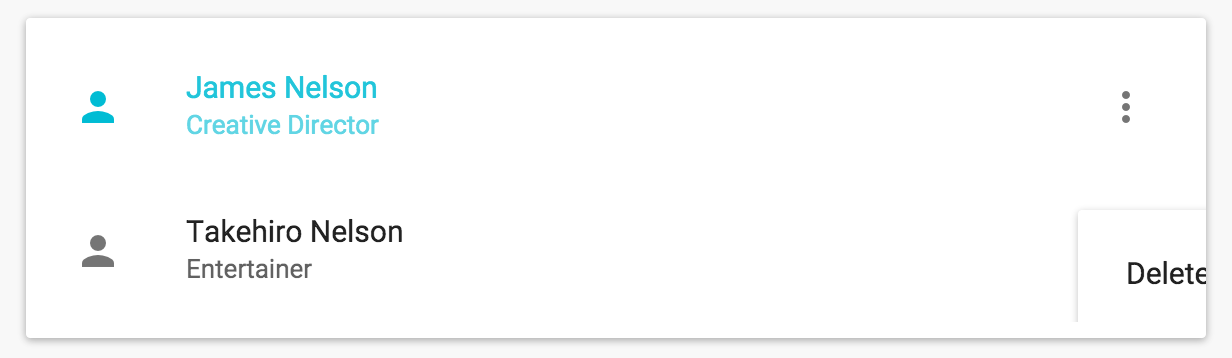
实际上我们想要的是这样的:
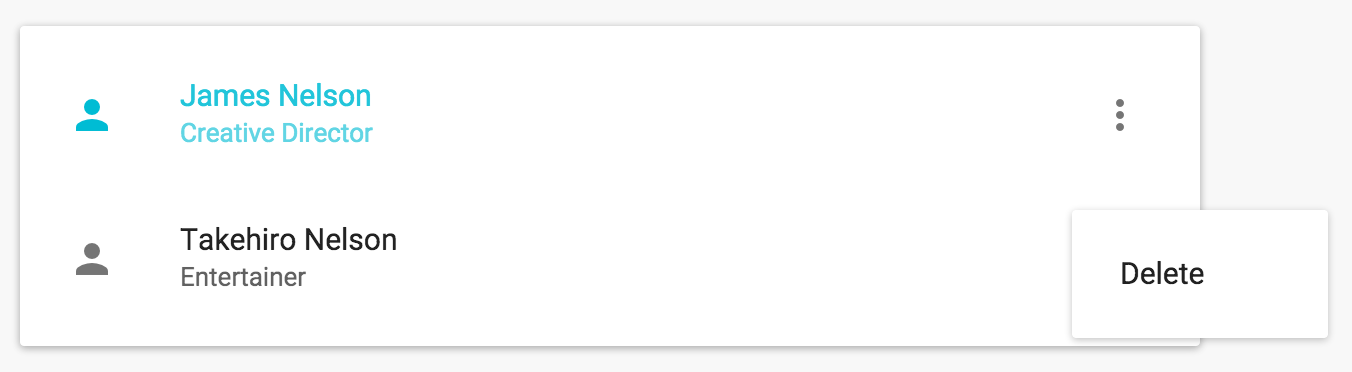
解决
幸运的是有一种相当优雅的方式来达到目的,尽管该方式并不太常见。
作为每个人最早学习到的React方法之一,React.render大概如下:
ReactComponent render(

  ReactElement element,

  DOMElement container,

  [function callback]

)
通常我们使用其来将整个应用挂载到一个DOM元素下面。令人愉悦的是,其不仅仅局限于此,实际上我们可以在一个组件中通过React.render将另一个组件挂载到完全不同的DOM节点。作为组件的render函数其本身必须保持纯净(不能改变state或者和dom进行交互) ,否则的话我们应该在componentDidUpdate或者componentDidMount里面进行操作。另外我们需要确保当其父组件卸载的时,所有已经被渲染的组件可以同样正确的被卸载。
兼顾以上几点,我们可以构建一个解决相关问题的组件。
/**

 * 注:该文章较早,与dom相关的方法已经被拆分到ReactDom中

 */

var RenderInBody = React.createClass({

  componentDidMount: function() {

    // 创建待弹出元素的挂载节点

    this.popup = document.createElement("div");

    // 添加至document.body

    document.body.appendChild(this.popup);

    this._renderLayer();

  },

  componentDidUpdate: function() {

    // 更新时

    this._renderLayer();

  },

  componentWillUnmount: function() {

    // 从挂载节点上清除popup元素

    // (React元素使用该方法,清除的不仅是dom还有state和事件)

    React.unmountComponentAtNode(this.popup);

    // 移除挂载节点

    document.body.removeChild(this.popup);

  },

  _renderLayer: function() {

    // 将children挂载到 popup节点

    React.render(this.props.children, this.popup);

  }

  render: function() {

    // 渲染一个占位符。

    return React.DOM.div(this.props);

  }

});
然后无论何时我们想要将父组件的dom转换到document.body上时,需要做的只是将我们组件的输出包括在RenderInBody组件里,像下面这样就行了:
var Dialog = React.createClass({

  render: function() {

    // 弹框组件

    var dialogPopup = <DialogPopup {...this.props} />;

    // 包括该组件

    return (

      <RenderInBody>{dialogPopup}</RenderInBody>

    );

  }

});
结束语
原文地址
Rendering React components to the document body
本文翻自Rendering React components to the document body这就是所谓的render to body模式.
对于那些popup即弹出层组件,如果将其直接挂载在父元素下面,可能会存在被父元素影响的可能。
为了解决这样的问题,作者提供了一种思路,既然可能会受直接父元素影响,那么直接跨过去,挂载到body上不就解决这个问题了。
这就是本文的用意所在。
感谢原作者,学习到了一种更优雅的处理方式,原本自己写的Dialog之类的组件,确实是挂到直接父元素下面,即写在哪出现在哪,很容易受到其他元素影响。
好文共赏,与诸君共勉。
Rendering React components to the document body的更多相关文章
- React Components之间的通信方式了解下
先来几个术语: 官方 我的说法 对应代码 React element React元素 let element=<span>A爆了</span> Component 组件 cla ...
- [Poi] Use Markdown as React Components by Adding a Webpack Loader to Poi
Poi ships with many webpack loaders included, but you may run into scenarios where you'll need to cu ...
- React components render order All In One
React components render order All In One components render order / components lifecycle DOM tree ren ...
- [React] Styling React Components With Aphrodite
Aphrodite is a library styling React components. You get all the benefits of inline styles (encapsul ...
- React Components Template
React Components Template "use strict"; /** * * @author xgqfrms * @license MIT * @copyrigh ...
- [React] Create and import React components with Markdown using MDXC
In this lesson I demonstrate how to use the library MDXC to create and import React components with ...
- [React] Recompose: Theme React Components Live with Context
SASS Bootstrap allows us to configure theme or branding variables that affect all components (e.g. P ...
- [React] Intro to inline styles in React components
React lets you use "inline styles" to style your components; inline styles in React are ju ...
- [React] Extracting Private React Components
we leverage private components to break our render function into more manageable pieces without leak ...
随机推荐
- Confluence 6 创建-使用-删除快捷链接
创建快捷链接 如何创建一个快捷键链接: 在屏幕的右上角单击 控制台按钮 ,然后选择 General Configuration 链接. 在左侧面板中选择 快捷链接(Shortcut Links). 为 ...
- xpath 根据根节点找数据
- mybatis-查询过程
基本的查询过程: sqlsession--->executor---->statementhandler---->statement----->db InputStream r ...
- SSM + Android 网络文件上传下载
SSM + Android 网络交互的那些事 2016年12月14日 17:58:36 ssm做为后台与android交互,相信只要是了解过的人都知道一些基本的数据交互,向json,对象,map的交互 ...
- NPOI操作Excel(二)--创建Excel并设置样式
由于XSSF中的XSSFWorkbook和HSSF中的HSSFWorkbook拥有的属性.方法等都是一样的,故下面就已一个为例做为展示,他们都继承与一个接口:IWorkbook(命名空间:using ...
- windows下使用Play框架
play类似于Spring这里的web框架.特点:MVC.函数编程. 版本:play 2.1.3 一.play命令 #play ~compile 功能:持续编译.在cmd中运行这个命令,只要 ...
- Scrapy项目创建以及目录详情
Scrapy项目创建已经目录详情 一.新建项目(scrapy startproject) 在开始爬取之前,必须创建一个新的Scrapy项目.进入自定义的项目目录中,运行下列命令: PS C:\scra ...
- Windows系统下安装运行Kafka
一.安装JAVA JDK 1.下载安装包 http://www.oracle.com/technetwork/java/javase/downloads/jdk8-downloads-2133151. ...
- python---手动实现两个有序列表的合并
可能又和标准的实现不一样, 但是自己的实现, 印象就会不一样的. # coding = utf-8 # 两个有序列表的合并,将two_list合并到one_list def merge_order_l ...
- 开始写博客,学习Linq(1)
摘自<linq实战>原文: 软件很简单.它可以归结为两件事情:代码和数据. 开发软件却并非那么简单,其中很重要的一项任务就是编写处理数据的代码. 无论选择了哪种语言,在程序开发得某个时候你 ...