
[vue]vue基础复习项案例stepbystep
看本篇第二次复习内容即可.
还有一些 文档了这个如
https://www.cnblogs.com/iiiiiher/p/9508733.html
https://www.cnblogs.com/iiiiiher/p/8973705.html
vue复习项目
1.展示/搜索功能

    tofixed

2.删除

    filter()

3.全选反选

    get

        checkAll的值, every

    set

        各选项,forEach

4.总价格

    reduce

5.选了多少本书

    filter+length

6.选中后变灰色

    动态样式绑定

7.双击修改功能
前端通用css
参考: http://www.cnblogs.com/keepfool/p/5619070.html
主要有一些
1.表单
2,列表
3.按钮

1.fieldset
<fieldset>

        <legend>

            添加书

        </legend>

        <div class="form-group">

            <label>Name:</label>

            <input type="text" v-model="newProduct.name" placeholder="name"> <br>

        </div>

        <div class="form-group">

            <label>price:</label>

            <input type="number" v-model.number="newProduct.price" placeholder="price"> <br>

        </div>
2.demo.css
* {

    margin: 0;

    padding: 0;

    box-sizing: border-box

}

/*字体*/

html {

    font-size: 12px;

    font-family: Ubuntu, simHei, sans-serif;

    font-weight: 400

}

body {

    font-size: 1rem

}

/*表格*/

table,

td,

th {

    border-collapse: collapse;

    border-spacing: 0

}

table {

    width: 100%

}

td,

th {

    border: 1px solid #bcbcbc;

    padding: 5px 10px

}

th {

    background: #42b983;

    font-size: 1.2rem;

    font-weight: 400;

    color: #fff;

    cursor: pointer

}

tr:nth-of-type(odd) {

    background: #fff

}

tr:nth-of-type(even) {

    background: #eee

}

fieldset {

    border: 1px solid #BCBCBC;

    padding: 15px;

}

/*输入框*/

input {

    outline: none

}

input[type=text] {

    border: 1px solid #ccc;

    padding: .5rem .3rem;

}

input[type=text]:focus {

    border-color: #42b983;

}

/*按钮*/

button {

    outline: none;

    padding: 5px 8px;

    color: #fff;

    border: 1px solid #BCBCBC;

    border-radius: 3px;

    background-color: #009A61;

    cursor: pointer;

}

button:hover {

    opacity: 0.8;

}

#app {

    margin: 0 auto;

    max-width: 640px

}

/*表单*/

.form-group {

    margin: 10px;

}

.form-group > label {

    display: inline-block;

    width: 10rem;

    text-align: right;

}

.form-group > input,

.form-group > select {

    display: inline-block;

    height: 2.5rem;

    line-height: 2.5rem;

}

/*文本居中*/

.text-center {

    text-align: center;

}

/*分页*/

.pagination {

    display: inline-block;

    padding-left: 0;

    margin: 21px 0;

    border-radius: 3px;

}

.pagination > li {

    display: inline;

}

.pagination > li > a {

    position: relative;

    float: left;

    padding: 6px 12px;

    line-height: 1.5;

    text-decoration: none;

    color: #009a61;

    background-color: #fff;

    border: 1px solid #ddd;

    margin-left: -1px;

    list-style: none;

}

.pagination > li > a:hover {

    background-color: #eee;

}

.pagination .active {

    color: #fff;

    background-color: #009a61;

    border-left: none;

    border-right: none;

}

.pagination .active:hover {

    background: #009a61;

    cursor: default;

}

.pagination > li:first-child > a .p {

    border-bottom-left-radius: 3px;

    border-top-left-radius: 3px;

}

.pagination > li:last-child > a {

    border-bottom-right-radius: 3px;

    border-top-right-radius: 3px;

}
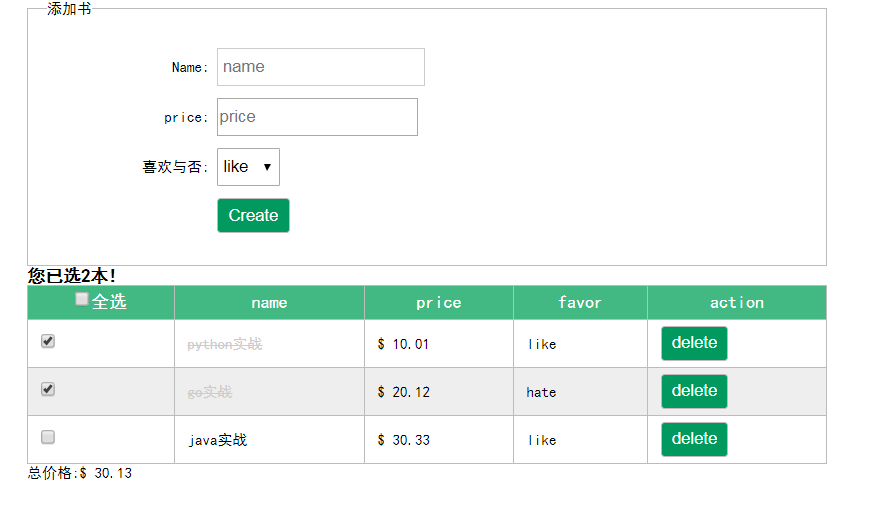
vuejs做了个增删改查app
1.全选/反选
2.总价格
3.删除
4.选了几本书
5.双击修改
<!DOCTYPE html>

<html lang="en">

<head>

    <meta charset="UTF-8">

    <title>04</title>

    <link rel="stylesheet" href="styles/demo.css">

    <style>

        .del {

            text-decoration: line-through !important;

            color: #cccccc;

        }

    </style>

</head>

<body>

<div id="app">

    <fieldset>

        <legend>

            添加书

        </legend>

        <div class="form-group">

            <label>Name:</label>

            <input type="text" v-model="newProduct.name" placeholder="name"> <br>

        </div>

        <div class="form-group">

            <label>price:</label>

            <input type="number" v-model.number="newProduct.price" placeholder="price"> <br>

        </div>

        <div class="form-group">

            <label>喜欢与否:</label>

            <select v-model="newProduct.favor">

                <option value="like">like</option>

                <option value="hate">hate</option>

            </select>

        </div>

        <div class="form-group">

            <label></label>

            <button @click="addProduct">Create</button>

        </div>

    </fieldset>

    <h3>您已选{{count}}本!</h3>

    <table border="1px">

        <thead>

        <tr>

            <th><input type="checkbox" v-model="checkAll">全选</th>

            <th>name</th>

            <th>price</th>

            <th>favor</th>

            <th>action</th>

        </tr>

        </thead>

        <tbody>

        <tr v-for="product in products" @dblclick="remember(product)">

            <td><input type="checkbox" v-model="product.isSelected"></td>

            <td :class="{del:product.isSelected}">

                <span v-show="cur!==product">{{product.name}}</span>

                <span v-show="cur==product"><input type="text" v-model="product.name" @keyup.enter="cancel"

                                                   @blur="cancel" v-focus="cur==product"></span>

            </td>

            <td>{{product.price|toFixed(2)}}</td>

            <td>{{product.favor}}</td>

            <td>

                <button @click="removeProduct(product)">delete</button>

            </td>

        </tr>

        </tbody>

    </table>

    <p>总价格:{{total|toFixed(2)}}</p>

</div>

<script src="node_modules/vue/dist/vue.js"></script>

<script>

  let vm = new Vue({

    el: "#app",

    data: {

      msg: "maotai",

      products: [

        {"name": "python实战", "price": 10.0111, "isSelected": true, "favor": "like"},

        {"name": "go实战", "price": 20.12111, "isSelected": true, "favor": "hate"},

        {"name": "java实战", "price": 30.3333, "isSelected": false, "favor": "like"},

      ],

      newProduct: {"name": "", "price": "", "isSelected": "", "favor": "like"},

      cur: '',

    },

    computed: {

      checkAll: {

        get() {

          return this.products.every(item => item.isSelected)

        },

        set(val) {

          this.products.forEach(item => item.isSelected = val)

        }

      },

      total() {

        return this.products.reduce((prev, next) => {

          if (!next.isSelected) return prev;

          return prev + next.price;

        }, 0)

      },

      count() {

        return this.products.filter(item => item.isSelected).length

      }

    },

    filters: {

      toFixed(input, param1) {

        return "$ " + input.toFixed(param1)

      }

    },

    methods: {

      addProduct() {

        this.products.push(this.newProduct);

        this.newProduct = {"name": "", "price": "", "isSelected": "", "favor": "like"}

      },

      removeProduct(p) {

        this.products = this.products.filter(item => item !== p)

      },

      remember(p) {

        this.cur = p;

      },

      cancel() {

        this.cur = ''

      }

    },

    directives: {

      focus(el, bindings) {

        if (bindings.value) {

          el.focus();

        }

      }

    }

  })

</script>

</body>

</html>
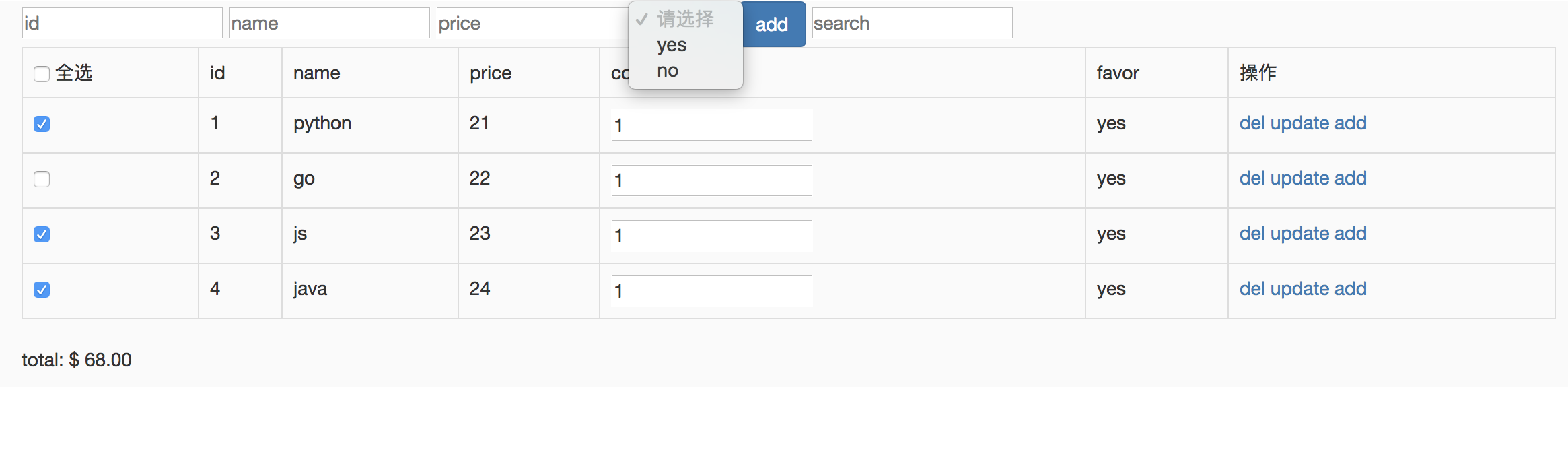
vue第二次复习
<!DOCTYPE html>

<html lang="en">

<head>

    <meta charset="UTF-8">

    <title>Title</title>

    <link rel="stylesheet" href="node_modules/bootstrap/dist/css/bootstrap.css">

    <style>

        * {

            margin: 0;

            padding: 0;

        }

        .mask {

            width: 100%;

            height: 100%;

            position: fixed;

            background: rgba(0, 0, 0, .35);

        }

        .mask .dialog {

            width: 400px;

            height: 400px;

            background-color: #ffffff;

            position: relative;

            top: 50%;

            left: 50%;

            transform: translate3d(-50%, -50%, 0);

        }

    </style>

</head>

<body>

<div id="app" v-change-backgroup>

    <modal :childflag="flag" @childclosedialog="closedialog">

        <div class="title" slot="title">更新obj</div>

        <div class="content" slot="content">更新content</div>

    </modal>

    <div class="container">

        <input type="text" placeholder="id" v-model.number="id">

        <input type="text" placeholder="name" v-model="name">

        <input type="text" placeholder="price" v-model.number="price">

        <select v-model="favor">

            <option value="" disabled>请选择</option>

            <option value="yes">yes</option>

            <option value="no">no</option>

        </select>

        <button class="btn btn-primary" @click="add">add</button>

        <input type="text" placeholder="search" v-model="keyword" v-auto-focus>

        <table class="table table-bordered">

            <tr>

                <td><input type="checkbox" v-model="checkAll"> 全选</td>

                <td>id</td>

                <td>name</td>

                <td>price</td>

                <td>count</td>

                <td>favor</td>

                <td>操作</td>

            </tr>

            <tr v-for="item in search(keyword)">

                <td><input type="checkbox" v-model="item.isSelected"></td>

                <td>{{item.id}}</td>

                <td>{{item.name}}</td>

                <td>{{item.price}}</td>

                <td><input type="number" min="0" v-model="item.count"></td>

                <td>{{item.favor}}</td>

                <td>

                    <a href="#" @click.prevent="del(item)">del</a>

                    <a href="#" @click.prevent="opendialog">update</a>

                    <a href="#" @click.prevent="opendialog">add</a>

                </td>

            </tr>

        </table>

        <p>total: {{totalprice|toFixed(2,'$ ')}}</p>

    </div>

</div>

<template id="modal">

    <div class="mask" v-show="childflag">

        <div class="dialog">

            <button @click="close">close</button>

            <div class="title" slot="title">默认标题</div>

            <div class="content" slot="content">默认content</div>

        </div>

    </div>

</template>

<script src="node_modules/vue/dist/vue.js"></script>

<script>

    let modal = {

        props: ['childflag'],

        template: "#modal",

        methods: {

            close() {

                this.$emit('childclosedialog')

            }

        }

    };

    let vm = new Vue({

        el: "#app",

        data: {

            id: '',

            name: '',

            price: '',

            count: '',

            favor: '',

            list: [

                {id: 1, name: 'python', price: 21, count: 1, favor: 'yes', isSelected: true},

                {id: 2, name: 'go', price: 22, count: 1, favor: 'yes', isSelected: false},

                {id: 3, name: 'js', price: 23, count: 1, favor: 'yes', isSelected: true},

                {id: 4, name: 'java', price: 24, count: 1, favor: 'yes', isSelected: true},

            ],

            keyword: '',

            flag: false,

        },

        computed: {

            checkAll: {

                get() {

                    return this.list.every(item => item.isSelected)

                },

                set(val) {

                    this.list.forEach(item => item.isSelected = val)

                }

            },

            totalprice() {

                return this.list.reduce((prev, next, index) => {

                    if (!next.isSelected) return prev;

                    return prev += next.price * next.count;

                }, 0)

            }

        },

        methods: {

            add() {

                this.id && this.name && this.age && this.gender ? this.list.unshift({

                    id: this.id,

                    name: this.name,

                    age: this.age,

                    gender: this.gender,

                    isSelected: true

                }) : null;

                this.id = this.name = this.age = this.gender = '';

            },

            del(p) {

                this.list = this.list.filter(item => item !== p)

            },

            search(keyword) {

                return this.list.filter(item => item.name.includes(keyword))

            },

            opendialog() {

                this.flag = true;

            },

            closedialog() {

                this.flag = false;

            }

        },

        filters: {

            toFixed(input, param1, param2) {

                return param2 + parseFloat(input).toFixed(param1)

            }

        },

        directives: {

            autoFocus: {

                inserted: el => el.focus(),

            },

            changeBackgroup(el) {

                el.style.backgroundColor = "#fafafa";

            }

        },

        components: {

            modal

        }

    })

</script>

</body>

</html>
todo:
1.勾选,加央视
2.点击修改
3.点update 和 add 分别弹出同一个modal(通过slot模版)
[vue]vue基础复习项案例stepbystep的更多相关文章
- vue.js最最最基础的入门案例
打算自己写一点vue.js从入门到进阶的笔记,方便一些新手从头开始开发的时候,可以参考一下. 写的或许是很简单的文章,提供给新手参考.暂时都是一些入门级别的. 以后会慢慢的加深,进阶,写出一些更好,更 ...
- vue入门基础知识点测试
vue入门基础知识点测试 1.文本(值绑定){{var}}----控制<div></div>的值显示当前时间,且1秒更新一次.(可查阅 setinterval 函数,时间Dat ...
- Vue学习记录第一篇——Vue入门基础
前面的话 Vue中文文档写得很好,界面清爽,内容翔实.但文档毕竟不是教程,文档一上来出现了大量的新概念,对于新手而言,并不友好.个人还是比较喜欢类似于<JS高级程序设计>的风格,从浅入深, ...
- Vue组件基础用法
前面的话 组件(Component)是Vue.js最强大的功能之一.组件可以扩展HTML元素,封装可重用的代码.根据项目需求,抽象出一些组件,每个组件里包含了展现.功能和样式.每个页面,根据自己所需, ...
- 一个综合实例讲解vue的基础知识点。
本文通过一个简单的实例来讲解一下vue的基本知识点.通过这个综合实例的讲解,vue的基础知识就会掌握的差不多了. 首先看一下项目的效果:
- Vue入门基础
前面的话 Vue中文文档写得很好,界面清爽,内容翔实.但文档毕竟不是教程,文档一上来出现了大量的新概念,对于新手而言,并不友好.个人还是比较喜欢类似于<JS高级程序设计>的风格,从浅入深, ...
- Vue组件基础
<!DOCTYPE html><html> <head> <meta charset="utf-8"> ...
- react router @4 和 vue路由 详解(一)vue路由基础和使用
完整版:https://www.cnblogs.com/yangyangxxb/p/10066650.html 1.vue路由基础和使用 a.大概目录 我这里建了一个router文件夹,文件夹下有in ...
- Vue入门基础(火柴)
前言 由于个人十分欣赏博友——小火柴的蓝色理想,他的博文我看了大多数,觉得十分的精彩,然而很多都是看后即忘.我想除了没有经常动手敲代码,更可能是在看的时候忽略了很多细节,因此打算把他的博文通通给“抄袭 ...
随机推荐
- XMLHttpRequest.withCredentials 解决跨域请求头无Cookie的问题
查看原文 XMLHttpRequest.withCredentials 属性是一个Boolean类型,它指示了是否该使用类似cookies,authorization headers(头部授权)或者 ...
- javac编译后运行提示找不到或无法加载主类
第一种常见错误: package demo_01; public class hello { public static void main(String[] args) { System.out.p ...
- docker报错:Failed to restart docker.service: Unit not found.
前言:我之前安装好docker了,但是关机重启后,发现docker就没了 报错:Failed to restart docker.service: Unit not found. 解决方法: 1. ...
- MySQL入门命令
SQL(Structured Query Language) SQL是结构化查询语言,是一种用来操作RDBMS的数据库语言,当前关系型数据库都支持使用SQL语言进行操作,也就是说可以通过 SQL 操作 ...
- ~/Library/MobileDevice/Provisioning Profiles
~/Library/MobileDevice/Provisioning Profiles
- left join on and 与 left join on where的区别
数据库在通过连接两张或多张表来返回记录时,都会生成一张中间的临时表,然后再将这张临时表返回给用户. 在使用left jion时,on和where条件的区别如下: 1. on条件是在生成临时 ...
- 通过 ContentResolver 读取联系人信息
1.首先动态获取 读取联系人信息权限 <1>配置文件中声明对应权限 ) } ] == PackageManager.PERMISSION_GRANTED) { readContact ...
- 在Node.js中使用ffi调用dll
类似的文章还是比较多的,但或多或少有一些问题没有解决,在此我将其整合并分享给大家: 测试环境: Node.js 9.9.0 VisualStudio 2015 "ffi": &qu ...
- RAID 0 ~ RAID 7
一.RAID解析1.RAID 0(1)将几块磁盘并行组合,横向写数据(2)并发IO,写数据最快缺点:不提供数据冗余,如果其中一块磁盘废掉,则数据全毁详细:条带深度大时,一次IO只能从一块磁盘上读取,无 ...
- python3 配置logging日志类
配置类config_file: from configparser import ConfigParser class config_file: def __init__(self,conf_file ...