
原创-使用pywinauto进行dotnet的winform程序控制(一)
pywinauto自动化控制win32的ui的程序,网上有好多的教程。但是操作dotnet写的winform教程,就少之又少。今天我就来分享我的pywinauto操作dotnet的winform的研究。
我自己写了个dotnet4的winform程序,样子是这样的
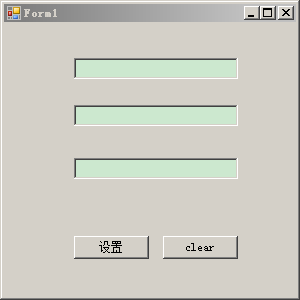
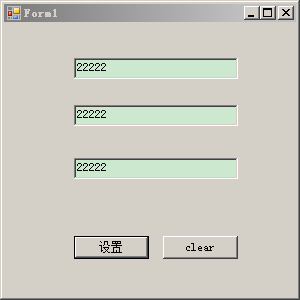
在第一个输入框输入文字后,点击“设置”,就能在下面的输入框同时显示
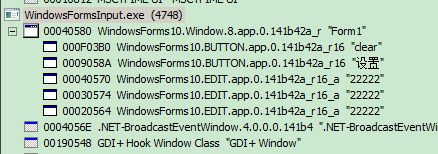
然后,我就打开WinSpy++.exe分析这个dotnet4写的winform,发现层次是这样的:
下图是与以vc写的win32的gui程序的winspy的分析
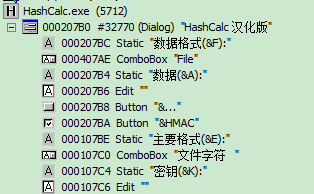
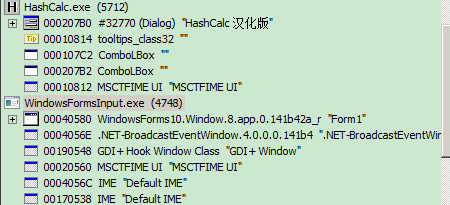
而参照该博主的博客文章https://blog.csdn.net/qq_37193537/article/details/81206788
winspy++的分析
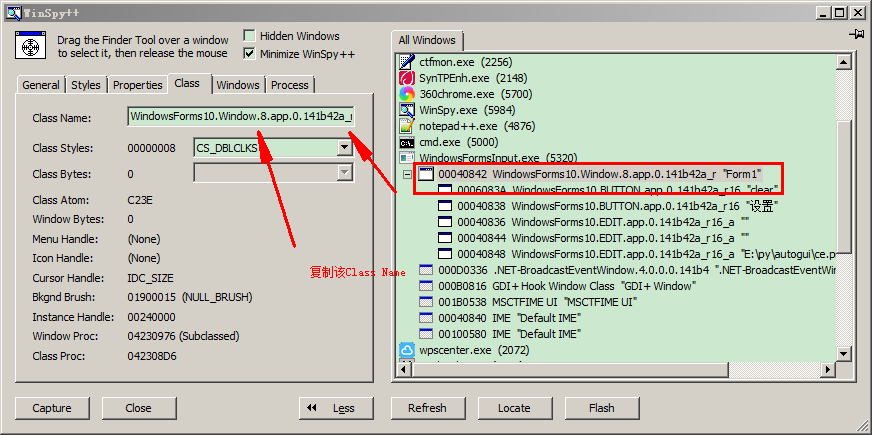
进行画葫芦的分析dotnet写的winform,代码如下:
from pywinauto.application import Application

app= Application().start("WindowsFormsInput.exe")#.exe的路径是正确的,修改自己的路径

form = app.window_(title_re=u"Form1", class_name="WindowsForms10.Window.8.app.0.141b42a_r16_ad1")#

form.print_control_identifiers()
以下是输出:
E:\py\autogui>python win32dotnet.py

win32dotnet.py:: DeprecationWarning: Method .window_() is deprecated, use .wind

ow() instead.

  form = app.window_(title_re=u"Form1", class_name="WindowsForms10.Window.8.app.

.141b42a_r16_ad1")#

Control Identifiers:

WindowsForms10.Window..app..141b42a_r16_ad1 - 'Form1'    (L88, T88, R388, B388

)

['WindowsForms10.Window.8.app.0.141b42a_r16_ad1', 'Form1', 'Form1WindowsForms10.

Window..app..141b42a_r16_ad1']

child_window(title="Form1", auto_id="Form1", control_type="WindowsFormsInput.For

m1")

   |

   | Button - 'clear'    (L251, T324, R326, B347)

   | ['clearButton', 'Button', 'clear', 'Button0', 'Button1']

   | child_window(title="clear", auto_id="button2", control_type="System.Windows

.Forms.Button")

   |

   | Button - '设置'    (L162, T324, R237, B347)

   | ['Button2', '设置Button', '设置']

   | child_window(title="设置", auto_id="button1", control_type="System.Windows.

Forms.Button")

   |

   | Edit - 'E:\py\autogui\ce.png'    (L162, T246, R326, B267)

   | ['Form1Edit', 'Edit', 'Form1Edit0', 'Form1Edit1', 'Edit0', 'Edit1']

   | child_window(title="E:\py\autogui\ce.png", auto_id="textBox3", control_type

="System.Windows.Forms.TextBox")

   |

   | Edit - ''    (L162, T193, R326, B214)

   | ['Form1Edit2', 'Edit2']

   | child_window(auto_id="textBox2", control_type="System.Windows.Forms.TextBox

")

   |

   | Edit - ''    (L162, T146, R326, B167)

   | ['Form1Edit3', 'Edit3']

   | child_window(auto_id="textBox1", control_type="System.Windows.Forms.TextBox

")
初步分析dotnet的win的控件排序与打印的是倒序了。
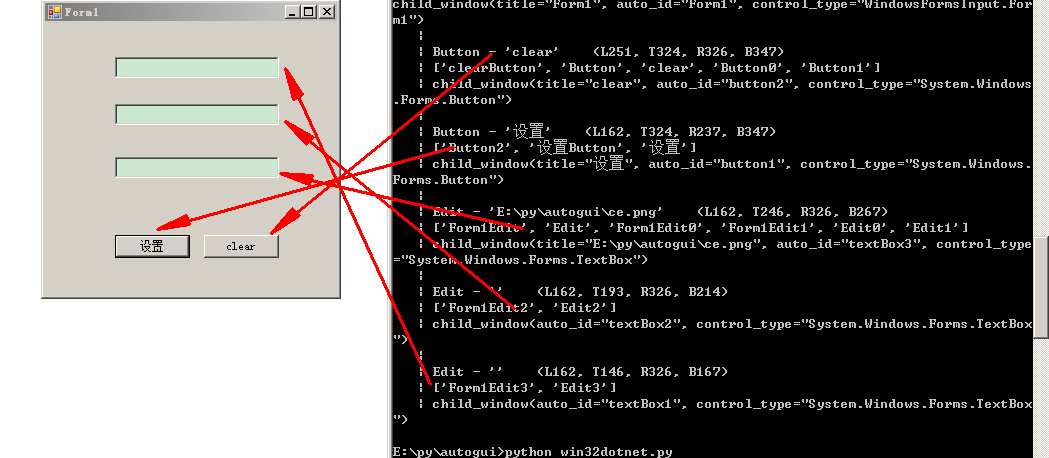
增加了在第一个Edit中输入字符串:
from pywinauto.application import Application

app= Application().start("WindowsFormsInput.exe")#.exe的路径是正确的,修改自己的路径

form = app.window_(title_re=u"Form1", class_name="WindowsForms10.Window.8.app.0.141b42a_r16_ad1")

form.Form1Edit3.type_keys(r"E:\py\autogui\ce.png")
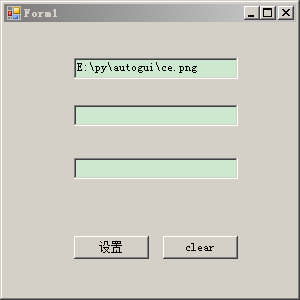
控制点击“设置”按钮
from pywinauto.application import Application

app= Application().start("WindowsFormsInput.exe")#.exe的路径是正确的,修改自己的路径

form = app.window_(title_re=u"Form1", class_name="WindowsForms10.Window.8.app.0.141b42a_r16_ad1")#

form.Form1Edit3.type_keys(r"E:\py\autogui\ce.png")

#form.Button2.click()    #同样起作用

form.设置.click()
原创-使用pywinauto进行dotnet的winform程序控制(一)的更多相关文章
- 使用winform程序控制window服务的操作
继上篇 c#之添加window服务(定时任务) 基础之上, 这篇文章主要讲述,使用winform程序来控制window服务的安装,启动,停止,卸载等操作 1.在同一个解决方案添加winform项目,如 ...
- [原创][开源]SunnyUI.Net, C# .Net WinForm开源控件库、工具类库、扩展类库、多页面开发框架
SunnyUI.Net, 基于 C# .Net WinForm 开源控件库.工具类库.扩展类库.多页面开发框架 Blog: https://www.cnblogs.com/yhuse Gitee: h ...
- 原创+部分引用啦:C# Winform界面中的分隔线问题
C sharp 中Winform中的控件很多,一个小小的问题居然会绕上一个小弯子,做界面的时候, 你需要在界面上弄一条分隔线,把相关的功能分隔开来,结果原来在其它 IDE编辑器里很容易实现的这个功能, ...
- 新的尝试!ComponentOne WinForm 和 .NET Core 3.0
在微软 Build 2018 开发者大会上,.NET 团队公布了 .NET Core 的下一个主要版本 .NET Core 3.0 的规划蓝图:.NET Core 3将开始支持Windows桌面应用程 ...
- Winform自定义控件实例
本文转自http://www.cnblogs.com/hahacjh/archive/2010/04/29/1724125.html 写在前面: .Net已经成为许多软件公司的选择,而.Net自定义W ...
- 解决vs2019中暂时无法为.net core WinForms使用 Designer 的临时方法
目录 解决vs2019中暂时无法为.net core WinForms使用 Designer 的临时方法 安装 vs 2019 professional/enterprise版本 在vs的设置里,勾选 ...
- 基于VLC的播放器开发
VLC的C++封装 因为工作需要,研究了一段时间的播放器开发,如果从头开始做,可以学习下FFmpeg(http://www.ffmpeg.org/),很多播放器都是基于FFmpeg开发的,但是这样工作 ...
- WPF之VLC流媒体播放
原文:WPF之VLC流媒体播放 最近在做关于在WPF使用VLC流媒体播放的问题,现在可以在WPF中实现VLC本地播放了,流播放解决了,在下面的代码中注释流媒体播放那两段代码,更多的在乎大家摸索了^^, ...
- 一个支持 CodeFirst/DbFirst/ModelFirst 的数据库小工具
一个支持 CodeFirst/DbFirst/ModelFirst 的数据库小工具 Intro DbTool 是一个支持 CodeFirst/DbFirst/ModelFirst 的数据库小工具,原本 ...
随机推荐
- 简单几步教你实现移动硬盘PE、装win7/vista! 一盘在手,系统无忧!
第一步:格式化u盘成为ntfs格式.(以下同样适用于移动硬盘)提供两个方法:,方法一是格式化成fat32,再到命令提示符即俗称的dos窗口运行convert.方法二在xp下,点击u盘所在盘符,选择属性 ...
- CUDA一维纹理内存
纹理一词来源于GPU图形世界,GPU通用并行计算"盗用"了纹理一词,定义了一个纹理内存的概念.纹理内存缓存在 设备上,在某些情况下能减少对内存的请求并降低内存带宽的使用,是专门为那 ...
- .NET开发人员的瓶颈和职业发展
现在社会比前几年浮躁了,越来越多的人抱怨薪水低,高薪工作不好找; 诚然这有CPI的压力,可是也有很多人没有认清自己的职业发展. 很多.net程序员个各种纠结,想拿高薪又拿不到,想提高又不知道怎么能提高 ...
- 理解c#
首先在介绍c#的时候我们要先理解什么是.NET,.NET就是微软的用来实验XML,Web Services,SOA(面向服务的体系结构service-oriented architecture)和敏捷 ...
- SharePoint 2010 WebPart Web部分 总的膏
SharePoint 2010 WebPart Web部分 总的膏 之前写SharePoint WebPart Web部分相关的博客,我们没有做一个索引.网友在查看的时候非常不方便,于 ...
- 批量删除C和C++注释
使用Python语言 ,实现批量删除C/C++类型注释1.目前支持去掉.h .hpp .c .cpp .java 这些以//或/**/为注释符的源文件 2.支持递归遍历目录 3.当前版本为Python ...
- pdf密码解除工具
PDF Password Remover 3.0下载地址: 链接:https://pan.baidu.com/s/1hAmcGB-vMxz79IGGskdzHQ 提取码:q6y8
- golang1.8 通过plugin方式build so
golang1.83只有linux下支持plugin方式生成so package main // // No C code needed. import "C" import ( ...
- SQL Server根据字段查询不出记录
今天写了一条select语句,很奇怪的一件事,我写程序几年了,第一次碰到这个问题,就是数据库里有这个值,你根据这个值查询就是查询不出来这行记录. 所以我想是不是里面有空格,回车什么的,最后果然如此. ...
- 零元学Expression Blend 4 - Chapter 35 讨厌!!我不想一直重复设定!!『Template Binding』使用前後的差异
原文:零元学Expression Blend 4 - Chapter 35 讨厌!!我不想一直重复设定!!『Template Binding』使用前後的差异 因为先前写到自制Button时需特别注意T ...