
spring boot (一)
spring boot 启动注解 @SpringBootApplication
@Target(ElementType.TYPE)

@Retention(RetentionPolicy.RUNTIME)

@Documented

@Inherited

@SpringBootConfiguration  //继承了Configuration,表示当前是注解类

@EnableAutoConfiguration  //自动装配注解

@ComponentScan(excludeFilters = {  //扫描包设置

		@Filter(type = FilterType.CUSTOM, classes = TypeExcludeFilter.class),

		@Filter(type = FilterType.CUSTOM,

				classes = AutoConfigurationExcludeFilter.class) })

public @interface SpringBootApplication {
重点 @EnableAutoConfiguration spring boot 自动装配注解
@Target(ElementType.TYPE)

@Retention(RetentionPolicy.RUNTIME)

@Documented

@Inherited

@AutoConfigurationPackage

@Import(AutoConfigurationImportSelector.class)  //导入自动配置的组件

public @interface EnableAutoConfiguration {
再看AutoConfigurationImportSelector.class 类 重要方法 String [] selectImports 获取自动装配全限定类名数组
@Override

	public String[] selectImports(AnnotationMetadata annotationMetadata) {

		if (!isEnabled(annotationMetadata)) {

			return NO_IMPORTS;

		}

		AutoConfigurationMetadata autoConfigurationMetadata = AutoConfigurationMetadataLoader

				.loadMetadata(this.beanClassLoader);

         //方法调用

		AutoConfigurationEntry autoConfigurationEntry = getAutoConfigurationEntry(

				autoConfigurationMetadata, annotationMetadata);

		return StringUtils.toStringArray(autoConfigurationEntry.getConfigurations());

	}

protected AutoConfigurationEntry getAutoConfigurationEntry(

			AutoConfigurationMetadata autoConfigurationMetadata,

			AnnotationMetadata annotationMetadata) {

		if (!isEnabled(annotationMetadata)) {

			return EMPTY_ENTRY;

		}

		AnnotationAttributes attributes = getAttributes(annotationMetadata);

        //方法调用

		List<String> configurations = getCandidateConfigurations(annotationMetadata,

				attributes);

		configurations = removeDuplicates(configurations);

		Set<String> exclusions = getExclusions(annotationMetadata, attributes);

		checkExcludedClasses(configurations, exclusions);

		configurations.removeAll(exclusions);

		configurations = filter(configurations, autoConfigurationMetadata);

		fireAutoConfigurationImportEvents(configurations, exclusions);

		return new AutoConfigurationEntry(configurations, exclusions);

	}

protected List<String> getCandidateConfigurations(AnnotationMetadata metadata,

			AnnotationAttributes attributes) {

        //自动配置幕后英雄:SpringFactoriesLoader   其主要功能就是从指定的配置文件META-                INF/spring.factories加载配置

		List<String> configurations = SpringFactoriesLoader.loadFactoryNames(

				getSpringFactoriesLoaderFactoryClass(), getBeanClassLoader());

		Assert.notEmpty(configurations,

				"No auto configuration classes found in META-INF/spring.factories. If you "

						+ "are using a custom packaging, make sure that file is correct.");

		return configurations;

	}

调用SpringFactoriesLoader 类方法

public static List<String> loadFactoryNames(Class<?> factoryClass, @Nullable ClassLoader classLoader) {

        String factoryClassName = factoryClass.getName();

        return (List)loadSpringFactories(classLoader).getOrDefault(factoryClassName, Collections.emptyList());

    }

    private static Map<String, List<String>> loadSpringFactories(@Nullable ClassLoader classLoader) {

        MultiValueMap<String, String> result = (MultiValueMap)cache.get(classLoader);

        if (result != null) {

            return result;

        } else {

            try {

                Enumeration<URL> urls = classLoader != null ? classLoader.getResources("META-INF/spring.factories") : ClassLoader.getSystemResources("META-INF/spring.factories");

                //////

            } catch (IOException var13) {

                throw new IllegalArgumentException("Unable to load factories from location [META-INF/spring.factories]", var13);

            }

        }

    }
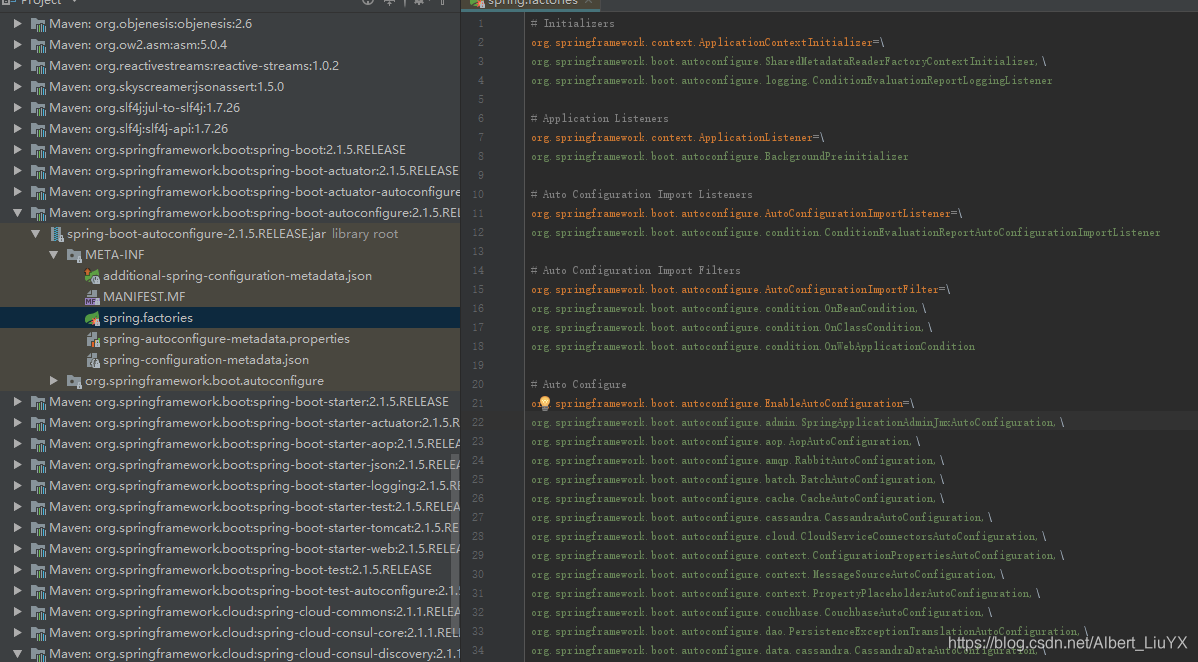
可见 最后由 SpringFactoriesLoader将META-INF/spring.factories 文件加载解析
spring-boot-autoconfigure下的spring.factory文件 大部分配置类都是spring boot 启动配置类
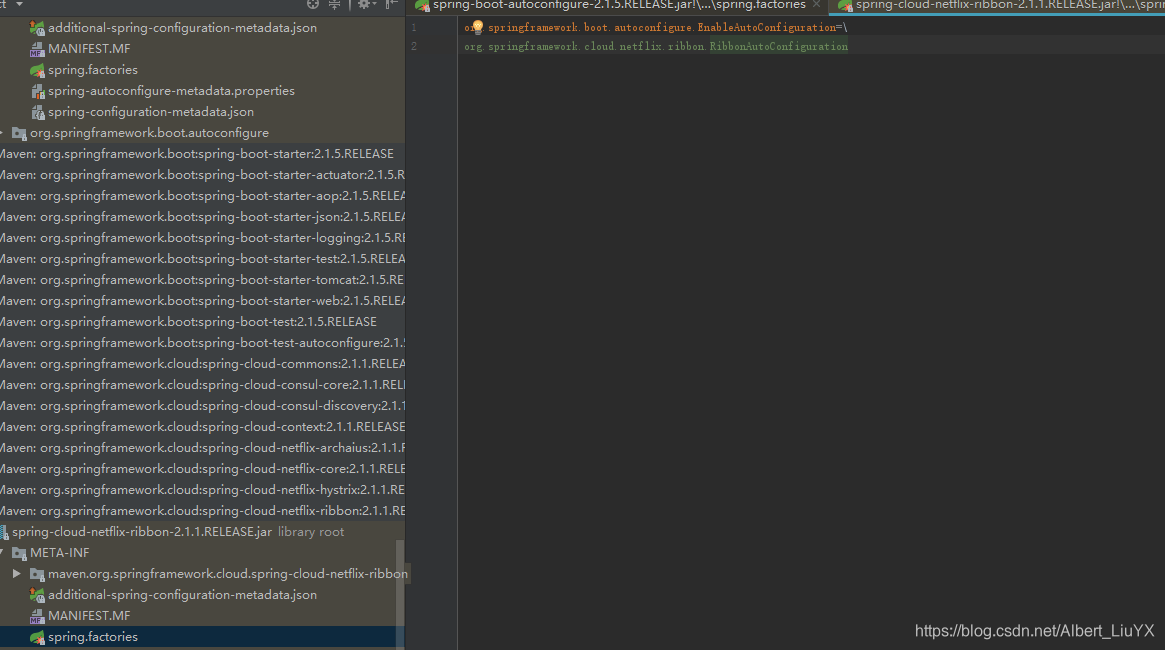
在看看比如spring-cloud-netflix-ribbon 中的spring.factory 只有一个RibbonAutoConfiguration
再看下RibbonAutoConfiguration类
@Configuration  //说明是一个配置类

@Conditional(RibbonAutoConfiguration.RibbonClassesConditions.class)   //装配条件  只有classpath存在指定类才加载

@RibbonClients

@AutoConfigureAfter(name =  //加载配置顺序在XX之后 "org.springframework.cloud.netflix.eureka.EurekaClientAutoConfiguration")

@AutoConfigureBefore({ LoadBalancerAutoConfiguration.class,

		AsyncLoadBalancerAutoConfiguration.class })

@EnableConfigurationProperties({ RibbonEagerLoadProperties.class,

		ServerIntrospectorProperties.class })   //自动转化properties文件配置

public class RibbonAutoConfiguration {
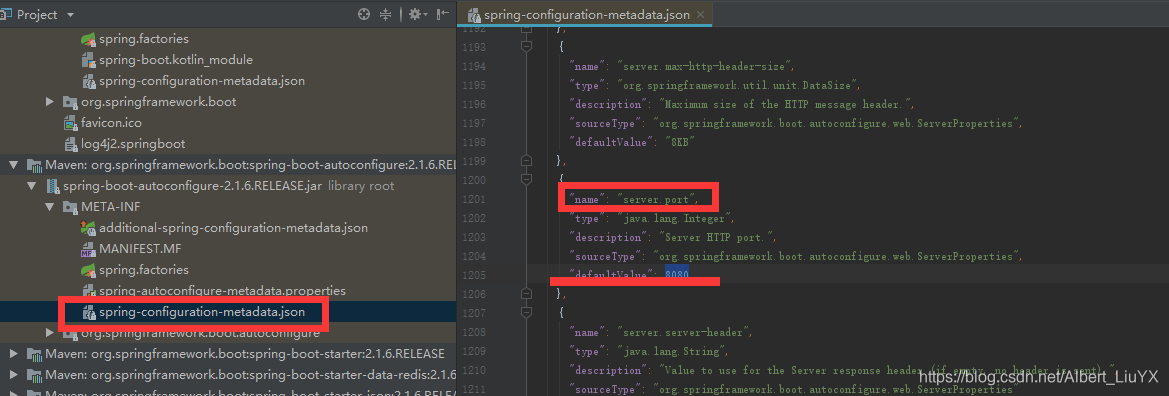
spring boot 默认配置查看
spring boot (一)的更多相关文章
- 玩转spring boot——快速开始
开发环境: IED环境:Eclipse JDK版本:1.8 maven版本:3.3.9 一.创建一个spring boot的mcv web应用程序 打开Eclipse,新建Maven项目 选择quic ...
- 【微框架】之一:从零开始,轻松搞定SpringCloud微框架系列--开山篇(spring boot 小demo)
Spring顶级框架有众多,那么接下的篇幅,我将重点讲解SpringCloud微框架的实现 Spring 顶级项目,包含众多,我们重点学习一下,SpringCloud项目以及SpringBoot项目 ...
- 玩转spring boot——开篇
很久没写博客了,而这一转眼就是7年.这段时间并不是我没学习东西,而是园友们的技术提高的非常快,这反而让我不知道该写些什么.我做程序已经有十几年之久了,可以说是彻彻底底的“程序老炮”,至于技术怎么样?我 ...
- 玩转spring boot——结合redis
一.准备工作 下载redis的windows版zip包:https://github.com/MSOpenTech/redis/releases 运行redis-server.exe程序 出现黑色窗口 ...
- 玩转spring boot——AOP与表单验证
AOP在大多数的情况下的应用场景是:日志和验证.至于AOP的理论知识我就不做赘述.而AOP的通知类型有好几种,今天的例子我只选一个有代表意义的“环绕通知”来演示. 一.AOP入门 修改“pom.xml ...
- 玩转spring boot——结合JPA入门
参考官方例子:https://spring.io/guides/gs/accessing-data-jpa/ 接着上篇内容 一.小试牛刀 创建maven项目后,修改pom.xml文件 <proj ...
- 玩转spring boot——结合JPA事务
接着上篇 一.准备工作 修改pom.xml文件 <project xmlns="http://maven.apache.org/POM/4.0.0" xmlns:xsi=&q ...
- 玩转spring boot——结合AngularJs和JDBC
参考官方例子:http://spring.io/guides/gs/relational-data-access/ 一.项目准备 在建立mysql数据库后新建表“t_order” ; -- ----- ...
- 玩转spring boot——结合jQuery和AngularJs
在上篇的基础上 准备工作: 修改pom.xml <project xmlns="http://maven.apache.org/POM/4.0.0" xmlns:xsi=&q ...
- 玩转spring boot——MVC应用
如何快速搭建一个MCV程序? 参照spring官方例子:https://spring.io/guides/gs/serving-web-content/ 一.spring mvc结合thymeleaf ...
随机推荐
- jquery怎样获取多个复选框的值?
jquery的遍历方法可以获取复选框所欲的选中值 1 2 $("input:checkbox:checked").each(function(index,element)); ...
- 洛谷 P1640 BZOJ 1854 [SCOI2010]连续攻击游戏
题目描述 lxhgww最近迷上了一款游戏,在游戏里,他拥有很多的装备,每种装备都有2个属性,这些属性的值用[1,10000]之间的数表示.当他使用某种装备时,他只能使用该装备的某一个属性.并且每种装备 ...
- ELK 聚合查询
在elasticsearch中es支持对存储文档进行复杂的统计.简称聚合. ES中的聚合被分为两大类. 1.Metrics, Metrics 是简单的对过滤出来的数据集进行avg,max等操作,是一个 ...
- HDU 4506
EASY题,快速幂... #include <iostream> #include <cstdio> #include <cstring> #include < ...
- POJ 2373
原本一道挺简单的DP题,思路有了,运用单调队列,但在写单调队列时写挫了... 这道题只需要计算偶数位置的即可,这是显而易见的,我有注意过这情况,写的时候却没在意...--! 加入队列的元素应该当前no ...
- SPOJ 1811LCS Longest Common Substring
后缀自己主动机裸题.... Longest Common Substring Time Limit: 2000MS Memory Limit: Unknown 64bit IO Format: ...
- 从OTF字体文件里查找字体名称
for in ? 使用神器vim就好了. . . vim ./AKZIDENZGROTESK-COND.OTF
- leetcode || 50、Pow(x, n)
problem: Implement pow(x, n). Hide Tags Math Binary Search 题意:求x的n次幂 thinking: (1)最简单想到的是直观上的数学幂函数求法 ...
- 初步了解Shuttle ESB
ESB:EnterpriseService Bus,即企业服务总线.它是传统中间件技术与XML.Web服务等技术结合的产物.从面向服务体系架构发展而来. ESB採用了"总线"这种模 ...
- linux虚拟机网络设置(本机使用公司内网)
使用桥接方式 设置: 一开始没有的话可以add 编辑edit 参考公司网络,下图是公司内网地址 然后设置 然后ping就ok了