
how to use Sqoop to import/ export data
Sqoop is a tool designed for efficiently transferring data between RDBMS and HDFS, we can import data from mysql, oracle, and other data bases into HDFS very easily; meanwhile we can dump data into data base from HDFS. For detailed documentation, please refer to sqoop documentation.
Before using Sqoop, please follow steps to setup it correctly.
Sqoop - Import
the following command is used for import
sqoop import (generic-args) (import-args)
given a table named stock_info, and the schema is:

Case 1: we can use below command to import stock_info data to hadoop hdfs file system:
sqoop import --connect jdbc:mysql://host:port/dbname --username loginuser --password loginuser --table stock_info --m 1
and the result looks like:
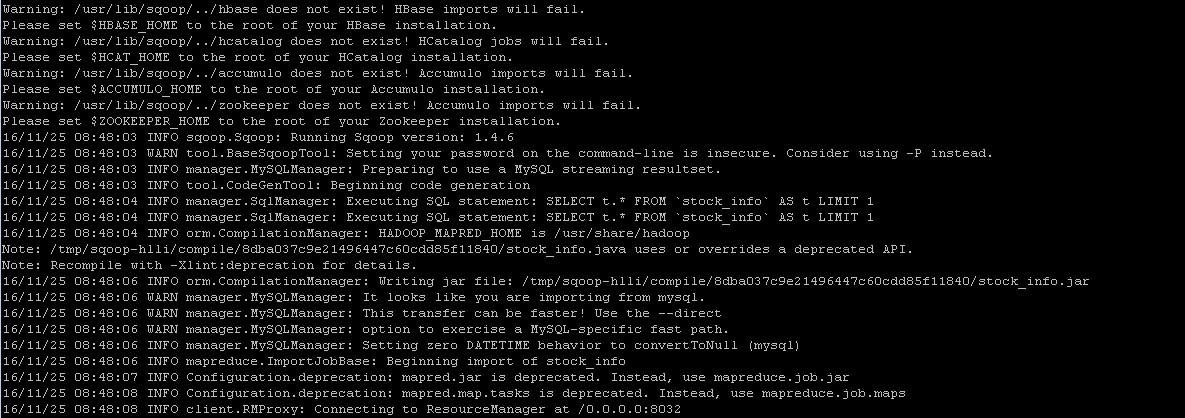
we can verify result in hdfs by running command
hadoop fs -cat /emp/part-m-*
Case 2: sepcify the target directory in hdfs by running the following import command
sqoop import --connect jdbc:mysql://host:port/dbname --username loginuser --password loginuser --table stock_info --m 1 --target-dir /temp
then we can verify result by executing the same command as above
Case 3: imcremental import by specifying --incremental, --check-column and --append arguments. Note we should change 'last_chg_date' when applying other tables.
sqoop import --connect jdbc:mysql://host:port/dbname --username loginuser --password loginuser --table stock_info --m 1 --target-dir /temp --incremental lastmodified --check-column last_chg_date --append
Case 4: specify target file format as parquet format by adding argument '--as-parquetfile'
sqoop import --connect jdbc:mysql://host:port/dbname --username loginuser --password loginuser --table stock_info --m 1 --target-dir /temp --incremental lastmodified --check-column last_chg_date --append --as-parquetfile
Case 5: import all tables
sqoop import-all-tables --connect jdbc:mysql://host:port/dbname --username loginuser --password loginuser
Sqoop - Export
export means to dump data from hdfs to mysql, oracle or other data bases, command syntax is like
sqoop export (generic-args) (export-args)
given there are many parquet files under stock_info folder which is imported by sqoop import command incrementally
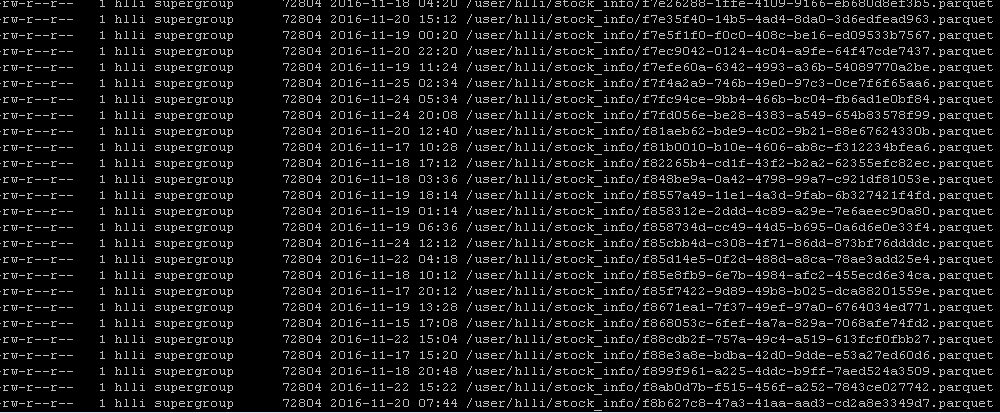
then we want to dump data back into mysql data base, using the following command
sqoop export --connent jdbc:mysql://host:port/dbname --username loginuser --password loginuser --table stock_info --export-dir /user/hlli/stock_info
finally verify data in mysql command line
select * from stock_info;
Incremental importing data
by using linux timer 'crontab' to schedule a job to execute importing periodically.
cd /var/spool/cron
touch hlli (please change hlli to your user name here)
vi hlli
*/ * * * * /usr/lib/sqoop/bin/sqoop import --connect jdbc:mysql://host:port/dbname --username loginuser --password loginuser --table stock_info --m 1 --target-dir /temp --incremental lastmodified --check-column last_chg_date --append --as-parquetfile
if it works, you will receive email in '/var/spool/mail/hlli'; meanwhile we can verify data by running command
hadoop fs -ls /
Commonly used Sqoop commands
sqoop help import
sqoop help export
sqoop help job
sqoop help codegen
sqoop help eval
sqoop help list-tables
sqoop help list-databases
sqoop help import-all-tables
References:
- http://sqoop.apache.org/
- http://man.linuxde.net/crontab
how to use Sqoop to import/ export data的更多相关文章
- 1.3 Quick Start中 Step 7: Use Kafka Connect to import/export data官网剖析(博主推荐)
不多说,直接上干货! 一切来源于官网 http://kafka.apache.org/documentation/ Step 7: Use Kafka Connect to import/export ...
- hadoop kafka import/export data (8)
reference: http://kafka.apache.org/quickstart need to solve issue ISSUE 1: [2019-01-29 15:59:39,272] ...
- Data import/export of Netezza using external table
Introduction External table is a special table in Netezza system, which could be used to import/exp ...
- sqoop import/export使用经验
一.先创建一个小表(test_01)进行测试(主节点IP:169.254.109.130/oracle服务器IP:169.254.109.100) 1.测试连接oracle; sqoop list-t ...
- Sqoop import export参数
通用参数 import export 通用通用参数选项 含义说明–connect 指定JDBC连接字符串–connection-manager 指定要使用的连接管理器类–dri ...
- [Hive - LanguageManual] Import/Export
LanguageManual ImportExport Skip to end of metadata Added by Carl Steinbach, last edited by Le ...
- 前端 高级 (二十五)vue2.0项目实战一 配置简要说明、代码简要说明、Import/Export、轮播和列表例子
一.启动服务自动打开浏览器运行 二.配置简要说明 1.node_modules 安装好的依赖文件,中间件等,所在位置 2.package.jason 配置当前项目要安装的中间件和依赖文件 { &quo ...
- 探讨ES6的import export default 和CommonJS的require module.exports
今天来扒一扒在node和ES6中的module,主要是为了区分node和ES6中的不同意义,避免概念上的混淆,同时也分享一下,自己在这个坑里获得的心得. 在ES6之前 模块的概念是在ES6发布之前就出 ...
- ES6中的export,import ,export default
ES6模块主要有两个功能:export和importexport用于对外输出本模块(一个文件可以理解为一个模块)变量的接口import用于在一个模块中加载另一个含有export接口的模块.也就是说使用 ...
随机推荐
- Log--检查各数据库日志的使用情况
-- Recovery model, log reuse wait description, log file size,-- log usage size and compatibility lev ...
- 小议C#接口的隐式与显示实现(续)
上文连接,讲的比较模糊,而且调用起来感觉比较混乱 http://www.cnblogs.com/walleyekneel/p/3581489.html 这次改为显式接口调用,可能项目也有这个一个需求 ...
- windows service使用log4net 记录日志
最近写了个定时邮件推送的服务,当利用lognet4记录日志时,发现日志并没有记录.后来明白windows 服务一般默认是在C:\Windows\System 或是C:\Windows\System32 ...
- 析构函数的调用------新标准c++程序设计
示例1: #include<iostream> using namespace std; class CDemo{ public: ~CDemo(){cout<<"d ...
- 和Webbrowser进行简单交互
作为第一篇,简单的控件使用就不说了. 直接从简单的交互开始吧! C#使用网页中已有的js函数 webBrowser.Document.InvokeScript("Stop");// ...
- 【转】VS2010中无System.Data.OracleClient引用的问题
源地址:http://blog.csdn.net/pinchw/article/details/30465749
- uC/OS-II 一些函数简介
获得更多资料欢迎进入我的网站或者 csdn或者博客园 以前搞硬件的经验,最近突然翻出来了.分享给大家:主要讲解uC/OS-II常用函数:虽说现在转行软件了,但是感觉之前搞硬件的经验还真是很有用对于理解 ...
- SDUT OJ 数据结构实验之图论八:欧拉回路
数据结构实验之图论八:欧拉回路 Time Limit: 1000 ms Memory Limit: 65536 KiB Submit Statistic Discuss Problem Descrip ...
- 将符合json的字符串转化为json对象
变量data是符合json格式的字符串 var data="[key:value]"; 第一种方式: var jsonData = eval("("+data+ ...
- [USACO08DEC]拍头Patting Heads 数学 BZOJ 1607
题目描述 It's Bessie's birthday and time for party games! Bessie has instructed the N (1 <= N <= 1 ...