
触摸事件onTouchListener
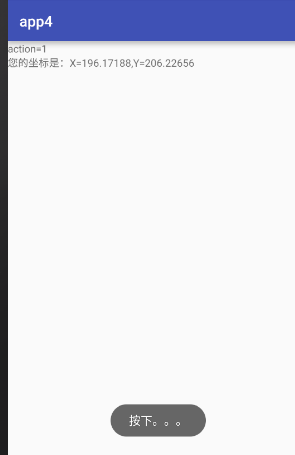
1.效果图:
(1)MainAcivity.java
 package com.example.app3;

 import android.content.DialogInterface;

 import android.support.v7.app.AppCompatActivity;

 import android.os.Bundle;

 import android.view.KeyEvent;

 import android.view.View;

 import android.widget.EditText;

 import android.widget.TextView;

 public class MainActivity extends AppCompatActivity {

     private EditText editText;

     private TextView textView;

     @Override

     protected void onCreate(Bundle savedInstanceState) {

         super.onCreate(savedInstanceState);

         setContentView(R.layout.activity_main);

         editText = (EditText) findViewById(R.id.et);

         textView = (TextView) findViewById(R.id.tv_show);

         editText.setOnKeyListener(new View.OnKeyListener() {

             @Override

             public boolean onKey(View v, int keyCode, KeyEvent event) {

             editText.setOnKeyListener(new View.OnKeyListener() {

                 @Override

                 public boolean onKey(View v, int keyCode, KeyEvent event) {

                     switch (event.getAction()){

                         case KeyEvent.ACTION_UP:

                             String info = editText.getText().toString();

                             textView.setText("您输入的银行卡号是:"+subs(info));

                         case  KeyEvent.ACTION_DOWN:

                             break;

                     }

                     return false;

                 }

             });

                 return false;

             }

         });

     }

     public String subs(String info){

         String mess="";

         for(int i =0;i<=info.length()/4;i++){

             if(i*4+4<info.length()){

                 mess=mess+info.substring(i*4,i*4+4)+"  ";

             }else{

                 mess=mess+info.substring(i*4,info.length());

             }

         }

         return mess;

     }

 }
2.acivity_mian.xml
 <?xml version="1.0" encoding="utf-8"?>

 <LinearLayout xmlns:android="http://schemas.android.com/apk/res/android"

     xmlns:tools="http://schemas.android.com/tools"

     android:layout_width="match_parent"

     android:layout_height="match_parent"

     android:paddingBottom="@dimen/activity_vertical_margin"

     android:paddingLeft="@dimen/activity_horizontal_margin"

     android:paddingRight="@dimen/activity_horizontal_margin"

     android:paddingTop="@dimen/activity_vertical_margin"

     tools:context="com.example.app3.MainActivity"

     android:orientation="vertical">

     <EditText

         android:id="@+id/et"

         android:hint="请输入您的银行卡号"

         android:layout_width="match_parent"

         android:layout_height="wrap_content" />

     <TextView

         android:id="@+id/tv_show"

         android:layout_width="wrap_content"

         android:layout_height="wrap_content"

         android:text="" />

 </LinearLayout>
触摸事件onTouchListener的更多相关文章
- Android 手势&触摸事件 MotionEvent
1.http://blog.csdn.net/omg_2012/article/details/7881443 这篇相当好啊 2.http://blog.csdn.net/android_tutor/ ...
- Android 手势&触摸事件
在刚开始学Android的时候,就觉得Google的文档不咋样,在研究手势时,更加的感觉Google的文档写得实在是太差了.很多常量,属性和方法,居然连个描述都没有. 没有描述也就罢了,但是OnGes ...
- 一个demo让你彻底理解Android触摸事件的并发
注:本文涉及的demo的地址:https://github.com/absfree/TouchDispatch 1. 触摸动作及事件序列 (1)触摸事件的动作 触摸动作一共有三种:ACTION_DOW ...
- 对于android触摸事件模型的一些理解
body{ font-family: "Microsoft YaHei UI","Microsoft YaHei",SimSun,"Segoe UI& ...
- 触摸事件 Touch MotionEvent ACTION
MotionEvent简介 当用户触摸屏幕时,将创建一个MontionEvent对象,MotionEvent包含了关于发生触摸的位置.时间信息,以及触摸事件的其他细节. 获取MontionEvent对 ...
- 一步一步学android之事件篇——触摸事件
触摸事件顾名思义就是触摸手机屏幕触发的事件,当用户触摸添加了触摸事件的View时,就是执行OnTouch()方法进行处理,下面通过一个动态获取坐标的例子来学习OnTouchListener事件,效果如 ...
- android 组件内部实现触摸事件,更改背景
当我们需要实现触摸事件的时候,通常就会想到OnTouchEvent这个方法,它能够获取触摸点的坐标,而组件同样也有这样的一个功能,使用这个功能,可以实现组件在父布局界面上移动,缩放,更改背景图片.这里 ...
- 初识Android触摸事件传递机制
前言 今天总结的一个知识点是Andorid中View事件传递机制,也是核心知识点,相信很多开发者在面对这个问题时候会觉得困惑,另外,View的另外一个难题滑动冲突,比如在ScrollView中嵌套Li ...
- Android触摸事件(一)-TouchEventHelper
文件夹 文件夹 概述 关于更新 2016-08-31 2016-06-20 关于单点触摸事件singleTouch 单击的两种方式 关于双击事件 双击事件的检測逻辑 双击事件触发的时机 关于多点触摸事 ...
随机推荐
- ShareSDK入门指南:Android 10分钟快速集成
ShareSDK 官方已提供Android 快速集成教程,以官方教程为参考,本文重点指导大家在集成中遇到的问题. Android 快速集成官方教程:http://wiki.mob.com/Androi ...
- netty入门代码学习
服务端代码: package com.lsp.netty; /** * @author lishupeng * @create 2017-05-27 下午 3:48 **/ import io.net ...
- CodeSmith和PowerDesigner (转)
首先,既然要讲解如何使用CodeSmith和PowerDesigner快速生成批量代码,当然要先安装这2个软件啦,下面就简单说说如何安装破解这2款软件吧,当然破解只是学习之用,请大家不要用于商业用途哈 ...
- svn备份
公司的svn体量很大,要是一不小心误删了SVN版本库,就要哭了,所以有了下面的备份脚本 #每个版本库完全备份 #!/bin/bash SOUR_SVN="/var/www/svn" ...
- bzoj1855: [Scoi2010]股票交易 单调队列优化dp ||HDU 3401
这道题就是典型的单调队列优化dp了 很明显状态转移的方式有三种 1.前一天不买不卖: dp[i][j]=max(dp[i-1][j],dp[i][j]) 2.前i-W-1天买进一些股: dp[i][j ...
- 爆破phpmyadmin小脚本
#!usr/bin/env python #encoding: utf-8 #by i3ekr import requests headers = {'Content-Type':'applicati ...
- LeetCode 4 :Majority Element
problem:Given an array of size n, find the majority element. The majority element is the element tha ...
- 使用maven构建第一个web项目
在eclipse中,正常创建maven项目后,发现在index.jsp中会报错,此时在pom.xml中加入如下依赖关系即可 <dependency> <groupId>java ...
- 【洛谷】xht模拟赛 题解
前言 大家期待已久并没有的题解终于来啦~ 这次的T1和HAOI2016撞题了...深表歉意...表示自己真的不知情... 天下的水题总是水得相似,神题各有各的神法.--<安娜·卡列妮娜> ...
- 解析gtest框架运行机制
前言 Google test是一款开源的白盒单元测试框架,据说目前在Google内部已在几千个项目中应用了基于该框架的白盒测试. 最近的工作是在搞一个基于gtest框架搭建的自动化白盒测试项目,该项目 ...