
spring cloud微服务实践一
最近在学习spring框架.其中spring cloud在微服务方面很火,所以在学习过程中,也做一些记录.
注:这一个系列的开发环境版本为 java1.8, spring boot2.x, spring cloud Greenwich.SR2, IDE为 Intelli IDEA
spring cloud的简介
关于spring cloud是什么,做什么的问题这里就不再详细说明了.需要的可以看
这篇文章[http://www.ityouknow.com/springcloud/2017/05/01/simple-springcloud.html] (博客园markdown不支持超链接).
接下来我们就来实践spring cloud的几个核心组件.
注册中心Eureka
Eureka是Netflix开源的一款提供服务注册和发现的产品.它是spring cloud最核心的组件之一.
接下来我们看看具体的构建步骤:
构建步骤
1.创建spring cloud项目
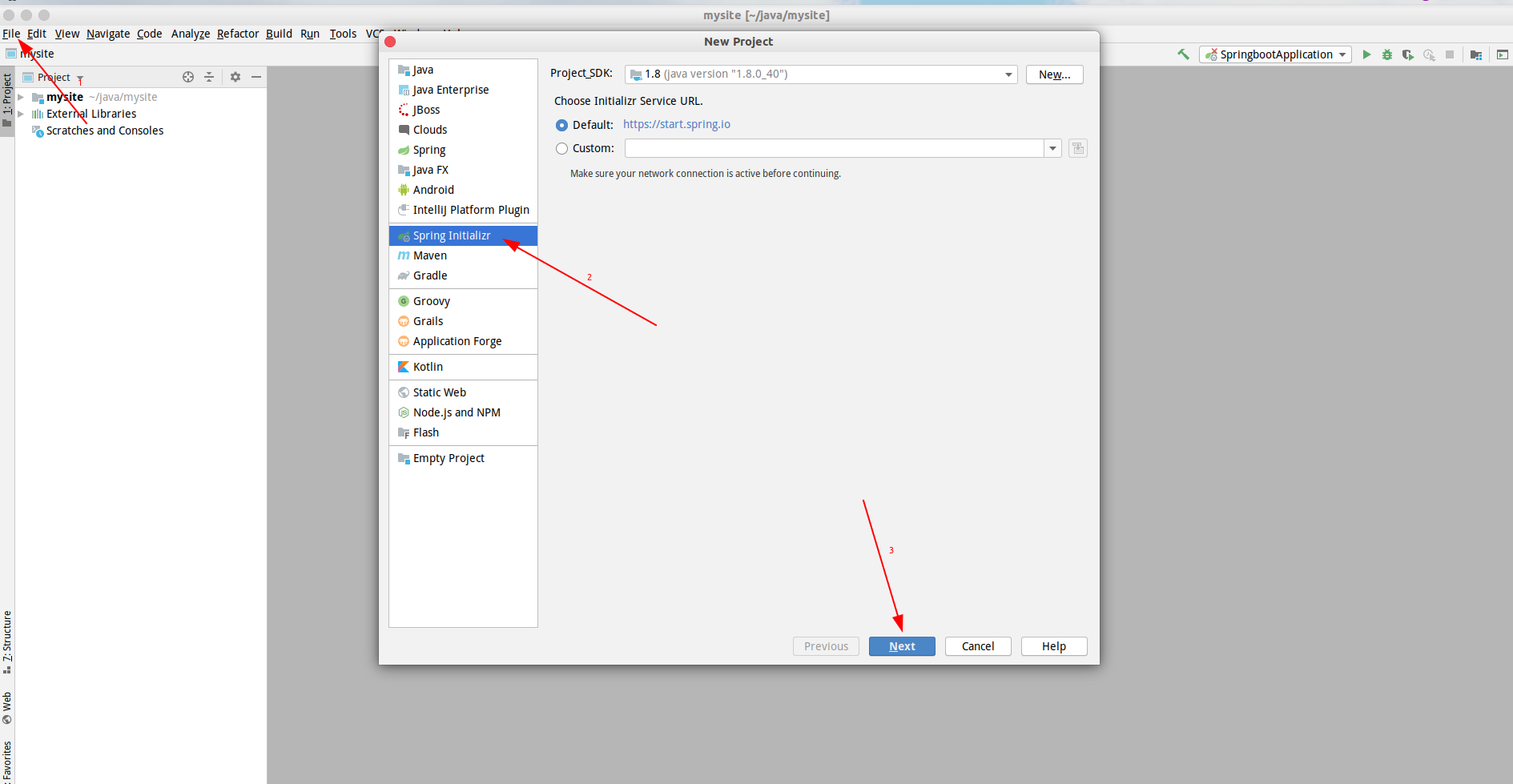
选择菜单 File>New>Project, 选择 Spring Initializr,然后 next.
2.输入项目名称
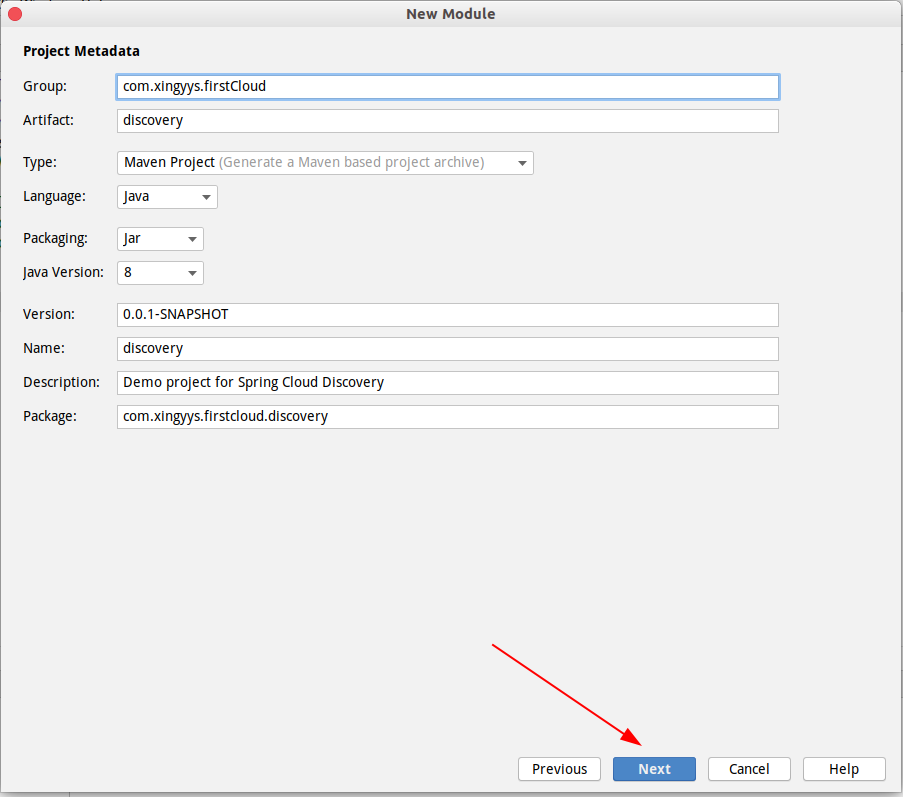
Group 为组织名, Artifact 为项目名, 输出完毕后 next.
3.选择依赖
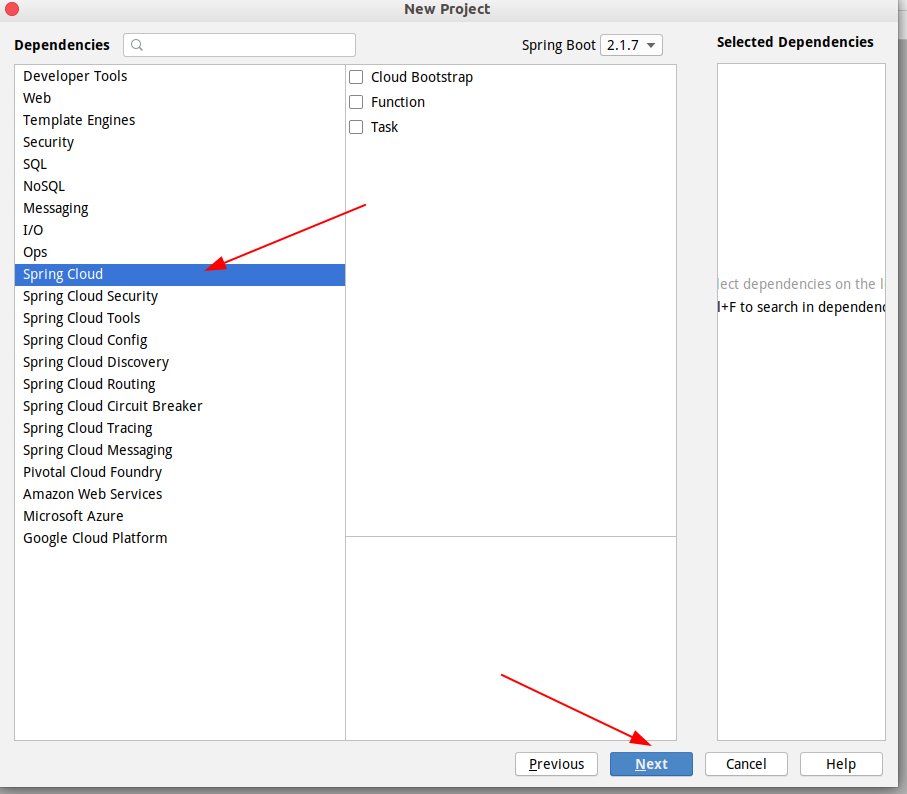
接下来选择依赖,直接Spring Cloud, 然后 next.
4.选择项目路径
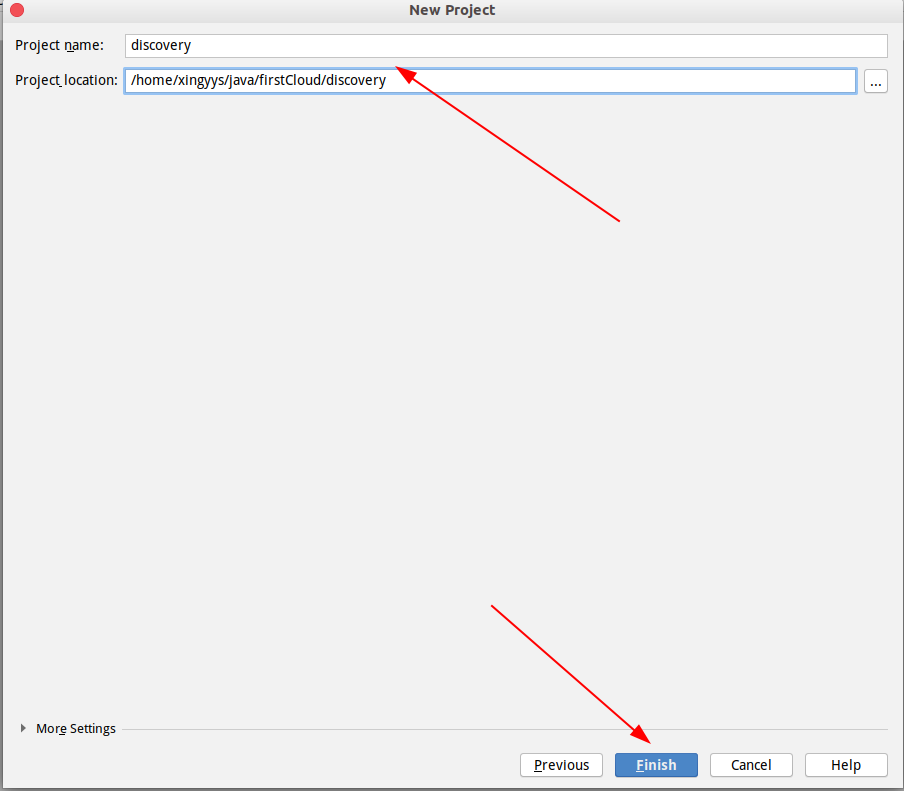
选好路径,直接 next.
5.完成创建
到这里,一个标准的spring cloud项目就出来了
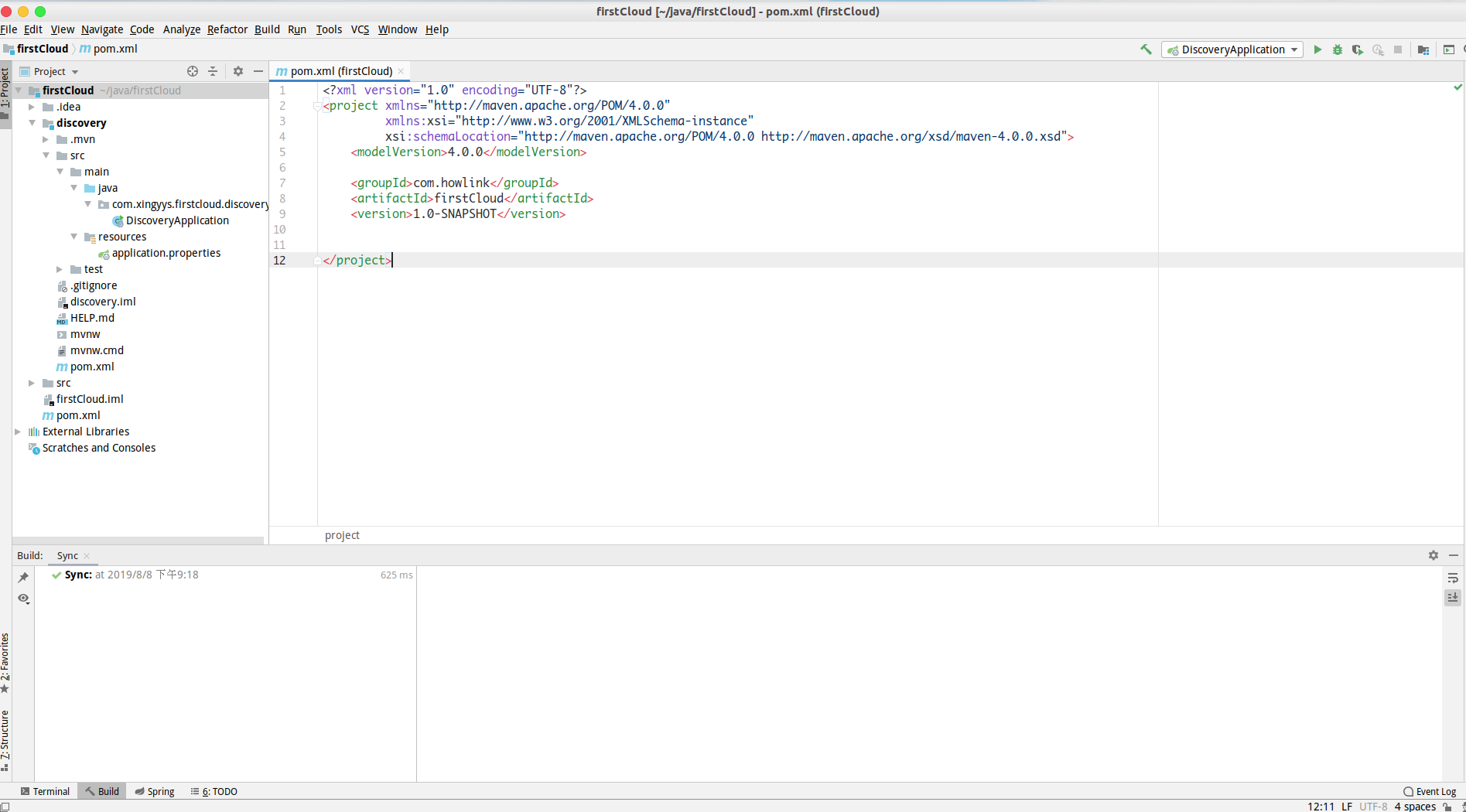
6.补充代码
接下来就是补充代码了.
实例代码
1.首先的依赖关系: pom.xml
<?xml version="1.0" encoding="UTF-8"?>

<project xmlns="http://maven.apache.org/POM/4.0.0" xmlns:xsi="http://www.w3.org/2001/XMLSchema-instance"

         xsi:schemaLocation="http://maven.apache.org/POM/4.0.0 http://maven.apache.org/xsd/maven-4.0.0.xsd">

    <modelVersion>4.0.0</modelVersion>

    <parent>

        <groupId>org.springframework.boot</groupId>

        <artifactId>spring-boot-starter-parent</artifactId>

        <version>2.1.6.RELEASE</version>

        <relativePath/> <!-- lookup parent from repository -->

    </parent>

    <groupId>com.xingyys.firstCloud</groupId>

    <artifactId>discovery</artifactId>

    <version>0.0.1-SNAPSHOT</version>

    <name>discovery</name>

    <description>Demo project for Spring Cloud Discovery</description>

    <properties>

        <java.version>1.8</java.version>

        <spring-cloud.version>Greenwich.SR2</spring-cloud.version>

    </properties>

    <dependencies>

        <dependency>

            <groupId>org.springframework.cloud</groupId>

            <artifactId>spring-cloud-starter-netflix-eureka-server</artifactId>

        </dependency>

        <dependency>

            <groupId>org.springframework.boot</groupId>

            <artifactId>spring-boot-starter-test</artifactId>

            <scope>test</scope>

        </dependency>

    </dependencies>

    <dependencyManagement>

        <dependencies>

            <dependency>

                <groupId>org.springframework.cloud</groupId>

                <artifactId>spring-cloud-dependencies</artifactId>

                <version>${spring-cloud.version}</version>

                <type>pom</type>

                <scope>import</scope>

            </dependency>

        </dependencies>

    </dependencyManagement>

    <build>

        <plugins>

            <plugin>

                <groupId>org.springframework.boot</groupId>

                <artifactId>spring-boot-maven-plugin</artifactId>

            </plugin>

        </plugins>

    </build>

</project>
要注意的是spring boot2.x版本和1.x版本在依赖上有一些不同,所以特别注意 properties中的<spring-cloud.version>Greenwich.SR2</spring-cloud.version>
2.启动代码中添加@EnableEurekaServer注解
@SpringBootApplication

@EnableEurekaServer

public class DiscoveryApplication {

    public static void main(String[] args) {

        SpringApplication.run(DiscoveryApplication.class, args);

    }

}
3.配置文件 application.properties
spring.application.name=spring-cloud-eureka

server.port=8000

eureka.client.register-with-eureka=false

eureka.client.fetch-registry=false

eureka.client.serviceUrl.defaultZone=http://localhost:${server.port}/eureka/
- eureka.client.register-with-eureka :表示是否将自己注册到Eureka Server,默认为true。
- eureka.client.fetch-registry :表示是否从Eureka Server获取注册信息,默认为true。
- eureka.client.serviceUrl.defaultZone :设置与Eureka Server交互的地址,查询服务和注册服务都需要依赖这个地址。默认是http://localhost:8761/eureka ;多个地址可使用 , 分隔。
4.编译打包
进入到discovery目录下执行命令:
# 忽略测试

mvn clean package -Dmaven.test.skip=true
编译成功后会在 target目录下生成 discovery.xx.jar包
5.运行discovery
java -jar target/discovery-0.0.1-SNAPSHOT.jar
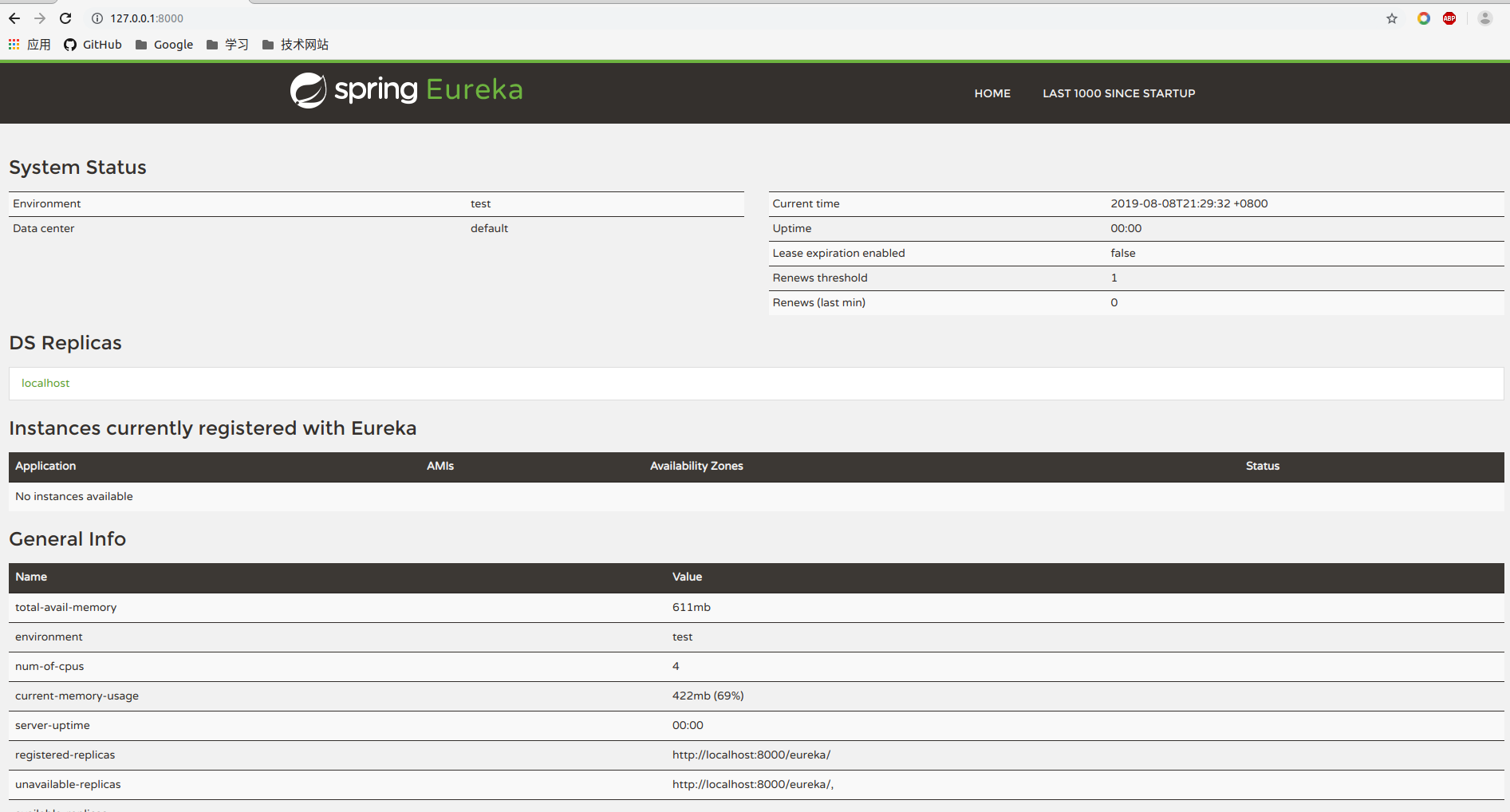
都成功的话,浏览器访问 http://localhost:8000:
注册中心的高可用
既然注册中心这么重要,那么单机运行怎么能保证服务的可靠性呢.所以我们就需要对注册中心做集群.
Eureka通过互相注册的方式来实现高可用的部署,所以我们只需要将Eureke Server配置其他可用的serviceUrl就能实现高可用部署.
接下来我们就来看看怎么实现吧:
双活配置
1.创建application-node1.properties,作为node1服务中心的配置,并将serviceUrl指向node2`, :
spring.application.name=discovery-node1

server.port=8001

eureka.client.register-with-eureka=true

eureka.client.fetch-registry=true

eureka.instance.hostname=node1

eureka.client.serviceUrl.defaultZone=http://node2:8002/eureka/
2.创建application-node2.properties,作为node2服务中心的配置,并将serviceUrl指向node1:
spring.application.name=discovery-node2

server.port=8002

eureka.client.register-with-eureka=true

eureka.client.fetch-registry=true

eureka.instance.hostname=node2

eureka.client.serviceUrl.defaultZone=http://node1:8001/eureka/
3.修改hosts
127.0.0.1 node1

127.0.0.1 node2
4.修改代码,添加@EnableEurekaClient注解:
@SpringBootApplication

@EnableEurekaServer

@EnableEurekaClient

public class DiscoveryApplication {

    public static void main(String[] args) {

        SpringApplication.run(DiscoveryApplication.class, args);

    }

}
5.打包启动
依次执行下面命令
#打包

mvn clean package -Dmaven.test.skip=true

# 分别以node1和node2 配置信息启动eureka

# --spring.profiles.active 指定启动不同的配置文件

java -jar target/discovery-0.0.1-SNAPSHOT.jar --spring.profiles.active=node1

java -jar target/discovery-0.0.1-SNAPSHOT.jar --spring.profiles.active=node2
成功后访问浏览器就会变成这样:

更多集群
如果是三个及以上的节点又要怎么配合呢,其实也是同样的原理.以三个节点为例,每个节点注册为其他节点的client就可以了.
因为spring cloud也支持yaml格式的配置文件,所以三个节点的配置文件可以写在一个yaml文件中:
---

spring:

  application:

    name: discovery

  profiles: nodes1

server:

  port: 8000

eureka:

  instance:

    hostname: node1

  client:

    serviceUrl:

      defaultZone: http://node2:8001/eureka/,http://node3:8002/eureka/

---

spring:

  application:

    name: discovery

  profiles: nodes2

server:

  port: 8001

eureka:

  instance:

    hostname: node2

  client:

    serviceUrl:

      defaultZone: http://node1:8000/eureka/,http://node3:8002/eureka/

---

spring:

  application:

    name: discovery

  profiles: nodes3

server:

  port: 8002

eureka:

  instance:

    hostname: node3

  client:

    serviceUrl:

      defaultZone: http://node1:8000/eureka/,http://node2:8001/eureka/
分别启动:
java -jar target/discovery-0.0.1-SNAPSHOT.jar --spring.profiles.active=nodes1

java -jar target/discovery-0.0.1-SNAPSHOT.jar --spring.profiles.active=nodes2

java -jar target/discovery-0.0.1-SNAPSHOT.jar --spring.profiles.active=nodes3
浏览器访问:

spring cloud微服务实践一的更多相关文章
- spring cloud微服务实践二
在上一篇,我们已经搭建了spring cloud微服务中的注册中心.但只有一个注册中心还远远不够. 接下来我们就来尝试提供服务. 注:这一个系列的开发环境版本为 java1.8, spring boo ...
- spring cloud微服务实践七
在spring cloud 2.x以后,由于zuul一直停滞在1.x版本,所以spring官方就自己开发了一个项目 Spring Cloud Gateway.作为spring cloud微服务的网关组 ...
- spring cloud微服务实践五
本篇我们来看看怎么实现spring cloud的配置中心. 在分布式系统中,特别是微服务架构下,可能会存在许多的服务,每个服务都会存在一个或多个的配置文件.那怎么多的配置文件的管理就会成为一个大问题. ...
- spring cloud微服务实践六
本片我们就来认识下spring cloud中的zuul组件. 注:这一个系列的开发环境版本为 java1.8, spring boot2.x, spring cloud Greenwich.SR2, ...
- spring cloud微服务实践三
上篇文章里我们实现了spring cloud中的服务提供者和使用者.接下来我们就来看看spring cloud中微服务的其他组件. 注:这一个系列的开发环境版本为 java1.8, spring bo ...
- Spring Cloud微服务实践之路-起始
由于各种原因,公司要对现有的营销产品进行微服务化,如果可以,则对公司所有产品逐步进行微服务化. 而本人将探索这条路,很艰难,但干劲十足.整个过会记录下来,以便以后查阅. 感谢公司!感谢领导! 相关书籍 ...
- spring cloud微服务实践四
spring cloud的hystrix还有一个配搭的库hystrix-dashboard,它是hystrix的一款监控工具,能直观的显示hystrix响应信息,请求成功率等.但是hystrix-da ...
- Spring Cloud微服务实践之路- Eureka Server 中的第一个异常
EMERGENCY! EUREKA MAY BE INCORRECTLY CLAIMING INSTANCES ARE UP WHEN THEY'RE NOT. RENEWALS ARE LESSER ...
- 放弃Dubbo,选择最流行的Spring Cloud微服务架构实践与经验总结
http://developer.51cto.com/art/201710/554633.htm Spring Cloud 在国内中小型公司能用起来吗?从 2016 年初一直到现在,我们在这条路上已经 ...
随机推荐
- ngx.shared.DICT.expire 详解
ngx.shared.DICT.expire 原文链接: ngx.shared.DICT.expire syntax: success, err = ngx.shared.DICT:expire(ke ...
- Linux 系统配置IPv6
1.自动获取IPV6地址 1)修改/etc/sysconfig/network文件,修改如下字段,不存在则手动添加,部分系统默认是开启的NETWORKING_IPV6=yes 2)修改/etc/sys ...
- Flutter移动电商实战 --(46)详细页_自定义TabBar Widget
主要实现详情和评论的tab provide定义变量 自己做一个tab然后用provide去控制 定义两个变量来判断是左侧选中了还是右侧选中了.并定义一个方法来接受参数,修改是左侧还是右侧选中的状态值 ...
- [webpack]深入学习webpack核心模块tapable
一.手动实现同步钩子函数 1.SyncHook class SyncHook { // 钩子是同步的 constructor(args){ this.tasks = []; } tap(name,ta ...
- 机器学习 - 算法 - SVM 支持向量机
SVM 原理引入 支持向量机( SVM,Support Vector Machine ) 背景 2012年前较为火热, 但是在12年后被神经网络逼宫, 由于应用场景以及应用算法的不同, SVM还是需要 ...
- React之简介
官网链接React 用于构建用户界面的 JavaScript 库 特色 声明式: React 使创建交互式 UI 变得轻而易举.为你应用的每一个状态设计简洁的视图,当数据改变时 React 能有效地更 ...
- Qt编写控件属性设计器9-数据库采集
一.前言 数据库作为数据源,在很多组态软件中使用非常多,指定数据库类型,填写好数据库连接信息,指定对应的数据库表和字段,采集间隔,程序按照采集间隔自动采集数据库数据,绑定到界面上的控件赋值显示即可.使 ...
- robot用例执行常用命令(还没试)
执行命令 执行一个用例 robot -t “testcase_name“ data_test.robot 按用例文件执行 robot data_test.robot或者robot --suite “p ...
- Node.js使用ftp连接远程ftp服务器枚举和下载文件示例
示例代码: var Ftp = require('ftp'); var fs = require('fs'); var path = require('path'); // 首先判断参数中是否包含{d ...
- js动态改变iframe的高度
js动态改变iframe的高度的写法 〈iframe id="docDetail" width="100%" height="200" ...