
Android笔记(十一) Android中的布局——网格布局
网格布局是Android4.0新增的布局管理器,因此需要在Android4.0之后的版本才可以使用,之前的平台使用该布局的话,需要导入相应的支持库。
GridLayout的作用类似于HTML中的table标签,它把整个容器划分成row*column个网格,每个网格都可以放置一个组件,也可以设置一个组件横跨多少列、多少行。
GridLayout提供了setRowCount(int)和setColumnCount(int)方法来控制该网格的行数和列数。
简单代码示例:
gridlayout.xml
<?xml version="1.0" encoding="utf-8"?>

<GridLayout xmlns:android="http://schemas.android.com/apk/res/android"

    android:layout_width="match_parent"

    android:layout_height="match_parent"

    android:rowCount="6"

    android:columnCount="4"

    android:id="@+id/root">

    <!-- 定一个一个横跨四列的文本框,并设置该文本框的前景色、背景色等属性 -->

    <TextView

        android:layout_width="match_parent"

        android:layout_height="wrap_content"

        android:layout_columnSpan="4"

        android:textSize="50sp"

        android:layout_marginLeft="4px"

        android:layout_marginRight="4px"

        android:padding="5px"

        android:layout_gravity="right"

        android:background="#eee"

        android:textColor="#000"

        android:text="0"

        />

    <!-- 定义一个横跨四列的按钮 -->

    <Button

        android:layout_width="match_parent"

        android:layout_height="wrap_content"

        android:layout_columnSpan="4"

        android:text="清除"/>

    <!-- 添加其他按钮 -->

    <Button

        android:text="7"

        android:layout_rowWeight="1"

        android:layout_columnWeight="1"/>

    <Button

        android:text="8"

        android:layout_rowWeight="1"

        android:layout_columnWeight="1"/>

    <Button

        android:text="9"

        android:layout_rowWeight="1"

        android:layout_columnWeight="1"/>

    <Button

        android:text="/"

        android:layout_rowWeight="1"

        android:layout_columnWeight="1"/>

    <Button

        android:text="4"

        android:layout_rowWeight="1"

        android:layout_columnWeight="1"/>

    <Button

        android:text="5"

        android:layout_rowWeight="1"

        android:layout_columnWeight="1"/>

    <Button

        android:text="6"

        android:layout_rowWeight="1"

        android:layout_columnWeight="1"/>

    <Button

        android:text="*"

        android:layout_rowWeight="1"

        android:layout_columnWeight="1"/>

    <Button

        android:text="1"

        android:layout_rowWeight="1"

        android:layout_columnWeight="1"/>

    <Button

        android:text="2"

        android:layout_rowWeight="1"

        android:layout_columnWeight="1"/>

    <Button

        android:text="3"

        android:layout_rowWeight="1"

        android:layout_columnWeight="1"/>

    <Button

        android:text="-"

        android:layout_rowWeight="1"

        android:layout_columnWeight="1"/>

    <Button

        android:text="0"

        android:layout_rowWeight="1"

        android:layout_columnWeight="1"/>

    <Button

        android:text="."

        android:layout_rowWeight="1"

        android:layout_columnWeight="1"/>

    <Button

        android:text="+"

        android:layout_rowWeight="1"

        android:layout_columnWeight="1"/>

    <Button

        android:text="="

        android:layout_rowWeight="1"

        android:layout_columnWeight="1"/>

</GridLayout>
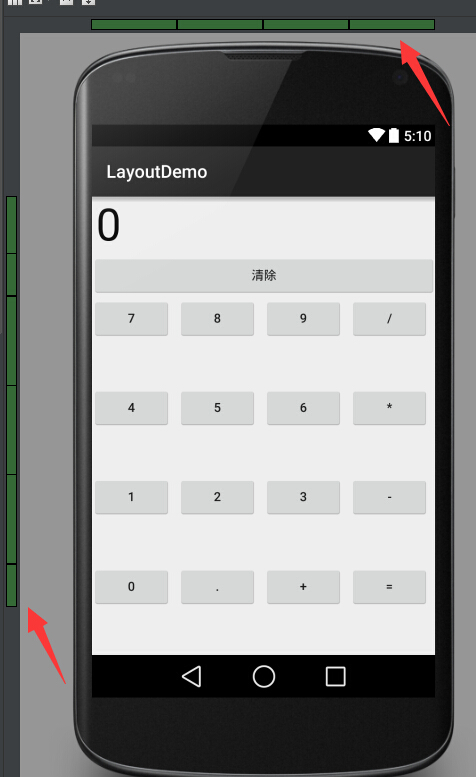
运行结果:
Android笔记(十一) Android中的布局——网格布局的更多相关文章
- Android 笔记之 Android 系统架构
Android笔记之Android系统架构 h2{ color: #4abcde; } a{ color: blue; text-decoration: none; } a:hover{ color: ...
- Python pyQt4/PyQt5 学习笔记3(绝对对位,盒布局,网格布局)
本节研究布局管理的内容. (一)绝对对位 import sys from PyQt4 import QtGui class Example(QtGui.QWidget): def __init__( ...
- Android进阶(十一)Android系统架构讲解
如果说一个成功男人的背后会有一个默默支持的女人的话,那么一个优越稳定的平台背后必有一个成熟的系统架构所支撑着.那么,Android的系统架构是怎么样的呢?从下图我们可以从整体上有个大致的了解(图片来源 ...
- Android 基础 十一 Android的消息机制
Handler是Android消息机制的上层接口,这使得在开发应用过程中我们只需要和Handler交互即可.Handler的使用过程很简单,通过它可以轻松地将一个任务切换到Handler所在的线程中去 ...
- Android笔记: Android版本号
由于有2套版本号 总是对应不准 记下来做过标记 Android 4.3 ----18 Android 4.2---17 Android 4.1---16 Android 4.0.3---15Andro ...
- Android笔记:java 中的数组
在与嵌入式设备通讯的过程中使用的socket通讯 获取的字节流,通常转换为字节数组,需要根据协议将字节数组拆分.对于有规律的重复拆分可以使用,由于java中不能像c中直接进行内存操作例如使用struc ...
- Android笔记:java 中的枚举
部分数据使用枚举比较方便,java中的enmu不如c#中使用方便 记录备忘 以c#中的代码为例 public enum PlayState { /// <summary> /// 关闭 / ...
- Android笔记之Fragment中创建ViewModel的正确方式
之前一直都是这么写的 pageViewModel = ViewModelProviders.of(this).get(PageViewModel.class); //参数this是当前fragment ...
- Java学习笔记十一:Java中的方法
Java中的方法 一:什么是方法: 所谓方法,就是用来解决一类问题的代码的有序组合,是一个功能模块. 学过C语言或者其他语言的应该都知道函数这个东西,在Java中,其实方法就是函数,只不过叫法不同,在 ...
随机推荐
- Linux的桌面虚拟化技术KVM(三)——KVM虚拟机克隆和快照
Linux的桌面虚拟化技术KVM(一)——新建KVM虚拟机 Linux的桌面虚拟化技术KVM(二)——远程桌面管理 (1).KVM虚拟机克隆 KVM虚拟克隆命令virt-clone [选项] 常用选项 ...
- 报错:MetaException(message:Version information not found in metastore. )
报错背景: CDH安装完成hive后启动失败. 报错现象: [main]: Metastore Thrift Server threw an exception... MetaException(me ...
- centos7 gcc升级
1. 安装必备 yum groupinstall "Development Tools" yum install glibc-static libstdc++-static 2 ...
- ubuntu下vs code配置c++
链接地址:https://blog.csdn.net/u010648921/article/details/82628616 摘要:Ctrl+Shift+B, F5
- openpyxl,xlrd,win32com,wxpython,logging
目录 一. openpyxl常用操作总结 二. xlrd常用操作总结 三. win32com常用操作总结 四. 自定义异常 五. 判断中文 六. Excel数字字母转换 七. 使用wxpython进行 ...
- 第七章 云原生生态的基石 Kubernetes
7.1 Kubernetes架构 K8s的核心组件: etcd: 协同存储,负责保存整个集群的状态. API:资源操作的唯一入口. controller manager: 维护集群的状态,执行故障检测 ...
- GitToc-为你的Github仓库的Readme自动生成一个目录
维护自己的Github仓库的时候发现Github的Readme不支持Toc目录,所以就自己写了一个小工具. 工具地址:https://github.com/Holy-Shine/GitToc 简介 如 ...
- 一个栈的入栈序列为ABCDEF,则不可能的出栈序列是
技术之瞳 阿里巴巴技术笔试心得习题2.65: 一个栈的入栈序列为ABCDEF,则不可能的出栈序列是(D) A.DEFCBA B.DCEFBA C.FEDCBA D.FECDBA E.ABCDEF ...
- 什么是netty--通俗易懂
一.Netty介绍 1.什么是netty Netty 是由 JBOSS 提供的一个 Java 开源框架.Netty 提供异步的.基于事件驱动的网络应用程序框架,用以快速开发高性能.高可靠性的网络 ...
- [转帖]时序数据库技术体系 – InfluxDB TSM存储引擎之数据读取
时序数据库技术体系 – InfluxDB TSM存储引擎之数据读取 http://hbasefly.com/2018/05/02/timeseries-database-7/ 2018年5月2日 ...