
maven版cxf集合jetty开发服务端(一)
一、首先新建一个maven项目
二、pom.xml引入依赖
<dependency>

    <groupId>org.apache.cxf</groupId>

    <artifactId>cxf-api</artifactId>

    <version>2.5.0</version>

</dependency>

<dependency>

    <groupId>org.apache.cxf</groupId>

    <artifactId>cxf-rt-frontend-jaxws</artifactId>

    <version>2.5.0</version>

</dependency>

<dependency>

    <groupId>org.apache.cxf</groupId>

    <artifactId>cxf-rt-bindings-soap</artifactId>

    <version>2.5.0</version>

</dependency>

<dependency>

    <groupId>org.apache.cxf</groupId>

    <artifactId>cxf-rt-transports-http</artifactId>

    <version>2.5.0</version>

</dependency>

<dependency>

    <groupId>org.apache.cxf</groupId>

    <artifactId>cxf-rt-ws-security</artifactId>

    <version>2.5.0</version>

</dependency>

<dependency>

    <groupId>org.apache.cxf</groupId>

    <artifactId>cxf-rt-transports-http-jetty</artifactId>

    <version>2.5.0</version>

</dependency>
三、开发接口类
package com.xie.ws;

import javax.jws.WebService;

@WebService

public interface HelloWorld {

    String sayHi(String username);

}
四、开发实现类
import javax.jws.WebService;

import com.xie.ws.HelloWorld;

@WebService(endpointInterface="com.xie.ws.HelloWorld")

public class HelloWorldImpl implements HelloWorld {

    public String sayHi(String username) {

        System.out.println("Hello,"+username);

        return "Hello,"+username;

    }

}
五、创建服务
1、java自带jetty启动
import javax.xml.ws.Endpoint;

import com.xie.ws.impl.HelloWorldImpl;

public class WebServiceTest {

    public static void main(String[] args) {

        HelloWorldImpl hw = new HelloWorldImpl();

        String address = "http://localhost:8080/CxfWSServer";

        Endpoint.publish(address, hw);

        System.out.println("WebService暴露成功。。。");

    }

}
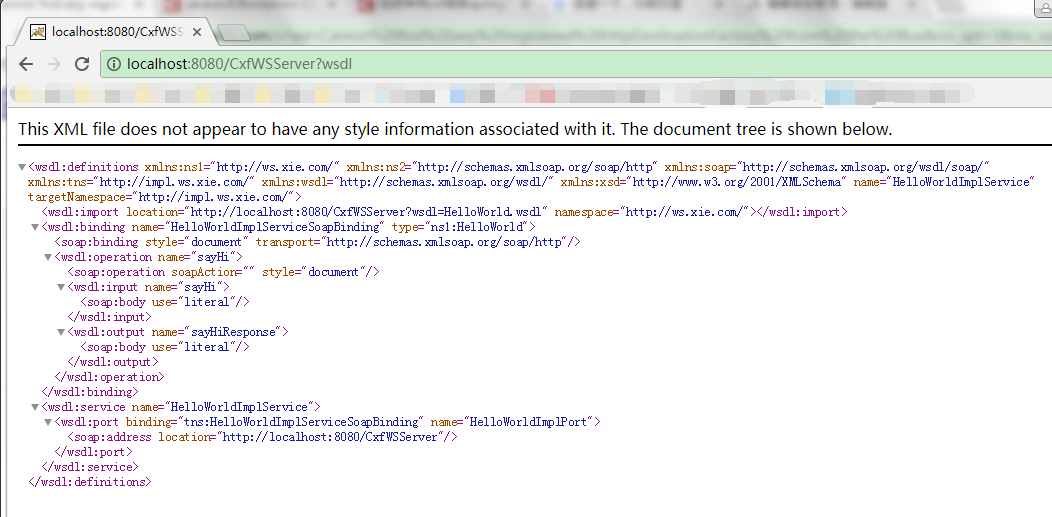
2、浏览器访问:http://localhost:8080/CxfWSServer?wsdl 如图所示:
maven版cxf集合jetty开发服务端(一)的更多相关文章
- maven版cxf集合spring开发服务端(二)
一.新建一个maven项目 二.pom.xml引入依赖 <dependency> <groupId>org.apache.cxf</groupId> <art ...
- WebService-03-使用CXF开发服务端和客户端
写在前面的话 前面两节说了使用Java提供的包开发服务端和客户端,现在使用CXF来开发,CXF提供了两个类发而服务,一个是ServerFactoryBean,另一个是JaxWsServerFactor ...
- webservice -- cxf客户端调用axis2服务端
背景: 有个项目, 需要由第三方提供用户信息, 实现用户同步操作, 对方给提供webservice接口(axis2实现)并也使用axis2作主客户端调用我方提供的webservice接口 起初, 由于 ...
- 用beego开发服务端应用
用beego开发服务端应用 说明 Quick Start 安装 创建应用 编译运行 打包发布 代码生成 开发文档 目录结构说明 使用配置文件 beego默认参数 路由设置 路由的表述方式 直接设置路由 ...
- 基于Apache CXF的Web Service服务端/客户端
转自:https://www.aliyun.com/zixun/wenji/1263190.html CXF服务端: package com.sean.server; import javax.jws ...
- Spring+SpringMVC+Mybatis+Maven+CXF+WebService整合之服务端
WebService服务端项目结构: <project xmlns="http://maven.apache.org/POM/4.0.0" xmlns:xsi="h ...
- java版gRPC实战之三:服务端流
欢迎访问我的GitHub https://github.com/zq2599/blog_demos 内容:所有原创文章分类汇总及配套源码,涉及Java.Docker.Kubernetes.DevOPS ...
- nodejs 开发服务端 child_process 调试方法(1)
由于最近正在做一个服务端项目,采用了nodejs引擎开发,主要是master-worker工作机制;主进程可以直接调试,但是子进程调试好像有点麻烦,我没有找到好的方法; worker这里,我分拆成了几 ...
- 【笔记6-支付及订单模块】从0开始 独立完成企业级Java电商网站开发(服务端)
支付模块 实际开发工作中经常会遇见如下场景,一个支付模块,一个订单模块,有一定依赖,一个同事负责支付模块,另一个同事负责订单模块,但是开发支付模块的时候要依赖订单模块的相关类 ,方法,或者工具类,这些 ...
随机推荐
- numpy 生成数组
可以看这个博客 https://www.cnblogs.com/td15980891505/p/6082858.html import numpy as np 建立数组并初始化数组 np.zeros( ...
- Python自定义任务发邮件提醒
前言 在工作中,有时会有一些定期需要执行的任务或在将来某一天需要执行的任务,为避免疏漏,设计个小工具,发邮件提醒自己去处理. 方案简介 1.建立一个Excel文件,里面定义好待提醒的任务 2.建立一个 ...
- JDBC——PreparedStatement执行SQL的对象
Statement的子接口,预编译SQL,动态SQL 功能比爹强大 用来解决SQL注入的 预编译SQL:参数使用?作为占位符,执行SQL的时候给?赋上值就可以了 使用步骤: 1.导入驱动jar包 复制 ...
- @Cacheable注解不生效原因
因为@Cacheable注解应用了AOP动态代理,生成代理类,判断缓存中是否存在该key,如果不存在则调用被代理类的标有@Cachable注解的方法,否则不执行. 所以当类A的方法a调用方法b(标有@ ...
- TC基础与自动化
前言 互联网产品的测试常常要覆盖在不同网络下的表现,例如丢包,带宽受限,时延及抖动等网络较差的情况,为了测试场景的网络情况可定义及复现,就需要有个工具对弱网进行模拟.业界一些通用的弱网模拟工具,如NE ...
- RESTful 【个人理解总结】
RESTful 个人理解总结 一.什么是 RESTful 面向资源 简单的说:RESTful是一种架构的规范与约束.原则,符合这种规范的架构就是RESTful架构. 先看REST是什么意思,英文Re ...
- Mac升级后如何查看自己的网络端口
OS X 10.9 下面 网络实用工具 从实用工具目录里消失了,可能这个程序用的人太少就取消了吧.但是对于做互联网的人还是有点用的. 参考http://www.mamicode.com/info-de ...
- springboot13(redis缓存)
redis做springboot2.x的缓存 1.首先是引入依赖 <dependency> <groupId>org.springframework.boot</grou ...
- python3爬取高清壁纸(1)
这次爬取的目标是:美桌网首页 > 桌面壁纸 > 卡通动漫 类别下的壁纸. 我们先随机选取一个专辑来爬(http://www.win4000.com/wallpaper_detail_545 ...
- ubuntu---yolo报错darknet: ./src/cuda.c:36: check_error: Assertion `0' failed.
装好darknet后,直接测试的时候,报错: darknet: ./src/cuda.c:36: check_error: Assertion `0' failed.解决办法是打开yolov3.cfg ...