
05: 配置yum源
1.1 将镜像复制到本地创建yum源
1、将准备好的系统镜像放到指定的目录,本次目录指定在:/dawnfs/sourcecode
2、创建挂载目录:mkdir /mnt/yum
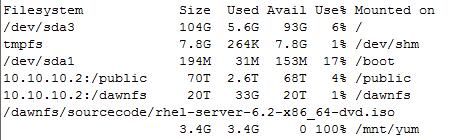
3、挂载镜像: mount -o loop /dawnfs/sourcecode/rhel-server-6.2-x86_64-dvd.iso /mnt/yum挂载完成后,使用 df -h来检查挂载是否成功:
4、修改/etc/yum.repos.d/local.repo文件
[local]

name = Red Hat Yum Name

baseurl=file:///aaa/CentOS-7.3-x86_64-DVD-1611

enabled=1

gpgcheck=0
local.repo
ps:原文件中enabled=0,gpgcheck=1.修改成enable=1,gpgcheck=0。否则输入 yum grouplist 命令时会报错
5、清除原来的yum: yum clean all
6、检查软件列表:yum list
7、查看yum组:yum grouplist
8、安装yum组,以安装Desktop为例: yum install -y "Desktop"
1.2 将windows共享挂载到centos 7.3中并配置yum源
1、临时挂载windows共享
mount.cifs //1.1.1.100/share /aaa -o user=tom,pass=1
2、配置yum源文件
[local]

name = Red Hat Yum Name

baseurl=file:///aaa/CentOS-7.3-x86_64-DVD-1611

enabled=1

gpgcheck=0
local.repo
1.3 配置centos网路yum源
cd /etc/yum.repos.d
# CentOS-Base.repo

#

# The mirror system uses the connecting IP address of the client and the

# update status of each mirror to pick mirrors that are updated to and

# geographically close to the client.  You should use this for CentOS updates

# unless you are manually picking other mirrors.

#

# If the mirrorlist= does not work for you, as a fall back you can try the

# remarked out baseurl= line instead.

#

#

[base]

name=CentOS-$releasever - Base - mirrors.ustc.edu.cn

baseurl=http://mirrors.ustc.edu.cn/centos/$releasever/os/$basearch/

#mirrorlist=http://mirrorlist.centos.org/?release=$releasever&arch=$basearch&repo=os

gpgcheck=1

gpgkey=http://mirrors.ustc.edu.cn/centos/RPM-GPG-KEY-CentOS-5

#released updates

[updates]

name=CentOS-$releasever - Updates - mirrors.ustc.edu.cn

baseurl=http://mirrors.ustc.edu.cn/centos/$releasever/updates/$basearch/

#mirrorlist=http://mirrorlist.centos.org/?release=$releasever&arch=$basearch&repo=updates

gpgcheck=1

gpgkey=http://mirrors.ustc.edu.cn/centos/RPM-GPG-KEY-CentOS-5

#additional packages that may be useful

[extras]

name=CentOS-$releasever - Extras - mirrors.ustc.edu.cn

baseurl=http://mirrors.ustc.edu.cn/centos/$releasever/extras/$basearch/

#mirrorlist=http://mirrorlist.centos.org/?release=$releasever&arch=$basearch&repo=extras

gpgcheck=1

gpgkey=http://mirrors.ustc.edu.cn/centos/RPM-GPG-KEY-CentOS-5

#packages used/produced in the build but not released

[addons]

name=CentOS-$releasever - Addons - mirrors.ustc.edu.cn

baseurl=http://mirrors.ustc.edu.cn/centos/$releasever/addons/$basearch/

#mirrorlist=http://mirrorlist.centos.org/?release=$releasever&arch=$basearch&repo=addons

gpgcheck=1

gpgkey=http://mirror.centos.org/centos/RPM-GPG-KEY-CentOS-5

#additional packages that extend functionality of existing packages

[centosplus]

name=CentOS-$releasever - Plus - mirrors.ustc.edu.cn

baseurl=http://mirrors.ustc.edu.cn/centos/$releasever/centosplus/$basearch/

#mirrorlist=http://mirrorlist.centos.org/?release=$releasever&arch=$basearch&repo=centosplus

gpgcheck=1

enabled=0

gpgkey=http://mirrors.ustc.edu.cn/centos/RPM-GPG-KEY-CentOS-5

#contrib - packages by Centos Users

[contrib]

name=CentOS-$releasever - Contrib - mirrors.ustc.edu.cn

baseurl=http://mirrors.ustc.edu.cn/centos/$releasever/contrib/$basearch/

#mirrorlist=http://mirrorlist.centos.org/?release=$releasever&arch=$basearch&repo=contrib

gpgcheck=1

enabled=0

gpgkey=http://mirrors.ustc.edu.cn/centos/RPM-GPG-KEY-CentOS-5
CentOS5-Base.repo
# CentOS-Base.repo

#

# The mirror system uses the connecting IP address of the client and the

# update status of each mirror to pick mirrors that are updated to and

# geographically close to the client.  You should use this for CentOS updates

# unless you are manually picking other mirrors.

#

# If the mirrorlist= does not work for you, as a fall back you can try the

# remarked out baseurl= line instead.

#

#

[base]

name=CentOS-$releasever - Base - mirrors.ustc.edu.cn

baseurl=http://mirrors.ustc.edu.cn/centos/$releasever/os/$basearch/

#mirrorlist=http://mirrorlist.centos.org/?release=$releasever&arch=$basearch&repo=os

gpgcheck=1

gpgkey=http://mirrors.ustc.edu.cn/centos/RPM-GPG-KEY-CentOS-6

#released updates

[updates]

name=CentOS-$releasever - Updates - mirrors.ustc.edu.cn

baseurl=http://mirrors.ustc.edu.cn/centos/$releasever/updates/$basearch/

#mirrorlist=http://mirrorlist.centos.org/?release=$releasever&arch=$basearch&repo=updates

gpgcheck=1

gpgkey=http://mirrors.ustc.edu.cn/centos/RPM-GPG-KEY-CentOS-6

#additional packages that may be useful

[extras]

name=CentOS-$releasever - Extras - mirrors.ustc.edu.cn

baseurl=http://mirrors.ustc.edu.cn/centos/$releasever/extras/$basearch/

#mirrorlist=http://mirrorlist.centos.org/?release=$releasever&arch=$basearch&repo=extras

gpgcheck=1

gpgkey=http://mirrors.ustc.edu.cn/centos/RPM-GPG-KEY-CentOS-6

#additional packages that extend functionality of existing packages

[centosplus]

name=CentOS-$releasever - Plus - mirrors.ustc.edu.cn

baseurl=http://mirrors.ustc.edu.cn/centos/$releasever/centosplus/$basearch/

#mirrorlist=http://mirrorlist.centos.org/?release=$releasever&arch=$basearch&repo=centosplus

gpgcheck=1

enabled=0

gpgkey=http://mirrors.ustc.edu.cn/centos/RPM-GPG-KEY-CentOS-6

#contrib - packages by Centos Users

[contrib]

name=CentOS-$releasever - Contrib - mirrors.ustc.edu.cn

baseurl=http://mirrors.ustc.edu.cn/centos/$releasever/contrib/$basearch/

#mirrorlist=http://mirrorlist.centos.org/?release=$releasever&arch=$basearch&repo=contrib

gpgcheck=1

enabled=0

gpgkey=http://mirrors.ustc.edu.cn/centos/RPM-GPG-KEY-CentOS-6
CentOS6-Base.repo
# CentOS-Base.repo

#

# The mirror system uses the connecting IP address of the client and the

# update status of each mirror to pick mirrors that are updated to and

# geographically close to the client.  You should use this for CentOS updates

# unless you are manually picking other mirrors.

#

# If the mirrorlist= does not work for you, as a fall back you can try the

# remarked out baseurl= line instead.

#

#

[base]

name=CentOS-$releasever - Base

#mirrorlist=http://mirrorlist.centos.org/?release=$releasever&arch=$basearch&repo=os

baseurl=http://mirrors.ustc.edu.cn/centos/$releasever/os/$basearch/

gpgcheck=1

gpgkey=file:///etc/pki/rpm-gpg/RPM-GPG-KEY-CentOS-7

#released updates

[updates]

name=CentOS-$releasever - Updates

# mirrorlist=http://mirrorlist.centos.org/?release=$releasever&arch=$basearch&repo=updates

baseurl=http://mirrors.ustc.edu.cn/centos/$releasever/updates/$basearch/

gpgcheck=1

gpgkey=file:///etc/pki/rpm-gpg/RPM-GPG-KEY-CentOS-7

#additional packages that may be useful

[extras]

name=CentOS-$releasever - Extras

# mirrorlist=http://mirrorlist.centos.org/?release=$releasever&arch=$basearch&repo=extras

baseurl=http://mirrors.ustc.edu.cn/centos/$releasever/extras/$basearch/

gpgcheck=1

gpgkey=file:///etc/pki/rpm-gpg/RPM-GPG-KEY-CentOS-7

#additional packages that extend functionality of existing packages

[centosplus]

name=CentOS-$releasever - Plus

# mirrorlist=http://mirrorlist.centos.org/?release=$releasever&arch=$basearch&repo=centosplus

baseurl=http://mirrors.ustc.edu.cn/centos/$releasever/centosplus/$basearch/

gpgcheck=1

enabled=0

gpgkey=file:///etc/pki/rpm-gpg/RPM-GPG-KEY-CentOS-7
CentOS7-Base.repo
1.4 yum常用命令
yum provides */kinit # 列出kinit命令使用哪个安装包
05: 配置yum源的更多相关文章
- linux配置yum源、mount及yum命令
配置yum源: 在/mnt目录下新建一个空的目录,名为rhel. [root@localhost mnt]# mkdir rhel 然后 [root@localhost Packages]# cd ...
- RHEL 7.0 本地配置yum源
RHEL 7.0 本地配置yum源 yum简介 yum = Yellow dog Updater, Modified 主要功能是更方便的添加/删除/更新RPM包. 它能自动解决包的倚赖性问题. 它 ...
- CentOS7.1 JDK安装 和 CentOS7.1配置yum源
1.卸载自带OPENJDK #查看自身jdk java -verson #查看自身安装的java rpm -qa | grep java #显示如下 python-javapackages-3.4. ...
- linux配置yum源
yum(全称为 Yellow dog Updater, Modified)是一个在Fedora和RedHat以及SUSE中的Shell前端软件包管理器.基於RPM包管理,能够从指定的服务器自动下载RP ...
- RedHat 6配置yum源为网易镜像(转)
概述 由于版权的问题,RedHat6不能直接使用yum一些指令,需要配置yum源为网易镜像,但是网上谈到很多:整理一下,将有用的信息整理如下,以便于能够为其他的配置服务配置使用:需要卸载掉原理系统自带 ...
- Linux 配置yum源.
Linux 配置yum源. 环境:虚拟机中安装了RedHat ,在进行安装mariadb的时候,出现如下错误.是因为yum源的问题,需要进行配置yum源.本教程是配置本地yum源. [root@loc ...
- redhat 配置yum源(配置163 yum repo)
一般安装好redhat后,不能注册的话,不能使用系统自带的yum源.但是我们可以自己配置yum源来解决这一问题.下面介绍下redhat配置163yum源. 1) 查看版本号和系统类别: cat /et ...
- 克隆虚拟机及配置yum源的步骤及讲解(Hadoop基础)
1.克隆虚拟机 找一台需要克隆的虚拟机但虚拟机必须在关机下进行,(建议将前期Linux环境 配置完成) 在VMware中右键虚拟机找到克隆的选项. 点击克隆 可以克隆他的快照(提前做快照)或者是克 ...
- centos 配置yum源
1.yum配置 yum的配置文件在 /etc/yum.conf [root@mini ~]# cat /etc/yum.conf [main] cachedir=/var/cache/yum/$ba ...
随机推荐
- php iconv() : Detected an illegal character in input string
php iconv() : Detected an illegal character in input string_php技巧_脚本之家 https://www.jb51.net/article/ ...
- httpd.conf .htaccess apache 服务器配置
PHP Advanced and Object-Oriented Programming Larry Ullman The standard solution in these situations ...
- ios-Objective-C中的各种遍历(迭代)方式(转载)
iOS开发实用技巧—Objective-C中的各种遍历(迭代)方式 说明: 1)该文简短介绍在iOS开发中遍历字典.数组和集合的几种常见方式. 2)该文对应的代码可以在下面的地址获得:https:// ...
- Python开发【Tornado】:搭建文件下载服务、音频文件播放
Tornado 如何做文件下载 要求:浏览器输入url地址,直接弹窗提示下载 Tornado服务端,搭建文件下载服务 #!/usr/bin/env python # -*- coding:utf-8 ...
- Python性能鸡汤(转)
英文原文:http://blog.monitis.com/index.php/2012/02/13/python-performance-tips-part-1/ 英文原文:http://blog.m ...
- 【Fiddler】杂乱基础学习
1.过滤fiddler筛选 打开fiddler>Tools>Fiddler Options>HTTPS>...from remote clients only,勾选这个选项就可 ...
- java-JProfiler(三)-进行本地JVM的性能监控-监视本地java程序
1.打开JProfiler 默认会启动快速窗口[或者使用菜单Session→Start Center]打开 这里监视本地java程序,故在 主界面 2.查看监视界面 这时就可以查看 Instance ...
- word 加载adobe acrobat ,保存word中的清晰图片
1:先安装 adobe 并激活 https://blog.csdn.net/xintingandzhouyang/article/details/82558235 2:打开word,点击 文件&g ...
- Spark Storage(二) 集群下的broadcast
Broadcast 简单来说就是将数据从一个节点复制到其他各个节点,常见用于数据复制到节点本地用于计算,在前面一章中讨论过Storage模块中BlockManager,Block既可以保存在内存中,也 ...
- (转)找回Git中丢失的Commit
总结:更新代码前一定要先将本地修改的文件存到本地git仓库.今天脑残直接更新了远程仓库代码导入今天写的代码...... @[git|commit|reflog] 在使用Git的过程中,有时候会因为一些 ...