
SQL Server:使用 PIVOT 行转列和 UNPIVOT 列转行
| ylbtech-SQL Server:使用 PIVOT 行转列和 UNPIVOT 列转行 |
| A,PIVOT 语法 返回顶部 |
PIVOT 提供的语法比一系列复杂的 SELECT...CASE 语句中所指定的语法更简单和更具可读性。有关 PIVOT 语法的完整说明,请参阅 FROM (Transact-SQL)。
以下是带批注的 PIVOT 语法。
SELECT <非透视的列>,

    [第一个透视的列] AS <列名称>,

    [第二个透视的列] AS <列名称>,

    ...

    [最后一个透视的列] AS <列名称>,

FROM

    (<生成数据的 SELECT 查询>)

    AS <源查询的别名>

PIVOT

(

    <聚合函数>(<要聚合的列>)

FOR

[<包含要成为列标题的值的列>]

    IN ( [第一个透视的列], [第二个透视的列],

    ... [最后一个透视的列])

) AS <透视表的别名>

<可选的 ORDER BY 子句>;
| B,PIVOT 示例1返回顶部 |
go

-- ==========================

-- 学生成绩表,ByYuanbo

-- ==========================

-- drop table StudentScores;

create table StudentScores

(

username    varchar(20),        --姓名

[subject]    varchar(30),        --科目

score        float,              --成绩

);

go

-- 01、插入测试数据

insert into StudentScores(username,[subject],score) values('张三', '语文', 80);

insert into StudentScores(username,[subject],score) values('张三', '语文', 90);

insert into StudentScores(username,[subject],score) values('张三', '数学', 90);

insert into StudentScores(username,[subject],score) values('张三', '英语', 70);

insert into StudentScores(username,[subject],score) values('张三', '生物', 85);

insert into StudentScores(username,[subject],score) values('李四', '语文', 70);

insert into StudentScores(username,[subject],score) values('李四', '数学', 92);

insert into StudentScores(username,[subject],score) values('李四', '数学', 100);

insert into StudentScores(username,[subject],score) values('李四', '英语', 76);

insert into StudentScores(username,[subject],score) values('李四', '生物', 88);

insert into StudentScores(username,[subject],score) values('王二', '语文', 60);

insert into StudentScores(username,[subject],score) values('王二', '数学', 82);

insert into StudentScores(username,[subject],score) values('王二', '英语', 96);

insert into StudentScores(username,[subject],score) values('王二', '生物', 78);

go

-- 02、查询数据

select * from StudentScores;

--P1、如果我想知道每位学生的每科成绩,而且每个学生的全部成绩排成一行,这样方便我查看、统计,导出数据

--A1、传统 case 方法

select username as '姓名'

,max(case [subject] when '语文' then score else 0 end) as '语文'

,max(case [subject] when '数学' then score else 0 end) as '数学'

,max(case [subject] when '英语' then score else 0 end) as '英语'

,max(case [subject] when '生物' then score else 0 end) as '生物'

from StudentScores

group by username;

/*

以下是带批注的 PIVOT 语法。

SELECT <非透视的列>,

    [第一个透视的列] AS <列名称>,

    [第二个透视的列] AS <列名称>,

    ...

    [最后一个透视的列] AS <列名称>,

FROM

    (<生成数据的 SELECT 查询>)

    AS <源查询的别名>

PIVOT

(

    <聚合函数>(<要聚合的列>)

FOR

[<包含要成为列标题的值的列>]

    IN ( [第一个透视的列], [第二个透视的列],

    ... [最后一个透视的列])

) AS <透视表的别名>

<可选的 ORDER BY 子句>;

*/

go

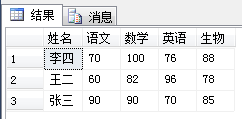
-- A2:PIVOT 方法

select username as '姓名',[语文],[数学],[英语],[生物] from StudentScores a

PIVOT

(

max(a.score) for a.subject in([语文],[数学],[英语],[生物])

)b;
示例脚本源
--A1、传统 case 方法

select username as '姓名'

,max(case [subject] when '语文' then score else 0 end) as '语文'

,max(case [subject] when '数学' then score else 0 end) as '数学'

,max(case [subject] when '英语' then score else 0 end) as '英语'

,max(case [subject] when '生物' then score else 0 end) as '生物'

from StudentScores

group by username;
-- A2:PIVOT 方法

select username as '姓名',[语文],[数学],[英语],[生物] from StudentScores a

PIVOT

(

max(a.score) for a.subject in([语文],[数学],[英语],[生物])

)b;
| C,UNPIVOT 示例1返回顶部 |
go

-- ==========================

-- 工程详细表,ByYuanbo

-- ==========================

-- drop table ProjectDetail;

create table ProjectDetail

(

projectName varchar(20),        --功能名称

overseaSupply int,            --海外供应商供给数量

nativeSupply int,            --国内供应商供给数量

southSupply int,            --南方供应商供给数量

northSupply int                --北方供应商供给数量

);

go

-- 01、添加测试数据

insert into ProjectDetail(projectName,overseaSupply,nativeSupply,southSupply,northSupply)

 values('A', 100, 200, 50, 50);

insert into ProjectDetail(projectName,overseaSupply,nativeSupply,southSupply,northSupply)

 values('B', 200, 300, 150, 150);

insert into ProjectDetail(projectName,overseaSupply,nativeSupply,southSupply,northSupply)

 values('C', 159, 400, 20, 320);

 go

 -- 02、查询数据

select * from ProjectDetail;

-- P1:查询项目每个供应商的供给数量?

-- A1:UNPIVOT 方法

select b.projectName,b.supplier,b.supllyNumber from (

select projectName,overseaSupply,nativeSupply,southSupply,northSupply from ProjectDetail) a

UNPIVOT

(

supllyNumber for supplier in(overseaSupply,nativeSupply,southSupply,northSupply)

)b;
示例脚本源
-- P1:查询项目每个供应商的供给数量?

-- A1:UNPIVOT 方法

select b.projectName,b.supplier,b.supllyNumber from (

select projectName,overseaSupply,nativeSupply,southSupply,northSupply from ProjectDetail) a

UNPIVOT

(

supllyNumber for supplier in(overseaSupply,nativeSupply,southSupply,northSupply)

)b;
| D,PIVOT 示例2返回顶部 |
go

-- ==========================

-- 销售季度表,ByYuanbo

-- ==========================

-- drop table SalesByQuarter

create table SalesByQuarter

(

year int,            -- 年份

quarter char(2),    -- 季度

amount money        -- 总额

);

go

-- 01、插入数据

set nocount on

declare @index int

declare @q int

set @index = 0

declare @year int

while (@index < 30)

begin

    set @year = 2005 + (@index % 4)

    set @q = (CasT((RAND() * 500) as int) % 4) + 1

    insert into SalesByQuarter values(@year, 'Q' + CasT(@q as char(1)), RAND() * 10000.00)

    set @index = @index + 1

end;

go

-- 02、查询

select * from SalesByQuarter;

go

-- 03、传统 CASE 方法

select year as 年份

,sum(case when quarter = 'Q1' then amount else 0 end) 一季度

,sum(case when quarter = 'Q2' then amount else 0 end) 二季度

,sum(case when quarter = 'Q3' then amount else 0 end) 三季度

,sum(case when quarter = 'Q4' then amount else 0 end) 四季度

from SalesByQuarter

group by year

order by year desc;

go

-- 04、PIVOT 方法

select year as 年份, Q1 as 一季度, Q2 as 二季度, Q3 as 三季度, Q4 as 四季度 from SalesByQuarter

PIVOT(SUM (amount) FOR quarter IN (Q1, Q2, Q3, Q4) )P

order by year desc;
示例脚本源
| E,返回顶部 |
| F,返回顶部 |
| G,相关资源返回顶部 |
| H,返回顶部 |
 |
作者:ylbtech 出处:http://storebook.cnblogs.com/ 本文版权归作者和博客园共有,欢迎转载,但未经作者同意必须保留此段声明,且在文章页面明显位置给出原文连接,否则保留追究法律责任的权利。 |
SQL Server:使用 PIVOT 行转列和 UNPIVOT 列转行的更多相关文章
- Sql server 中将数据行转列列转行(二)
老规矩,先弄一波测试数据,数据填充代码没有什么意义,先折叠起来: /* 第一步:创建临时表结构 */ CREATE TABLE #Student --创建临时表 ( StuName ), --学生名称 ...
- SQL Server里PIVOT运算符的”红颜祸水“
在今天的文章里我想讨论下SQL Server里一个特别的T-SQL语言结构——自SQL Server 2005引入的PIVOT运算符.我经常引用这个与语言结构是SQL Server里最危险的一个——很 ...
- SQL Server数据库PIVOT函数的使用详解(一)
http://database.51cto.com/art/201108/285250.htm SQL Server数据库中,PIVOT在帮助中这样描述滴:可以使用 PIVOT 和UNPIVOT 关系 ...
- SQL server 2005 PIVOT运算符的使用
原文:SQL server 2005 PIVOT运算符的使用 PIVOT,UNPIVOT运算符是SQL server 2005支持的新功能之一,主要用来实现行到列的转换.本文主要介绍PIVOT运算符的 ...
- SQL Server 2014新特性探秘(3)-可更新列存储聚集索引
简介 列存储索引其实在在SQL Server 2012中就已经存在,但SQL Server 2012中只允许建立非聚集列索引,这意味着列索引是在原有的行存储索引之上的引用了底层的数据,因此会 ...
- 通过DBCC Page查看在SQL Server中哪行数据被锁住了?
原文:通过DBCC Page查看在SQL Server中哪行数据被锁住了? 如何查看被锁的是哪行数据?通过dbcc page可以. 要想明白这个问题: 首先,需要模拟阻塞问题,这里直接模拟了阻塞问题的 ...
- SQL Server删除重复行的6个方法
SQL Server删除重复行是我们最常见的操作之一,下面就为您介绍六种适合不同情况的SQL Server删除重复行的方法,供您参考. 1.如果有ID字段,就是具有唯一性的字段 delect ta ...
- SQL Server获取指定行的数据
SQL Server获取指定行(如第二行)的数据 --SQL Server获取指定行(如第二行)的数据-- --法一(对象法)-- select * from ( select * , numbe ...
- SQL SERVER 判断是否存在数据库、表、列、视图
SQL SERVER 判断是否存在数据库.表.列.视图 --1. 判断数据库是否存在 IF EXISTS (SELECT * FROM SYS.DATABASES WHERE NAME = '数据库名 ...
随机推荐
- 踩过无数坑实现的哈夫曼压缩(JAVA)
最近可能又是闲着没事干了,就想做点东西,想着还没用JAVA弄过数据结构,之前搞过算法,就试着写写哈夫曼压缩了. 本以为半天就能写出来,结果,踩了无数坑,花了整整两天时间!!orz...不过这次踩坑,算 ...
- 【BZOJ 4832 】 4832: [Lydsy2017年4月月赛]抵制克苏恩 (期望DP)
4832: [Lydsy2017年4月月赛]抵制克苏恩 Time Limit: 1 Sec Memory Limit: 128 MBSubmit: 275 Solved: 87 Descripti ...
- luogu P1502 窗口的星星
题目链接 P1502 窗口的星星 题解 扫描线+线段树 线段树的每一个节点处理的是左边框放在当前x-1位置时的框内星星的亮度大小 按照x坐标进行离散化,得到离散化后每一个坐标x的可影响的范围 维护扫描 ...
- BZOJ.2938.[POI2000]病毒(AC自动机)
题目链接 \(Description\) 给n个模式串,问是否存在长度无限的主串,使得任何一个模式串都没有在主串中出现. \(Solution\) 先建AC自动机. 假设我们有了一个无限长的安全代码, ...
- 2013-2014 ACM-ICPC, NEERC, Southern Subregional Contest Problem C. Equivalent Cards 计算几何
Problem C. Equivalent Cards 题目连接: http://www.codeforces.com/gym/100253 Description Jane is playing a ...
- Linux学习笔记08—如何关闭防火墙
Linux系统下面自带了防火墙iptables,iptables可以设置很多安全规则.但是如果配置错误很容易导致各种网络问题,那么如果要关闭禁用防火墙怎么操作呢,咗嚛本经验以centos系统为例演示如 ...
- Node.js数据库连接池操作通用工具(MySQL模块)
出处:OSN开源站点数据库通用工具类,OSN源代码地址,https://github.com/obullxl/osnode-site,百度云演示站点,http://obullxl.duapp.com使 ...
- Sublime Text 2搭建Go开发环境,代码提示+补全+调试
本文在已安装Go环境的前提下继续. 1.安装Sublime Text 2 2.安装Package Control. 运行Sublime,按下 Ctrl+`(`在Tab键上边),然后输入以下内容: im ...
- mmc生产任务分配问题续
mmc生产任务分配问题续,本题目比上个题目难, 要注意的是,生产,销售,库存的关系, 生产+上月库存-销售=本月库存, 期初,生产=库存,销售没有.
- Unity3D实践系列06,球体撞击物体游戏
本篇实现一个球体在固定区域移动撞击Cube的游戏. 首先有1个Plane当作地面,1个Sphere当作球体,4个Cube当作墙,12个Cube当作被撞击物体,另外还有球体的撞击计算,在撞击的过程适时显 ...