
[控件] TranformFadeView
TranformFadeView
效果图:

源码地址:
https://github.com/YouXianMing/UI-Component-Collection
注意:
maskView是iOS8中新出的,用以简化alpha遮罩的操作,与layer的mask是一回事,想要修改兼容的,请考虑使用layer的mask来满足你的需求.
特点:
* 方块的个数可以自己设定
* 你可以实现你自己的策略来设定渐变消失的方式
核心源码:
//

//  TranformFadeView.h

//  TransformationFadeView

//

//  Created by XianMingYou on 15/4/16.

//  Copyright (c) 2015年 XianMingYou. All rights reserved.

//

#import <UIKit/UIKit.h>

@interface TranformFadeView : UIView

/**

 *  Image显示方式

 */

@property (nonatomic) UIViewContentMode  contentMode;

/**

 *  要显示的相片

 */

@property (nonatomic, strong) UIImage   *image;

/**

 *  垂直方向方块的个数

 */

@property (nonatomic) NSInteger          verticalCount;

/**

 *  水平方向方块的个数

 */

@property (nonatomic) NSInteger          horizontalCount;

/**

 *  开始构造出作为mask用的view

 */

- (void)buildMaskView;

/**

 *  渐变动画的时间

 */

@property (nonatomic) NSTimeInterval     fadeDuradtion;

/**

 *  两个动画之间的时间间隔

 */

@property (nonatomic) NSTimeInterval     animationGapDuration;

/**

 *  开始隐藏动画

 *

 *  @param animated 是否执行动画

 */

- (void)fadeAnimated:(BOOL)animated;

/**

 *  开始显示动画

 *

 *  @param animated 时候执行动画

 */

- (void)showAnimated:(BOOL)animated;

@end
//

//  TranformFadeView.m

//  TransformationFadeView

//

//  Created by XianMingYou on 15/4/16.

//  Copyright (c) 2015年 XianMingYou. All rights reserved.

//

#import "TranformFadeView.h"

#define  STATR_TAG  0x19871220

@interface TranformFadeView ()

/**

 *  图片

 */

@property (nonatomic, strong) UIImageView    *imageView;

/**

 *  所有的maskView

 */

@property (nonatomic, strong) UIView         *allMaskView;

/**

 *  maskView的个数

 */

@property (nonatomic)         NSInteger       maskViewCount;

/**

 *  存储maskView的编号

 */

@property (nonatomic, strong) NSMutableArray *countArray;

@end

@implementation TranformFadeView

/**

 *  初始化并添加图片

 *

 *  @param frame frame值

 */

- (void)initImageViewWithFrame:(CGRect)frame {

    self.imageView                     = [[UIImageView alloc] initWithFrame:frame];

    self.imageView.layer.masksToBounds = YES;

    [self addSubview:self.imageView];

}

- (instancetype)initWithFrame:(CGRect)frame {

    if (self = [super initWithFrame:frame]) {

        [self initImageViewWithFrame:self.bounds];

    }

    return self;

}

- (void)buildMaskView {

    /**

     *  如果没有,就返回空

     */

    if (self.horizontalCount <  || self.verticalCount < ) {

        return;

    }

    // 承载所有的maskView

    self.allMaskView = [[UIView alloc] initWithFrame:self.bounds];

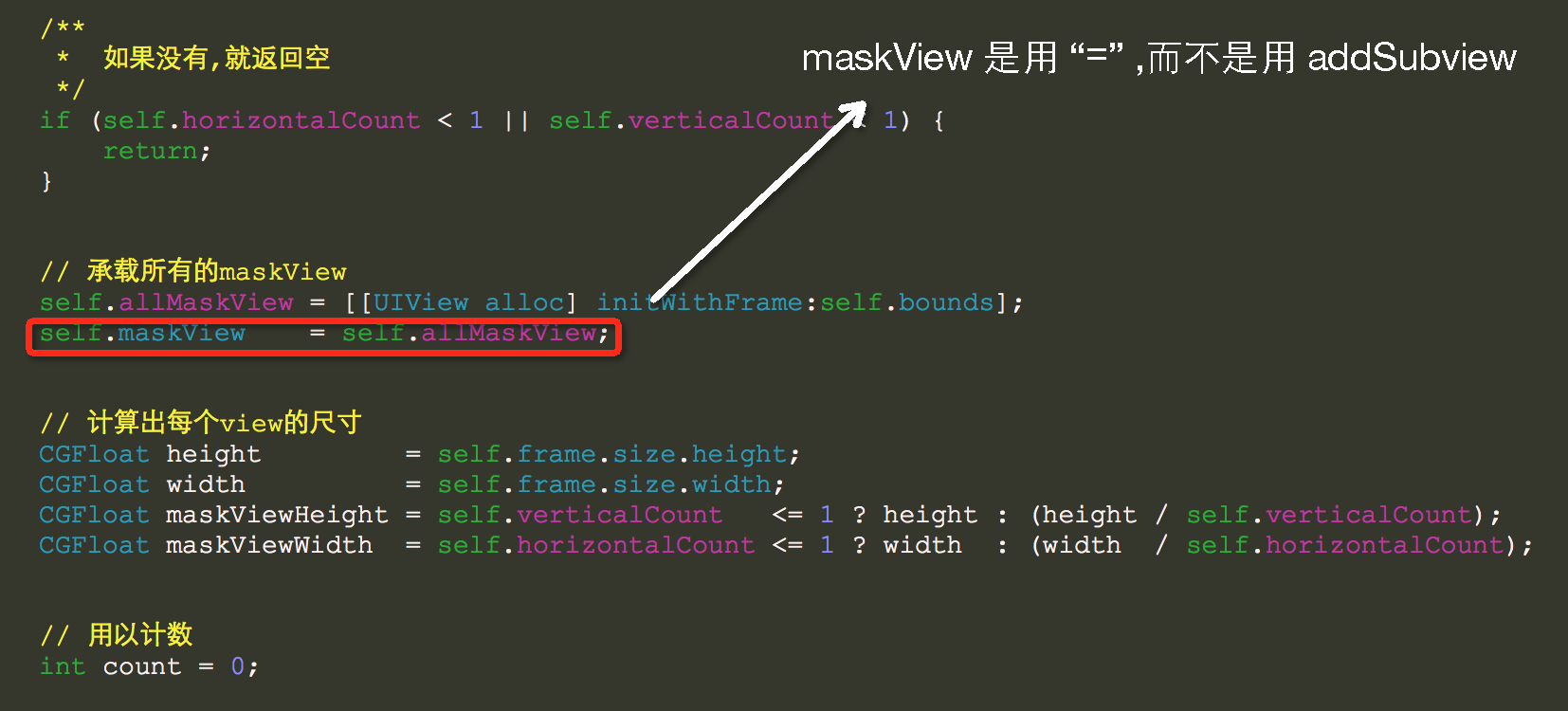
    self.maskView    = self.allMaskView;

    // 计算出每个view的尺寸

    CGFloat height         = self.frame.size.height;

    CGFloat width          = self.frame.size.width;

    CGFloat maskViewHeight = self.verticalCount   <=  ? height : (height / self.verticalCount);

    CGFloat maskViewWidth  = self.horizontalCount <=  ? width  : (width  / self.horizontalCount);

    // 用以计数

    int count = ;

    // 先水平循环,再垂直循环

    for (int horizontal = ; horizontal < self.horizontalCount; horizontal++) {

        for (int vertical = ; vertical < self.verticalCount; vertical++) {

            CGRect frame = CGRectMake(maskViewWidth  * horizontal,

                                      maskViewHeight * vertical,

                                      maskViewWidth,

                                      maskViewHeight);

            UIView *maskView         = [[UIView alloc] initWithFrame:frame];

            maskView.frame           = frame;

            maskView.tag             = STATR_TAG + count;

            maskView.backgroundColor = [UIColor blackColor];

            [self.allMaskView addSubview:maskView];

            count++;

        }

    }

    self.maskViewCount = count;

    // 存储

    self.countArray    = [NSMutableArray array];

    for (int i = ; i < self.maskViewCount; i++) {

        [self.countArray addObject:@(i)];

    }

}

/**

 *  策略模式一

 *

 *  @param inputNumber 输入

 *

 *  @return 输出

 */

- (NSInteger)strategyNormal:(NSInteger)inputNumber {

    NSNumber *number = self.countArray[inputNumber];

    return number.integerValue;

}

- (void)fadeAnimated:(BOOL)animated {

    if (animated == YES) {

        for (int i = ; i < self.maskViewCount; i++) {

            UIView *tmpView = [self maskViewWithTag:[self strategyNormal:i]];

            [UIView animateWithDuration:(self.fadeDuradtion <= .f ? .f : self.fadeDuradtion)

                                  delay:i * (self.animationGapDuration <= .f ? 0.2f : self.animationGapDuration)

                                options:UIViewAnimationOptionCurveLinear

                             animations:^{

                                 tmpView.alpha = .f;

                             } completion:^(BOOL finished) {

                             }];

        }

    } else {

        for (int i = ; i < self.maskViewCount; i++) {

            UIView *tmpView = [self maskViewWithTag:i];

            tmpView.alpha   = .f;

        }

    }

}

- (void)showAnimated:(BOOL)animated {

    if (animated == YES) {

        for (int i = ; i < self.maskViewCount; i++) {

            UIView *tmpView = [self maskViewWithTag:[self strategyNormal:i]];

            [UIView animateWithDuration:(self.fadeDuradtion <= .f ? .f : self.fadeDuradtion)

                                  delay:i * (self.animationGapDuration <= .f ? 0.2f : self.animationGapDuration)

                                options:UIViewAnimationOptionCurveLinear

                             animations:^{

                                 tmpView.alpha = .f;

                             } completion:^(BOOL finished) {

                             }];

        }

    } else {

        for (int i = ; i < self.maskViewCount; i++) {

            UIView *tmpView = [self maskViewWithTag:i];

            tmpView.alpha   = .f;

        }

    }

}

/**

 *  根据tag值获取maskView

 *

 *  @param tag maskView的tag值

 *

 *  @return tag值对应的maskView

 */

- (UIView *)maskViewWithTag:(NSInteger)tag {

    return [self.maskView viewWithTag:tag + STATR_TAG];

}

/* 重写setter,getter方法 */

@synthesize contentMode = _contentMode;

- (void)setContentMode:(UIViewContentMode)contentMode {

    _contentMode               = contentMode;

    self.imageView.contentMode = contentMode;

}

- (UIViewContentMode)contentMode {

    return _contentMode;

}

@synthesize image = _image;

- (void)setImage:(UIImage *)image {

    _image               = image;

    self.imageView.image = image;

}

- (UIImage *)image {

    return _image;

}

@end
需要注意的细节:
[控件] TranformFadeView的更多相关文章
- JS调用Android、Ios原生控件
在上一篇博客中已经和大家聊了,关于JS与Android.Ios原生控件之间相互通信的详细代码实现,今天我们一起聊一下JS调用Android.Ios通信的相同点和不同点,以便帮助我们在进行混合式开发时, ...
- HTML5 progress和meter控件
在HTML5中,新增了progress和meter控件.progress控件为进度条控件,可表示任务的进度,如Windows系统中软件的安装.文件的复制等场景的进度.meter控件为计量条控件,表示某 ...
- 百度 flash html5自切换 多文件异步上传控件webuploader基本用法
双核浏览器下在chrome内核中使用uploadify总有302问题,也不知道如何修复,之所以喜欢360浏览器是因为帮客户控制渲染内核: 若页面需默认用极速核,增加标签:<meta name=& ...
- JS与APP原生控件交互
"热更新"."热部署"相信对于混合式开发的童鞋一定不陌生,那么APP怎么避免每次升级都要在APP应用商店发布呢?这里就用到了混合式开发的概念,对于电商网站尤其显 ...
- UWP开发必备:常用数据列表控件汇总比较
今天是想通过实例将UWP开发常用的数据列表做汇总比较,作为以后项目开发参考.UWP开发必备知识点总结请参照[UWP开发必备以及常用知识点总结]. 本次主要讨论以下控件: GridView:用于显示数据 ...
- 【踩坑速记】开源日历控件,顺便全面解析开源库打包发布到Bintray/Jcenter全过程(新),让开源更简单~
一.写在前面 自使用android studio开始,就被它独特的依赖方式:compile 'com.android.support:appcompat-v7:25.0.1'所深深吸引,自从有了它,麻 ...
- 对百度WebUploader开源上传控件的二次封装,精简前端代码(两句代码搞定上传)
前言 首先声明一下,我这个是对WebUploader开源上传控件的二次封装,底层还是WebUploader实现的,只是为了更简洁的使用他而已. 下面先介绍一下WebUploader 简介: WebUp ...
- Windows API 设置窗口下控件Enable属性
参考页面: http://www.yuanjiaocheng.net/webapi/create-crud-api-1-put.html http://www.yuanjiaocheng.net/we ...
- VB.NET设置控件和窗体的显示级别
前言:在用VB.NET开发射频检测系统ADS时,当激活已存在的目标MDI子窗体时,被其他子窗体遮住了,导致目标MDI子窗体不能显示. 这个问题怎么解决呢?网上看到一篇帖子VB.NET设置控件和窗体的显 ...
随机推荐
- 自然语言处理--Word2vec(二)
前一篇,word2vec(一)主要讲了word2vec一些表层概念,以及主要介绍CBOW方法来求解词向量模型,这里主要讲论文 Distributed Representations of Words ...
- idea 错误: -source 1.6 中不支持 diamond 运算符的解决办法
在取一段github代码时,发现说是支持jdk 7 ,但是使用MAVEN编译不过去. 报错信息为错误: -source 1.6 中不支持 diamond 运算符 我使用的环境是1.7 + intel ...
- Go RabbitMQ (一)
RabbitMQ 简介 RabbitMQ是一个消息代理,用来负责接收和转发消息. 术语 生产者:生产者是负责发送消息的 队列:队列是RabbitMQ用来存储消息的,受主机内存和磁盘大小的限制,本质上是 ...
- Oracle 12c Lnux 启动脚本
#!/bin/bash # #oracle: Start/Stop Oracle Database 11g R2/12c # # chkconfig: # description: The Oracl ...
- 通用数据库连接池-C3PO
C3PO是一个开放源代码的JDBC数据连接池实现项目,实现了数据源和JNDI绑定,支持JDBC3规范和JDBC2的标准扩展.开源项目在使用:Hibernate,Spring,MYSQL等. 下载: h ...
- 数据库初识--从MySQL 出发
要学Web 开发,也得先对数据库有所了解呀.数据库分门别类,多种多样,目前我选择了 MySQL . 看了 MySQL,觉得数据库处理也不是很难,主要就是一些对数据的处理,MySQL 主要就是一些命令的 ...
- 任务四十:UI组件之日历组件(一)
任务四十:UI组件之日历组件(一) 面向人群: 有一定基础的同学 难度: 中 重要说明 百度前端技术学院的课程任务是由百度前端工程师专为对前端不同掌握程度的同学设计.我们尽力保证课程内容的质量以及学习 ...
- 15.Generator 函数的语法
Generator 函数的语法 Generator 函数的语法 简介 基本概念 Generator 函数是 ES6 提供的一种异步编程解决方案,语法行为与传统函数完全不同.本章详细介绍 Generat ...
- Python操作 Memcache、Redis
Python操作 Memcached.Redis 一.Memcached和Redis对比 1.1 Memcached和Redis的数据类型对比 memcached只有一种数据类型,key对应value ...
- Winform开发全套31个UI组件开源共享
一.前言 这套UI库是上一个公司(好几年前了)完成的.当时主要为开发公司内部ERP系统,重新设计实现了所有用到的Winform组建,包括Form窗体组建6个(支持换肤),基础控件25个.其中有很多参考 ...