
Ubuntu18.04安装openCV4.1.2
Ubuntu18.04下安装openCV4.1.2
注意:
在整个安装过程中,包括后期QT的使用中不要出现中文路径。会很坑的。
一、下载openCV4.1.2
可以再官网进行下载https://opencv.org/releases/->选择Sources下载源码然后进行编译安装
也可以在https://github.com/opencv/opencv/tree/4.1.2下载源码进行编译安装
也可以在百度云盘下载安装https://pan.baidu.com/s/1LIqIvyA6BjjAy1pkC-Mg0w。
二、更新Ubuntu18.04apt源为阿里源(如果已更新或者其他源可以自己尝试)。
// 1.备份/etc/apt/sources.list
cp /etc/apt/sources.list /etc/apt/sources.list.bak
// 2.打开/etc/apt/sources.list
sudo vim /etc/apt/sources.list
// 3.删除文件内所有内容
// 4.将一下内容复制进/etc/apt/sources.list文件中
 deb http://mirrors.aliyun.com/ubuntu/ bionic main restricted universe multiverse

 deb http://mirrors.aliyun.com/ubuntu/ bionic-security main restricted universe multiverse

 deb http://mirrors.aliyun.com/ubuntu/ bionic-updates main restricted universe multiverse

 deb http://mirrors.aliyun.com/ubuntu/ bionic-proposed main restricted universe multiverse

 deb http://mirrors.aliyun.com/ubuntu/ bionic-backports main restricted universe multiverse

 deb-src http://mirrors.aliyun.com/ubuntu/ bionic main restricted universe multiverse

 deb-src http://mirrors.aliyun.com/ubuntu/ bionic-security main restricted universe multiverse

 deb-src http://mirrors.aliyun.com/ubuntu/ bionic-updates main restricted universe multiverse

 deb-src http://mirrors.aliyun.com/ubuntu/ bionic-proposed main restricted universe multiverse

 deb-src http://mirrors.aliyun.com/ubuntu/ bionic-backports main restricted universe multiverse
// 5.更新源
 sudo apt-get update

 sudo apt-get upgrade
三、解决ubuntu1804无法安装libjasper-dev问题(速度会非常的慢,一定要耐心等待)
// 1.检测是否有问题
apt-get install libjasper-dev
如果有报错信息:errorE: unable to locate libjasper-dev则继续解决一下问题,没有则可跳过第三步。
// 2.解决方案
 sudo add-apt-repository "deb http://security.ubuntu.com/ubuntu xenial-security main"

 sudo apt update

 sudo apt install libjasper1 libjasper-dev
添加一个源来重新安装,其中,libjasper1是新的依赖项。
但是上述命令会可能产生新的问题。无法找到add-apt-repository问题
// 3.解决add-apt-repository问题
 apt-get -y install software-properties-common

 apt-get -y install apt-file

 apt-get update
四、添加openCV安装的相关准备
//1.安装cmake(如果已经安装过可以忽略)
sudo apt-get install cmake
// 2.安装openCV相关依赖(如果刚才第三步失败或者跳过的话可能 libjasper-dev 会报错)
sudo apt-get install build-essential libtbb2 libtbb-dev libjpeg-dev libpng-dev libtiff-dev libjasper-dev libdc1394--dev
事实上,OpenCV的依赖项众多,在cmake阶段检查依赖项是否安装,调整自己的功能。因此,可根据项目需要调整安装依赖项。
五、安装openCV
//1.将下载的opencv-4.1.2.zip拷贝到主目录下,并解压缩
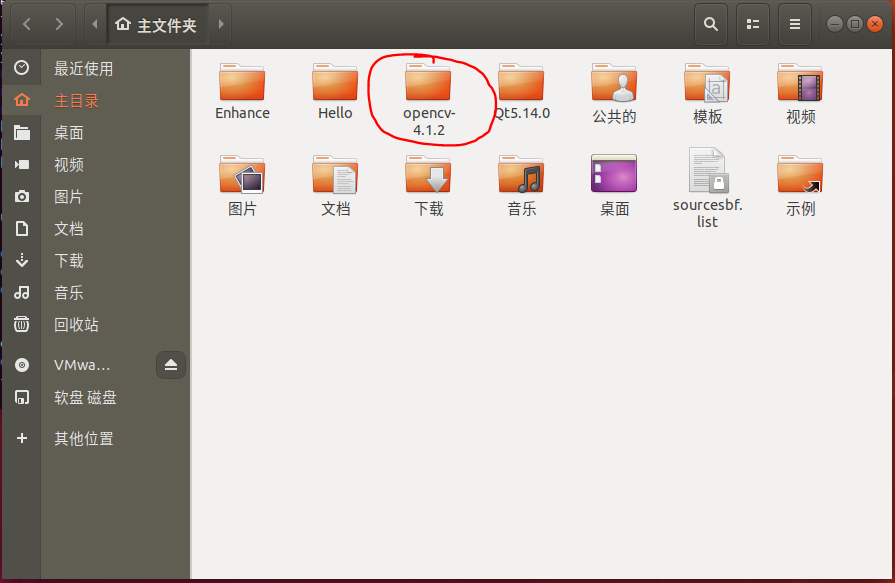
// 2.打开终端并切换至主目录下的openCV-4.1.2
cd /home/DepZcb/openCV-4.1.
// 3.在openCV-4.1.2下创建一个名为build目录,并切换到这个目录下
 mkdir build

 cd ./build
// 4.执行cmake,生成makefile文件
cmake -D CMAKE_BUILD_TYPE=Release -D OPENCV_GENERATE_PKGCONFIG=ON -D CMAKE_INSTALL_PREFIX=/usr/local ..
命令说明:
OpenCV4默认不生成.pc文件,OPENCV_GENERATE_PKGCONFIG=ON才会生成。该编译选项开启生成opencv4.pc文件,支持pkg-config功能。
可用-D CMAKE_INSTALL_PREFIX指定安装目录。如果指定安装目录则默认各部分分别安装在/usr/local/目录的include/ bin/ lib/3个文件夹下.
.. 为上一级目录。
// 5.执行makefile文件(有些人说上一步不会生成makefile,我在虚拟机和纯系统中都试过,在deepin下安装也试过没有出现类似问题。但出现了一堆其他问题,感觉还是源没有配置好)
sudo make -j[N]
说明:-j[n]我的电脑是四核四线程,可以运行make -j4,如果是八核可用make -j8。如果不想编译时影响工作,可以用-j3。建议虚拟机的同学就直接运行sudo make就行.
这一步事件很长的,大概需要半个小时往上。请耐心等待。
// 6.进行make install安装
sudo make install
六、C++环境配置
// 1.先在/etc/ld.so.conf.d/文件夹下新建一个opencv4.conf,然后再文件中写入/usr/local/lib。
 cd /etc/ld.so.conf.d/

 sudo touch opencv4.conf

 sudo sh -c 'echo "/usr/local/lib" > opencv4.conf'入代码片
// 2.更新pkg-config
sudo ldconfig
// 3.查看安装
 pkg-config --libs opencv4

 pkg-config --cflags opencv4
// 4.配置bash
 sudo vim /etc/bash.bashrc

 //在末尾添加

 PKG_CONFIG_PATH=$PKG_CONFIG_PATH:/usr/local/lib/pkgconfig

 export PKG_CONFIG_PATH
//5.更新bash
 sudo source /etc/bash.bashrc

 //激活配置然后更新database

 sudo updatedb
可能会遇到问题sudo: source: command not found,这时可如下2步处理(如图):
1> sudo -s
2> source /etc/profile
安装完成
七、可能出现的问题
// 1.QT5 Core编译错误
 CMake Warning at cmake/OpenCVFindLibsGUI.cmake: (find_package):

 By not providing "FindQt5Core.cmake" in CMAKE_MODULE_PATH this project has

 asked CMake to find a package configuration file provided by "Qt5Core", but

 CMake did not find one.

 Could not find a package configuration file provided by "Qt5Core" with any

 of the following names:

 Qt5CoreConfig.cmake

 qt5core-config.cmake

 Add the installation prefix of "Qt5Core" to CMAKE_PREFIX_PATH or set

 "Qt5Core_DIR" to a directory containing one of the above files.  If

 "Qt5Core" provides a separate development package or SDK, be sure it has

 been installed.

 Call Stack (most recent call first):

 CMakeLists.txt: (include)

 CMake Warning at cmake/OpenCVFindLibsGUI.cmake: (find_package):

 By not providing "FindQt5Gui.cmake" in CMAKE_MODULE_PATH this project has

 asked CMake to find a package configuration file provided by "Qt5Gui", but

 CMake did not find one.

 Could not find a package configuration file provided by "Qt5Gui" with any

 of the following names:

   Qt5GuiConfig.cmake

   qt5gui-config.cmake

 Add the installation prefix of "Qt5Gui" to CMAKE_PREFIX_PATH or set

 "Qt5Gui_DIR" to a directory containing one of the above files.  If "Qt5Gui"

 provides a separate development package or SDK, be sure it has been

 installed.

 Call Stack (most recent call first):

 CMakeLists.txt: (include)

 CMake Warning at cmake/OpenCVFindLibsGUI.cmake: (find_package):

 By not providing "FindQt5Widgets.cmake" in CMAKE_MODULE_PATH this project

 has asked CMake to find a package configuration file provided by

 "Qt5Widgets", but CMake did not find one.

 Could not find a package configuration file provided by "Qt5Widgets" with

 any of the following names:

   Qt5WidgetsConfig.cmake

   qt5widgets-config.cmake

 Add the installation prefix of "Qt5Widgets" to CMAKE_PREFIX_PATH or set

 "Qt5Widgets_DIR" to a directory containing one of the above files.  If

 "Qt5Widgets" provides a separate development package or SDK, be sure it has

 been installed.

 Call Stack (most recent call first):

   CMakeLists.txt: (include)

 CMake Warning at cmake/OpenCVFindLibsGUI.cmake: (find_package):

   By not providing "FindQt5Test.cmake" in CMAKE_MODULE_PATH this project has asked CMake to find a package configuration file provided by "Qt5Test", but

   CMake did not find one.

   Could not find a package configuration file provided by "Qt5Test" with any

   of the following names:

 Qt5TestConfig.cmake

 qt5test-config.cmake

 Add the installation prefix of "Qt5Test" to CMAKE_PREFIX_PATH or set

 "Qt5Test_DIR" to a directory containing one of the above files.  If

 "Qt5Test" provides a separate development package or SDK, be sure it has

 been installed.

 Call Stack (most recent call first):

   CMakeLists.txt: (include)

 CMake Warning at cmake/OpenCVFindLibsGUI.cmake: (find_package):

   By not providing "FindQt5Concurrent.cmake" in CMAKE_MODULE_PATH this

   project has asked CMake to find a package configuration file provided by

   "Qt5Concurrent", but CMake did not find one.

   Could not find a package configuration file provided by "Qt5Concurrent"

   with any of the following names:

     Qt5ConcurrentConfig.cmake

     qt5concurrent-config.cmake

   Add the installation prefix of "Qt5Concurrent" to CMAKE_PREFIX_PATH or set

   "Qt5Concurrent_DIR" to a directory containing one of the above files.  If

   "Qt5Concurrent" provides a separate development package or SDK, be sure it

   has been installed.

   Call Stack (most recent call first):

   CMakeLists.txt: (include)

 qmake: could not exec '/usr/lib/x86_64-linux-gnu/qt4/bin/qmake': No such file     or         directory

 CMake Error at /usr/share/cmake-2.8/Modules/FindQt4.cmake: (message):

   Found unsuitable Qt version "" from NOTFOUND, this code requires Qt .x

 Call Stack (most recent call first):

   cmake/OpenCVFindLibsGUI.cmake: (find_package)

   CMakeLists.txt: (include)

 -- Configuring incomplete, errors occurred!

 See also "/home/*******/OpenCV/opencv-2.4.9/build/CMakeFiles/CMakeOutput.log".

 See also "/home/*******/OpenCV/opencv-2.4.9/build/CMakeFiles/CMakeError.log".

 Qt5Core-CMake did not find one
解决办法:安装qt5-default
sudo apt-get install qt5-default
八、python环境的配置
// 1.安装python和numpy
sudo apt-get install python-dev python-numpy python3-dev python3-numpy #如果已经安装过,则该步骤省略
// 2.验证
$ python3

>>> import cv2

>>> print(cv2.__version__)

'4.1.1'

>>>
九、卸载openCV
如果安装出现了百度不能解决的问题。最好的办法就是卸载重新装一次(第一次安装时前前后后卸载了四五次)。
// 1. 删除openCV4.conf
 cd /etc/ld.so.conf.d/

 sudo rm opencv4.conf
// 2.卸载
 cd

 cd ./OpenCV-4.1./build

 sudo make uinstall
Ubuntu18.04安装openCV4.1.2的更多相关文章
- Ubuntu18.04安装OpenCV4.1.0
Ubuntu18.04安装OpenCV4.1.0 1.首先要安装依赖 sudo apt-get install build-essential \ cmake git libgtk2.0-dev pk ...
- Ubuntu18.04安装mysql5.7
Ubuntu18.04安装mysql5.7 1.1安装 首先执行下面三条命令: # 安装mysql服务 sudo apt-get install mysql-server # 安装客户端 sudo a ...
- Ubuntu18.04安装RabbitMQ
Ubuntu18.04安装RabbitMQ 2018年06月10日 19:32:38 dmfrm 阅读数:2492 版权声明:本文为博主原创文章,未经博主允许不得转载. https://blog ...
- ubuntu18.04 安装mysql不出现设置 root 帐户的密码问题(装)
ubuntu18.04 安装mysql不出现设置 root 帐户的密码问题 https://blog.csdn.net/NeptuneClouds/article/details/80995 ...
- ubuntu18.04 安装hadoop 2.7.3+hive 2.3.4
1. 安装hadoop 详细请参见本人的另外一片博文<Hadoop 2.7.3 分布式集群安装> 2. 下载hive 2.3.4 解压文件到/opt/software -bin.tar.g ...
- Ubuntu18.04安装Virtualenv虚拟环境
在Ubuntu18.04安装Virtualenv虚拟环境 [实验环境]: 在这台电脑上已经安装了python3 [安装参考] 1.查看是否已安装virtualenv virtualenv --vers ...
- Ubuntu18.04安装thunderbird并设置中文
Ubuntu18.04安装thunderbird并设置中文 安装thunderbird sudo apt-get install thunderbird 安装中文包 sudo apt-get inst ...
- Ubuntu18.04安装Docker, centos7安装Docker
Ubuntu18.04安装Docker 第一种方法从Ubuntu的仓库直接下载安装: 安装比较简单,这种安装的Docker不是最新版本,不过对于学习够用了,依次执行下面命令进行安装. $ sudo a ...
- Ubuntu18.04安装和配置Java JDK11并卸载自带OpenJDK
卸载自带的OpenJDK方法: 在终端执行命令:sudo apt-get remove openjdk* Ubuntu18.04安装JDK11.0.2 前面步骤一样,可参考:https://www.c ...
随机推荐
- JSON《===》JavaBean的相互转换
1.JSON的作用和好处 在JavaWeb项目中前后端直接的交互,接口之间的对接等等,基本离不开JSON. JSON: 全称JavaScript Object Notation(JavaScript ...
- java架构之路(MQ专题)kafka集群配置和简单使用
前面我们说了RabbitMQ和RocketMQ的安装和简单的使用,这次我们说一下Kafka的安装配置,后面我会用几个真实案例来说一下MQ的真实使用场景.天冷了,不愿意伸手,最近没怎么写博客了,还请见谅 ...
- [深度学习][图像处理][毕设][笔记][安装环境][下载地址]安装VS2013、matconvnet、cuda、cudnn过程中产生的一些记录,2018.5.6号
最近半个多月,被cuda等软件折磨的死去活来,昨天下午,终于安装好了环境,趁着matlab正在,在线下载VOT2016数据集,3点睡眼惺忪被闹醒后,睡不着,爬上来写这份记录. 先记录一下自己电脑的基本 ...
- 力扣(LeetCode)4的幂 个人题解
给定一个整数 (32 位有符号整数),请编写一个函数来判断它是否是 4 的幂次方. 示例 1: 输入: 16 输出: true 示例 2: 输入: 5 输出: false 进阶:你能不使用循环或者递归 ...
- ndk编译出来的executable动态库入口函数的参数错乱
早些时间用ndk编译带main入口函数的动态库,测试可运行.今天要作它用时,发现在这个入口函数并没有传入正确的参数. hello.cpp有main函数,用ndk分别编译成可执行文件和动态库文件,使两者 ...
- 解构ffmpeg(一)
ffmpeg应用程序项目将其核心库libav*的使用或编程抽象成FilterGraph,InputFile,OutputFile,InputStream,OutputStream,InputFilte ...
- 20191121-6 Scrum立会报告+燃尽图 02
此作业的要求参见https://edu.cnblogs.com/campus/nenu/2019fall/homework/10066一.小组情况 队名:扛把子 组长:孙晓宇 组员:宋晓丽 梁梦瑶 韩 ...
- Single-Shot Object Detection with Enriched Semantics
整合一下能够查到的资料,然后结合自己的理解,算是对这篇文章的一个小小的总结吧.这是CVPR2018的一篇关于小目标检测的文章,出发点是作者认为小目标的检测信息随着层数的增加而不断地丢失了,所以想利用语 ...
- 五分钟了解物联网SIM卡 | 我的物联网成长记10
[摘要] SIM卡是移动通信中不可或缺的组成部分,在物联网解决方案中,设备移动上网也需要使用SIM卡.那么,SIM卡是什么?SIM卡有几种?各种SIM卡有什么区别?本文将为您答疑解惑. 通信进化史 过 ...
- Kibana笔记
• 根据id查询 GET index_1/doc/1 • 全文检索 GET index_1/doc/_search GET index_1/doc/_search{ "query" ...