
Salesforce LWC学习(七) Navigation & Toast
上一篇我们介绍了针对LWC中常用的LDS的适配的wire service以及@salesforce模块提供的相关的service,其实LWC中还提供其他的好用的service,比如针对导航相关的lightning/navigation以及展示toast提示信息相关的lightning/platformShowToastEvent。此篇主要针对这两个service进行简单的介绍。
一. lightning/navigation
我们有好多场景会用到跳转操作,比如创建记录以后跳转到此记录详情页,点击连接跳转到下载页面或者直接下载文件,跳转到某个列表等等。LWC中封装了lightning/navigation service去实现相关的跳转操作。当然,此service除了封装了跳转相关的功能,还封装了获取当前PageReference的功能。详情如下所示。
1. CurrentPageReference:此方法用于获取当前页面的引用,使用以下的声明便可以获取到当前的页面的引用了。如果我们想编辑其键值对的parameter,我们需要更新当前page reference的Page state。至于如何更新,下面会有介绍。
 import { CurrentPageReference } from 'lightning/navigation';

 @wire(CurrentPageReference)

 pageRef;
返回的pageRef为PageReference变量。PageReference为js封装的对象,有三个变量。
1) type:当前PageReference的类型。lwc封装了以下的类型:
- Lightning Component
- Knowledge Article
- Login Page
- Named Page
- Navigation Item Page
- Object Page
- Record Page
- Record Relationship Page
- Web Page
这些PageReference详情可以参看:https://developer.salesforce.com/docs/component-library/documentation/lwc/lwc.reference_page_reference_type
我们常用的有Lightning Component / Object Page / Record Page / Record Relationship Page / Web Page。
2)attribute:声明不同类型的PageReference创建PageReference需要配置不同的attribute,细节的attribute的配置同看上面链接。
3)state:用来存储键值对类型的parameter。我们在URL中可能传递参数,使用CurrentPageReference获取到的PageReference中,state存储的便是其参数部分。
下面来一个demo更好的了解用法以及返回内容。
 import { LightningElement, wire } from 'lwc';

 import {CurrentPageReference} from 'lightning/navigation';

 export default class GetCurrentPageReferenceDemo extends LightningElement {

     @wire(CurrentPageReference)

     pageRef;

     get currentPageInfo() {

         if(this.pageRef !== undefined) {

             return JSON.stringify(this.pageRef);

         }

         return '';

     }

 }
getCurrentPageReferenceDemo.html:
 <template>

     {currentPageInfo}

 </template>
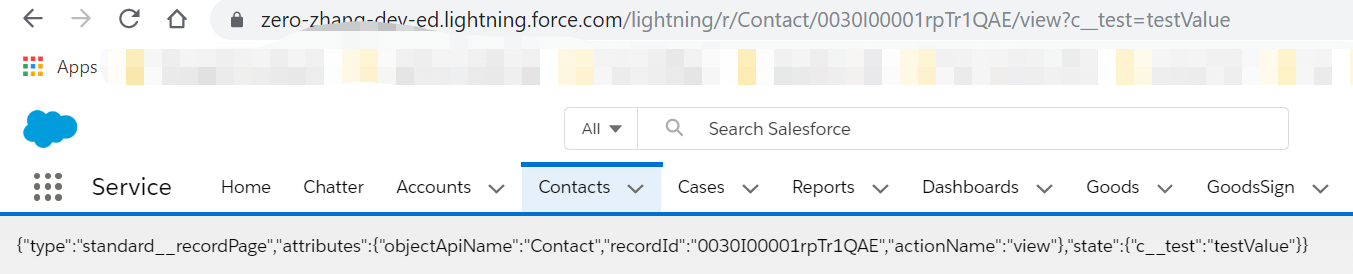
显示结果:我们将此component放在contacts的详情页里面,并且针对详情页的URL手动设置了parameter,返回的结果如下图所示。
2. NavigationMixin:使用此adapter实现跳转功能。此adapter封装了两个API实现跳转。
[NavigationMixin.Navigate](pageReference, [replace])- 在应用中一个component调用此API跳转到另外一个页面;[NavigationMixin.GenerateUrl](pageReference)- component调用此API获取需要跳转的URL的Promise。
这两个API,先调用GenerateUrl获取到Promise,然后使用Navigate的API即可实现跳转。我们使用此service前需要先在头引入,和其他的区别为我们还需要在javascript的class中去继承NavigationMixin。
import { NavigationMixin } from 'lightning/navigation';

export default class MyCustomElement extends NavigationMixin(LightningElement) {}
上面的两个API我们也可以看见pageReference参数,此参数和上面的CurrentPageReference返回值类型相同,均为javascript中封装的CurrentPageReference对象。我们可以使用plain object去拼接此对象的变量。说的比较绕,下面通过一个官方的demo便可以更好的了解。
navigationLineExample.js:在connectedCallback生命周期处声明了PageReference的Promise,用于handleClick时去触发。
 import { LightningElement, track } from 'lwc';

 import { NavigationMixin } from 'lightning/navigation';

 export default class NavigationLinkExample extends NavigationMixin(LightningElement) {

     @track url;

     connectedCallback() {

         // Store the PageReference in a variable to use in handleClick.

         // This is a plain Javascript object that conforms to the

         // PageReference type by including "type" and "attributes" properties.

         // The "state" property is optional.

         this.accountHomePageRef = {

             type: "standard__objectPage",

             attributes: {

                 "objectApiName": "Account",

                 "actionName": "home"

             }

         };

         this[NavigationMixin.GenerateUrl](this.accountHomePageRef)

             .then(url => this.url = url);

     }

     handleClick(evt) {

         // Stop the event's default behavior.

         // Stop the event from bubbling up in the DOM.

         evt.preventDefault();

         evt.stopPropagation();

         // Navigate to the Account Home page.

         this[NavigationMixin.Navigate](this.accountHomePageRef);

     }

 }
navigationLineExample.html:点击按钮触发handleClick方法
 <template>

     <div>

         <a href={url} onclick={handleClick}>Account Home</a>

     </div>

 </template>
将demo配置在account的record page中,通过上面的demo我们便可以实现跳转到Account的home页面的功能,也可以看到声明 PageReference中的type以及attributes的神奇之处。原理了解以后只需要通过改变PageReference Type以及其对应的attribute我们便可以实现更多的功能,感兴趣的小伙伴可以自行尝试。
我们在跳转或者自刷新时,有时需要传递参数,在LWC中上面也提到过使用state变量传递参数,我们在更新此变量前先了解一下相关的限制和要求。
- pagereference对象已冻结,因此不能直接更改它。如果我们想要跳转到一个同样的页面并且这个页面包含了已经更新了的state,我们需要copy一下当前的这个PageReference然后使用Object.assign({}, pageReference)方式去更新state,如果跳转到不同的页面,我们只需要创建plain PageReference的时候传进去即可,就不会有此点所说的限制。
- state变量在构建键值对时,键必须使用namespace加上两个下划线__作为前缀,如果不是managed package,则namespace为c,比如我们想要传递testParam的值为testValue。则构建键值对应该为state.c__testParam = testValue;
- state变量中的键值对的value必须全部为string类型因为state变量的键值对均可以序列化到URL query parameter。
- 如果想要删除state的某个键值对,只需要设置value为undefined即可。
通过上述1,2,3,4点我们可以看出来,1属于限制,2,3,4属于规范。我们针对跳转到其他页面直接设置state即可,如果针对跳转到当前页面,只是参数变化,便需要考虑上面的第一点。通过官方提供的demo可以更好的了解针对parameter的处理。
pageStateChangeExample.js:demo中考虑的时跳转到当前页面,只是参数的变化的处理。此时pagereference已经冻结,只能通过Object.assign方法去处理。
 import { LightningElement, wire, track } from 'lwc';

 import { CurrentPageReference, NavigationMixin } from 'lightning/navigation';

 export default class PageStateChangeExample extends NavigationMixin(LightningElement) {

     // Injects the page reference that describes the current page

     @wire(CurrentPageReference)

     setCurrentPageReference(currentPageReference) {

         this.currentPageReference = currentPageReference;

         if (this.connected) {

             // We need both the currentPageReference, and to be connected before

             // we can use NavigationMixin

             this.generateUrls();

         } else {

             // NavigationMixin doesn't work before connectedCallback, so if we have

             // the currentPageReference, but haven't connected yet, queue it up

             this.generateUrlOnConnected = true;

         }

     }

     @track

     showPanelUrl;

     @track

     noPanelUrl;

     // Determines the display for the component's panel

     get showPanel() {

         // Derive this property's value from the current page state

         return this.currentPageReference &&

             this.currentPageReference.state.c__showPanel == 'true';

     }

     generateUrls() {

         this[NavigationMixin.GenerateUrl](this.showPanelPageReference)

             .then(url => this.showPanelUrl = url);

         this[NavigationMixin.GenerateUrl](this.noPanelPageReference)

             .then(url => this.noPanelUrl = url);

     }

     // Returns a page reference that matches the current page

     // but sets the "c__showPanel" page state property to "true"

     get showPanelPageReference() {

         return this.getUpdatedPageReference({

             c__showPanel: 'true' // Value must be a string

         });

     }

     // Returns a page reference that matches the current page

     // but removes the "c__showPanel" page state property

     get noPanelPageReference() {

         return this.getUpdatedPageReference({

             // Removes this property from the state

             c__showPanel: undefined

         });

     }

     // Utility function that returns a copy of the current page reference

     // after applying the stateChanges to the state on the new copy

     getUpdatedPageReference(stateChanges) {

         // The currentPageReference property is read-only.

         // To navigate to the same page with a modified state,

         // copy the currentPageReference and modify the copy.

         return Object.assign({}, this.currentPageReference, {

             // Copy the existing page state to preserve other parameters

             // If any property on stateChanges is present but has an undefined

             // value, that property in the page state is removed.

             state: Object.assign({}, this.currentPageReference.state, stateChanges)

         });

     }

     connectedCallback() {

         this.connected = true;

         // If the CurrentPageReference returned before this component was connected,

         // we can use NavigationMixin to generate the URLs

         if (this.generateUrlOnConnected) {

             this.generateUrls();

         }

     }

     handleShowPanelClick(evt) {

         evt.preventDefault();

         evt.stopPropagation();

         // This example passes true to the 'replace' argument on the navigate API

         // to change the page state without pushing a new history entry onto the

         // browser history stack. This prevents the user from having to press back

         // twice to return to the previous page.

         this[NavigationMixin.Navigate](this.showPanelPageReference, true);

     }

     handleNoPanelClick(evt) {

         evt.preventDefault();

         evt.stopPropagation();

         this[NavigationMixin.Navigate](this.noPanelPageReference, true);

     }

 }
pageStateChangeExample.html:针对showPanel以及noPanelUrl的处理
<template>

    <div>

        <a href={showPanelUrl} onclick={handleShowPanelClick}>Show Panel</a>

    </div>

    <div if:true={showPanel}>

        <h1>This is the panel</h1>

        <a href={noPanelUrl} onclick={handleNoPanelClick}>Hide Panel</a>

    </div>

</template>
二. Lightning/platformShowToastEvent
当我们进行DML操作或者某种场景或者validation需要展示一些信息,当然我们可以通过ligtning-messages展示信息在页面上,另外一种方式可以使用toast方式仅显示几秒的提示信息随后消失的样式。LWC提供了lightning/platformShowToastEvent实现此功能。模块中封装了ShowToastEvent事件,实例化以后dispatchEvent即可使用。
ShowToastEvent事件有以下的几个参数
- title:toast的标题部分,展示在header区域;
- message:toast的内容部分。此message可以是一个纯文本,也可以是一个包含place holder的文本,place holder通常是URL或者文本;
- messageData:当message中包含{} place holder时,使用messageData进行替换;
- variant:toast中展示的theme以及icon的样式。有几个值供选择:info / success / warning / error。我们可以根据不同的场景显示不同的variant进行展示;
- mode:用来决定toast展示多长时间。有几个值供选择:dismissable/pester/sticky。dismissable是默认的值,功能为用户点击关闭按钮或者经过3秒以后toast消失;pester用于只显示3秒,3秒以后自动消失(此种没有关闭按钮);sticky用于只有用户点击关闭按钮才会消失。
我们在recordEditFormSample展示此用法。
 <template>

     <lightning-record-edit-form

         record-id={recordId}

         object-api-name={objectApiName}

         onsubmit={handleSubmit}

         onload={handleLoad}

         onsuccess={handleSuccess}

         onerror={handleError}

         >

         <lightning-messages></lightning-messages>

         <lightning-input-field field-name="Name"></lightning-input-field>

         <lightning-input-field field-name="Industry"></lightning-input-field>

         <lightning-input-field field-name="AnnualRevenue"></lightning-input-field>

         <div class="slds-m-top_medium">

             <lightning-button class="slds-m-top_small" label="Cancel" onclick={handleReset}></lightning-button>

             <lightning-button class="slds-m-top_small" type="submit" label="Save Record"></lightning-button>

         </div>

     </lightning-record-edit-form>

 </template>
recordEditFormSample.js
 /* eslint-disable no-console */

 import { LightningElement, api } from 'lwc';

 import { ShowToastEvent } from 'lightning/platformShowToastEvent';

 export default class RecordEditFormSample extends LightningElement {

     @api recordId;

     @api objectApiName;

     handleSubmit(event) {

         event.preventDefault();       // stop the form from submitting

         const fields = event.detail.fields;

         if(fields.Industry === null || fields.Industry === '') {

             const evt = new ShowToastEvent({

                 title: "Account Operated Failed",

                 message: "Account Industry cannot be blank",

                 variant: "error",

                 mode:"pester"

             });

             this.dispatchEvent(evt);

             return;

         }

         this.template.querySelector('lightning-record-edit-form').submit(fields);

     }

     handleLoad(event) {

         console.log('execute load');

     }

     handleSuccess(event) {

         const evt = new ShowToastEvent({

             title: "Account Operated Success",

             message: "Record is :" + event.detail.id,

             variant: "success"

         });

         this.dispatchEvent(evt);

     }

     handleError(event) {

         const evt = new ShowToastEvent({

             title: "Account Operated Failed",

             message: event.detail.message,

             variant: "error",

             mode: "sticky"

         });

         this.dispatchEvent(evt);

     }

     handleReset(event) {

         const inputFields = this.template.querySelectorAll(

             'lightning-input-field'

         );

         if (inputFields) {

             inputFields.forEach(field => {

                 field.reset();

             });

         }

      }

 }
效果展示:
sticky样式,只有点击关闭按钮才能消失toast。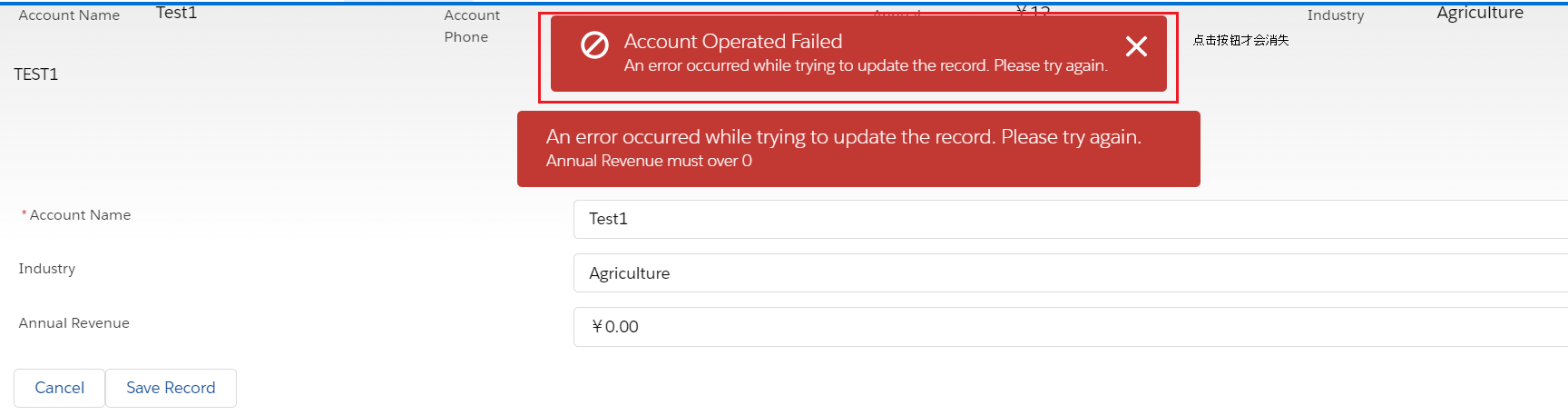
总结:此篇主要说的是Navigation以及Toast相关的知识,其中Navigation可以根据不同的type以及attribute去做不同功能的跳转以及下载等操作,篇中例举的比较少,感兴趣的可以深入学习。篇中有错误地方欢迎指出,有不懂的欢迎留言。
Salesforce LWC学习(七) Navigation & Toast的更多相关文章
- Salesforce LWC学习(三十) lwc superbadge项目实现
本篇参考:https://trailhead.salesforce.com/content/learn/superbadges/superbadge_lwc_specialist 我们做lwc的学习时 ...
- Salesforce LWC学习(三十九) lwc下quick action的recordId的问题和解决方案
本篇参考: https://developer.salesforce.com/docs/component-library/bundle/force:hasRecordId/documentation ...
- Salesforce LWC学习(十七) 前端知识之 onclick & onblur & onmousedown
在Salesforce LWC学习(八) Look Up组件实现篇中,我们实现了公用的lookup组件,使用的过程中,会发现当我们输入内容以后,搜索出来的列表便无法被清空. 针对此种情况我们打算优化一 ...
- Salesforce LWC学习(四十) dynamic interaction 浅入浅出
本篇参考: Configure a Component for Dynamic Interactions in the Lightning App Builder - Salesforce Light ...
- Salesforce LWC学习(二十一) Error浅谈
本篇参考:https://developer.salesforce.com/docs/component-library/documentation/en/lwc/data_error https:/ ...
- Salesforce LWC学习(三) import & export / api & track
我们使用vs code创建lwc 时,文件会默认生成包含 template作为头的html文件,包含了 import LightningElement的 js文件以及对应的.js-meta.xml文件 ...
- Salesforce LWC学习(十五) Async 以及 Picklist 公用方法的实现
本篇参考:salesforce 零基础学习(六十二)获取sObject中类型为Picklist的field values(含record type) https://developer.salesfo ...
- Salesforce LWC学习(三十六) Quick Action 支持选择 LWC了
本篇参考: https://developer.salesforce.com/docs/component-library/documentation/en/lwc/lwc.use_quick_act ...
- Salesforce LWC学习(十六) Validity 在form中的使用浅谈
本篇参考: https://developer.salesforce.com/docs/component-library/bundle/lightning-input/documentation h ...
随机推荐
- appcan IDE 无法 请求数据
我们4月27号从4.0.1升级到4.0.2后,IDE本地预览get请求不到数据.但是在线打包安装到手机又是正常的. 先下载 "uexXmlHttpMgr.rar",下载链接:htt ...
- Pandas 库之 DataFrame
How to use DataFrame ? 简介 创建 DataFrame 查看与筛选数据:行列选取 DataFrame 数据操作:增删改 一.About DataFrame DataFrame 是 ...
- 30213Java_接口
1.简介 接口作用 为什么需要接口?接口和抽象类的区别? 接口就是比“抽象类”还“抽象”的“抽象类”,可以更加规范的对子类进行约束.全面地专业地实现了:规范和具体实现的分离. 抽象类还提供某些具体实现 ...
- 汇总VSCode中比较好用的插件
使用vscode编辑器两年的时间,总结出前端一些比较方便的插件 1. Auto Close Tag 自动添加HTML / XML关闭标签 2. Auto Complete Tag 自动完成标签 3 A ...
- Go-cron定时任务
1.cron(计划任务) 按照约定的时间,定时的执行特定的任务(job). cron 表达式 表达了这种约定. cron 表达式代表了一个时间集合,使用 6 个空格分隔的字段表示. 秒 分 时 日 月 ...
- Python模块之pexpect
一.pexpect模块介绍 Pexpect使Python成为控制其他应用程序的更好工具.可以理解为Linux下的expect的Python封装,通过pexpect我们可以实现对ssh,ftp,pass ...
- windows下搭建syslog服务器及基本配置
一.环境 windows7 64位+ kiwi_syslog_server_9.5.0 kiwi_syslog百度云下载地址: 链接: https://pan.baidu.com/s/1EpPBNsL ...
- 40 篇原创干货,带你进入 Spring Boot 殿堂!
两个月前,松哥总结过一次已经完成的 Spring Boot 教程,当时感受到了小伙伴们巨大的热情. 两个月过去了,松哥的 Spring Boot 教程又更新了不少,为了方便小伙伴们查找,这里再给大家做 ...
- Ubuntu 图形界面入门
Ubuntu 图形界面入门 一.目标 熟悉 Ubuntu 图形界面的基本使用 二..Ubuntu 的任务栏 三. 窗口操作按钮 四. 窗口菜单条
- restapi(6)- do it the functional way, 重温函数式编程
再次看了看上篇博客的源代码,发现连自己都看不懂了.想是为了赶时间交货不知不觉又回到OOP行令模式了,看看下面这段代码: (post & parameters('pid,'desc.?,'wid ...