
Salesforce LWC学习(十七) 前端知识之 onclick & onblur & onmousedown
在Salesforce LWC学习(八) Look Up组件实现篇中,我们实现了公用的lookup组件,使用的过程中,会发现当我们输入内容以后,搜索出来的列表便无法被清空。
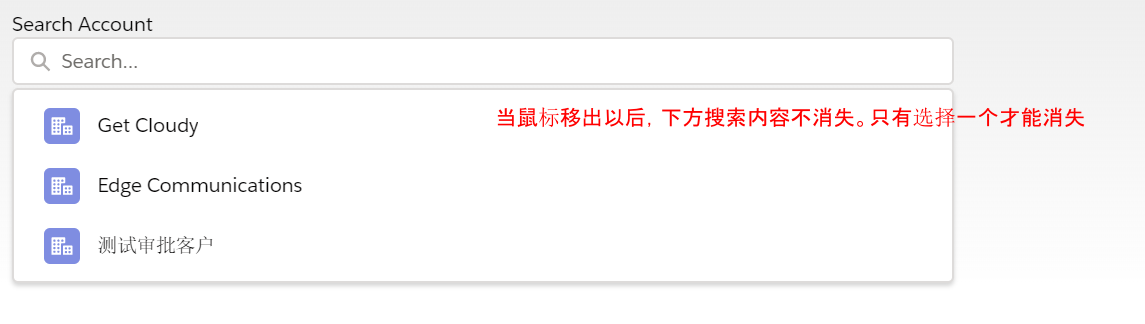
针对此种情况我们打算优化一下代码,针对前端的输入框,增加onblur函数,当鼠标移除情况下,设置searchTerm为空字符串并且不让下方的options展示,当鼠标移入或者输入内容情况下在展示下方的options.
customLookUpForLwc.html:输入框添加onblur,下方options使用变量控制显隐
<template>

    <div>

        <div class="slds-form-element">

            <div class="slds-form-element__control">

                <div class="slds-combobox_container">

                    <div id="box" class={boxClass} aria-expanded="true" aria-haspopup="listbox" role="combobox">

                        {searchLabel}

                        <div class="slds-combobox__form-element slds-input-has-icon slds-input-has-icon_right" role="none">

                            <template if:true={isValue}>

                                <div id="lookup-pill" class="slds-pill-container">

                                    <lightning-pill class="pillSize" label={valueObj} name={valueObj} onremove={handleRemovePill}>

                                        <lightning-icon icon-name={iconName} alternative-text="acc" ></lightning-icon>

                                    </lightning-pill>

                                </div>

                            </template>

                            <template if:false={isValue}>

                                <div class="slds-p-top_none">

                                    <lightning-input class={inputClass} type="search" id="input" value={searchTerm}

                                        onclick={handleClick}  onchange={onChange}

                                        onblur={handleBlurEvent}

                                        variant="label-hidden" autocomplete="off" placeholder="Search..." label='account search'>

                                    </lightning-input>

                                </div>

                            </template>

                        </div>

                        <template if:true={isEnableShowOptions}>

                            <div id="listbox-id-1" class="slds-dropdown slds-dropdown_length-with-icon-7 slds-dropdown_fluid" role="listbox">

                                <ul class="slds-listbox slds-listbox_vertical" role="presentation">

                                    <template for:each={options} for:item="item">

                                        <li key={item.Id} onclick={onSelect} data-id={item.Id} role="presentation">

                                            <span class="slds-lookup__item-action slds-lookup__item-action--label" role="option">

                                                <lightning-icon class="slds-icon slds-icon--small slds-icon-text-default" icon-name={iconName} alternative-text={objName} size="small"></lightning-icon>

                                                <span class="slds-truncate">{item.Name}</span>

                                            </span>

                                        </li>

                                    </template>

                                </ul>

                            </div>

                        </template>

                    </div>

                </div>

            </div>

        </div>

    </div>

</template>
customLookUpForLwc.js:搜索结果处增加处理项,同时增加是否显隐标签的判断逻辑
/* eslint-disable no-console */

/* eslint-disable @lwc/lwc/no-async-operation */

import lookUp from '@salesforce/apex/CustomLookUpForLwcController.lookUp';

import { getObjectInfo } from 'lightning/uiObjectInfoApi';

import { getRecord } from 'lightning/uiRecordApi';

import { api, LightningElement, track, wire } from 'lwc';

export default class CustomLookUpForLwc extends LightningElement {

    //store object record id

    @api valueId;

    //record API name

    @api objName;

    //record icon name,see Lightning Design System to choose

    @api iconName;

    @api filter = '';

    //unique key used to mark the unique component. several component use this component need to mapping

    @api uniqueKey;

    //used to set the field to fetch.eg: ['Account.Name'] means we need to search account name field as filter

    @api fields;

    //search label show in lookup component

    @api searchLabel;

    @track searchTerm = '';

    //record name value

    @track valueObj;

    //record href

    @track href;

    //fetch result

    @track options;

    //fetch result backup

    @track optionsBackup;

    //is available value to show in lightning-pill

    @track isValue = false;

    //indicator if enable show options

    @track isEnableShowOptions = true;

    //css

    @track boxClass = 'slds-combobox slds-dropdown-trigger slds-dropdown-trigger_click slds-has-focus';

    @track inputClass = '';

    @wire(lookUp, {searchTerm : '$searchTerm', myObject : '$objName', filter : '$filter'})

    wiredRecords({ error, data }) {

        if (data) {

            this.record = data;

            this.error = undefined;

            if(this.searchTerm && this.isEnableShowOptions) {

                this.options = this.record;

            } else if(this.isEnableShowOptions) {

                if(!this.optionsBackup) {

                    this.optionsBackup = this.record;

                }

                this.options = this.optionsBackup;

            }

        } else if (error) {

            this.error = error;

            this.record = undefined;

        }

    }

    //To get preselected or selected record

    @wire(getRecord, { recordId: '$valueId', fields: '$fields' })

    wiredOptions({ error, data }) {

        if (data) {

            this.record = data;

            this.error = undefined;

            this.valueObj = this.record.fields.Name.value;

            this.href = '/'+this.record.id;

            this.isValue = true;

        } else if (error) {

            this.error = error;

            this.record = undefined;

        }

    }

    handleClick() {

        this.searchTerm = '';

        this.isEnableShowOptions = true;

        this.inputClass = 'slds-has-focus';

        this.boxClass = 'slds-combobox slds-dropdown-trigger slds-dropdown-trigger_click slds-has-focus slds-is-open';

    }

    onSelect(event) {

        console.log("In onSelect");

        let ele = event.currentTarget;

        let selectedId = ele.dataset.id;

        //As a best practise sending selected value to parent and inreturn parent sends the value to @api valueId

        let key = this.uniqueKey;

        const valueSelectedEvent = new CustomEvent('valueselect', {

            detail: { selectedId, key },

        });

        this.dispatchEvent(valueSelectedEvent);

        this.boxClass = 'slds-combobox slds-dropdown-trigger slds-dropdown-trigger_click slds-has-focus';

    }

    onChange(event) {

        this.searchTerm = event.target.value;

        this.isEnableShowOptions = true;

    }

    handleBlurEvent() {

        this.isEnableShowOptions = false;

        this.searchTerm = '';

    }

    handleRemovePill() {

        this.isValue = false;

        let selectedId = '';

        let key = this.uniqueKey;

        const valueSelectedEvent = new CustomEvent('valueselect', {

            detail: { selectedId, key },

        });

        this.dispatchEvent(valueSelectedEvent);

    }

}
我们修改以后运行结果为:当我们输入内容onblur失去焦点时,确实实现了下方内容隐藏,但是当我们输入内容有结果选中下方item时,item也并没有选中而是同样出现了下方内容隐藏的效果。这个是什么原因呢?
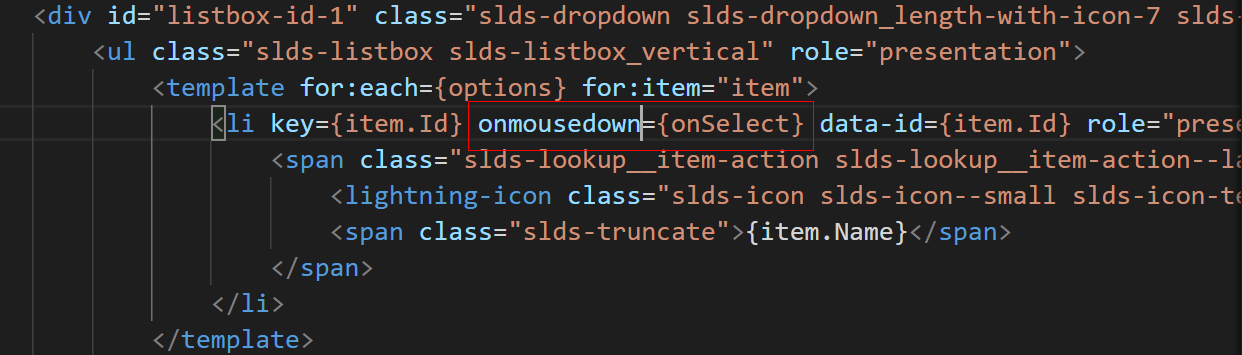
这个时候需要考虑的一点就是标准事件的执行顺序问题,标准事件中,我们常用的有 onclick / onblur,大家都知道onclick 是按钮按压以后执行,onblur是元素失去焦点以后执行。相当于onclick 为 onmousedown -> onmouseup这两个操作以后作为onclick,onblur在onmousedown以后,但是在onmouseup以前,也就是说Onblur在onclick操作以前,所以上述的demo中,下面的ul li的onclick事件无法调用到只能调用到input的onblur的事件,针对这种情况我们最终只需要将li的事件从onclick 修改成onmousedown即可完美的解决上述的问题。
总结:篇中主要是通过优化共通方法来引出 onclick / onblur 的执行顺序问题以及提出如何解决此种问题的方案,知识点很简单,纯粹前端知识,篇中有错误地方欢迎指出,有不懂欢迎留言。
Salesforce LWC学习(十七) 前端知识之 onclick & onblur & onmousedown的更多相关文章
- Salesforce LWC学习(十三) 简单知识总结篇一
本篇参考:https://developer.mozilla.org/zh-CN/docs/Web/JavaScript 随着项目的学习以及trailhead的学习,会遇见自己曾经模糊的定义或者比较浪 ...
- Salesforce LWC学习(十) 前端处理之 list 处理
本篇参看:https://developer.mozilla.org/zh-CN/docs/Web/JavaScript/Reference/Global_Objects/Array list是我们经 ...
- Salesforce LWC学习(三十) lwc superbadge项目实现
本篇参考:https://trailhead.salesforce.com/content/learn/superbadges/superbadge_lwc_specialist 我们做lwc的学习时 ...
- Salesforce LWC学习(三十九) lwc下quick action的recordId的问题和解决方案
本篇参考: https://developer.salesforce.com/docs/component-library/bundle/force:hasRecordId/documentation ...
- Salesforce LWC学习(四十) dynamic interaction 浅入浅出
本篇参考: Configure a Component for Dynamic Interactions in the Lightning App Builder - Salesforce Light ...
- Salesforce LWC学习(二十六) 简单知识总结篇三
首先本篇感谢长源edward老哥的大力帮助. 背景:我们在前端开发的时候,经常会用到输入框,并且对这个输入框设置 required或者其他的验证,当不满足条件时使用自定义的UI或者使用标准的 inpu ...
- Salesforce LWC学习(三) import & export / api & track
我们使用vs code创建lwc 时,文件会默认生成包含 template作为头的html文件,包含了 import LightningElement的 js文件以及对应的.js-meta.xml文件 ...
- Salesforce LWC学习(三十二)实现上传 Excel解析其内容
本篇参考:salesforce lightning零基础学习(十七) 实现上传 Excel解析其内容 上一篇我们写了aura方式上传excel解析其内容.lwc作为salesforce的新宠儿,逐渐的 ...
- Salesforce LWC学习(十六) Validity 在form中的使用浅谈
本篇参考: https://developer.salesforce.com/docs/component-library/bundle/lightning-input/documentation h ...
随机推荐
- Java——TCP/IP超详细总结
网络的基础知识 一.协议 1.简介: 在计算机网络与信息通信领域里,人们经常提及“协议”一词.互联网中常用的具有代表性的协议有IP.TCP.HTTP等.而LAN(局域网)中常用的协议有IPX/SPX” ...
- Bootstrap初识
目录 概述 快速入门 响应式布局 CSS样式和JS插件 全局CSS样式 组件 插件 案例:黑马旅游网 概述 概念:一个前端开发的框架,Bootstrap是美国Twitter公司的设计师Mark Ott ...
- spring boot中使用AJAX请求,并将回调函数赋值给input输入框
HTML: <script>/* $(document).ready(function(){} 页面加载事件,加载完页面之后执行 */ $(document).ready(function ...
- CF-292D Connected Components 并查集 好题
D. Connected Components 题意 现在有n个点,m条编号为1-m的无向边,给出k个询问,每个询问给出区间[l,r],让输出删除标号为l-r的边后还有几个连通块? 思路 去除编号为[ ...
- 使用JDBC操作MySQL
使用JDBC操作MySQL 步骤 加载驱动 连接数据库 操作数据库(增删改查) 关闭结果集,操作,数据库 准备工作 java连接MySQL的jar包 加载数据库驱动 public class Load ...
- layui的layer.msg,form提交
layer.msg('提示文字',{shift:1,time:2000},function(){ location.reload();});其中shift是提示框的动画样式,-1为无动画form.on ...
- [翻译] .NET 官宣跨平台 UI 框架 MAUI
MAUI Build 2020 大会上,微软终于正式公布 .NET 上的跨平台框架,正式版将在 .NET 6 和大家见面. MAUI 是日益流行的 Xamarin.Forms 的进化,Xamarin. ...
- com.zx.hikari.pool.HikariPool : HikariPool-1 - Exception during pool initialization. 报错问题
数据库连接问题 需要处理的地方有3处 1.url: jdbc:mysql://localhost:3306/springboot?useUnicode=true&characterEncodi ...
- React-Router 4 两个常用路由变量
讲真我个人不太喜欢4.x版本,虽然作者自信动态路由的形式符合React组件化的哲学,但是路由和一般组件耦合太深,而且后期组件分片也麻烦,以后需要重构的话怕是会一番折腾.同学公司用的还是3.x版本. 不 ...
- 关于RAID小结
独立硬盘冗余阵列(RAID, Redundant Array of Independent Disks),旧称廉价磁盘冗余阵列(Redundant Array of Inexpensive Disks ...