
Spark 广播变量 和 累加器
1. 广播变量
理解图
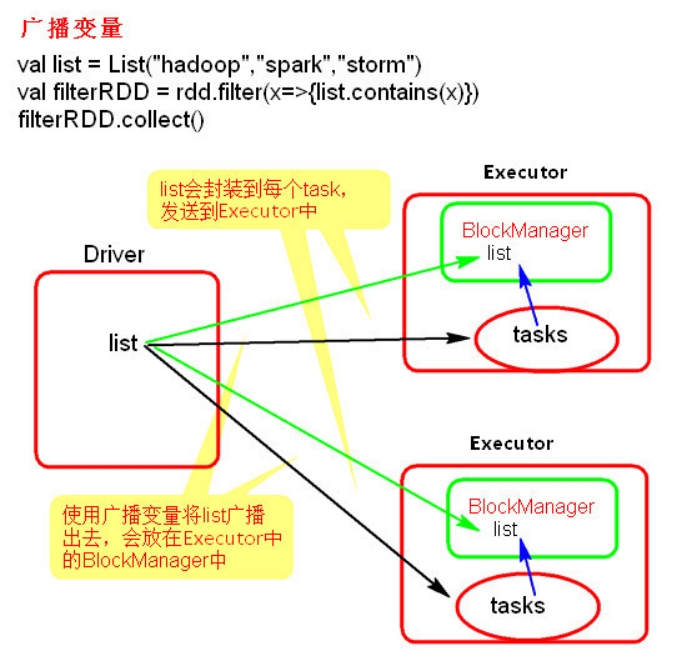
使用示例
# word.txt

hello scala

hello python

hello java

hello go

hello julia

hello C++

hello lucene
package com.ronnie.scala.core.Test import org.apache.spark.broadcast.Broadcast
import org.apache.spark.{SparkConf, SparkContext} object BroadCastTest {
def main(args: Array[String]): Unit = {
val conf = new SparkConf()
conf.setMaster("local").setAppName("broadcast")
val sc = new SparkContext(conf)
val list: Seq[String] = List("hello scala")
val broadCast: Broadcast[Seq[String]] = sc.broadcast(list)
val lineRDD = sc.textFile("./resources/word.txt") lineRDD.filter(x => {
val list = broadCast.value
list.contains(x)
}).foreach(println)
}
}
源码
package org.apache.spark.broadcast

import java.io.Serializable

import scala.reflect.ClassTag

import org.apache.spark.SparkException

import org.apache.spark.internal.Logging

import org.apache.spark.util.Utils

/**

 * A broadcast variable. Broadcast variables allow the programmer to keep a read-only * variable cached on each machine rather than shipping a copy of it with tasks.

 * 一个广播变量。 这些广播变量允许程序员在每台机器上维持一个只读的缓存的变量, 而不是将该变量和它一起拷贝。

 * They can be used, for example, to give every node a copy of a large input dataset * in an efficient manner.

 * 这些广播变量可用于把一个巨大的传入数据集的副本以一种有效地方式发送给每个节点

 *

 * Spark also attempts to distribute broadcast variables using efficient broadcast

 * algorithms to reduce communication cost.

 * Spark 尝试以高效的广播算法 来 分发 广播变量 且 减少通讯开销

 *

 * Broadcast variables are created from a variable `v` by calling

 * [[org.apache.spark.SparkContext#broadcast]].

 * 广播变量由 一个变量'v' 通过调用 SparkContext中的broadcast参数 产生

 *

 * The broadcast variable is a wrapper around `v`, and its value can be accessed by

 * calling the `value` method. The interpreter session below shows this:

 * 该广播变量是一个基于 变量 'v' 的 包装, 并且它的值可以通过 调用 value

 * 方法来获取。解释程序会话表现如下(scala命令行)

 *

 * {{{

 * scala> val broadcastVar = sc.broadcast(Array(1, 2, 3))

 * broadcastVar: org.apache.spark.broadcast.Broadcast[Array[Int]] = Broadcast(0)

 *

 * scala> broadcastVar.value

 * res0: Array[Int] = Array(1, 2, 3)

 * }}}

 *

 * After the broadcast variable is created, it should be used instead of the value

 * `v` in any functions run on the cluster so that `v` is not shipped to the nodes

 * more than once.

 * 在广播变量被创建之后, 它应当被使用而不是 将 变量 'v' 以任何方式运行在集群上, 所以 变量

 * 'v' 并没有被装载到节点上多次

 *

 * In addition, the object `v` should not be modified after it is broadcast in order * to ensure that all nodes get the same value of the broadcast variable (e.g. if the * variable is shipped to a new node later).

 * 此外, 在 对象 'v'已经被广播之后, 它不应当再被修改 以 确保 所有的节点都能获得相同的广播变量值

 *

 * @param id A unique identifier for the broadcast variable.

 * @tparam T Type of the data contained in the broadcast variable.

 */

abstract class Broadcast[T: ClassTag](val id: Long) extends Serializable with Logging {

  /**

   * Flag signifying whether the broadcast variable is valid

   * 标记了 该广播变量是否有效的标签

   * (that is, not already destroyed) or not.

   */

  @volatile private var _isValid = true

  // 破坏的位置

  private var _destroySite = ""

  /** Get the broadcasted value. 获取被广播的值*/

  def value: T = {

    assertValid()

    getValue()

  }

  /**

   * Asynchronously delete cached copies of this broadcast on the executors.

   * 异步删除 在 executor进程上 缓存的 广播

   * If the broadcast is used after this is called, it will need to be re-sent to

   * each executor.

   * 如果该广播在这次被调用之前已经被使用过了, 它需要被重新发送到每个 executor进程

   */

   // 去持久化

  def unpersist() {

    unpersist(blocking = false)

  }

  /**

   * Delete cached copies of this broadcast on the executors.

   * 在 executor进程上删除缓存的 当前 广播

   * If the broadcast is used after this is called, it will need to be re-sent to

   * each executor.

   * 如果该广播在这次被调用之前已经被使用过了, 它需要被重新发送到每个 executor进程

   * @param blocking Whether to block until unpersisting has completed

   * blocking 代表了是否阻塞到在去持久化完成 的标签

   */

  def unpersist(blocking: Boolean) {

    assertValid()

    doUnpersist(blocking)

  }

  /**

   * Destroy all data and metadata related to this broadcast variable. Use this with * caution;

   * 破坏所有的与该广播变量相关的数据与元数据 使用这个指令要小心(rm -rf/* 2.0?)

   * once a broadcast variable has been destroyed, it cannot be used again.

   * 一个单一个广播变量被破坏了, 它就不能再被使用了

   * This method blocks until destroy has completed

   * 该方法会阻塞到 破坏 执行完成

   */

  def destroy() {

    destroy(blocking = true)

  }

  /**

   * Destroy all data and metadata related to this broadcast variable. Use this with * caution;

   * 破坏所有的与该广播变量相关的数据与元数据 使用这个指令要小心

   * once a broadcast variable has been destroyed, it cannot be used again.

   * 一个单一个广播变量被破坏了, 它就不能再被使用了

   * @param blocking Whether to block until destroy has completed

   * blocking: 是否阻塞到 破坏 执行完成的标签

   */

  private[spark] def destroy(blocking: Boolean) {

    assertValid()

    _isValid = false

    _destroySite = Utils.getCallSite().shortForm

    logInfo("Destroying %s (from %s)".format(toString, _destroySite))

    doDestroy(blocking)

  }

  /**

   * Whether this Broadcast is actually usable. This should be false once persisted

   * state is removed from the driver.

   * 判断此广播是否需实际上可以被使用, 一旦持久状态从这个driver中被移除, 就应该为false

   */

  private[spark] def isValid: Boolean = {

    _isValid

  }

  /**

   * Actually get the broadcasted value. Concrete implementations of Broadcast class * must define their own way to get the value.

   * 真实的获取 被广播的值。 要落实广播类的应用必须要定义他们自己的方式来获取值

   */

  protected def getValue(): T

  /**

   * Actually unpersist the broadcasted value on the executors.

   * 真实的将executor进程上的被广播的值去持久化

   * Concrete implementations of Broadcast class must define their own logic to

   * unpersist their own data.

   * 要落实广播类的应用必须要定义他们自己的逻辑来将他们自己的数据去持久化

   */

  protected def doUnpersist(blocking: Boolean)

  /**

   * Actually destroy all data and metadata related to this broadcast variable.

   * 真实的破坏所有 与 这个广播变量相关的 数据 和 元数据

   * Implementation of Broadcast class must define their own logic to destroy their

   * ownstate.

   * 要落实广播类的应用必须要定义他们自己的逻辑来破坏他们自己的状态

   */

  protected def doDestroy(blocking: Boolean)

  /** Check if this broadcast is valid. If not valid, exception is thrown.

   * 检查这个广播是否是有效的。 如果无效, 就抛出异常

   */

  protected def assertValid() {

    if (!_isValid) {

      throw new SparkException(

        "Attempted to use %s after it was destroyed (%s) ".format(toString, _destroySite))

    }

  }

  override def toString: String = "Broadcast(" + id + ")"

}
注意事项
广播变量只能在 Driver 端定义, 不能在 Executor 端定义
在 Driver 端可以修改广播变量的值, 在 Executor 端无法修改广播变量的值
2. 累加器
理解图
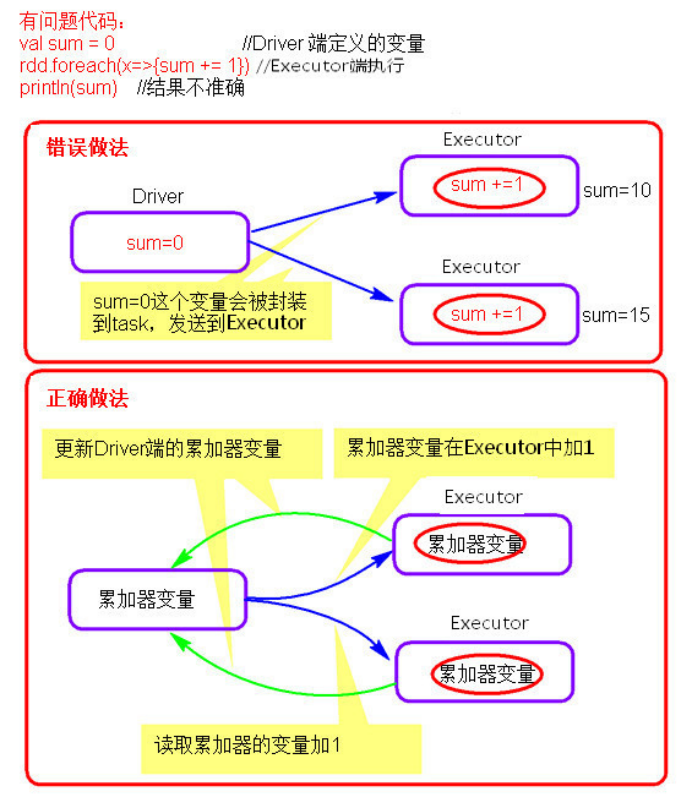
使用示例
源码
/**

 * An [[AccumulatorV2 accumulator]] for computing sum, count, and average of 64-bit

 * integers.

 * 一个 基于 AccumulatorV2 类的 用于计算和, 计数 和 获取 64 bit int 平均数的累加器

 *

 * @since 2.0.0

 */

class LongAccumulator extends AccumulatorV2[jl.Long, jl.Long] {

  // 总和

  private var _sum = 0L

  // 计数

  private var _count = 0L

  /**

   * Returns false if this accumulator has had any values added to it or the sum is

   * non-zero.

   * 如果有任何值被添加到这个累加器中, 或者 sum 为非0, 就返回 false

   * @since 2.0.0

   */

  override def isZero: Boolean = _sum == 0L && _count == 0

  // 创建了新对象, 深拷贝

  override def copy(): LongAccumulator = {

    val newAcc = new LongAccumulator

    newAcc._count = this._count

    newAcc._sum = this._sum

    newAcc

  }

  // 重设(都初始化为0)

  override def reset(): Unit = {

    _sum = 0L

    _count = 0L

  }

  /**

   * Adds v to the accumulator, i.e. increment sum by v and count by 1.

   * 添加 v 到 累加器, sum = sum + v, count = count + 1

   * @since 2.0.0

   */

  override def add(v: jl.Long): Unit = {

    _sum += v

    _count += 1

  }

  /**

   * Adds v to the accumulator, i.e. increment sum by v and count by 1.

   * @since 2.0.0

   */

  def add(v: Long): Unit = {

    _sum += v

    _count += 1

  }

  /**

   * Returns the number of elements added to the accumulator.

   * 返回 添加到累加器的元素的数量

   * @since 2.0.0

   */

  def count: Long = _count

  /**

   * Returns the sum of elements added to the accumulator.

   * 返回 添加到累加器元素的和

   * @since 2.0.0

   */

  def sum: Long = _sum

  /**

   * Returns the average of elements added to the accumulator.

   * 返回添加到累加器中的元素的平均值

   * @since 2.0.0

   */

  def avg: Double = _sum.toDouble / _count

  // 合并累加器

  override def merge(other: AccumulatorV2[jl.Long, jl.Long]): Unit = other match {

    // 如果类型相同, 就合并 sum 和 count

    case o: LongAccumulator =>

      _sum += o.sum

      _count += o.count

    // 如果不同, 就抛出异常

    case _ =>

      throw new UnsupportedOperationException(

        s"Cannot merge ${this.getClass.getName} with ${other.getClass.getName}")

  }

  private[spark] def setValue(newValue: Long): Unit = _sum = newValue

  override def value: jl.Long = _sum

}
注意事项
累加器在 Driver 端定义赋初始值
累加器只能在 Driver 端读取, 在 Executor端更新
Spark 广播变量 和 累加器的更多相关文章
- Spark 广播变量和累加器
Spark 的一个核心功能是创建两种特殊类型的变量:广播变量和累加器 广播变量(groadcast varible)为只读变量,它有运行SparkContext的驱动程序创建后发送给参与计算的节点.对 ...
- 【Spark-core学习之七】 Spark广播变量、累加器
环境 虚拟机:VMware 10 Linux版本:CentOS-6.5-x86_64 客户端:Xshell4 FTP:Xftp4 jdk1.8 scala-2.10.4(依赖jdk1.8) spark ...
- Spark广播变量和累加器
一.广播变量图解 二.代码 val conf = new SparkConf() conf.setMaster("local").setAppName("brocast& ...
- Spark RDD持久化、广播变量和累加器
Spark RDD持久化 RDD持久化工作原理 Spark非常重要的一个功能特性就是可以将RDD持久化在内存中.当对RDD执行持久化操作时,每个节点都会将自己操作的RDD的partition持久化到内 ...
- Spark(三)RDD与广播变量、累加器
一.RDD的概述 1.1 什么是RDD RDD(Resilient Distributed Dataset)叫做弹性分布式数据集,是Spark中最基本的数据抽象,它代表一个不可变.可分区.里面的元素可 ...
- Spark——DataFrames,RDD,DataSets、广播变量与累加器
Spark--DataFrames,RDD,DataSets 一.弹性数据集(RDD) 创建RDD 1.1RDD的宽依赖和窄依赖 二.DataFrames 三.DataSets 四.什么时候使用Dat ...
- Spark(八)【广播变量和累加器】
目录 一. 广播变量 使用 二. 累加器 使用 使用场景 自定义累加器 在spark程序中,当一个传递给Spark操作(例如map和reduce)的函数在远程节点上面运行时,Spark操作实际上操作的 ...
- 广播变量、累加器、collect
广播变量.累加器.collect spark集群由两类集群构成:一个驱动程序,多个执行程序. 1.广播变量 broadcast 广播变量为只读变量,它由运行sparkContext的驱动程序创建后发送 ...
- spark 广播变量
Spark广播变量 使用广播变量来优化,广播变量的原理是: 在每一个Executor中保存一份全局变量,task在执行的时候需要使用和这一份变量就可以,极大的减少了Executor的内存开销. Exe ...
随机推荐
- 攻防世界web进阶区(2)--记一次sql注入
题目地址:http://111.198.29.45:56094 这是一道sql注入题. 试试1' order by 3#,发现页面显示正常,将3换为4时,页面报错,则说明含有3个字段. 接下来判断输出 ...
- 吴裕雄 Bootstrap 前端框架开发——Bootstrap 辅助类:"text-success" 类的文本样式
<!DOCTYPE html> <html> <head> <meta charset="utf-8"> <title> ...
- myBatis 操作 mysql时,使用 like 关键进行模糊查询的方法
参考:https://blog.csdn.net/rainbow702/article/details/50519424 like CONCAT('%', #{mkName}, '%')
- tomcat重载web项目,debug
Reloading Context with name [/testCookie] is completed 加载上下文名称[ / ]完成testcookie //start九月 05, 2017 9 ...
- NO18 linux开机自启动设置--开机流程--中文乱码--查看行数
第八题:装完系统后,希望让网络文件共享服务NES,仅在3级别上开机自启动,该如何做? 解答:什么是开机自启动,在Linux下软件服务随系统启动而启动的配置. 方法一:文件配置法,可以把要启动的服务的命 ...
- 2.24 模拟赛 + DIV2 总结
本来实在是不想打了,后来真的手痒. 晚上发现正进行DIV2然后就打了场,模拟,幸好没参加,逆风.排名2400 Codeforces Round #622 (Div. 2) A题十分钟过了 B题http ...
- pytorch & numpy广播法则
广播法则 所有数组向维度最高的数组看齐,若维度不足则在最前面的维度用1补齐 扩展维度后,所有数组在某一维度相同或者长度为1,否则不能计算 当可以计算时,将长度为1的维度扩展为另一数组相应维度的长度 a ...
- HiBench成长笔记——(9) 分析源码monitor.py
monitor.py 是主监控程序,将监控数据写入日志,并统计监控数据生成HTML统计展示页面: #!/usr/bin/env python2 # Licensed to the Apache Sof ...
- 怎样管理Exchange Server 2013资源邮箱
1. exchange资源邮箱介绍 这次将介绍Exchange Server 2013的资源邮箱相关内容. Exchange Server 2013的资源邮箱包含两类,其一为“会议室邮箱”,另一类是“ ...
- JDK8~JDK11的新特性
#JDK 1.8 新特性接口中的静态方法 只能由接口自己调用 接口中的默认方法 可以不被覆盖 #JDK 1.9 新特性(可能在JDK8中被忽略了,没来得及加)接口可以定义私有方法,但是只能让自己调用, ...