
C#线程安全打开/保存文件对话框
下载FileDialogsThreadAppartmentSafe_v1.zip
如果您将C#用于桌面开发项目,您可能知道Win32打开和保存文件对话框的默认C#包装类的强大功能。它们易于使用,您将始终拥有正确的Windows风格。

但也存在一些问题,其中一些问题在本文中进行了讨论。
背景
一旦开发了更大的应用程序,您可能会注意到,一旦将调用者线程单元状态设置为MTA,默认 OpenFileDialog和SaveFileDialog 对话框将不再起作用。调用ShowDialog 实例的方法后,您将收到以下异常。
{System.Threading.ThreadStateException: Current thread must be set to

single thread apartment (STA) mode before OLE calls can be made.

Ensure that your Main function has STAThreadAttribute marked on it.

This exception is only raised if a debugger is attached to the process.

at System.Windows.Forms.FileDialog.RunDialog(IntPtr hWndOwner)

at System.Windows.Forms.CommonDialog.ShowDialog(IWin32Window owner)
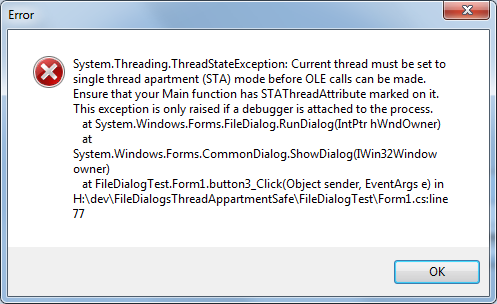
通过在STA模式下创建一个调用打开或保存文件对话框的新线程,可以轻松解决此问题。但是,如果您的应用程序应该在多个显示设备上运行,则会弹出下一个问题。您会注意到,您无法像使用常见的winforms表单实例那样设置打开文件对话框的父级。
那么,如何解决这个问题呢?好吧,我想到的第一件事就是使用默认Win32 方法通过使用以下PInvokes来设置这些对话框的位置:
[DllImport("User32.dll", CharSet = CharSet.Auto, SetLastError = true)]

public static extern bool GetWindowRect(IntPtr handle, ref RECT r);

[DllImport("user32.dll", ExactSpelling = true, CharSet = CharSet.Auto)]

public static extern IntPtr GetParent(IntPtr hWnd);

[DllImport("user32.dll", SetLastError = true)]

 [return: MarshalAs(UnmanagedType.Bool)]

public static extern bool SetWindowPos(IntPtr hWnd,

    IntPtr hWndInsertAfter, int x, int y, int cx, int cy, uint uFlags);
可以在任何Win32 对话框实例上设置窗口的位置。但是,一旦您仔细查看了打开/保存文件对话框的不同成员和属性,您会注意到这些对话框没有像常见对话框中那样的底层对话框实例的Handle 成员。IntPtr Win32System.Windows.Forms
但是使用static PInvoke 方法并不是面向.NET面向对象,对吧?如果您的应用程序是MDI应用程序,那么事情会变得有点混乱,因为您需要使用IntPtr 所有这些对话框实例的对话框来使用这些Win32 PInvokes方法。
所以我决定创建两个类,CFileOpenDlgThreadApartmentSafe并CFileSaveDlgThreadApartmentSafe使用CFileDlgBase 以通用方法命名的基类和文件对话框的成员。
我的目标是拥有对话类:
- 具有与默认.NET对话框相当的属性
- 可从STA和MTA线程调用者调用
- 与原始对话框一样的模态行为
- 不使用
static PInvoke方法
这些类可以在FileDialogsThreadAppartmentSafe 程序集中找到。
如何使用代码
在项目中引用程序集FileDialogsThreadAppartmentSafe.dll,并按以下方式使用这些类:
CFileOpenDlgThreadApartmentSafe dlg = new CFileOpenDlgThreadApartmentSafe();

dlg.Filter = "Text file (*.txt)|*.txt";

dlg.DefaultExt = "txt";

Point ptStartLocation = new Point(this.Location.X, this.Location.Y);

dlg.StartupLocation = ptStartLocation;

DialogResult res = dlg.ShowDialog();

if (res != System.Windows.Forms.DialogResult.OK)

     return;

MessageBox.Show(string.Format("Open file {0}", dlg.FilePath));
第二个项目是使用两个对话框以及原始基本实现的示例。
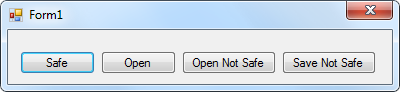
在第13行的Program.cs文件中,您可以看到main方法被标记为[MTAThread]。这就是为什么当您点击标记为“不安全”的按钮时,您将收到上述异常。
using System;

using System.Collections.Generic;

using System.Linq;

using System.Windows.Forms;

namespace FileDialogTest

{

    static class Program

    {

        /// <summary>

        /// The main entry point for the application.

        /// </summary>

        [MTAThread]

        static void Main()

        {

            Application.EnableVisualStyles();

            Application.SetCompatibleTextRenderingDefault(false);

            Application.Run(new Form1());

        }

    }

}
兴趣点
实现中最有趣的部分是调用ShowDialog()两个类的方法。此方法定义为:
public virtual DialogResult ShowDialog()
在CFileDlgBase 基类内。
这是类中ShowDialog 方法的实现CFileOpenDlgThreadApartmentSafe 。
 复制代码
复制代码public override DialogResult ShowDialog()
{
DialogResult dlgRes = DialogResult.Cancel;
Thread theThread = new Thread((ThreadStart)delegate
{
OpenFileDialog ofd = new OpenFileDialog();
ofd.Multiselect = false;
ofd.RestoreDirectory = true; if (!string.IsNullOrEmpty(this.FilePath))
ofd.FileName = this.FilePath;
if (!string.IsNullOrEmpty(this.Filter))
ofd.Filter = this.Filter;
if (!string.IsNullOrEmpty(this.DefaultExt))
ofd.DefaultExt = this.DefaultExt;
if (!string.IsNullOrEmpty(this.Title))
ofd.Title = this.Title;
if (!string.IsNullOrEmpty(this.InitialDirectory))
ofd.InitialDirectory = this.InitialDirectory; //Create a layout dialog instance on the current thread to align the file dialog Form
frmLayout = new Form(); if (this.StartupLocation != null)
{ //set the hidden layout form to manual form start position
frmLayout.StartPosition = FormStartPosition.Manual; //set the location of the form
frmLayout.Location = this.StartupLocation;
frmLayout.DesktopLocation = this.StartupLocation;
} //the layout form is not visible
frmLayout.Width = 0;
frmLayout.Height = 0;
dlgRes = ofd.ShowDialog(frmLayout); if (dlgRes == DialogResult.OK)
this.FilePath = ofd.FileName;
}); try
{
//set STA as the Open file dialog needs it to work
theThread.TrySetApartmentState(ApartmentState.STA); //start the thread
theThread.Start(); // Wait for thread to get started
while (!theThread.IsAlive) { Thread.Sleep(1); } // Wait a tick more (@see: http://scn.sap.com/thread/45710)
Thread.Sleep(1); //wait for the dialog thread to finish
theThread.Join(); DialogSuccess = true;
}
catch (Exception err)
{
DialogSuccess = false;
} return (dlgRes);
}
该方法在单线程单元模式下启动一个新线程,并创建一个不可见的对话框实例,用作Win32 文件对话框的父对象。这样,我们就不需要处理IntPtr在不同线程上创建的实例或实例。显示对话框后,该方法等待对话框线程完成threads Join 方法。即使在新线程实例上创建了真实文件对话框,阻塞调用程序线程也会产生模态对话框行为。
C#线程安全打开/保存文件对话框的更多相关文章
- MFC打开/保存文件对话框:CFileDialog
MFC打开/保存文件对话框:CFileDialog CFileDialog 文件选择对话框的使用:首先构造一个对象并提供相应的参数,构造函数原型如下: CFileDialog::CFileDial ...
- Winform控件:保存文件对话框(SaveFileDialog)
SaveFileDialog用于保存文件 1.新建Winform窗体应用程序,命名为SaveFileDialogDemo. 2.在界面上添加一个按钮的控件(用于打开保存文件对话框),添加文本控件,用于 ...
- C#项目打开/保存文件夹/指定类型文件,获取路径
C#项目打开/保存文件夹/指定类型文件,获取路径 转:http://q1q2q363.xiaoxiang.blog.163.com/blog/static/1106963682011722424325 ...
- ASP.NET—016:ASP.NET中保存文件对话框
本想在asp.net中使用savediallog保存文件,结果提示:当应用程序不是以 UserInteractive 模式执行时显示模式对话框或窗口是无效操作. 在ASP.NET中使用例如以下方式.保 ...
- Delphi的保存文件对话框-TsaveDialog
TsaveDialog继承于TOpenDialog,只介绍以下几个内容: 1.TsaveDialog如何设定为保存的默认路径是当前程序所在的文件夹: 默认目录是当前程序所在目录应设置属性Initial ...
- c# 打开、保存文件对话框 和 文件夹选择对话框
1. OpenFileDialog openImageDialog = new OpenFileDialog(); openImageDialog.Filter = "Image Files ...
- java中文件保存、打开文件对话框
package com.soft.test; //AWT: FileDialog类 + FilenameFilter类 可以实现本功能 //Swing: JFileChooser类 + FileFil ...
- 【转】python qt(pyqt)的文件打开、文件保存、文件夹选择对话框
import PyQt4.QtCore,PyQt4.QtGui # 获取文件路径对话框 file_name = QFileDialog.getOpenFileName(self,"open ...
- 12.JAVA之GUI编程打开与保存文件
功能:java图形用户界面开发,练习打开保存文件 代码如下: import java.awt.FileDialog; import java.awt.Frame; import java.awt.Me ...
随机推荐
- iOS CoreData 介绍和使用(以及一些注意事项)
iOS CoreData介绍和使用(以及一些注意事项) 最近花了一点时间整理了一下CoreData,对于经常使用SQLite的我来说,用这个真的有点用不惯,个人觉得实在是没发现什么亮点,不喜勿喷啊.不 ...
- 开发者了解NET的15个特性
NET 开发者了解的15个特性 本文列举了 15 个值得了解的 C# 特性,旨在让 .NET 开发人员更好的使用 C# 语言进行开发工作. ObsoleteAttribute ObsoleteAttr ...
- 在Eclipse里连接Tomcat部署到项目(maven项目和web项目都适用)
不多说,直接上干货! 前提, Tomcat *的下载(绿色版和安装版都适用) Tomcat *的安装和运行(绿色版和安装版都适用) Tomcat的配置文件详解 我这里以,manven项目为例,当然,w ...
- P2742 [USACO5.1]圈奶牛Fencing the Cows
题目描述 农夫约翰想要建造一个围栏用来围住他的奶牛,可是他资金匮乏.他建造的围栏必须包括他的奶牛喜欢吃草的所有地点.对于给出的这些地点的坐标,计算最短的能够围住这些点的围栏的长度. 输入输出格式 输入 ...
- dl learn task
https://deeplearning4j.org/cn/word2vec Task 1 分类http://blog.csdn.net/czs1130/article/details/7071734 ...
- 【原创】关于JMS[1]
面向消息中间件(MOM)为分布式系统提供异步,解耦,稳定,可扩展和安全的行为.MOM在分布式计算领域是一个重要的概念.它允许应用使用代理器API在分布式环境实现各种功能.Java消息服务(Java M ...
- 【原创】关于not in的一些事情
早上到公司,收到一条cocall消息,是某哥们遇到的疑惑,可能很多新手并不知情: 请教个问题 我执行 . select * from t_htgl_htpswj t where t.c_wjmc = ...
- springmvc两种非注解的处理器适配器
<?xml version="1.0" encoding="UTF-8"?> <web-app xmlns:xsi="http:// ...
- POJ 2029 Get Many Persimmon Trees 【 二维树状数组 】
题意:给出一个h*w的矩形,再给出n个坐标,在这n个坐标种树,再给出一个s*t大小的矩形,问在这个s*t的矩形里面最多能够得到多少棵树 二维的树状数组,求最多能够得到的树的时候,因为h,w都不超过50 ...
- H5中嵌入flash
<object height="900px" width="100%" classid="clsid:D27CDB6E-AE6D-11cf-96 ...