
springboot学习(六) springboot开发web应用
1、简介
Spring Boot非常适合开发web应用程序。你可以使用内嵌的Tomcat,Jetty或Undertow轻轻松松地创建一个HTTP服务器。大多数的web应用都使用spring-boot-starter-web模块进行快速搭建和运行。
2、静态资源的访问
(1)默认情况
Spring Boot从classpath下一个叫/static(/public,/resources或/META-INF/resources)的文件夹或从ServletContext根目录提供静态内容。这使用了Spring MVC的ResourceHttpRequestHandler,所以你可以通过添加自己的WebMvcConfigurerAdapter并覆写addResourceHandlers方法来改变这个行为(加载静态文件)。
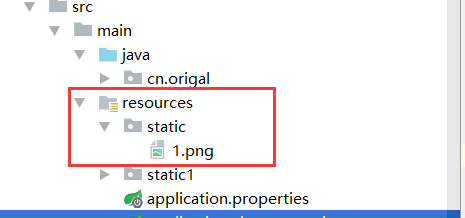
默认例子:我们在resources目录下创建一个目录叫做static,然后将1张名为1.png图片拷贝到该目录下,启动程序后,直接通过http://localhost:8080/1.png访问,就可以看到该张图片。
(2)静态资源的映射
spring boot默认将/**形式的请求映射到/static(/public,/resources或/META-INF/resources)目录,所以默认情况下我们访问静态资源的时候不需要添加目录static,如果想要改变请求的映射,那么在配置文件中添加:
spring.mvc.static-path-pattern=/static/**
添加过后,如果想要访问上面的静态资源,则需要通过http://localhost:8080/static/1.png请求才可以。
(3)自定义静态文件目录
如果需要重新定义静态文件访问的目录,则可以在配置文件中添加:
spring.resources.static-locations=classpath:/static1/,classpath:/static2/,file:E:/image/
添加完成后,静态资源目录就会被重新定向到上面的那些文件夹下面,而不再是默认的文件夹。
- 静态可以目录可以定义多个,不同的目录之间用","隔开
- 使用classpath: 为前缀指向的是相对目录
- 使用file: 为前缀指定的是绝对目录
(4)静态文件缓存
在配置文件中配置使用静态文件缓存,并且在请求url中添加上版本号,那么在修改静态文件过后,就可以直接看到最新的静态文件:
 #  对静态文件进行缓存处理

 spring.resources.chain.strategy.content.enabled=true

 spring.resources.chain.strategy.content.paths=/**

 #  对静态文件添加版本,修改文件后,不需要改文件名就可以直接看到修改过后的内容

 spring.resources.chain.strategy.fixed.enabled=true

 spring.resources.chain.strategy.fixed.paths=/**

 spring.resources.chain.strategy.fixed.version=1.0.0
请求地址:http://localhost:8080/1.jpg?v=1.0.0
说明:如果想要把项目作为一个jar包的形式运行,那么就不要使用src/main/webapp目录,因为这个目录只会在war包下使用。
3、web模板引擎
spring boot为freemaker, groovy, thymeleaf, mustache提供自动配置支持。可能的话,尽量使用上面的这些模板引擎,并且尽可能的不要使用jsp,因为内置的servlet容器使用他们时,无法完全使用spring boot的某些特性。
当使用上面这些模板时,会自动从src/main/resources/templates目录下读取相应的模板。
如果想用thymeleaf引擎,那么在pom中引入依赖:
<dependency>

       <groupId>org.springframework.boot</groupId>

       <artifactId>spring-boot-starter-thymeleaf</artifactId>

</dependency>
thymeleaf模板引擎的默认配置为:
 # Enable template caching.

 spring.thymeleaf.cache=true

 # Check that the templates location exists.

 spring.thymeleaf.check-template-location=true

 # Content-Type value.

 spring.thymeleaf.content-type=text/html

 # Enable MVC Thymeleaf view resolution.

 spring.thymeleaf.enabled=true

 # Template encoding.

 spring.thymeleaf.encoding=UTF-8

 # Comma-separated list of view names that should be excluded from resolution.

 spring.thymeleaf.excluded-view-names=

 # Template mode to be applied to templates. See also StandardTemplateModeHandlers.

 spring.thymeleaf.mode=HTML5

 # Prefix that gets prepended to view names when building a URL.

 spring.thymeleaf.prefix=classpath:/templates/

 # Suffix that gets appended to view names when building a URL.

 spring.thymeleaf.suffix=.html  spring.thymeleaf.template-resolver-order= # Order of the template resolver in the chain. spring.thymeleaf.view-names= # Comma-separated list of view names that can be resolved.
需要调整,则将对应的拷贝到配置文件中,进行修改即可。
springboot学习(六) springboot开发web应用的更多相关文章
- springboot学习入门之五---开发Web应用之JSP篇
转载:http://tengj.top/2017/03/13/springboot5/ 1整体结构 整体的框架结构,跟前面介绍Thymeleaf的时候差不多,只是多了webapp这个用来存放jsp的目 ...
- springboot学习入门之四---开发Web应用之Thymeleaf篇
http://tengj.top/2017/03/13/springboot4/ 1项目结构 说明: root package结构:com.dudu 应用启动类Application.java置于ro ...
- SpringBoot学习(六)-->SpringBoot的自动配置的原理
Spring Boot的自动配置的原理 Spring Boot在进行SpringApplication对象实例化时会加载META-INF/spring.factories文件,将该配置文件中的配置载入 ...
- SpringBoot学习(七)-->SpringBoot在web开发中的配置
SpringBoot在web开发中的配置 Web开发的自动配置类:在Maven Dependencies-->spring-boot-1.5.2.RELEASE.jar-->org.spr ...
- SpringBoot学习(一)—— web项目基础搭建
首先我们在浏览器打开这个网站 https://start.spring.io/ 打开后可以看到以下页面 在这里我们可以快速搭建一个SpringBoot基础项目,填写和选择完相应的信息后,我们点击那个绿 ...
- 【SpringBoot学习一】开发入门--快速创建springboot程序
前言 本片博客记录快速创建springboot工程的两种方式.一种是使用maven创建,一种是使用spring initializr创建.开发环境JDK1.8.IDEA.maven. SpringBo ...
- SpringBoot学习之SpringBoot执行器
在以往的分布式开发当中,各个服务节点的监控必不可少.监控包含有很多方面,比如说:内存占用情况,节点是否健康等.在spring-boot会给我们提供相关资源监控叫做spring-boot-actuato ...
- SpringBoot学习(五)-->SpringBoot的核心
SpringBoot的核心 1.入口类和@SpringBootApplication Spring Boot的项目一般都会有*Application的入口类,入口类中会有main方法,这是一个标准的J ...
- SpringBoot学习(四)-->SpringBoot快速入门,开山篇
Spring Boot简介 Spring Boot的目的在于创建和启动新的基于Spring框架的项目.Spring Boot会选择最适合的Spring子项目和第三方开源库进行整合.大部分Spring ...
- SpringBoot学习(一):SpringBoot入门
1.Spring Boot 简介 1) 简化Spring应用开发的一个框架: 2) 整个Spring技术栈的一个大整合: 3) J2EE开发的一站式解决方案: 2.微服务 2014,martin fo ...
随机推荐
- CF 1006B Polycarp's Practice【贪心】
Polycarp is practicing his problem solving skill. He has a list of n problems with difficulties a1,a ...
- Android学习--跨程序共享数据之内容提供其探究
什么是内容提供器? 跨程序共享数据之内容提供器,这是个什么功能?看到这个名称的时候最能给我们提供信息的应该是“跨程序”这个词了,是的重点就是这个词,这个内容提供器的作用主要是用于在不同的引用程序之间实 ...
- Codeforces Round #209 (Div. 2) D. Pair of Numbers (模拟)
D. Pair of Numbers time limit per test 2 seconds memory limit per test 256 megabytes input standard ...
- ASP.NET Core 2.2 基础知识(七) 选项模式
承接上一篇 配置, 选项模式是专门用类来表示相关配置的服务. 基本选项配置 新建一个选项类,该类必须是包含无参数的构造函数的非抽象类. public class MyOptions { public ...
- AOJ 2251 Merry Christmas (最小点覆盖)
[题目链接] http://judge.u-aizu.ac.jp/onlinejudge/description.jsp?id=2251 [题目大意] 给出一张图,现在有一些任务,要求在ti时刻送礼物 ...
- 【最大流】【费用流】bzoj1834 [ZJOI2010]network 网络扩容
引用题解: 最大流+费用流. 第一问最大流即可. 第二问为“最小费用最大流”. 由题意,这一问的可转化为在上一问的“残量网络”上,扩大一些边的容量,使能从新的图中的最大流为k. 那么易得:对于还有剩余 ...
- 泳池迷宫(p24)
/*2018年8月26日15:55:29作者:冰樱梦page-24泳池迷宫*/public class swiming{public static void main(String[] args){i ...
- 使用urlretrieve下载图片
示例代码: from urllib.request import urlretrieve from urllib.request import urlopen from bs4 import Beau ...
- linux过滤ip地址
一.系统版本 [root@zabbix-server tmp]# cat /etc/redhat-release CentOS Linux release 7.2.1511 (Core) 二.用awk ...
- druid.io 海量实时OLAP数据仓库 (翻译+总结) (1)
介绍 我是NDPmedia公司的大数据OLAP的资深高级工程师, 专注于OLAP领域, 现将一个成熟的可靠的高性能的海量实时OLAP数据仓库介绍给大家: druid.io NDPmedia在2014年 ...