
可编辑的el-table表格,结合input输入,upload文件上传的表格
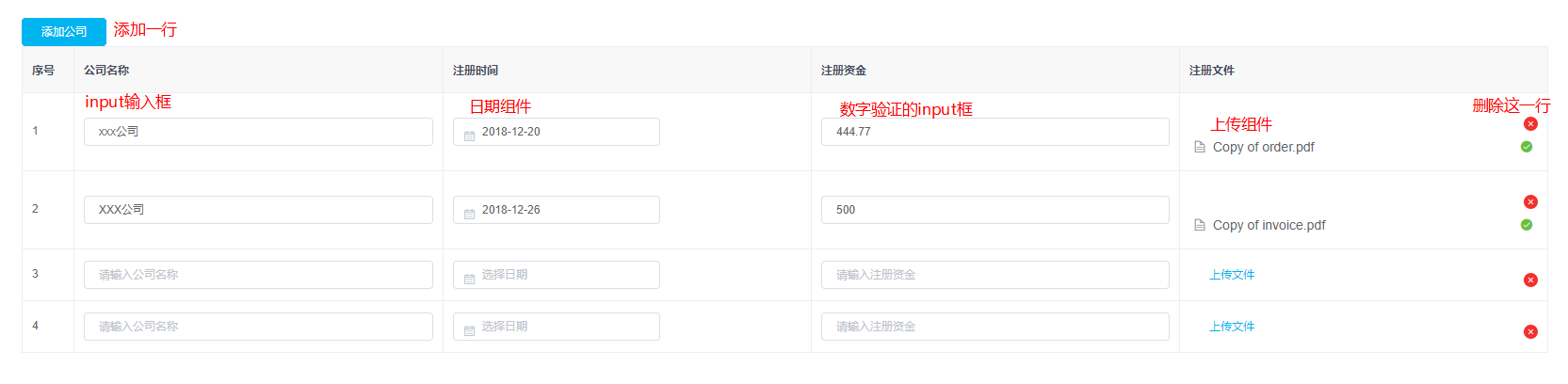
<template>

  <div>

    <p>shopInfo</p>

    <div class="company">

      <p><el-button type="primary" @click="addCompany">添加公司</el-button></p>

      <el-table

        ref="multipleTable"

        :data="tableData3"

        border

        style="width: 100%">

        <el-table-column

          label="序号"

          type="index"

          width="55">

        </el-table-column>

        <el-table-column

          label="公司名称"

          show-overflow-tooltip>

          <template slot-scope="scope">

            <el-input v-model="scope.row.name" placeholder="请输入公司名称"></el-input>

          </template>

        </el-table-column>

        <el-table-column

          label="注册时间"

          show-overflow-tooltip>

          <template slot-scope="scope">

            <el-date-picker

              v-model="scope.row.date"

              type="date"

              placeholder="选择日期">

            </el-date-picker>

          </template>

        </el-table-column>

        <el-table-column

          label="注册资金"

          show-overflow-tooltip>

          <template slot-scope="scope">

            <el-input @blur="InputNumber(scope.row, 'amount')" v-model="scope.row.amount" placeholder="请输入注册资金"></el-input>

          </template>

        </el-table-column>

        <el-table-column

          label="注册文件"

          show-overflow-tooltip>

          <template slot-scope="scope">

            <el-upload

              class="upload-demo"

              :action="action"

              :data="uploadData"

              :on-preview="handlePreview"

              <!-- 在组件的回调函数里加一个索引的参数 -->

              :on-remove="function(file,fileList){return handleRemove(file,fileList,scope.$index)}"

              :on-success="function(res,file,fileList){return handleSuccess(res,file,fileList,scope.$index)}"

              multiple

              :limit="1"

              :file-list="fileList[scope.$index]">

              <el-button size="small" type="text" v-if="!scope.row.file">上传文件</el-button>

            </el-upload>

            <span class="delete" @click="deleteCompany(scope.$index)"><img src="/static/images/close.png" alt=""></span>

          </template>

        </el-table-column>

      </el-table>

    </div>

  </div>

</template>

<style scoped>

  .company {

    padding: 30px;

    text-align: left;

  }

  .delete {

    position: absolute;

    top: 25px;

    right: 10px;

  }

  td .el-upload-list__item {

    margin-top: -25px;

  }

</style>

<script>

// import host from 'rootPath/config/host' // host文件

// import apiPath from 'rootPath/config/api.json' // api文件

export default {

  name: 'shopInfo',

  data () {

    return {

      tableData3: [],

      selectedTable: [],

      fileList: [[]],

      // action: `${host.apiUrl}${apiPath.common.qiniuupload}`,

      action: ``,

      uploadData: {userId: 1304, pathName: 'company'}

    }

  },

  created () {

    this.setTable()

  },

  methods: {

    setTable () {

      this.tableData3 = [{

        name: '',

        date: '',

        amount: null,

        file: ''

      }]

    },

    // 添加公司

    addCompany () {

      this.tableData3.push({

        name: '',

        date: '',

        amount: null,

        file: ''

      })

      this.fileList.push([])

    },

    // 删除公司

    deleteCompany (i) {

      this.tableData3.splice(i, 1)

      // 删除的时候要把fileList清除,否则页面已上传的文件不会被清空

      this.fileList.splice(i, 1)

      console.log(this.fileList)

    },

    // 过滤输入的金额

    InputNumber (row, property) {

      row[property] = this.limitInputPointNumber(row[property])

    },

    // 限制只能输入数字(可以输入两位小数)

    limitInputPointNumber (val) {

      if (val === 0 || val === '0' || val === '') {

        return ''

      } else {

        let value = null

        value = String(val).replace(/[^\d.]/g, '') // 清除“数字”和“.”以外的字符

        value = value.replace(/\.{2,}/g, '.') // 只保留第一个. 清除多余的

        value = value.replace('.', '$#$').replace(/\./g, '').replace('$#$', '.')

        value = value.replace(/^(-)*(\d+)\.(\d\d).*$/, '$1$2.$3') // 只能输入两个小数

        return value

      }

    },

    // 预览图片

    handlePreview (file) {

    },

    // 删除图片

    handleRemove (file, fileList, index) {

      this.tableData3[index].file = ''

    },

    // 图片上传

    handleSuccess (res, file, fileList, index) {

      if (res.code) {

        this.tableData3[index].file = res.data.url

      }

      // 上传之后,把返回的fileList赋值给对应组件的fileList

      this.fileList[index] = fileList

    }

  }

}

</script>
可编辑的el-table表格,结合input输入,upload文件上传的表格的更多相关文章
- 动态input file多文件上传到后台没反应的解决方法!!!
其实我也不太清除具体是什么原因,但是后面就可以了!!! 我用的是springMVC 自带的文件上传 1.首先肯定是要有springMVC上传文件的相关配置! 2.前端 这是动态input file上传 ...
- javascript input type=file 文件上传
在JS中,input type=file 是常用的文件上传API,但感觉W3C说的不是很清楚,同时网上的资料也比较乱. 由于做微信开发,所以网页打算尽量少用第三方库或者插件,以加快网页的加载速度.因为 ...
- js 实现 input type="file" 文件上传示例代码
在开发中,文件上传必不可少但是它长得又丑.浏览的字样不能换,一般会让其隐藏点其他的标签(图片等)来时实现选择文件上传功能 在开发中,文件上传必不可少,<input type="file ...
- input type='file'文件上传自定义样式
使用场景: 在未使用UI库时免不了会用到各种上传文件,那么默认的上传文件样式无法达到项目的要求,因此重写(修改)上传文件样式是必然的,下面的效果是最近项目中自己写的一个效果,写出来做个记录方便以后使用 ...
- [置顶] js 实现 <input type="file" /> 文件上传
在开发中,文件上传必不可少,<input type="file" /> 是常用的上传标签,但是它长得又丑.浏览的字样不能换,我们一般会用让,<input type ...
- jspsmartupload 文件上传让input数据和文件上传同时提交
一.使用原因: 文件上传时,表单的属性中必须要有multipart/form-data,如以下例子: <form name="form_post" class="a ...
- input type="file"文件上传时得到文件的本地路劲
<!DOCTYPE html><html><head> <meta charset="UTF-8"> <meta name=& ...
- input type="file"文件上传到后台读取
html页面(表单采用bootStrap) js部分: //更换头像时把上传的图片post方式到控制器 <script type="text/javascript"> ...
- input框多文件上传
在input标签中加入 multiple 属性,可以在一个输入框中选择多个文件进行上传 <input type="file" name="img" mul ...
随机推荐
- Python实现wc.exe
github传送门 项目相关要求 基本功能 -c file.c 返回文件file.c的字符数 (实现) -w file.c 返回文件file.c的词的数目(实现) -l file.c 返回文件file ...
- 利用Response.Buffer做类似异步效果
在page_load加入以下代码 Response.Buffer = false; //这句话非常重要 for (int i = 0; i < 10; i++) { Thread.Sleep( ...
- 「CF932E」 Team Work
题目链接 戳我 题意 有\(n\)个箱子,从中选出\(i\)个箱子,然后把\(k\)个不同的球装在这\(i\)个箱子中,求方案数. 实际上这题就是求: \[ \sum_{i=1}^nc_n^i*i^k ...
- 个人常用Markdow语法代码备用
1.分隔线 -------------------------------- 2.OC代码 ``` Objective-C ``` 3.字体加粗 ##加粗## 4.标题样式 <h1> &l ...
- IO模型《一》IO模型介绍
IO模型介绍 为了更好地了解IO模型,我们需要事先回顾下:同步.异步.阻塞.非阻塞 同步(synchronous) IO和异步(asynchronous) IO,阻塞(blocking) IO和非阻塞 ...
- day3学python 字典+列表集合+文件读取
字典+列表集合+文件读取 字典示例 ************************ 各地食品的三级菜单************************* 1.使用字典嵌套字典 2.采用死循环思路 3 ...
- HSSFWorkbook导出表格使用
HSSFWorkbook excel的文档对象 HSSFSheet excel的表单 HSSFRow ...
- 连续bezier曲线的实现
需求场景 一系列的坐标点,划出一条平滑的曲线 3次Bezier曲线 基本上大部分绘图工具都实现了3次Bezier曲线,4个点确定一条3次Bezier曲线.以html5中的canvas为例 let ct ...
- ListBox Dock Fill 总是有空隙的问题
ListBox Dock设置了Fill, Right等 设计界面如己所愿,但是实际运行时,底部总是有不小的空隙. 原因是ListBox有一个属性: IntergralHeight 默认为True 此属 ...
- linux安装数据库
1.登录数据库 mysql -u root -p xxxxxx 2.创建数据库 create database xx; 3.use xx; 4.source xx.sql