
python+BeautifulSoup+多进程爬取糗事百科图片
用到的库;
import requests

import os

from bs4 import BeautifulSoup

import time

from multiprocessing import Pool
定义图片存储路径;
path = r'E:\爬虫\0805\\'
请求头,模拟浏览器请求;
在浏览器中的位置,按f12打开开发者模式;
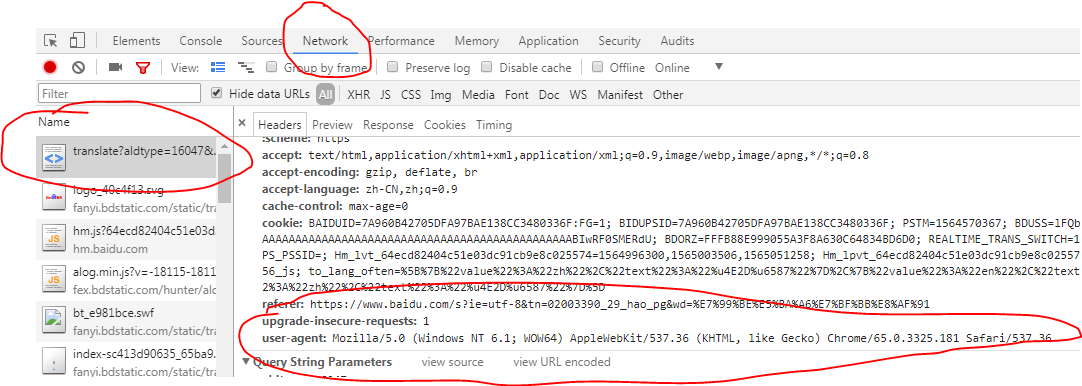
headers = {

    'User-Agent': 'Mozilla/5.0 (Windows NT 6.1; WOW64) AppleWebKit/537.36 (KHTML, like Gecko) Chrome/65.0.3325.181 Safari/537.36'

}
主函数;
def get_images(url):

    data = 'https:'

    res = requests.get(url,headers=headers)

    soup = BeautifulSoup(res.text,'lxml')

    url_infos = soup.select('div.thumb > a > img')

    # print(url_infos)

    for url_info in url_infos:

        try:

            urls = data+url_info.get('src')

            if os.path.exists(path+urls.split('/')[-1]):

                print('图片已下载')

            else:

                image = requests.get(urls,headers=headers)

                with open(path+urls.split('/')[-1],'wb') as fp:

                    fp.write(image.content)

                print('正在下载:'+urls)

                time.sleep(0.5)

        except Exception as e:

            print(e)
开始爬虫程序;
if __name__ == '__main__':

    # 路由列表

    urls = ['https://www.qiushibaike.com/imgrank/page/{}/'.format(i) for i in range(1,14)]

    # 开启多进程爬取

    pool = Pool()

    pool.map(get_images,urls)

    print('抓取完毕')
爬取中;

打开文件夹查看爬取结果;

done
完整代码;
import requests

import os

from bs4 import BeautifulSoup

import time

from multiprocessing import Pool

"""

************常用爬虫库***********

       requests

       BeautifulSoup

       pyquery

       lxml

************爬虫框架***********

       scrapy

       三大解析方式:re,css,xpath

"""

headers = {

    'User-Agent': 'Mozilla/5.0 (Windows NT 6.1; WOW64) AppleWebKit/537.36 (KHTML, like Gecko) Chrome/65.0.3325.181 Safari/537.36'

}

path = r'E:\爬虫\0805\\'

def get_images(url):

    data = 'https:'

    res = requests.get(url,headers=headers)

    soup = BeautifulSoup(res.text,'lxml')

    url_infos = soup.select('div.thumb > a > img')

    # print(url_infos)

    for url_info in url_infos:

        try:

            urls = data+url_info.get('src')

            if os.path.exists(path+urls.split('/')[-1]):

                print('图片已下载')

            else:

                image = requests.get(urls,headers=headers)

                with open(path+urls.split('/')[-1],'wb') as fp:

                    fp.write(image.content)

                print('正在下载:'+urls)

                time.sleep(0.5)

        except Exception as e:

            print(e)

if __name__ == '__main__':

    # 路由列表

    urls = ['https://www.qiushibaike.com/imgrank/page/{}/'.format(i) for i in range(1,14)]

    # 开启多进程爬取

    pool = Pool()

    pool.map(get_images,urls)

    print('抓取完毕')
python+BeautifulSoup+多进程爬取糗事百科图片的更多相关文章
- python+正则+多进程爬取糗事百科图片
话不多说,直接上代码: # 需要的库 import requests import re import os from multiprocessing import Pool # 请求头 header ...
- python爬虫之爬取糗事百科并将爬取内容保存至Excel中
本篇博文为使用python爬虫爬取糗事百科content并将爬取内容存入excel中保存·. 实验环境:Windows10 代码编辑工具:pycharm 使用selenium(自动化测试工具)+p ...
- Python爬虫:爬取糗事百科
网上看到的教程,但是是用正则表达式写的,并不能运行,后面我就用xpath改了,然后重新写了逻辑,并且使用了双线程,也算是原创了吧#!/usr/bin/python# -*- encoding:utf- ...
- 8.Python爬虫实战一之爬取糗事百科段子
大家好,前面入门已经说了那么多基础知识了,下面我们做几个实战项目来挑战一下吧.那么这次为大家带来,Python爬取糗事百科的小段子的例子. 首先,糗事百科大家都听说过吧?糗友们发的搞笑的段子一抓一大把 ...
- python网络爬虫--简单爬取糗事百科
刚开始学习python爬虫,写了一个简单python程序爬取糗事百科. 具体步骤是这样的:首先查看糗事百科的url:http://www.qiushibaike.com/8hr/page/2/?s=4 ...
- Python爬虫实战一之爬取糗事百科段子
大家好,前面入门已经说了那么多基础知识了,下面我们做几个实战项目来挑战一下吧.那么这次为大家带来,Python爬取糗事百科的小段子的例子. 首先,糗事百科大家都听说过吧?糗友们发的搞笑的段子一抓一大把 ...
- 转 Python爬虫实战一之爬取糗事百科段子
静觅 » Python爬虫实战一之爬取糗事百科段子 首先,糗事百科大家都听说过吧?糗友们发的搞笑的段子一抓一大把,这次我们尝试一下用爬虫把他们抓取下来. 友情提示 糗事百科在前一段时间进行了改版,导致 ...
- [爬虫]用python的requests模块爬取糗事百科段子
虽然Python的标准库中 urllib2 模块已经包含了平常我们使用的大多数功能,但是它的 API 使用起来让人感觉不太好,而 Requests 自称 “HTTP for Humans”,说明使用更 ...
- 初识python 之 爬虫:使用正则表达式爬取“糗事百科 - 文字版”网页数据
初识python 之 爬虫:使用正则表达式爬取"古诗文"网页数据 的兄弟篇. 详细代码如下: #!/user/bin env python # author:Simple-Sir ...
随机推荐
- windows mysql手动添加my.ini 服务启动不了
[mysqld] character-set-server=utf8 #绑定IPv4和3306端口 bind-address=0.0.0.0 port= default_storage_engine= ...
- [Tool] Give some magic ! 那些奇思妙想的 Chrome 插件
[ Reggy ] - 网站注册类自动填充临时信息,Magic! 但是对于非常规的网站无效.是什么意思呢? 就是说,它不是常规的 form 表单,而是使用 Js 操作数据,所以任何插件都无法自动识别. ...
- DIY:从零开始写一个 SQL 构建器
最近在项目中遇到了一个棘手的问题,因为 EF Core 不支持直接生成 Update 语句,所以这个项目就用到了 EFCore.Plus 来实现这个功能,但是 EFCore.Plus 对 SQLite ...
- 开启和安装Kubernetes k8s 基于Docker For Windows
0.最近发现,Docker For Windows Stable在Enable Kubernetes这个问题上是有Bug的,建议切换到Edge版本,并且采用下文AliyunContainerServi ...
- 前端与编译原理 用js去运行js代码 js2run
# 前端与编译原理 用js去运行js代码 js2run 前端与编译原理似乎相隔甚远,各种热门的框架都学不过来,那能顾及到这么多底层呢,前端开发者们似乎对编译原理的影响仅仅是"抽象语法树&qu ...
- SQL Server 从Excel导入到数据库操作遇到的科学计数法问题
问题描述 今天在做从Excel导入数据到SQL Server 中将数据更新到表中,可惜就这一个简单的操作中出现了一点小插曲,就在我根据Excel中的编号关联表编号以此更新姓名字段时出现转换错误问题.如 ...
- [Linux] 树莓派 4B 安装 Ubuntu 19.10 (Eoan Ermine) IOT 版
硬件:Raspberry Pi 4B系统:Ubuntu 19.10 (Eoan Ermine) for IOT官网:https://ubuntu.com/download/iot/raspberry- ...
- NFS挂载参数
mount -t nfs -o rw,bg,hard,nointr,rsize=32768,wsize=32768,tcp,actimeo=0,vers=3,timeo=6 192.168.12.50 ...
- 手撕面试官系列(十):面试必备之常问Dubbo29题+MySQL55题
Dubbo专题 (面试题+答案领取方式见侧边栏) 1.Dubbo 支持哪些协议,每种协议的应用场景,优缺点?2.Dubbo 超时时间怎样设置?3.Dubbo 有些哪些注册中心?4.Dubbo 集群的负 ...
- 【Python爬虫案例学习】分析Ajax请求并抓取今日头条街拍图片
1.抓取索引页内容 利用requests请求目标站点,得到索引网页HTML代码,返回结果. from urllib.parse import urlencode from requests.excep ...