
python+BeautifulSoup+多进程爬取糗事百科图片
用到的库;
import requests

import os

from bs4 import BeautifulSoup

import time

from multiprocessing import Pool
定义图片存储路径;
path = r'E:\爬虫\0805\\'
请求头,模拟浏览器请求;
在浏览器中的位置,按f12打开开发者模式;
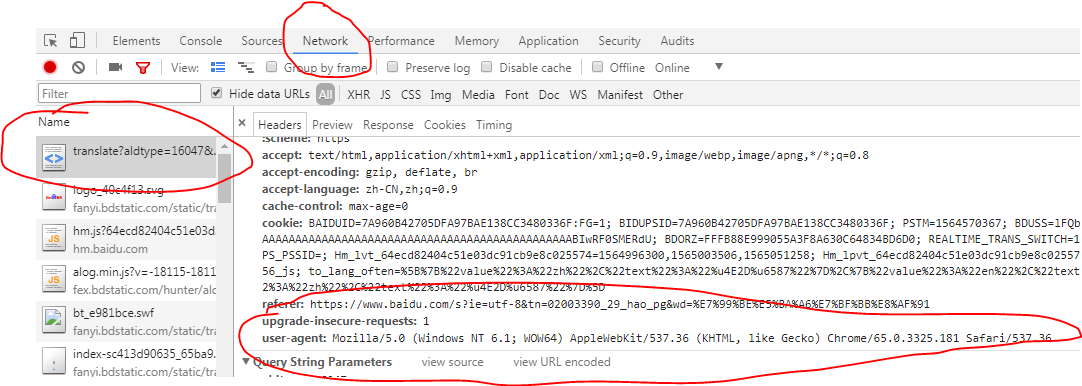
headers = {

    'User-Agent': 'Mozilla/5.0 (Windows NT 6.1; WOW64) AppleWebKit/537.36 (KHTML, like Gecko) Chrome/65.0.3325.181 Safari/537.36'

}
主函数;
def get_images(url):

    data = 'https:'

    res = requests.get(url,headers=headers)

    soup = BeautifulSoup(res.text,'lxml')

    url_infos = soup.select('div.thumb > a > img')

    # print(url_infos)

    for url_info in url_infos:

        try:

            urls = data+url_info.get('src')

            if os.path.exists(path+urls.split('/')[-1]):

                print('图片已下载')

            else:

                image = requests.get(urls,headers=headers)

                with open(path+urls.split('/')[-1],'wb') as fp:

                    fp.write(image.content)

                print('正在下载:'+urls)

                time.sleep(0.5)

        except Exception as e:

            print(e)
开始爬虫程序;
if __name__ == '__main__':

    # 路由列表

    urls = ['https://www.qiushibaike.com/imgrank/page/{}/'.format(i) for i in range(1,14)]

    # 开启多进程爬取

    pool = Pool()

    pool.map(get_images,urls)

    print('抓取完毕')
爬取中;

打开文件夹查看爬取结果;

done
完整代码;
import requests

import os

from bs4 import BeautifulSoup

import time

from multiprocessing import Pool

"""

************常用爬虫库***********

       requests

       BeautifulSoup

       pyquery

       lxml

************爬虫框架***********

       scrapy

       三大解析方式:re,css,xpath

"""

headers = {

    'User-Agent': 'Mozilla/5.0 (Windows NT 6.1; WOW64) AppleWebKit/537.36 (KHTML, like Gecko) Chrome/65.0.3325.181 Safari/537.36'

}

path = r'E:\爬虫\0805\\'

def get_images(url):

    data = 'https:'

    res = requests.get(url,headers=headers)

    soup = BeautifulSoup(res.text,'lxml')

    url_infos = soup.select('div.thumb > a > img')

    # print(url_infos)

    for url_info in url_infos:

        try:

            urls = data+url_info.get('src')

            if os.path.exists(path+urls.split('/')[-1]):

                print('图片已下载')

            else:

                image = requests.get(urls,headers=headers)

                with open(path+urls.split('/')[-1],'wb') as fp:

                    fp.write(image.content)

                print('正在下载:'+urls)

                time.sleep(0.5)

        except Exception as e:

            print(e)

if __name__ == '__main__':

    # 路由列表

    urls = ['https://www.qiushibaike.com/imgrank/page/{}/'.format(i) for i in range(1,14)]

    # 开启多进程爬取

    pool = Pool()

    pool.map(get_images,urls)

    print('抓取完毕')
python+BeautifulSoup+多进程爬取糗事百科图片的更多相关文章
- python+正则+多进程爬取糗事百科图片
话不多说,直接上代码: # 需要的库 import requests import re import os from multiprocessing import Pool # 请求头 header ...
- python爬虫之爬取糗事百科并将爬取内容保存至Excel中
本篇博文为使用python爬虫爬取糗事百科content并将爬取内容存入excel中保存·. 实验环境:Windows10 代码编辑工具:pycharm 使用selenium(自动化测试工具)+p ...
- Python爬虫:爬取糗事百科
网上看到的教程,但是是用正则表达式写的,并不能运行,后面我就用xpath改了,然后重新写了逻辑,并且使用了双线程,也算是原创了吧#!/usr/bin/python# -*- encoding:utf- ...
- 8.Python爬虫实战一之爬取糗事百科段子
大家好,前面入门已经说了那么多基础知识了,下面我们做几个实战项目来挑战一下吧.那么这次为大家带来,Python爬取糗事百科的小段子的例子. 首先,糗事百科大家都听说过吧?糗友们发的搞笑的段子一抓一大把 ...
- python网络爬虫--简单爬取糗事百科
刚开始学习python爬虫,写了一个简单python程序爬取糗事百科. 具体步骤是这样的:首先查看糗事百科的url:http://www.qiushibaike.com/8hr/page/2/?s=4 ...
- Python爬虫实战一之爬取糗事百科段子
大家好,前面入门已经说了那么多基础知识了,下面我们做几个实战项目来挑战一下吧.那么这次为大家带来,Python爬取糗事百科的小段子的例子. 首先,糗事百科大家都听说过吧?糗友们发的搞笑的段子一抓一大把 ...
- 转 Python爬虫实战一之爬取糗事百科段子
静觅 » Python爬虫实战一之爬取糗事百科段子 首先,糗事百科大家都听说过吧?糗友们发的搞笑的段子一抓一大把,这次我们尝试一下用爬虫把他们抓取下来. 友情提示 糗事百科在前一段时间进行了改版,导致 ...
- [爬虫]用python的requests模块爬取糗事百科段子
虽然Python的标准库中 urllib2 模块已经包含了平常我们使用的大多数功能,但是它的 API 使用起来让人感觉不太好,而 Requests 自称 “HTTP for Humans”,说明使用更 ...
- 初识python 之 爬虫:使用正则表达式爬取“糗事百科 - 文字版”网页数据
初识python 之 爬虫:使用正则表达式爬取"古诗文"网页数据 的兄弟篇. 详细代码如下: #!/user/bin env python # author:Simple-Sir ...
随机推荐
- js小数计算的问题,为什么0.1+0.2 != 0.3
//下面可以用原生解决 0.1+0.2 的问题 parseFloat((0.1 + 0.2).toFixed(10)) 复制代码 console.log(0.1+0.2===0.3); //true ...
- 1-3docker commit定制镜像
以定制⼀个 Web 服务器为例⼦ 1.commit定制镜像 docker pull nginx:1.17 运行容器 --name:容器名字 -d:后台 -p本地端口:容器内端口 docker ru ...
- [转载]schtasks命令使用实例介绍
Schtasks /Query /s "XXX" /V /FO /CSV > XXX.csv 原文出处:http://www.dzwebs.net/2969.html sch ...
- web基础---->script标签的特殊使用
今天要讲的就是怎样使用<script>去请求一个servlet,加载一些js资源以及额外的逻辑处理: 目录: JS的引入的几种方式 在script的标签中引入Servlet 动态引入JS的 ...
- git diff/difftool
参考好文:使用命令和P4Merge进行diff::https://www.cnblogs.com/cgzl/p/8597066.html git difftool 即可弹出比较工具的界面 哈哈 === ...
- Endpoint is unreachable and there is no snapshot available for offline browsing
docker Portainer配置的时候出现这个错误:Endpoint is unreachable and there is no snapshot available for offline b ...
- 027 SSM综合练习03--数据后台管理系统--product-list.jsp和main.jsp页面制作
1.product-list.jsp页面制作 (1)创建一个product-list1.jsp文件,清空,只保留 <%@ page contentType="text/html;cha ...
- 18 SpringMVC 文件上传和异常处理
1.文件上传的必要前提 (1)form 表单的 enctype 取值必须是:multipart/form-data(默认值是:application/x-www-form-urlencoded) en ...
- CentOS7安装Prometheus(二进制)
一.概述 Prometheus是由SoundCloud开发的开源监控报警系统和时序列数据库(TSDB).Prometheus使用Go语言开发,是Google BorgMon监控系统的开源版本. 环境说 ...
- sql servse 常用维护sql
1.说明:创建数据库 CREATE DATABASE database-name 2.说明:删除数据库 drop database dbname 3.说明:备份sql server --- 创建 备份 ...