
一个用WPF做的简单计算器源代码
一、界面设计XAML代码
<Window x:Class="fengjisuanqi.MainWindow"

        xmlns="http://schemas.microsoft.com/winfx/2006/xaml/presentation"

        xmlns:x="http://schemas.microsoft.com/winfx/2006/xaml"

        Title="我的简单计算器" Height="700" Width="480" ResizeMode="CanMinimize">

    <Grid Margin="0,0,0,0">

        <Grid.ColumnDefinitions>

            <ColumnDefinition/>

            <ColumnDefinition/>

            <ColumnDefinition/>

            <ColumnDefinition/>

        </Grid.ColumnDefinitions>

        <Grid.RowDefinitions>

            <RowDefinition Height="3*"/>

            <RowDefinition Height="*"/>

            <RowDefinition Height="2*"/>

            <RowDefinition Height="2*"/>

            <RowDefinition Height="2*"/>

            <RowDefinition Height="2*"/>

        </Grid.RowDefinitions>

        <!--

            <StackPanel Grid.Row="0" Grid.ColumnSpan="4" Margin="0">

                <TextBlock Name="gongshi" Height="Auto" Margin="0,10,0,0" Background="#FF5D4D4D" HorizontalAlignment="Right" FontSize="36" Width="470" Foreground="White"/>

            <TextBlock Name="jiguo" Height="80" Margin="0" Background="#ff5d4d4d" HorizontalAlignment="Right" Width="470" FontSize="36" Foreground="White"></TextBlock>

        </StackPanel>

        -->

        <TextBlock Name="ss" Grid.Row="0" Grid.ColumnSpan="4" Width="470" Height="Auto" Margin="0,0,0,0" Background="#FF5D4D4D" HorizontalAlignment="Right" FontSize="36" Foreground="White"/>

        <TextBlock Name="gongshi" Grid.Row="0" Grid.ColumnSpan="4" Height="Auto" Margin="0,0,0,0" Background="#FF5D4D4D" HorizontalAlignment="Right" FontSize="36" Foreground="White"/>

        <TextBlock Name="jiguo" Grid.Row="0" Grid.ColumnSpan="4" Height="60" Margin="0" Background="#FF5D4D4D" HorizontalAlignment="Right" FontSize="36" Foreground="White"/>

        <Button Content="7" FontSize="50" Grid.Row="2" Grid.Column="0" Click="Button_Click_1" Name="B7" />

        <Button Content="8" FontSize="50" Grid.Row="2" Grid.Column="1" Click="Button_Click_1" Name="B8" />

        <Button Content="9" FontSize="50" Grid.Row="2" Grid.Column="2" Click="Button_Click_1" Name="B9" />

        <Button Content="4" FontSize="50" Grid.Row="3" Grid.Column="0" Click="Button_Click_1" Name="B4" />

        <Button Content="5" FontSize="50" Grid.Row="3" Grid.Column="1" Click="Button_Click_1" Name="B5" />

        <Button Content="6" FontSize="50" Grid.Row="3" Grid.Column="2" Click="Button_Click_1" Name="B6" />

        <Button Content="1" FontSize="50" Grid.Row="4" Grid.Column="0" Click="Button_Click_1" Name="B1" />

        <Button Content="2" FontSize="50" Grid.Row="4" Grid.Column="1" Click="Button_Click_1" Name="B2" />

        <Button Content="3" FontSize="50" Grid.Row="4" Grid.Column="2" Click="Button_Click_1" Name="B3" />

        <Button Content="." FontSize="50" Grid.Row="5" Grid.Column="0" Click="Button_Click_1" Name="B" />

        <Button Content="0" FontSize="50" Grid.Row="5" Grid.Column="1" Click="Button_Click_1" Name="B0" />

        <Button Name="divide" FontSize="50" Content="/" Grid.Column="3" Grid.Row="2" Click="fuhao_Click_1"/>

        <Button Name="Multiply" FontSize="50" Content="*" Grid.Column="3" Grid.Row="3" Click="fuhao_Click_1"/>

        <Button Name="Minus" FontSize="50" Content="-" Grid.Column="3" Grid.Row="4" Click="fuhao_Click_1"/>

        <Button Name="Add" FontSize="50" Content="+" Grid.Column="3" Grid.Row="5" Click="fuhao_Click_1"/>

        <Button Name="result" FontSize="50" Grid.Column="2" Grid.Row="5" Click="result_Click_1" Content="="/>

        <Button Name="del" FontSize="30" Grid.Column="3" Grid.Row="1" Content="CE" Click="del_Click_1" Background="#FFEE0E0E"/>

        <Button Name="tuige" FontSize="30" Grid.Column="2" Grid.Row="1" Content="退格" Click="tuige_Click_1"/>

        <Rectangle Name="rect" Grid.Row="1" Grid.ColumnSpan="2">

            <Rectangle.Fill>

                <LinearGradientBrush EndPoint="0.5,1" StartPoint="0.5,0">

                    <GradientStop Color="#FF9DA49F" Offset="0"/>

                    <GradientStop Color="White" Offset="1"/>

                </LinearGradientBrush>

            </Rectangle.Fill>

        </Rectangle>

    </Grid>

</Window>
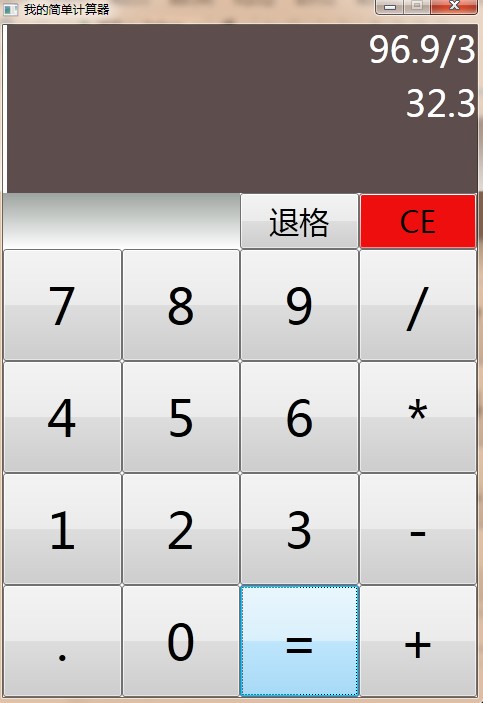
二、效果图
三、后台逻辑代码
using System;

using System.Collections.Generic;

using System.Linq;

using System.Text;

using System.Windows;

using System.Windows.Controls;

using System.Windows.Data;

using System.Windows.Documents;

using System.Windows.Input;

using System.Windows.Media;

using System.Windows.Media.Imaging;

using System.Windows.Navigation;

using System.Windows.Shapes;

namespace fengjisuanqi

{

    /// <summary>

    /// MainWindow.xaml 的交互逻辑

    /// </summary>

    public partial class MainWindow : Window

    {

        private string anxiazhi = "";

        private double resultnum = 0.0;

        public MainWindow()

        {

            InitializeComponent();

        }

        //运算方法

        private void OperationNum(string s)

        {

            if (jiguo.Text != "")

            {

                switch (anxiazhi)

                {

                    case "": resultnum = double.Parse(jiguo.Text);

                        anxiazhi = s;

                        break;

                    case "+": resultnum = resultnum + double.Parse(jiguo.Text);

                        anxiazhi = s;

                        break;

                    case "-": resultnum = resultnum - double.Parse(jiguo.Text);

                        anxiazhi = s;

                        break;

                    case "*": resultnum = resultnum * double.Parse(jiguo.Text);

                        anxiazhi = s;

                        break;

                    case "/": if (double.Parse(jiguo.Text) != 0.0)

                        {

                            resultnum = resultnum / double.Parse(jiguo.Text);

                        }

                        else

                        {

                            resultnum = 0.0;

                        }

                        anxiazhi = s;

                        break;

                    default: break;

                }

            }

            else

            {

                anxiazhi = s;

            }

        }

        private void Button_Click_1(object sender, RoutedEventArgs e)

        {

            if (anxiazhi == "=")

            {

                gongshi.Text = "";

                jiguo.Text = "";

                anxiazhi = "";

                resultnum = 0.0;

            }

            string s = ((Button)sender).Content.ToString();

            jiguo.Text = jiguo.Text + s;

            gongshi.Text = gongshi.Text + s;

        }

        //按运算符号的事件处理

        private void fuhao_Click_1(object sender, RoutedEventArgs e)

        {

            if (anxiazhi == "=")

            {

                gongshi.Text = jiguo.Text;

                anxiazhi = "";

            }

            string s = ((Button)sender).Content.ToString();//获得按钮文本内容

            gongshi.Text = gongshi.Text + s;

            OperationNum(s);

            jiguo.Text = "";

        }

        //按“=”号计算结果

        private void result_Click_1(object sender, RoutedEventArgs e)

        {

            OperationNum("=");

            jiguo.Text = resultnum.ToString();

        }

        //清除操作

        private void del_Click_1(object sender, RoutedEventArgs e)

        {

            jiguo.Text = "";

            gongshi.Text = "";

            anxiazhi = "";

            resultnum = 0.0;

        }

        //退格

        private void tuige_Click_1(object sender, RoutedEventArgs e)

        {

            //获取字符串长度

            int le = jiguo.Text.Length;

            int le2 = gongshi.Text.Length;

            if (le > &&le2>)

            {

                jiguo.Text = jiguo.Text.Substring(, le - );

                gongshi.Text = gongshi.Text.Substring(, le2 - );

            }

        }

    }

}
一个用WPF做的简单计算器源代码的更多相关文章
- PHP做的简单计算器
使用php做的简易计算器 能够进行+,-,*,/运算. 如下图 <?php if (isset($_POST['button'])) { $num1 = $_POST['num1']; $num ...
- 每天2个android小例子----简单计算器源代码
通过Android4.0 网格布局GridLayout来实现一个简单的计算器界面布局 package com.android.xiong.gridlayoutTest; import java.mat ...
- Android之一个简单计算器源代码
通过Android4.0 网格布局GridLayout来实现一个简单的计算器界面布局 源码如下(欢迎大家指导 批评 ) package com.android.xiong.gridlayoutTe ...
- 【C#】简单计算器源代码
form1.cs using System; using System.Collections.Generic; using System.ComponentModel; using System.D ...
- 平时没有怎么用Excel做 加减乘除 计算,猛地发现,其实Excel 是一个很好的简单计算器
平时没有怎么用Excel做 加减乘除 计算,猛地发现,其实Excel 是一个很好的简单计算器
- 基于MFC的一个简单计算器
写一个简单的计算器并不是什么很难的事,主要目的是要通过这个程序来学习和分析其中的核心算法.这个简易计算器的核心部分就是对输入的表达式的正确性判断与求值,其中包括对表达式的解析.中缀表达式转后缀表达式. ...
- WPF 3D:简单的Point3D和Vector3D动画创造一个旋转的正方体
原文:WPF 3D:简单的Point3D和Vector3D动画创造一个旋转的正方体 运行结果: 事实上很简单,定义好一个正方体,处理好纹理.关于MeshGeometry3D的正确定义和纹理这里就不多讲 ...
- 菜鸟学Android编程——简单计算器《一》
菜鸟瞎搞,高手莫进 本人菜鸟一枚,最近在学Android编程,网上看了一些视频教程,于是想着平时手机上的计算器应该很简单,自己何不尝试着做一个呢? 于是就冒冒失失的开撸了. 简单计算器嘛,功能当然很少 ...
- TypeC一个微软开发的超简单.NET依赖注入/IoC容器
控制反转(IoC,Inversion of Control)是由Martin Fowler总结出来的一种设计模式,用来减少代码间的耦合.一般而言,控制反转分为依赖注入(Dependency Injec ...
随机推荐
- [ActionScript 3.0] AS3.0 对象在一定范围随机显示不重叠
import flash.geom.Rectangle; import flash.display.MovieClip; import flash.display.Sprite; var arr:Ar ...
- Javascript同源策略对context.getImageData的影响
在本机测试HTML5 Canvas程序的时候,如果用context.drawImage()后再用context.getImageData()获取图片像素数据的时候会抛出错:SECURITY_ERR: ...
- SGU 176 【带上下界的有源汇的最小流】
---恢复内容开始--- 题意: 给了n个点,m条有向边. 接下来m行,每条边给起点终点与容量,以及一个标记. 标记为1则该边必须满容量,0表示可以在容量范围内任意流. 求: 从源点1号点到终点n号点 ...
- 共享一个MVC通过NPOI导出excel的通用方法
public static System.IO.MemoryStream ExportExcel<T>(string title, List<T> objList, param ...
- Kindle3与亚马逊
喜欢上亚马逊,偶尔会买些免费或极低价格的书,但始终无法把这些书传到“我的”kindle3上,原因是kindle3无法在中国注册,又绕不开DRM,同时经历了换屏.换主板,早已不是原来的kindle了.今 ...
- Android API 中文 ListView
正文 一.结构 public class RatingBar extends AbsSeekBar java.lang.Object android.view.View android.view.Vi ...
- POJ1298_The Hardest Problem Ever_最难的问题_Caesar 密码_C++
题目:http://poj.org/problem?id=1298 好吧,给了题目也看不懂……给出翻译(题目名翻译是:最难的问题,233333) 这一看就是老师给出题解: 然而没有什么用哈 最快的办法 ...
- Maven本地资源库
在本地安装的mvn文件夹中找到conf/setting.xml,然后找到localRepository结点,这个路径值就是Maven的实际路径 打开该文件夹就能够看到
- Flex Alert的匿名回调函数如何得到正确的this
Flex中经常使用Alert来弹出提示或确认窗口,为了方便省事,会直接用匿名函数作为回调,但有时如果要调用外部的this,你会发现匿名函数中的this无法指向外部父类,可以使用e.target获取pa ...
- iis 站点部署后 Microsof .Net Framework异常
最近在部署站点到 iis 中时,遇到 iis 崩溃的问题,一打开部署好 的站点后,就出现 Microsoft .Net Framework 异常的消息提示,具体的 异常情况如下: 于是在网上查找了很多 ...