
14-HTML-CSS案例
1、超链接美化

<!DOCTYPE html>

<html lang="en">

<head>

    <meta charset="UTF-8">

    <title>超链接美化</title>

    <style type="text/css">

        *{

            padding: 0;

            margin: 0;

        }

        ul{

            list-style: none;

        }

        .nav{

            width: 960px;

            /*height: 40px;*/

            overflow: hidden;

            margin: 100px auto ;

            background-color: purple;

            /*设置圆角*/

            border-radius: 5px;

        }

        .nav ul li{

            float: left;

            width: 160px;

            height: 40px;

            line-height: 40px;

            text-align: center;

        }

        .nav ul li a{

            display: block;

            width: 160px;

            height: 40px;

            color: white;

            font-size: 20px;

            text-decoration: none;

            font-family: 'Hanzipen SC';

        }

        /*a标签除外,不继承父元素的color*/

        .nav ul li a:hover{

            background-color: red;

            font-size: 22px;

        }

    </style>

</head>

<body>

    <div class="nav">

        <ul>

            <li>

                <a href="">网站导航</a>

            </li>

            <li>

                <a href="">网站导航</a>

            </li>

            <li>

                <a href="">网站导航</a>

            </li>

            <li>

                <a href="">网站导航</a>

            </li>

            <li>

                <a href="">网站导航</a>

            </li>

            <li>

                <a href="">网站导航</a>

            </li>

        </ul>

    </div>

</body>

</html>
2、背景图片repeat
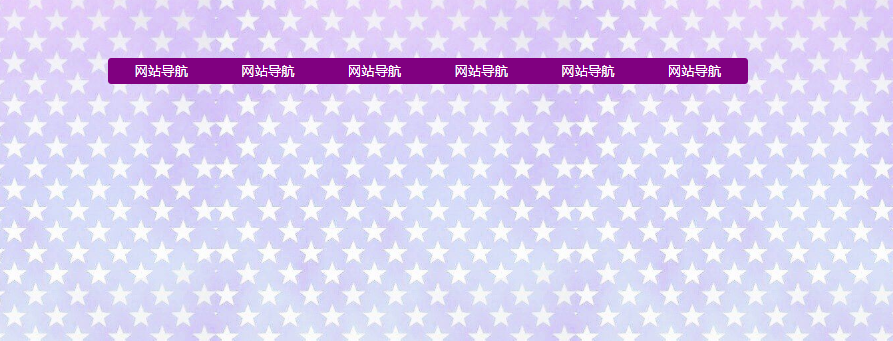
<!DOCTYPE html>

<html lang="en">

<head>

    <meta charset="UTF-8">

    <title>超链接美化</title>

    <style type="text/css">

        *{

            padding: 0;

            margin: 0;

        }

        ul{

            list-style: none;

        }

        body{

            background-image: url(./images/timg2.jpeg);

        }

        .nav{

            width: 960px;

            /*height: 40px;*/

            overflow: hidden;

            margin: 100px auto ;

            background-color: purple;

            /*设置圆角*/

            border-radius: 5px;

        }

        .nav ul li{

            float: left;

            width: 160px;

            height: 40px;

            line-height: 40px;

            text-align: center;

        }

        .nav ul li a{

            display: block;

            width: 160px;

            height: 40px;

            color: white;

            font-size: 20px;

            text-decoration: none;

            font-family: 'Hanzipen SC';

        }

        /*a标签除外,不继承父元素的color*/

        .nav ul li a:hover{

            background-color: red;

            font-size: 22px;

        }

    </style>

</head>

<body>

    <div class="nav">

        <ul>

            <li>

                <a href="">网站导航</a>

            </li>

            <li>

                <a href="">网站导航</a>

            </li>

            <li>

                <a href="">网站导航</a>

            </li>

            <li>

                <a href="">网站导航</a>

            </li>

            <li>

                <a href="">网站导航</a>

            </li>

            <li>

                <a href="">网站导航</a>

            </li>

        </ul>

    </div>

</body>

</html>
3、通天bar图

<!DOCTYPE html>

<html lang="en">

<head>

    <meta charset="UTF-8">

    <title>超链接美化</title>

    <style type="text/css">

        *{

            padding: 0;

            margin: 0;

        }

        ul{

            list-style: none;

        }

        body{

            /*background-image: url(./images/banner.jpg);*/

            /*background-repeat: no-repeat;*/

            /*水平居中通天banner图*/

            /*background-position: center top;*/

            /*综合属性设置*/

            background:  red  url('./images/banner.jpg')  no-repeat   center top;

        }

        .nav{

            width: 960px;

            /*height: 40px;*/

            overflow: hidden;

            margin: 100px auto ;

            background-color: purple;

            /*设置圆角*/

            border-radius: 5px;

        }

        .nav ul li{

            float: left;

            width: 160px;

            height: 40px;

            line-height: 40px;

            text-align: center;

        }

        .nav ul li a{

            display: block;

            width: 160px;

            height: 40px;

            color: white;

            font-size: 20px;

            text-decoration: none;

            font-family: 'Hanzipen SC';

        }

        /*a标签除外,不继承父元素的color*/

        .nav ul li a:hover{

            background-color: red;

            font-size: 22px;

        }

    </style>

</head>

<body>

    <div class="nav">

        <ul>

            <li>

                <a href="">网站导航</a>

            </li>

            <li>

                <a href="">网站导航</a>

            </li>

            <li>

                <a href="">网站导航</a>

            </li>

            <li>

                <a href="">网站导航</a>

            </li>

            <li>

                <a href="">网站导航</a>

            </li>

            <li>

                <a href="">网站导航</a>

            </li>

        </ul>

    </div>

</body>

</html>
4、固定导航栏
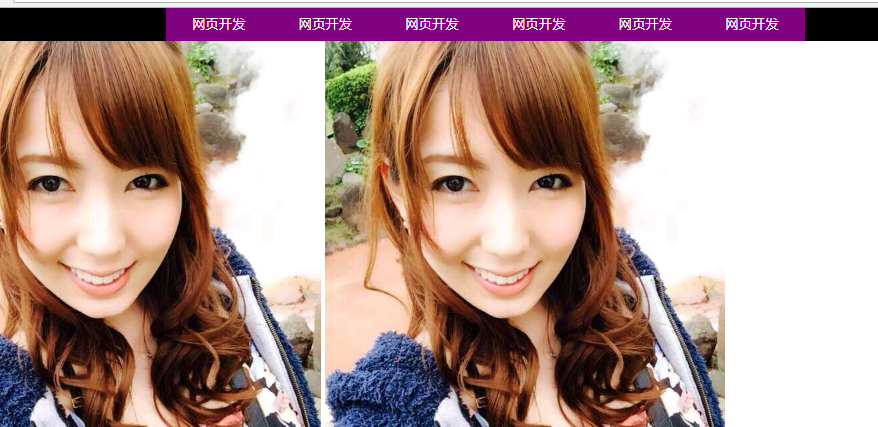
<!DOCTYPE html>

<html lang="en">

<head>

    <meta charset="UTF-8">

    <title>固定导航栏</title>

    <style type="text/css">

        *{

            padding: 0;

            margin: 0;

        }

        ul{

            list-style: none;

        }

        a{

            text-decoration: none;

        }

        body{

            /*给body设置导航栏的高度,来显示下方图片的整个内容*/

            padding-top: 49px;

        }

        .wrap{

            width: 100%;

            height: 49px;

            background-color: #000;

            /*设置固定定位之后,一定一定要加top属性和left属性*/

            position: fixed;

            top: 0;

            left: 0;

        }

        .wrap .nav{

            width: 960px;

            height: 49px;

            margin: 0 auto;

        }

        .wrap .nav ul li{

            float: left;

            width: 160px;

            height: 49px;

            text-align: center;

        }

        .wrap .nav ul li a{

            width: 160px;

            height: 49px;

            display: block;

            color: #fff;

            font: 20px/49px "Hanzipen SC";

            background-color: purple;

        }

        .wrap .nav ul li a:hover{

            background-color: red;

            font-size: 22px;

        }

    </style>

</head>

<body>

    <div class="wrap">

        <div class="nav">

            <ul>

                <li>

                    <a href="#">网页开发</a>

                </li>

                <li>

                    <a href="#">网页开发</a>

                </li>

                <li>

                    <a href="#">网页开发</a>

                </li>

                <li>

                    <a href="#">网页开发</a>

                </li>

                <li>

                    <a href="#">网页开发</a>

                </li>

                <li>

                    <a href="#">网页开发</a>

                </li>

            </ul>

        </div>

    </div>

    <img src="./bojie.jpg" alt="">

    <img src="./bojie.jpg" alt="">

    <img src="./bojie.jpg" alt="">

    <img src="./bojie.jpg" alt="">

    <img src="./bojie.jpg" alt="">

    <img src="./bojie.jpg" alt="">

    <img src="./bojie.jpg" alt="">

    <img src="./bojie.jpg" alt="">

    <img src="./bojie.jpg" alt="">

    <img src="./bojie.jpg" alt="">

    <img src="./bojie.jpg" alt="">

    <img src="./bojie.jpg" alt="">

</body>

</html>
5、父相子绝
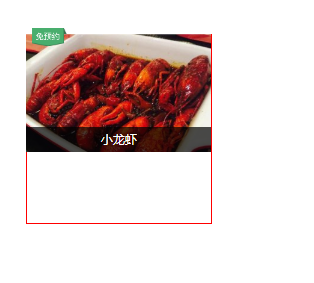
<!DOCTYPE html>

<html lang="en">

<head>

    <meta charset="UTF-8">

    <title></title>

    <style type="text/css">

        *{

            padding: 0;

            margin: 0;

        }

        .box{

            width: 277px;

            height: 284px;

            border: 1px solid red;

            margin: 100px;

            position: relative;

        }

        .box img{

            width: 277px;

            height: 177px;

        }

        .box .dtc{

            width: 52px;

            height: 27px;

            background: url(./images/common.png) no-repeat -54px 0;

            position: absolute;

            top: -9px;

            left: 9px;

        }

        .box .zhegai{

            width: 277px;

            height: 38px;

            color: #fff;

            line-height: 38px;

            text-align: center;

            background-color: rgba(0,0,0,.7);

            position: absolute;

            top: 139px;

            left: 0;

        }

    </style>

</head>

<body>

    <div class="box">

        <img src="./images/longxia.jpg" alt="">

        <span class="dtc"></span>

        <div class="zhegai">小龙虾</div>

    </div>

</body>

</html>
6
14-HTML-CSS案例的更多相关文章
- css案例学习之table tr th td ul li实现日历
效果 代码 <html> <head> <title>Calendar</title> <style> <!-- .month { b ...
- css案例学习之盒子模型
定义:每个盒子都有:边界.边框.填充.内容四个属性: 每个属性都包括四个部分:上.右.下.左:这四部分可同时设置,也可分别设置:里的抗震辅料厚度,而边框有大小和颜色之分,我们又可以理解为生活中所见盒子 ...
- 前端学习笔记--css案例
要实现的案例: 1.分析布局 2.划分文件结构: 3.编写css代码 * { padding: 0; margin: 0; } body { font-size: 16px; color: burly ...
- Css案例整理
1.实现两个div并排显示 案例:checkbox的标题和内容需要并排显示,checkbox竖向排列 <head> <style type="text/css"& ...
- CSS案例3(在线教育网站)
案例练习目的是总结以前的css和html 还有ps的使用. 制作步骤: 准备相关文件.(内部样式表) html文件(index.html) 图片文件 准备CSS 初始化. 书写结构和样式 确定版心(是 ...
- 第 14 章 CSS 颜色与度量单位
学习要点: 1.颜色表方案 2.度量单位 主讲教师:李炎恢 本章主要探讨 HTML5 中 CSS 颜色和度量单位等问题,包括颜色的选取方式.相对长度和绝对长度等. 一.颜色表方案 颜色的表现形式主要有 ...
- css笔记14:css文件之间可以相互引用
css文件之间相互引用是通过@import指令完成的 格式: @import url("被引用的css文件"); 顺便说一句,如果希望在html或者php文件中引用某个xxx.c ...
- css案例学习之用thead、tbody、tfoot实现漂亮的table布局
首先说说thead.tbody.tfoot <thead> <tbody> <tfoot> 无论前后顺序如何改变, <thead> 内的元素总是在表的最 ...
- css案例学习之ul li dl dt dd实现二级菜单
效果 代码实现 <!DOCTYPE html PUBLIC "-//W3C//DTD XHTML 1.0 Transitional//EN" "http://www ...
- css案例学习之按钮超链接
效果 css实现 <html> <head> <title>按钮超链接</title> <style> a{ /* 统一设置所有样式 */ ...
随机推荐
- Linux内核态和用户态
两张图说明Linux内核态和用户态之间的关系
- 铁乐学python_day21_面向对象编程3
抽象类和接口类 以下内容大部分摘自博客http://www.cnblogs.com/Eva-J/ 继承有两种用途: 一:继承基类的方法,并且做出自己的改变或者扩展(代码重用) 二:声明某个子类兼容于某 ...
- 生成器-yield初接触
什么是生成器? 生成器的实质就是迭代器 在python中有三种方式来获取生成器 1. 通过生成器函数 2. 通过各种推导式实现生成器 3. 通过数据的转换也可以获取生成器 将函数中的return换成y ...
- C++ Boost在Windows和Linux下的编译安装
再debian下直接apt-get install gcc g++就可以了.按照类似的逻辑,再Fedora下yum install gcc g++ 报告无法找到g++包. 差了一下,原来这个包的名字叫 ...
- 如何确定PHP CLI 的php.ini文件的位置
当我们安装扩展时,可能需要手动配置php.ini文件,把扩展加进去,所以要确认PHP CLI的php.ini文件的位置.可以运行php --ini查找PHP CLI的ini文件位置,结果类似如下(各个 ...
- 【原创】uwsgi中多进程+多线程原因以及串行化accept() - thunder_lock说明
如有不对,请详细指正. 最近再研究uwsgi如何部署python app,看uwsgi的文档,里面有太多的参数,但每个参数的解释太苍白,作为菜鸟的我实在是不懂.想搞清楚uwsgi的工作原因以及里面的一 ...
- SQL Server 中的排名函数与使用场景
1.RowNumber() Over (oder by.....) 在需要对某个不连续ID的表进行排序时使用 2.ROW_NUMBER() over(PARTITION by ...... ord ...
- log4jnet不记录日志的问题解决
背景:dll文件从别人项目里复制过来的,配置文件是从别的项目里配置过来的.然后就是不写日志. 最后经过搜索原项目,发现需要在AssemblyInfo.cs文件里加一段话, [assembly: log ...
- 写了一个web使用向导的小插件
运行效果: 引入插件: <link rel="stylesheet" href="ez-guide.css"> <script src=&qu ...
- Mybatis 的常见面试题
背景:好久没用Mybatis了,有些面试题还是要好好准备的. Mybatis 的常见面试题