
配置centos 7 mysql
http://www.cnblogs.com/starof/p/4680083.html
一、系统环境
yum update升级以后的系统版本为
[root@yl-web yl]# cat /etc/redhat-release

CentOS Linux release 7.1.1503 (Core)
二、mysql安装
一般网上给出的资料都是
#yum install mysql

#yum install mysql-server

#yum install mysql-devel
安装mysql和mysql-devel都成功,但是安装mysql-server失败,如下:

[root@yl-web yl]# yum install mysql-server

Loaded plugins: fastestmirror

Loading mirror speeds from cached hostfile

 * base: mirrors.sina.cn

 * extras: mirrors.sina.cn

 * updates: mirrors.sina.cn

No package mysql-server available.

Error: Nothing to do
查资料发现是CentOS 7 版本将MySQL数据库软件从默认的程序列表中移除,用mariadb代替了。
有两种解决办法:
1、方法一:安装mariadb
MariaDB数据库管理系统是MySQL的一个分支,主要由开源社区在维护,采用GPL授权许可。开发这个分支的原因之一是:甲骨文公司收购了MySQL后,有将MySQL闭源的潜在风险,因此社区采用分支的方式来避开这个风险。MariaDB的目的是完全兼容MySQL,包括API和命令行,使之能轻松成为MySQL的代替品。
安装mariadb,大小59 M。
[root@yl-web yl]# yum install mariadb-server mariadb
mariadb数据库的相关命令是:
systemctl start mariadb #启动MariaDB
systemctl stop mariadb #停止MariaDB
systemctl restart mariadb #重启MariaDB
systemctl enable mariadb #设置开机启动
所以先启动数据库
[root@yl-web yl]# systemctl start mariadb
然后就可以正常使用mysql了
[root@yl-web yl]# mysql -u root -p

Enter password:

Welcome to the MariaDB monitor.  Commands end with ; or \g.

Your MariaDB connection id is 3

Server version: 5.5.41-MariaDB MariaDB Server

Copyright (c) 2000, 2014, Oracle, MariaDB Corporation Ab and others.

Type 'help;' or '\h' for help. Type '\c' to clear the current input statement.

MariaDB [(none)]> show databases;

+--------------------+

| Database           |

+--------------------+

| information_schema |

| mysql              |

| performance_schema |

| test               |

+--------------------+

4 rows in set (0.00 sec)

MariaDB [(none)]>
安装mariadb后显示的也是 MariaDB [(none)]> ,可能看起来有点不习惯。下面是第二种方法。
2、方法二:官网下载安装mysql-server
# wget http://dev.mysql.com/get/mysql-community-release-el7-5.noarch.rpm

# rpm -ivh mysql-community-release-el7-5.noarch.rpm

# yum install mysql-community-server
安装成功后重启mysql服务。
# service mysqld restart
初次安装mysql,root账户没有密码。
[root@yl-web yl]# mysql -u root

Welcome to the MySQL monitor.  Commands end with ; or \g.

Your MySQL connection id is 3

Server version: 5.6.26 MySQL Community Server (GPL)

Copyright (c) 2000, 2015, Oracle and/or its affiliates. All rights reserved.

Oracle is a registered trademark of Oracle Corporation and/or its

affiliates. Other names may be trademarks of their respective

owners.

Type 'help;' or '\h' for help. Type '\c' to clear the current input statement.

mysql> show databases;

+--------------------+

| Database           |

+--------------------+

| information_schema |

| mysql              |

| performance_schema |

| test               |

+--------------------+

4 rows in set (0.01 sec)

mysql>
设置密码
mysql> set password for 'root'@'localhost' =password('password');

Query OK, 0 rows affected (0.00 sec)

mysql>
不需要重启数据库即可生效。
在mysql安装过程中如下内容:
Installed:
  mysql-community-client.x86_64 0:5.6.26-2.el7                mysql-community-devel.x86_64 0:5.6.26-2.el7
  mysql-community-libs.x86_64 0:5.6.26-2.el7                  mysql-community-server.x86_64 0:5.6.26-2.el7

Dependency Installed:
  mysql-community-common.x86_64 0:5.6.26-2.el7

Replaced:
  mariadb.x86_64 1:5.5.41-2.el7_0          mariadb-devel.x86_64 1:5.5.41-2.el7_0   mariadb-libs.x86_64 1:5.5.41-2.el7_0
  mariadb-server.x86_64 1:5.5.41-2.el7_0
所以安装完以后mariadb自动就被替换了,将不再生效。
[root@yl-web yl]# rpm -qa |grep mariadb

[root@yl-web yl]#
三、配置mysql
1、编码
mysql配置文件为/etc/my.cnf
最后加上编码配置
[mysql]

default-character-set =utf8
这里的字符编码必须和/usr/share/mysql/charsets/Index.xml中一致。
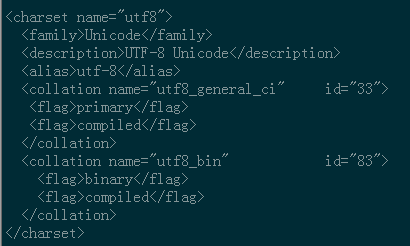
2、远程连接设置
把在所有数据库的所有表的所有权限赋值给位于所有IP地址的root用户。
mysql> grant all privileges on *.* to root@'%'identified by 'password';
如果是新用户而不是root,则要先新建用户
mysql>create user 'username'@'%' identified by 'password';
此时就可以进行远程连接了。
配置centos 7 mysql的更多相关文章
- Linux CentOS下MySQL的安装配置之浅谈
前期必备安装:VMware虚拟机,CentOS镜像[注意:Linux下使用CentOS MySQL是不用在官网下载的,只需要配置就OK了] 下面开始正式操作: //CentOS安装MySQL之浅谈 ...
- Linux配置mysql (centos配置java环境 mysql配置篇 总结四)
♣安装的几种方法和比较 ♣配置yum源 ♣安装mysql ♣启动mysql ♣修改密码 ♣导入.sql文件 ♣缓存设置 ♣允许远程登录(navicat) ♣配置编码为utf8 1.关于Linux系统 ...
- CentOS 下 MySQL 5.6 基于 RPM 的下载、安装、配置
CentOS 下 MySQL 5.6 基于 RPM 的下载.安装.配置 系统: CentOS 7 x86_64 MySQL 版本: 5.6.40 安装方式: RPM 下载 下载地址 操作系统 选择 R ...
- 阿里云服务器 ECS 部署lamp:centos+apache+mysql+php安装配置方法 (centos7)
阿里云服务器 ECS 部署lamp:centos+apache+mysql+php安装配置方法 (centos7) 1.效果图 1 2. 部署步骤 1 1. mysql安装附加(centos7) 7 ...
- CentOS安装GlassFish4.0 配置JDBC连接MySQL
转自:http://linux.it.net.cn/CentOS/course/2014/0724/3319.html 版本glassfish-4.0.zip 1.解压,拷贝到指定安装路径 unz ...
- (转)阿里云CentOS 7下配置及使用mysql
一.安装 1 正确的安装方法: 众所周知,Linux系统自带的repo是不会自动更新每个软件的最新版本(基本都是比较靠后的稳定版),所以无法通过yum方式安装MySQL的高级版本.所以我们需要先安装带 ...
- CentOS 下 MySQL DateBasic 抢救
CentOS 下 MySQL DateBasic 抢救 强 Kill 数据库进程. 分析问题:确定报错内容 报错信息:The server quit without updating PID file ...
- centOS安装Mysql指南
centOS安装Mysql指南 说明:使用操作系统centOS6.4 32位系统:mysql:mysql-5.7.10-linux-glibc2.5-i686.tar.gz; 一.准备 下载mysql ...
- 【Linux】Centos部署MySQL
将CentOS部署MySQL需要本地配置环境.本地编译MySQL,耗时较长的情况,优化为编译成型MySQL并打包,推送并按配置部署. 首先需要在一台机器配置好环境,搭个YUM源,并将所需要的包取出备用 ...
随机推荐
- advance 模板 怎么生成module
advance 模板 怎么生成module namespace写什么如果是前台呢就是 frontend\modules\modulename\Module@我叫红领巾 module id有什么用bak ...
- 【BZOJ 1005】[HNOI2008]明明的烦恼
Description 自从明明学了树的结构,就对奇怪的树产生了兴趣...... 给出标号为1到N的点,以及某些点最终的度数,允许在任意两点间连线,可产生多少棵度数满足要求的树? Input 第一行为 ...
- (转)assert()函数用法总结
assert宏的原型定义在<assert.h>中,其作用是如果它的条件返回错误,则终止程序执行,原型定义: #include <assert.h>void assert( in ...
- beego 0.9.0 中智能路由AutoRouter的使用方法及源码解读
了解beego的开发者肯定知道,beego的路由设计来源于sinatra,原来是不支持自动路由的,每一个路由都要自己配置的,如: type MainController struct { beego. ...
- 开源 P2P 直播 视频会议
转自:http://blog.csdn.net/pkueecser/article/details/8223074 一个P2P点播直播开源项目:P2PCenter(我转过来的时候发现已经都打不开了.. ...
- 1069: [SCOI2007]最大土地面积 - BZOJ
Description 在某块平面土地上有N个点,你可以选择其中的任意四个点,将这片土地围起来,当然,你希望这四个点围成的多边形面积最大.Input 第1行一个正整数N,接下来N行,每行2个数x,y, ...
- Java多线程——<六>更方便的线程
一.概述 标题很抽象,什么叫更方便?更是相比谁来说的呢? 原来,我们定义任务,都是实现自Runnable或者Callable接口,但是这样必然需要你将新定义的任务附着给线程,然后再调用线程启动.在不考 ...
- int a[5]={1,2,3,4,5}; int *p=(int*)(&a+1); printf("%d",*(p-1)); 答案为什么是5?
这个问题的关键是理解 &a a是一个数组名,也就是数组的首地址.对a进行取地址运算符,得到的是一个指向数组的指针!!!!这句话尤为重要!也就相当于int (*p) [5] = &a;p ...
- properties配置应用,为什么需要使用properties文件
在项目中我们常常会使用Constants常量类,达到系统全局配置的目的. 但是有些常量需要动态的配置,如果项目上线后,每次修改Constants.java然后再编译,再上传Constants.clas ...
- Properties --- C++读配置信息的类(一)
http://blog.csdn.net/billow_zhang/article/details/4304980 在开发实践中,积累了一些通用的C++ 类库,在此写出来给大家分享.也希望能给出更好的 ...