
Spring Security构建Rest服务-1300-Spring Security OAuth开发APP认证框架之JWT实现单点登录
基于JWT实现SSO
在淘宝( https://www.taobao.com )上点击登录,已经跳到了 https://login.taobao.com,这是又一个服务器。只要在淘宝登录了,就能直接访问天猫(https://www.tmall.com)了,这就是单点登录了。
淘宝、天猫都是一家的公司,所以呢希望用户在访问淘宝时如果在淘宝上做了登录,当在访问或者从淘宝跳转到天猫时,直接就处于登录状态而不用再次登录,用户体验大大的好。
结合OAuth协议,相比就是如下的流程图,应用A就相当于淘宝,应用B就相当于天猫,【认证服务器】就是淘宝天猫的 登录服务器。我们想要实现的效果就是:
在应用A上,如果用户访问了需要登录的服务,引导用户到认证服务器上做登录,登录后返回要访问的服务,如果此时再访问应用B,在应用B也处于登录状态,这样当访问应用B上受保护的服务时,就可以不用再登录了,这就是sso。
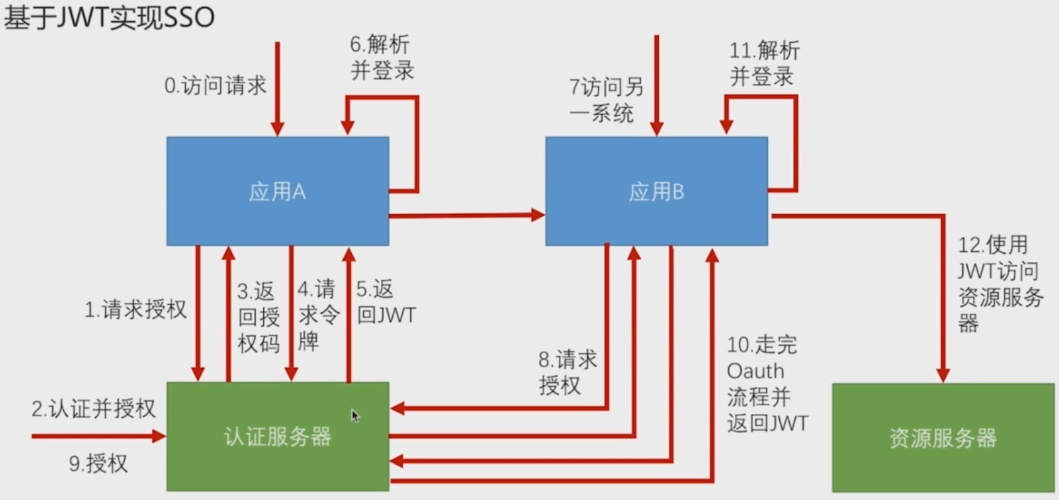
1,当在应用A上访问需要登录才能访问的服务时,会引导用户到认证服务器
2,用户在认证服务器上做认证并授权
3,认证成功并授权后,认证服务器返回授权码给应用A
4,应用A带着授权码请求令牌
5,认证服务器返回JWT
6,应用A解析JWT,用用户信息构建Authentication放在SecurityContext,做登录
7,此时访问应用B ,仍是未授权的状态
8,应用B请求认证服务器授权
9,认证服务器此时已经知道当前用户是谁的,要求用户去授权可以用登录信息去访问应用B
10,发给应用B 一个新的JWT,和应用A得到的JWT字符串是不一样的,但是解析出来的用户信息是一样的
11,然后用用户信息构建Authentication放在SecurityContext,完成在应用B的登录
最终的效果就是,用户在认证服务器上只做了一次登录,应用A和应用B分别使用两个JWT解析出用户信息,构建Authentication,放在SecurityContext,都做了登录,应用A、B的session里都有了用户信息,用户既可以访问应用A,也可以访问应用B,用的身份是一样的。
12,如果是前后端分离的,配置成资源服务器,拿着JWT去访问你的服务。
具体实现
初步项目结构:
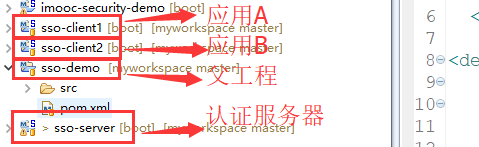
1,配置认证服务器sso-server:
AuthorizationServerConfig:这里就先写死了,可以自定义成配置文件
/**

 * 认证服务器

 * ClassName: AuthorizationServerConfig

 * @Description: TODO

 * @author lihaoyang

 * @date 2018年3月16日

 */

@Configuration

@EnableAuthorizationServer

public class AuthorizationServerConfig extends AuthorizationServerConfigurerAdapter{

    @Override

    public void configure(ClientDetailsServiceConfigurer clients) throws Exception {

        clients.inMemory()

            .withClient("imooc1")

            .secret("imoocsecrect1")

            .authorizedGrantTypes("authorization_code", "refresh_token")

            .scopes("all")

            .and()

            .withClient("imooc2")

            .secret("imoocsecrect2")

            .authorizedGrantTypes("authorization_code", "refresh_token")

            .scopes("all");

    }

    @Bean

    public TokenStore jwtTokenStore() {

        return new JwtTokenStore(jwtAccessTokenConverter());

    }

    /**

     * 给JWT加签名

     * @Description: 给JWT加签名

     * @param @return

     * @return JwtAccessTokenConverter

     * @throws

     * @author lihaoyang

     * @date 2018年3月16日

     */

    @Bean

    public JwtAccessTokenConverter jwtAccessTokenConverter(){

        JwtAccessTokenConverter converter = new JwtAccessTokenConverter();

        converter.setSigningKey("imooc");

        return converter;

    }

    @Override

    public void configure(AuthorizationServerEndpointsConfigurer endpoints) throws Exception {

        endpoints.tokenStore(jwtTokenStore()).accessTokenConverter(jwtAccessTokenConverter());

    }

    @Override

    public void configure(AuthorizationServerSecurityConfigurer security) throws Exception {

        //其他应用要访问认证服务器的tokenKey(就是下边jwt签名的imooc)的时候需要经过身份认证,获取到秘钥才能解析jwt

        security.tokenKeyAccess("isAuthenticated()");

    }

}
application.properties:默认用户名user,配置密码为123456
server.port = 9999

server.context-path = /server

security.user.password =123456  #密码
2,client1:@EnableOAuth2Sso 注解开启sso ,一个注解全搞定
/**

 *

 * ClassName: SsoCient1Application

 * @Description: TODO

 * @author lihaoyang

 * @date 2018年3月16日

 */

@SpringBootApplication

@RestController

@EnableOAuth2Sso

public class SsoClient1Application {

    @GetMapping("/user")

    public Authentication  user(Authentication  user){

        return user;

    }

    public static void main(String[] args) {

        SpringApplication.run(SsoClient1Application.class, args);

    }

}
配置:
security.oauth2.client.clientId = imooc1

security.oauth2.client.clientSecret = imoocsecrect1

#认证地址

security.oauth2.client.user-authorization-uri = http://127.0.0.1:9999/server/oauth/authorize

#获取token地址

security.oauth2.client.access-token-uri = http://127.0.0.1:9999/server/oauth/token

#拿认证服务器密钥解析jwt

security.oauth2.resource.jwt.key-uri = http://127.0.0.1:9999/server/oauth/token_key

server.port = 8080

server.context-path =/client1
client2:
/**

 *

 * ClassName: SsoCient1Application

 * @Description: TODO

 * @author lihaoyang

 * @date 2018年3月16日

 */

@SpringBootApplication

@RestController

@EnableOAuth2Sso

public class SsoClient2Application {

    @GetMapping("/user")

    public Authentication  user(Authentication  user){

        return user;

    }

    public static void main(String[] args) {

        SpringApplication.run(SsoClient2Application.class, args);

    }

}
配置
security.oauth2.client.clientId = imooc2

security.oauth2.client.clientSecret = imoocsecrect2

security.oauth2.client.user-authorization-uri = http://127.0.0.1:9999/server/oauth/authorize

security.oauth2.client.access-token-uri = http://127.0.0.1:9999/server/oauth/token

security.oauth2.resource.jwt.key-uri = http://127.0.0.1:9999/server/oauth/token_key

server.port = 8060

server.context-path =/client2
页面:
在client1和client2的resource目录下,新建static目录,新建index页,作为client1和client2之间,可以相互跳转的页面
client1:
<!DOCTYPE html>

<html>

<head>

<meta charset="UTF-8">

<title>SSO Client1</title>

</head>

<body>

    <h1>SSO Demo Client1</h1>

    <a href="http://127.0.0.1:8060/client2/index.html">访问Client2</a>

</body>

</html>
client2:
<!DOCTYPE html>

<html>

<head>

<meta charset="UTF-8">

<title>SSO Client2</title>

</head>

<body>

    <h1>SSO Demo Client2</h1>

    <a href="http://127.0.0.1:8080/client1/index.html">访问Client1</a>

</body>

</htm
启动sso-server、sso-client1、 sso-client2,访问client1 :
localhost:8080/client1,直接跳转到了配置的认证服务器认证地址,可以看到,url里携带了一些client1配置的参数
client_id=imooc1 客户端id,response_type=code 授权码模式,

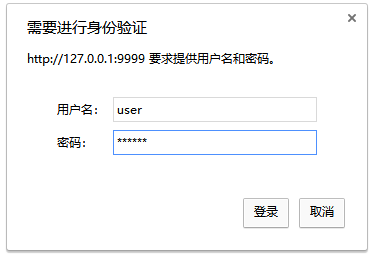
提示spring security默认的登录页,输入默认用户名user,密码123456
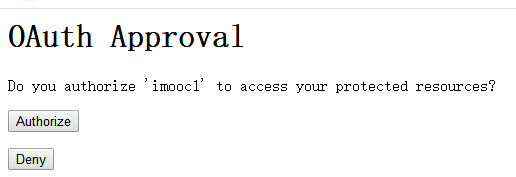
提示是否同意给client1授权,这个是默认配置,后续版本需要去除这一步。点击同意授权
访问到client1的index页:

点击跳转到client2连接,可以看到直接跳转到了认证服务器,提示是否同意给client2授权,此时 redirect_uri=http://127.0.0.1:8060/client2/login ,是client2

同意授权
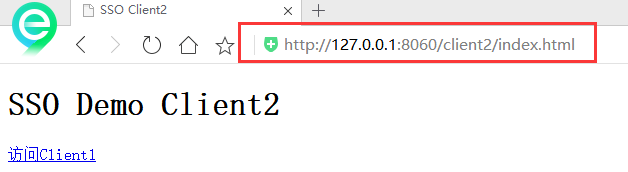
再访问client1时,也会提示是否授权,再同意之后,就可以相互访问了。
访问 http://127.0.0.1:8080/client1/user 查看当前用户信息:
{

  "authorities":[

    {

      "authority":"ROLE_USER"

    }

  ],

  "details":{

    "remoteAddress":"127.0.0.1",

    "sessionId":"318DF6369A3279AB037C2528F79A42A5",

    "tokenValue":"eyJhbGciOiJIUzI1NiIsInR5cCI6IkpXVCJ9.eyJleHAiOjE1MjE0OTQ0ODUsInVzZXJfbmFtZSI6InVzZXIiLCJhdXRob3JpdGllcyI6WyJST0xFX1VTRVIiXSwianRpIjoiMzlkODIxZTUtMTA5Yy00MjNlLWJlZDQtNmY5YTIwMTQ2MzQ3IiwiY2xpZW50X2lkIjoiaW1vb2MxIiwic2NvcGUiOlsiYWxsIl19.zlimgyRCvwShZBcbKGcEfsUY0RlgPRqqeDLx8zRIDoQ",

    "tokenType":"bearer",

    "decodedDetails":null

  },

  "authenticated":true,

  "userAuthentication":{

    "authorities":[

      {

        "authority":"ROLE_USER"

      }

    ],

    "details":null,

    "authenticated":true,

    "principal":"user",

    "credentials":"N/A",

    "name":"user"

  },

  "principal":"user",

  "credentials":"",

  "oauth2Request":{

    "clientId":"imooc1",

    "scope":[

      "all"

    ],

    "requestParameters":{

      "client_id":"imooc1"

    },

    "resourceIds":[

    ],

    "authorities":[

    ],

    "approved":true,

    "refresh":false,

    "redirectUri":null,

    "responseTypes":[

    ],

    "extensions":{

    },

    "grantType":null,

    "refreshTokenRequest":null

  },

  "clientOnly":false,

  "name":"user"

}
访问 http://127.0.0.1:8060/client2/user 查看 client2的登录用户信息:
{

  "authorities":[

    {

      "authority":"ROLE_USER"

    }

  ],

  "details":{

    "remoteAddress":"127.0.0.1",

    "sessionId":"EC7AD91E31A22B5B1806B86868C0F912",

    "tokenValue":"eyJhbGciOiJIUzI1NiIsInR5cCI6IkpXVCJ9.eyJleHAiOjE1MjE0OTQ0ODMsInVzZXJfbmFtZSI6InVzZXIiLCJhdXRob3JpdGllcyI6WyJST0xFX1VTRVIiXSwianRpIjoiMWFkMWI5N2QtNzAwZS00MzEwLWI4MmYtNmRiZmI1NWViNjIzIiwiY2xpZW50X2lkIjoiaW1vb2MyIiwic2NvcGUiOlsiYWxsIl19.YNCaXP8lOdDa_GeOjnGsc9oIGqm1VJbEas5_g8x3m7o",

    "tokenType":"bearer",

    "decodedDetails":null

  },

  "authenticated":true,

  "userAuthentication":{

    "authorities":[

      {

        "authority":"ROLE_USER"

      }

    ],

    "details":null,

    "authenticated":true,

    "principal":"user",

    "credentials":"N/A",

    "name":"user"

  },

  "credentials":"",

  "principal":"user",

  "clientOnly":false,

  "oauth2Request":{

    "clientId":"imooc2",

    "scope":[

      "all"

    ],

    "requestParameters":{

      "client_id":"imooc2"

    },

    "resourceIds":[

    ],

    "authorities":[

    ],

    "approved":true,

    "refresh":false,

    "redirectUri":null,

    "responseTypes":[

    ],

    "extensions":{

    },

    "grantType":null,

    "refreshTokenRequest":null

  },

  "name":"user"

}

©2014 JSON.cn All right reserved. 京I
可以看到。认证服务器给 client1和client2 返回的jwt 是不一样的,但是解析出来的都是 user 用户。说明这两个jwt 包含的信息是一样的。
上边的流程还存在问题。
1,sso-server 认证服务器的登录页是Spring Security 默认的弹框
2,在sso-server上登录后,当跳转到client1的服务时,还会弹出授权页面
3,在第一次访问 client1 和 client2 时,也会弹出授权页面
这些是不友好的,下边开始改造。
1,配置为表单登录
配置ss-server
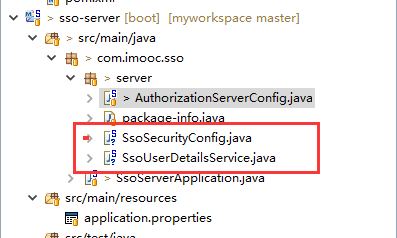
SsoUserDetailsService :是覆盖spring默认的登录方式,使用自定义的 loadUserByUsername 来登录
/**

 * 配置自己的登录,findByUsername而不是spring默认的user

 * ClassName: SsoUserDetailsService

 * @Description: TODO

 * @author lihaoyang

 * @date 2018年3月20日

 */

@Component

public class SsoUserDetailsService implements UserDetailsService{

    @Autowired

    private PasswordEncoder passwordEncoder;

    @Override

    public UserDetails loadUserByUsername(String username) throws UsernameNotFoundException {

        return new User(username,  // 用户名

                        passwordEncoder.encode("123456") , //密码

                        AuthorityUtils.commaSeparatedStringToAuthorityList("ROLE_USER"));//权限集合

    }

}
SsoSecurityConfig:告诉spring使用自己的登录方式,配置密码加密器,配置那些服务需要认证等
@Configuration

public class SsoSecurityConfig extends WebSecurityConfigurerAdapter{

    @Autowired

    private UserDetailsService userDetailsService;

    //密码加密解密

    @Bean

    public PasswordEncoder passwordEncoder(){

        return new BCryptPasswordEncoder();

    }

    /**

     * 配置登录方式等

     */

    @Override

    protected void configure(HttpSecurity http) throws Exception {

        http.formLogin() //表单登录

            .and()

            .authorizeRequests() //所有请求都需要认证

            .anyRequest()

            .authenticated();

    }

    /**

     * 告诉AuthenticationManager ,使用自己的方式登录时 【查询用户】和密码加密器

     */

    @Override

    protected void configure(AuthenticationManagerBuilder auth) throws Exception {

        auth.userDetailsService(userDetailsService).passwordEncoder(passwordEncoder());

    }

}
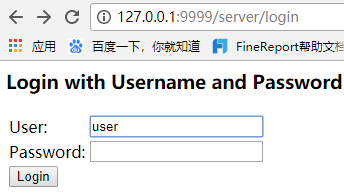
此时启动应用,登录页就变了,就成了想要表单登录,如果想自定义表单请看以前的文章
2,去掉点击授权按钮步骤
授权是Oauth协议的一部分,不能够去掉,Spring默认的授权是一个表单,让用户点击授权按钮,想要去除这个过程,思路就是在代码里找到这个表单,写一段js代码让表单自动提交,就不需要用户点击了。
实际上这段代码是在WhitelabelApprovalEndpoint 类里的:
红色部分就是授权的表单,使用css让表单隐藏,写个js自动提交表单
/**

 * Controller for displaying the approval page for the authorization server.

 *

 * @author Dave Syer

 */

@FrameworkEndpoint

@SessionAttributes("authorizationRequest")

public class WhitelabelApprovalEndpoint {

    @RequestMapping("/oauth/confirm_access")

    public ModelAndView getAccessConfirmation(Map<String, Object> model, HttpServletRequest request) throws Exception {

        String template = createTemplate(model, request);

        if (request.getAttribute("_csrf") != null) {

            model.put("_csrf", request.getAttribute("_csrf"));

        }

        return new ModelAndView(new SpelView(template), model);

    }

    protected String createTemplate(Map<String, Object> model, HttpServletRequest request) {

        String template = TEMPLATE;

        if (model.containsKey("scopes") || request.getAttribute("scopes") != null) {

            template = template.replace("%scopes%", createScopes(model, request)).replace("%denial%", "");

        }

        else {

            template = template.replace("%scopes%", "").replace("%denial%", DENIAL);

        }

        if (model.containsKey("_csrf") || request.getAttribute("_csrf") != null) {

            template = template.replace("%csrf%", CSRF);

        }

        else {

            template = template.replace("%csrf%", "");

        }

        return template;

    }

    private CharSequence createScopes(Map<String, Object> model, HttpServletRequest request) {

        StringBuilder builder = new StringBuilder("<ul>");

        @SuppressWarnings("unchecked")

        Map<String, String> scopes = (Map<String, String>) (model.containsKey("scopes") ? model.get("scopes") : request

                .getAttribute("scopes"));

        for (String scope : scopes.keySet()) {

            String approved = "true".equals(scopes.get(scope)) ? " checked" : "";

            String denied = !"true".equals(scopes.get(scope)) ? " checked" : "";

            String value = SCOPE.replace("%scope%", scope).replace("%key%", scope).replace("%approved%", approved)

                    .replace("%denied%", denied);

            builder.append(value);

        }

        builder.append("</ul>");

        return builder.toString();

    }

    private static String CSRF = "<input type='hidden' name='${_csrf.parameterName}' value='${_csrf.token}' />";

    private static String DENIAL = "<form id='denialForm' name='denialForm' action='${path}/oauth/authorize' method='post'><input name='user_oauth_approval' value='false' type='hidden'/>%csrf%<label><input name='deny' value='Deny' type='submit'/></label></form>";

    private static String TEMPLATE = "<html><body><h1>OAuth Approval</h1>"

            + "<p>Do you authorize '${authorizationRequest.clientId}' to access your protected resources?</p>"

            + "<form id='confirmationForm' name='confirmationForm' action='${path}/oauth/authorize' method='post'><input name='user_oauth_approval' value='true' type='hidden'/>%csrf%%scopes%<label><input name='authorize' value='Authorize' type='submit'/></label></form>"

            + "%denial%</body></html>";

    private static String SCOPE = "<li><div class='form-group'>%scope%: <input type='radio' name='%key%'"

            + " value='true'%approved%>Approve</input> <input type='radio' name='%key%' value='false'%denied%>Deny</input></div></li>";

}
@FrameworkEndpoint 注解和RestController的功能类似,里边可以写@RequestMapping 来处理某个请求,
但是RestController 的优先级比@FrameworkEndpoint 高,如果有两个@RequestMapping 的映射路径一样,Spring会优先执行RestController 的。
所以想要覆盖这个类的功能,要做的就是复制一份,把@FrameworkEndpoint 换成@RestController ,然后改造。
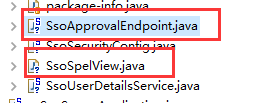
copy一份 WhitelabelApprovalEndpoint,命名为SsoApprovalEndpoint,将 @FrameworkEndpoint 换为 RestController ,里边 用到一个类SpelView,这个类不是public的,默认别的包用不了,所以这个也需要整一份,命名为SsoSpelView
表单部分代码:
<html>

    <body>

        <div style='display:none'>

            <h1>OAuth Approval</h1>"

            + "<p>Do you authorize '${authorizationRequest.clientId}' to access your protected resources?</p>"

            + "<form id='confirmationForm' name='confirmationForm' action='${path}/oauth/authorize' method='post'>

                <input name='user_oauth_approval' value='true' type='hidden'/>%csrf%%scopes%

                <label><input name='authorize' value='Authorize' type='submit'/></label>

            </form>"

+ "%denial%</div></body><script>document.getElementById('confirmationForm').submit();</script></html>
这样有点简单粗暴,效果就是授权页一闪而过,可以优化优化。
具体代码在github:https://github.com/lhy1234/spring-security
Spring Security构建Rest服务-1300-Spring Security OAuth开发APP认证框架之JWT实现单点登录的更多相关文章
- Spring Security构建Rest服务-1202-Spring Security OAuth开发APP认证框架之重构3种登录方式
SpringSecurityOAuth核心源码解析 蓝色表示接口,绿色表示类 1,TokenEndpoint 整个入口点,相当于一个controller,不同的授权模式获取token的地址都是 /oa ...
- Spring Security构建Rest服务-1203-Spring Security OAuth开发APP认证框架之短信验证码登录
浏览器模式下验证码存储策略 浏览器模式下,生成的短信验证码或者图形验证码是存在session里的,用户接收到验证码后携带过来做校验. APP模式下验证码存储策略 在app场景下里是没有cookie信息 ...
- Spring Security构建Rest服务-1201-Spring Security OAuth开发APP认证框架之实现服务提供商
实现服务提供商,就是要实现认证服务器.资源服务器. 现在做的都是app的东西,所以在app项目写代码 认证服务器: 新建 ImoocAuthenticationServerConfig 类,@Ena ...
- Spring Security构建Rest服务-1200-SpringSecurity OAuth开发APP认证框架
基于服务器Session的认证方式: 前边说的用户名密码登录.短信登录.第三方登录,都是普通的登录,是基于服务器Session保存用户信息的登录方式.登录信息都是存在服务器的session(服务器的一 ...
- Spring Security构建Rest服务-1205-Spring Security OAuth开发APP认证框架之Token处理
token处理之二使用JWT替换默认的token JWT(Json Web Token) 特点: 1,自包含:jwt token包含有意义的信息 spring security oauth默认生成的t ...
- Spring Security构建Rest服务-1204-Spring Security OAuth开发APP认证框架之Token处理
token处理之一基本参数配置 处理token时间.存储策略,客户端配置等 以前的都是spring security oauth默认的token生成策略,token默认在org.springframe ...
- Spring Cloud构建微服务架构(三)消息总线
注:此文不适合0基础学习者直接阅读,请先完整的将作者关于微服务的博文全部阅读一遍,如果还有疑问,可以再来阅读此文,地址:http://blog.csdn.net/sosfnima/article/d ...
- springBoot整合spring security+JWT实现单点登录与权限管理--筑基中期
写在前面 在前一篇文章当中,我们介绍了springBoot整合spring security单体应用版,在这篇文章当中,我将介绍springBoot整合spring secury+JWT实现单点登录与 ...
- 构建微服务:Spring boot
构建微服务:Spring boot 在上篇文章构建微服务:Spring boot 提高篇中简单介绍了一下spring data jpa的基础性使用,这篇文章将更加全面的介绍spring data jp ...
随机推荐
- SQL查询时,根据日期范围查询周
周数据会有weekbegin和weekend两个字段,用来描述周的开始日期和结束日期. 现在项目中的日历控件不支持周查询,只支持日期查询,所以目前面临的问题是,根据时间范围,查询周. 最终sql如下: ...
- Linux文件的扩展名--2019-04-25
1.压缩的和归档的文件 .bz2:使用bzip2压缩的文件 .gz:使用gzip压缩的文件 .tar:使用tar压缩的文件 .tbz:使用tar和bzip压缩的文件 .tgz:使用tar和gzip压缩 ...
- H5如何解监听页面退出需求???
事发背景(时间较久): 在一个阳光明媚的一天,这天lz正在工位上悠闲的敲着代码:说时迟那时快,运营小姐姐箭步过来,让lz做一个挽留弹窗:我当时一听这TM不是流氓么.于是便有了以下的故事... 如何实现 ...
- 【2019雅礼集训】【可持久化线段树】【模型转化】D1T2Permutation
目录 题意 输入格式 输出格式 思路 代码 题意 给定一个长度为n的序列A[],你需要确定一个长度为n的排列P[],定义当前排列的值为: \[\sum_{i=1}^{n}{A[i]P[i]}\] 现在 ...
- 一道令人抓狂的零一背包变式 -- UVA 12563 Jin Ge Jin Qu hao
题目链接: https://uva.onlinejudge.org/index.php?option=com_onlinejudge&Itemid=8&page=show_proble ...
- ARTS Challenge- Week 1 (2019.03.25~2019.03.31)
1.Algorithm - at least one leetcode problem per week(Medium+) 986. Interval List Intersections https ...
- 利用jquery-barcode.js实现生成条形码
jquery-barcode官网 js下载地址-github 代码示范(官网上也有) <!DOCTYPE html> <html> <head> <meta ...
- CSS水平垂直居中!
总结一下,最经典的面试题 分两种情况,宽高确定和不定宽高 (一)宽高确定 初始条件如下: 1. 绝对定位 + 负margin 里面的盒子相对于父盒子绝对定位,距离上面和左边分别为50%,此处的50%是 ...
- TypeScript 函数-Lambads 和 this 关键字的使用
let people = { name:["a","b","c","d"], /* getName:function() ...
- nodejs操作mysql常见错误
1.Cannot enqueue Handshake after already enqueuing a Hand shake.这个错误提示意思是某个数据库连接已经执行了,不能进行多次连接了.遇到此类 ...