
The Same Game": A Simple Game from Start to Finish3
视图: 画出你的游戏界面
前面,我们的文档对象中已经初始化了游戏板对象,接下来我们需要显示这些信息给用户了。
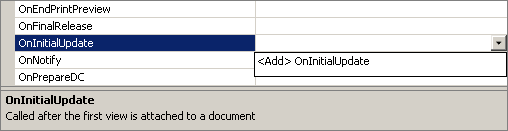
第一步是添加代码,来重新设置我们的窗口尺寸。缺省的窗口尺寸不是我们想要的,我们将重写OnInitialUpdate 方法来实现这一点。视图类继承了一个缺省的OnInitialUpdate方法,我们希望重写它来重定义我们窗口的尺寸。OnInitialUpdate方法在客户区被初始化更新的时候调用。首先我们来看一下如何添加该方法。
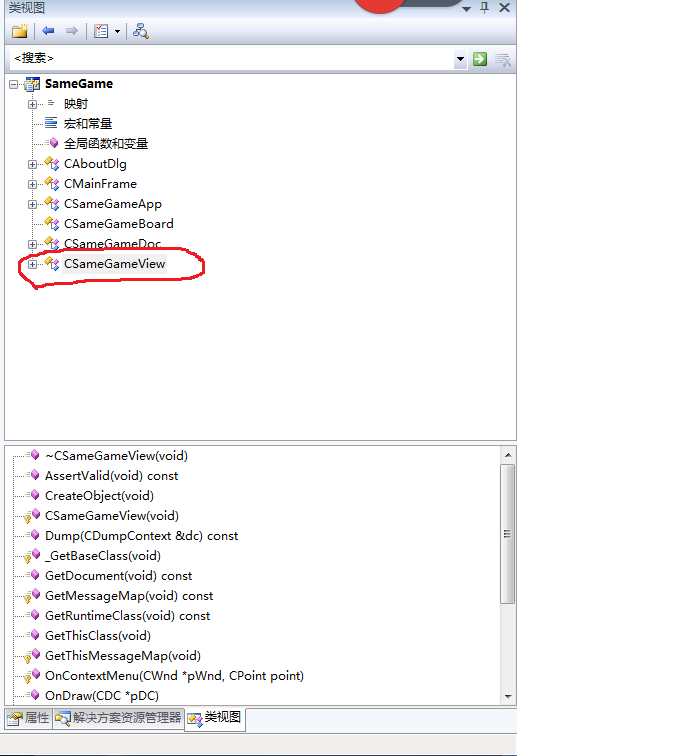
切换到类视图,选中CSameGameView,然后按Alt+Enter
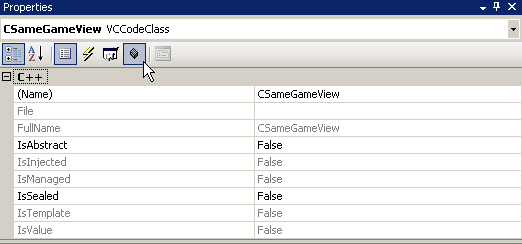
点击重写图标,如下图找到OnInitialUpdate方法进行重写:
以下是修改后的视图类头文件,注意字体着重的部分是修改的地方。
#pragma once

class CSameGameView : public CView

{

protected: // create from serialization only

  CSameGameView();

    DECLARE_DYNCREATE(CSameGameView)

  // Attributes

public:

  CSameGameDoc* GetDocument() const;

  // Overrides

public:

  virtual void OnDraw(CDC* pDC);  // overridden to draw this view

  virtual BOOL PreCreateWindow(CREATESTRUCT& cs);

protected:

  // Implementation

public:


  void ResizeWindow();


  virtual ~CSameGameView();

#ifdef _DEBUG

  virtual void AssertValid() const;

  virtual void Dump(CDumpContext& dc) const;

#endif

  // Generated message map functions

protected:

  DECLARE_MESSAGE_MAP()

public:

  virtual void OnInitialUpdate();

};

#ifndef _DEBUG  // debug version in SameGameView.cpp

inline CSameGameDoc* CSameGameView::GetDocument() const

{ return reinterpret_cast<CSameGameDoc*>(m_pDocument); }

#endif
在增加ResizeWindow方法的同时,我们也需要增加描绘游戏界面方法到CSameGameView类中。视图类的头文件和源文件中已经包含了一个 OnDraw方法,这里正是我们放置描绘界面代码的地方。以下是视图类实现类cpp的全部代码,注意着重字体的地方是新增的内容。
#include "stdafx.h"

#include "SameGame.h"

#include "SameGameDoc.h"

#include "SameGameView.h"

#ifdef _DEBUG

#define new DEBUG_NEW

#endif

// CSameGameView

IMPLEMENT_DYNCREATE(CSameGameView, CView)

BEGIN_MESSAGE_MAP(CSameGameView, CView)

END_MESSAGE_MAP()

// CSameGameView construction/destruction

CSameGameView::CSameGameView()

{

}

CSameGameView::~CSameGameView()

{

}

BOOL CSameGameView::PreCreateWindow(CREATESTRUCT& cs)

{

  return CView::PreCreateWindow(cs);

}

// CSameGameView drawing


void CSameGameView::OnDraw(CDC* pDC) // MFC will comment out the argument name by default; uncomment it

{

  //  First get a pointer to the document

  CSameGameDoc* pDoc = GetDocument();

  ASSERT_VALID(pDoc);

  if(!pDoc)

    return;

  //  Save the current state of the device context

  int nDCSave = pDC->SaveDC();

  //  Get the client rectangle

  CRect rcClient;

  GetClientRect(&rcClient);

  //  Get the background color of the board

  COLORREF clr = pDoc->GetBoardSpace(-1, -1);

  //	Draw the background first

  pDC->FillSolidRect(&rcClient, clr);

  //  Create the brush for drawing

  CBrush br;

  br.CreateStockObject(HOLLOW_BRUSH);

  CBrush* pbrOld = pDC->SelectObject(&br);

  //	Draw the squares

  for(int row = 0; row < pDoc->GetRows(); row++)

  {

    for(int col = 0; col < pDoc->GetColumns(); col++)

    {

      //  Get the color for this board space

      clr = pDoc->GetBoardSpace(row, col);

      //  Calculate the size and position of this space

      CRect rcBlock;

      rcBlock.top = row * pDoc->GetHeight();

      rcBlock.left = col * pDoc->GetWidth();

      rcBlock.right = rcBlock.left + pDoc->GetWidth();

      rcBlock.bottom = rcBlock.top + pDoc->GetHeight();

      //  Fill in the block with the correct color

      pDC->FillSolidRect(&rcBlock, clr);

      //  Draw the block outline

      pDC->Rectangle(&rcBlock);

    }

  }

  //  Restore the device context settings

  pDC->RestoreDC(nDCSave);

  br.DeleteObject();

}


// CSameGameView diagnostics

#ifdef _DEBUG

void CSameGameView::AssertValid() const

{

  CView::AssertValid();

}

void CSameGameView::Dump(CDumpContext& dc) const

{

  CView::Dump(dc);

}

//  non-debug version is inline

CSameGameDoc* CSameGameView::GetDocument() const

{

  ASSERT(m_pDocument->IsKindOf(RUNTIME_CLASS(CSameGameDoc)));

  return (CSameGameDoc*)m_pDocument;

}

#endif //_DEBUG

void CSameGameView::OnInitialUpdate()

{

  CView::OnInitialUpdate();


  //  Resize the window

  ResizeWindow();


}


void CSameGameView::ResizeWindow()

{

  //  First get a pointer to the document

  CSameGameDoc* pDoc = GetDocument();

  ASSERT_VALID(pDoc);

  if(!pDoc)

    return;

  //  Get the size of the client area and the window

  CRect rcClient, rcWindow;

  GetClientRect(&rcClient);

  GetParentFrame()->GetWindowRect(&rcWindow);

  //  Calculate the difference

  int nWidthDiff = rcWindow.Width() - rcClient.Width();

  int nHeightDiff = rcWindow.Height() - rcClient.Height();

  //  Change the window size based on the size of the game board

  rcWindow.right = rcWindow.left +

    pDoc->GetWidth() * pDoc->GetColumns() + nWidthDiff;

  rcWindow.bottom = rcWindow.top +

    pDoc->GetHeight() * pDoc->GetRows() + nHeightDiff;

  //  The MoveWindow function resizes the frame window

  GetParentFrame()->MoveWindow(&rcWindow);

}
描绘游戏板是非常简单的,就是一行一行一列一列的画出每一个彩色的砖块到屏幕上。
我们首先将客户区背景色填充成黑色,其中客户区填充颜色的取得通过呼叫GetBoardSpace(-1,-1) 方法;客户区大小的取得通过呼叫 GetClientRect方法,最后通过调用FillSolidRect方法实现填充任务。
//  Get the client rectangle

CRect rcClient;

GetClientRect(&rcClient);

//  Get the background color of the board

COLORREF clr = pDoc->GetBoardSpace(-1, -1);

//  Draw the background first

pDC->FillSolidRect(&rcClient, clr);
接下来,我们来画一个一个的小砖块,我们要画一个带颜色的矩形和一个黑色的边框,为了实现这点我们将画刷的类型设置成HOLLOW_BRUSH,这样当我们调用Rectangle()方法时不会用默认的白色背景填充我们的小方块。
嵌套的for循环的逻辑是非常简单的,就是一行一行,一列一列的在客户区描绘出小方块。通过文档类,我们可以获得每一个小砖块块随机的颜色,我们还可以得到小砖块的大小,进而计算出每个小方块应该描绘的位置。我们通过FillSolidRect() 方法来填充小砖块的颜色。通过 Rectangle() 方法来画小砖块的边框。
//  Draw the squares

for(int row = 0; row < pDoc->GetRows(); row++)

{

  for(int col = 0; col < pDoc->GetColumns(); col++)

  {

    //  Get the color for this board space

    clr = pDoc->GetBoardSpace(row, col);

    //  Calculate the size and position of this space

    CRect rcBlock;

    rcBlock.top = row * pDoc->GetHeight();

    rcBlock.left = col * pDoc->GetWidth();

    rcBlock.right = rcBlock.left + pDoc->GetWidth();

    rcBlock.bottom = rcBlock.top + pDoc->GetHeight();

    //  Fill in the block with the correct color

    pDC->FillSolidRect(&rcBlock, clr);

    //  Draw the block outline

    pDC->Rectangle(&rcBlock);

  }

}
接下来,我们要根据我们描绘的小砖块的个数及大小,重新计算窗口的大小。
//  Get the size of the client area and the window

CRect rcClient, rcWindow;

GetClientRect(&rcClient);

GetParentFrame()->GetWindowRect(&rcWindow);
注意我们取得了2个窗口的尺寸,一个是框架窗口(包含客户区,菜单,工具栏,及状态栏),一个是客户区的大小。我们首先需要计算出框架窗口和客户区窗口的高度差,宽度差;然后再把这个高度差加上我们所有砖块的行高度得到我们最终的窗口的高度,宽度的计算同理。
//  Calculate the difference

int nWidthDiff = rcWindow.Width() - rcClient.Width();

int nHeightDiff = rcWindow.Height() - rcClient.Height();

//  Change the window size based on the size of the game board

rcWindow.right = rcWindow.left +

  pDoc->GetWidth() * pDoc->GetColumns() + nWidthDiff;

rcWindow.bottom = rcWindow.top +

  pDoc->GetHeight() * pDoc->GetRows() + nHeightDiff;

//  The MoveWindow function resizes the frame window
最后我们调用父窗口也即框架窗口的MoveWindow方法重新设置窗口的大小。
GetParentFrame()->MoveWindow(&rcWindow);
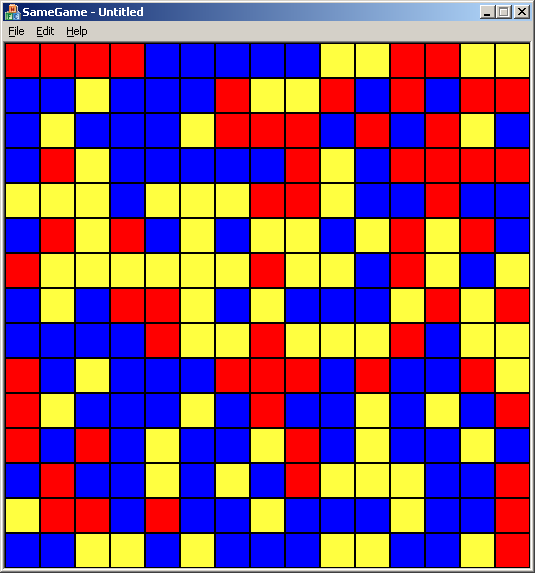
最终,我们的程序看起来应该是这样的:
结论
在这篇文章里,我们首先回顾了MFC的基本知识和文档视图结构的基本概念。接下来,我们抽象了一个游戏板类型,其中包含了我们的游戏数据信息,并且构建了一个视图将游戏信息描绘到了界面中,下一章,我们将运用事件驱动编程方法,实现与用户的交互,比如鼠标点击事件,来实现一个可玩的游戏版本。
The Same Game": A Simple Game from Start to Finish3的更多相关文章
- PHP设计模式(一)简单工厂模式 (Simple Factory For PHP)
最近天气变化无常,身为程序猿的寡人!~终究难耐天气的挑战,病倒了,果然,程序猿还需多保养自己的身体,有句话这么说:一生只有两件事能报复你:不够努力的辜负和过度消耗身体的后患.话不多说,开始吧. 一.什 ...
- Design Patterns Simplified - Part 3 (Simple Factory)【设计模式简述--第三部分(简单工厂)】
原文链接:http://www.c-sharpcorner.com/UploadFile/19b1bd/design-patterns-simplified-part3-factory/ Design ...
- WATERHAMMER: A COMPLEX PHENOMENON WITH A SIMPLE SOLUTION
开启阅读模式 WATERHAMMER A COMPLEX PHENOMENON WITH A SIMPLE SOLUTION Waterhammer is an impact load that is ...
- BZOJ 3489: A simple rmq problem
3489: A simple rmq problem Time Limit: 40 Sec Memory Limit: 600 MBSubmit: 1594 Solved: 520[Submit] ...
- Le lié à la légèreté semblait être et donc plus simple
Il est toutefois vraiment à partir www.runmasterfr.com/free-40-flyknit-2015-hommes-c-1_58_59.html de ...
- ZOJ 3686 A Simple Tree Problem
A Simple Tree Problem Time Limit: 3 Seconds Memory Limit: 65536 KB Given a rooted tree, each no ...
- 设计模式之简单工厂模式Simple Factory(四创建型)
工厂模式简介. 工厂模式专门负责将大量有共同接口的类实例化 工厂模式可以动态决定将哪一个类实例化,不必事先知道每次要实例化哪一个类. 工厂模式有三种形态: 1.简单工厂模式Simple Factory ...
- HDU 5795 A Simple Nim 打表求SG函数的规律
A Simple Nim Problem Description Two players take turns picking candies from n heaps,the player wh ...
- 关于The C compiler "arm-none-eabi-gcc" is not able to compile a simple test program. 的错误自省...
在 GCC ARM Embedded https://launchpad.net/gcc-arm-embedded/ 上面下载了个arm-none-eabi-gcc 用cmake 编译时 #指定C交叉 ...
随机推荐
- RPC实现原理(HSF、dubbo) 从头开始(一)
前言 阔别了很久博客园,虽然看了以前写的很多东西感觉好幼稚,但是还是觉得应该把一些自己觉得有用的东西和大家分享.废话不多说,现在开始进入正题. 之前的六年工作经验,呆过了一些大公司,每个在大公司呆过的 ...
- python+sqlite3
一个小例子, # -*- coding:utf-8 -*- ''' Created on 2015年10月8日 (1.1)Python 2.7 Tutorial Pt 12 SQLite - http ...
- OpenJudge/Poj 1631 Bridging signals
1.链接地址: http://poj.org/problem?id=1631 http://bailian.openjudge.cn/practice/1631 2.题目: Bridging sign ...
- Page类成员
1. Request,Response,Server属性:对contex.Request,context.Response,context.Server的简化调用2. AppRelativeVirtu ...
- ubuntu vim 插件安装
参考:http://blog.sina.com.cn/s/blog_00f0230d0100y7ih.html 不过由于时间久远,有些已经失效,以上是我的修改过程 参考:https://github. ...
- SSH框架jar神包
SSH JAR包链接(https://zhidao.baidu.com/share/ac8b1389bac84023d7442cad88f3933c.html)
- Educational Codeforces Round 6 C. Pearls in a Row
Educational Codeforces Round 6 C. Pearls in a Row 题意:一个3e5范围的序列:要你分成最多数量的子序列,其中子序列必须是只有两个数相同, 其余的数只能 ...
- C图书借还示例
以后要搞C了先自己练习一下,系统本身没有太大的实际用途,只是用来磨练编程规范,不足之处还望大家多多指正 .互相交流共同进步. 为了方便只使用了一个 book.c 文件,在vc6 下编译通过,其他编译器 ...
- bzoj3667: Rabin-Miller算法
Description Input 第一行:CAS,代表数据组数(不大于350),以下CAS行,每行一个数字,保证在64位长整形范围内,并且没有负数.你需要对于每个数字:第一,检验是否是质数,是质 ...
- android 布局如何支持多种不同屏幕尺寸
android 布局如何支持多种不同屏幕尺寸 --关于dp.layout-xxx.drawable-xxx作用的小结 转载自:http://blog.csdn.net/vincent_blog/art ...