
python自动化之使用allure生成测试报告
- 安装allure
- Windows用户:
- scoop install allure (需要先下载并安装Scoop,该方法无需配置环境变量)
- MAC用户:
- 通过Homebrew进行自动安装
- brew install allure (如果Homebrew版本比较旧,需要先升级Homebrew,否则安装的allure版本也很老,可能会与Python插件不兼容)
- 手动安装:
- 可以从官网 https://repo.maven.apache.org/maven2/io/qameta/allure/allure-commandline/ 手动下载
- 目前最新版本为2.13.6
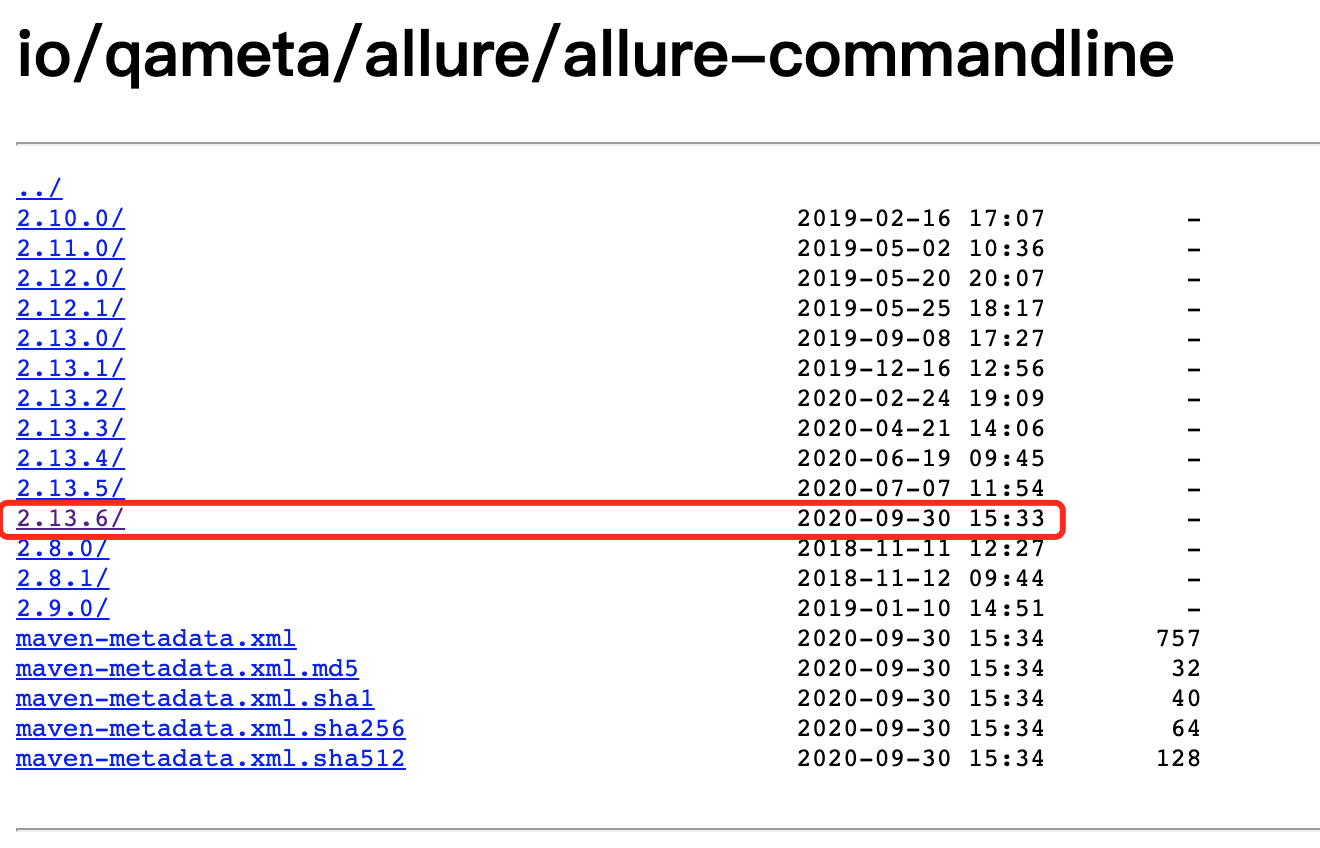
下载后解压并配置环境变量
- 安装allure-pytest插件
- pip install allure-pytest
allure常用特性
希望在报告中看到测试功能,子功能或场景,测试步骤,包括测试附加信息可以使用@feature,@story,@step,@attach
步骤:
- import allure
- 功能上加@allure.feature("功能名称")
- 子功能上加@allure.story("子功能名称")
- 步骤上加@allure.step("步骤细节")
- @allure.attach("具体文本信息"),需要附加的信息,可以是数据,文本,图片,视频,网页
- 如果只测试部分功能运行的时候可以加限制过滤:
- pytest 文件名 --allure-features "需要运行的功能名称"
allure特性—feature/story
@allure.feature与@allure.store的关系
- feature相当于一个功能,一个大的模块,将case分类到某个feature中,报告中在behaviore中显示,相当于testsuite
- story相当于对应这个功能或者模块下的不同场景,分支功能,属于feature之下的结构,报告在features中显示,相当于testcase
- feature与story类似于父与子关系
step特性
- 测试过程中每个步骤,一般放在具体逻辑方法中
- 可以放在关键步骤中,在报告中显示
- 在app,web自动化测试中,建议每切换到一个新的页面当做一个step
- 用法:
- @allure.step() 只能以装饰器的形式放在类或方法上面
- with allure.step(): 可以放在测试用例方法里面,但测试步骤的代码需要被该语句包含
运行:
在测试执行期间收集结果
pytest [测试文件] -s -q --alluredir=./result --clean-alluredir
- --alluredir这个选项,用于指定存储测试结果的路径
- --clean-alluredir 这个选项用来清除之前生成的结果
查看测试报告:
方法一:测试完成后查看实际报告,在线看报告,会直接打开默认浏览器展示当前报告
allure serve ./result
方法二:从结果生成报告,这是一个启动tomcat的服务,需要两个步骤
生成报告:
allure generate ./result -o ./report --clean (注意:--clean用来清除之前已生成的报告)
打开报告:
allure open -h 127.0.0.1 -p 8883 ./report (该方法直接生成一个tomcat服务,可远程访问)
举个例子:
有如下代码文件


#!/usr/bin/python

# -*- coding: UTF-8 -*-

"""

@author:chenshifeng

@file:test_allure.py

@time:2020/10/10

"""

import allure

import pytest

@allure.feature('登录模块')

class TestLogin():

    @allure.story('登录成功')

    @allure.title('登录成功标题')

    def test_login_sucess(self):

        with allure.step('步骤1:打开应用'):

            print('应用已打开')

        with allure.step('步骤2:进入登录页面'):

            print('登录页面已打开')

        with allure.step('步骤3:输入用户名和密码'):

            print('用户名和密码输入成功')

        print('登录测试用例:登录成功')

    @allure.story('登录成功')

    def test_login_sucess2(self):

        assert '1' == 1

        print('登录测试用例:登录成功')

    @allure.story('登录失败')

    def test_login_failure_a(self):

        print('登录测试用例:登录失败,用户名缺失')

    @allure.story('登录失败')

    def test_login_failure_b(self):

        print('登录测试用例:登录失败,密码缺失')

    @allure.story('登录失败')

    def test_login_failure_c(self):

        with allure.step('输入用户名'):

            print('已输入用户名')

        with allure.step('输入密码'):

            print('已输入密码')

        with allure.step('点击登录'):

            print('已点击登录')

        print('登录测试用例:登录失败,密码错误')

@allure.feature('搜索模块')

class TestSearch():

    def test_search1(self):

        print('搜索用例1')

    TEST_CASE_LINK = 'https://mirrors.huaweicloud.com/'

    @allure.testcase(TEST_CASE_LINK,'测试用例连接')

    def test_search2(self):

        print('搜索用例2')

    @allure.step('搜索步骤')

    def test_search3(self):

        print('搜索用例3')
依次执行命令:
pytest test_allure.py --alluredir=./result --clean-alluredir
allure serve ./result
chenshifengdeMacBook-Pro:testcode chenshifeng$ pytest test_allure.py --alluredir=./result --clean-alluredir

============================================================================= test session starts =============================================================================

platform darwin -- Python 3.9.0, pytest-6.1.1, py-1.9.0, pluggy-0.13.1

rootdir: /Users/chenshifeng/MyCode/PythonCode/SFDSZL/test_pytest, configfile: pytest.ini

plugins: allure-pytest-2.8.18

collected 8 items

test_allure.py .F......                                                                                                                                                 [100%]

================================================================================== FAILURES ===================================================================================

________________________________________________________________________ TestLogin.test_login_sucess2 _________________________________________________________________________

self = <test_allure.TestLogin object at 0x7fef3d5cba90>

    @allure.story('登录成功')

    def test_login_sucess2(self):

>       assert '1' == 1

E       AssertionError: assert '1' == 1

test_allure.py:27: AssertionError

=========================================================================== short test summary info ===========================================================================

FAILED test_allure.py::TestLogin::test_login_sucess2 - AssertionError: assert '1' == 1

========================================================================= 1 failed, 7 passed in 0.07s =========================================================================

chenshifengdeMacBook-Pro:testcode chenshifeng$ allure serve ./result

Generating report to temp directory...

Report successfully generated to /var/folders/p0/3_7fwrvx6n3ftpfd4wjb01300000gn/T/7024790777193223986/allure-report

Starting web server...

2020-10-13 21:39:56.174:INFO::main: Logging initialized @6818ms to org.eclipse.jetty.util.log.StdErrLog

Server started at <http://192.168.12.100:58977/>. Press <Ctrl+C> to exit
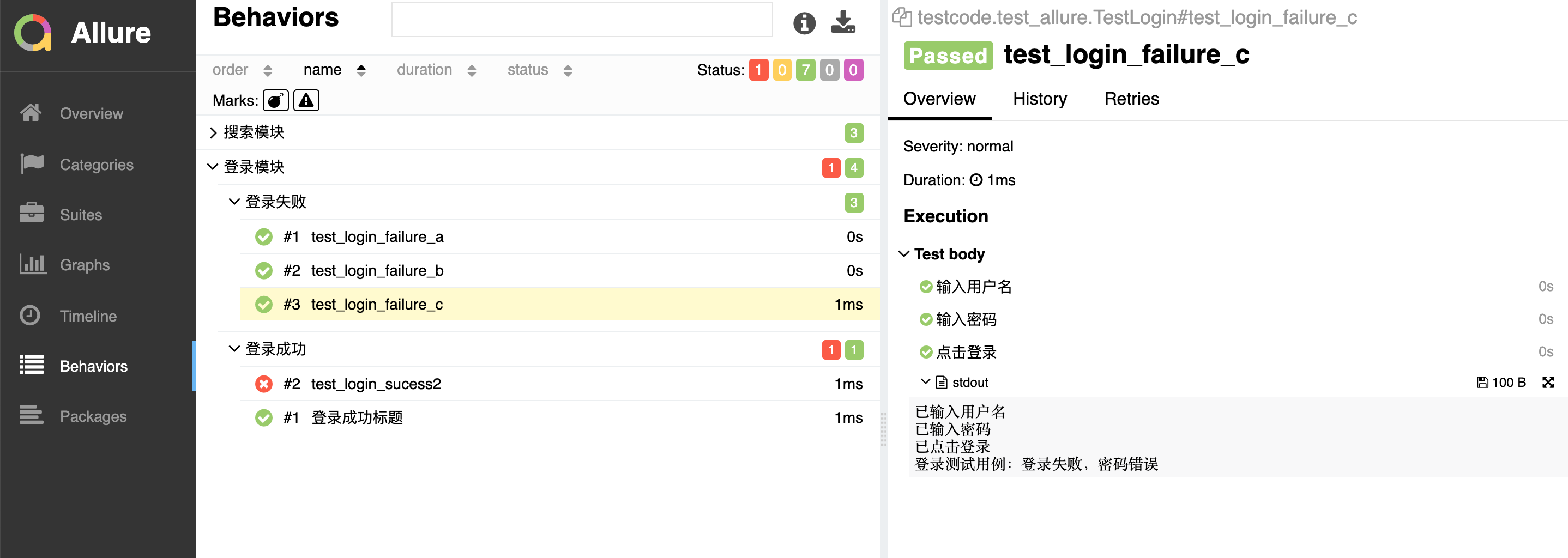
生成的报告:
allure特性-testcase
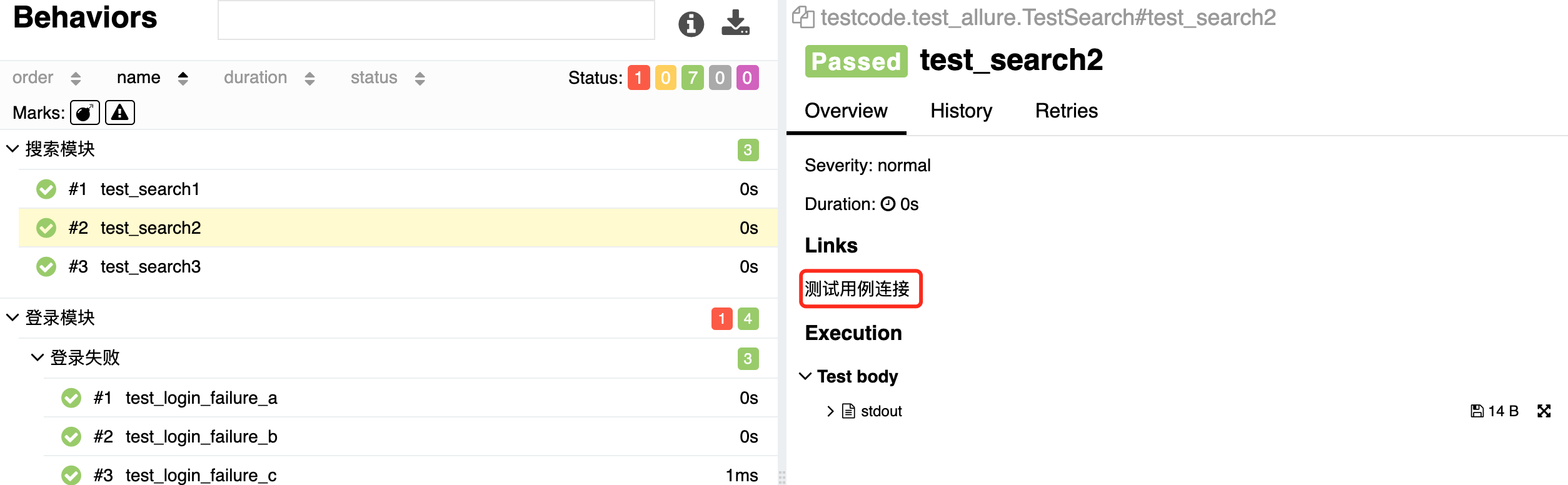
关联测试用例(可以直接给测试用例的地址链接)
例子:
TEST_CASE_LINK = 'https://mirrors.huaweicloud.com/'

@allure.testcase(TEST_CASE_LINK,'测试用例连接')

def test_search(self):

    print('搜索用例')
按重要性级别进行一定范围测试
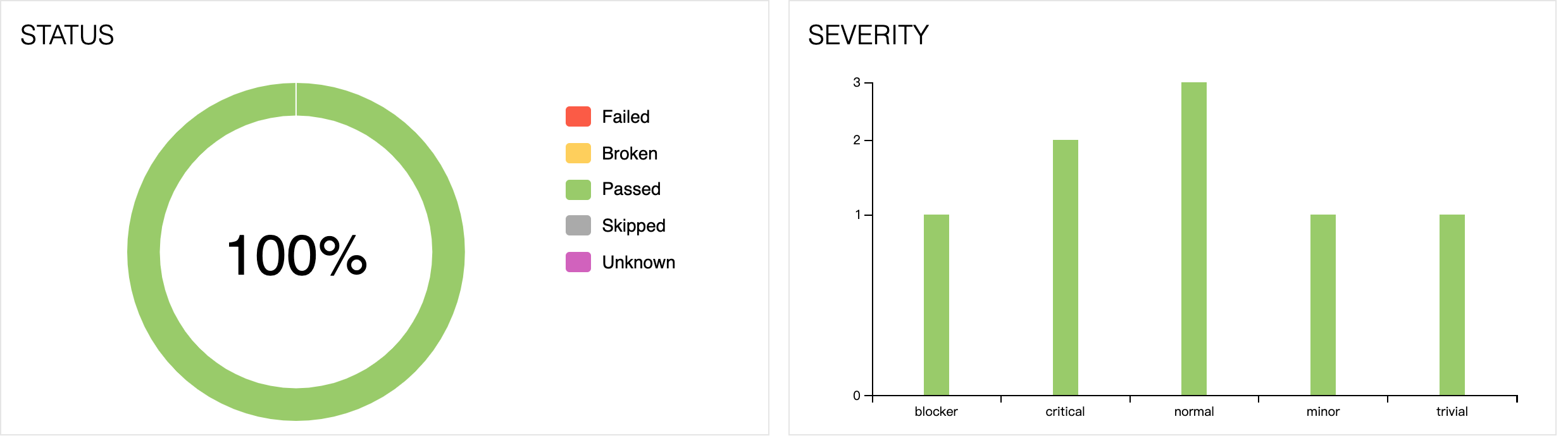
通常测试有P0、冒烟测试、验证上线测试。按重要性级别来执行的,比如上线要把主流程和重要模块都跑一遍,可通过以下方法解决
- 通过附加@pytest.mark标记
- 通过allure.feature,allure.story
- 也可以通过allure.severity来附加标记
- 级别:
- trivial:不重要,轻微缺陷(必输项无提示,或者提示不规范)
- minor 不太重要,次要缺陷(界面错误与UI需求不符)
- normal:正常问题,普通缺陷(数值计算错误)
- critical:严重,临界缺陷(功能点缺失)
- blocker:阻塞,中断缺陷(客户端程序无响应,无法执行下一步操作)
使用方法:
在方法、函数和类上面加 @allure.severity(allure.severity_level.TRIVIAL)
执行:
pytest -s -v 文件名 --allure-severities normal,critical
举例说明:
#!/usr/bin/python

# -*- coding: UTF-8 -*-

"""

@author:chenshifeng

@file:test_severity.py

@time:2020/10/11

"""

import allure

import pytest

# 不加任何标记,默认normal

def test_with_no_severity():

    pass

# trivial:不重要,轻微缺陷(必输项无提示,或者提示不规范)

@allure.severity(allure.severity_level.TRIVIAL)

def test_with_trivial_severity():

    pass

# minor 级别 不太重要,次要缺陷(界面错误与UI需求不符)

@allure.severity(allure.severity_level.MINOR)

def test_with_minor_severity():

    pass

# normal:正常问题,普通缺陷(数值计算错误)

@allure.severity(allure.severity_level.NORMAL)

def test_with_normal_severity():

    pass

# critical:严重,临界缺陷(功能点缺失)

@allure.severity(allure.severity_level.CRITICAL)

def test_with_ritical_severity():

    pass

# blocker:阻塞,中断缺陷(客户端程序无响应,无法执行下一步操作)

@allure.severity(allure.severity_level.BLOCKER)

def test_with_blocker_severity():

    pass

@allure.severity(allure.severity_level.NORMAL)

class TestClassWithNormalSeverity(object):

    # 不加任何标记,默认为同class级别

    def test_inside_with_normal_severity(self):

        pass

    # 重新设置了critical级别

    @allure.severity(allure.severity_level.CRITICAL)

    def test_inside_with_critical_severity(self):

        pass
执行:
chenshifengdeMacBook-Pro:testcode chenshifeng$ pytest test_severity.py --alluredir=./result --clean-alluredir -vs

============================================================================= test session starts =============================================================================

platform darwin -- Python 3.9.0, pytest-6.1.1, py-1.9.0, pluggy-0.13.1 -- /usr/local/bin/python3.9

cachedir: .pytest_cache

rootdir: /Users/chenshifeng/MyCode/PythonCode/SFDSZL/test_pytest, configfile: pytest.ini

plugins: allure-pytest-2.8.18

collected 8 items

test_severity.py::test_with_no_severity PASSED

test_severity.py::test_with_trivial_severity PASSED

test_severity.py::test_with_minor_severity PASSED

test_severity.py::test_with_normal_severity PASSED

test_severity.py::test_with_ritical_severity PASSED

test_severity.py::test_with_blocker_severity PASSED

test_severity.py::TestClassWithNormalSeverity::test_inside_with_normal_severity PASSED

test_severity.py::TestClassWithNormalSeverity::test_inside_with_critical_severity PASSED

============================================================================== 8 passed in 0.03s ==============================================================================

chenshifengdeMacBook-Pro:testcode chenshifeng$ allure serve ./result

Generating report to temp directory...

Report successfully generated to /var/folders/p0/3_7fwrvx6n3ftpfd4wjb01300000gn/T/17788207943997663035/allure-report

Starting web server...

2020-10-13 22:27:49.842:INFO::main: Logging initialized @6620ms to org.eclipse.jetty.util.log.StdErrLog

Server started at <http://192.168.12.100:59696/>. Press <Ctrl+C> to exit
终极用例:
百度搜索:
#!/usr/bin/python

# -*- coding: UTF-8 -*-

"""

@author:chenshifeng

@file:test_baidudemo.py

@time:2020/10/13

"""

import pytest

import allure

from selenium import webdriver

import time

@allure.testcase('https://www.github.com')

@allure.feature("百度搜索")

@pytest.mark.parametrize('test_data1',['allure','pytest','unittest'])

def test_steps_demo(test_data1):

    with allure.step('打开百度网页'):

        driver=webdriver.Chrome()

        driver.get('http://www.baidu.com')

        driver.maximize_window()

    with allure.step(f'输入搜索词:{test_data1}'):

        driver.find_element_by_id('kw').send_keys(test_data1)

        time.sleep(2)

        driver.find_element_by_id('su').click()

        time.sleep(2)

    with allure.step('保存图片'):

        driver.save_screenshot('./screenshot/baidu.png')

        allure.attach.file('./screenshot/baidu.png',attachment_type=allure.attachment_type.PNG)

    with allure.step('关闭浏览器'):

        driver.quit()
执行:
chenshifengdeMacBook-Pro:testcode chenshifeng$ pytest test_baidudemo.py --alluredir=./result --clean-alluredir -vs

============================================================================= test session starts =============================================================================

platform darwin -- Python 3.9.0, pytest-6.1.1, py-1.9.0, pluggy-0.13.1 -- /usr/local/bin/python3.9

cachedir: .pytest_cache

rootdir: /Users/chenshifeng/MyCode/PythonCode/SFDSZL/test_pytest, configfile: pytest.ini

plugins: allure-pytest-2.8.18

collected 3 items

test_baidudemo.py::test_steps_demo[allure] PASSED

test_baidudemo.py::test_steps_demo[pytest] PASSED

test_baidudemo.py::test_steps_demo[unittest] PASSED

============================================================================= 3 passed in 24.65s ==============================================================================

chenshifengdeMacBook-Pro:testcode chenshifeng$ allure serve ./result

Generating report to temp directory...

Report successfully generated to /var/folders/p0/3_7fwrvx6n3ftpfd4wjb01300000gn/T/18005664130273264423/allure-report

Starting web server...

2020-10-13 23:03:39.221:INFO::main: Logging initialized @7360ms to org.eclipse.jetty.util.log.StdErrLog

Server started at <http://192.168.12.100:60775/>. Press <Ctrl+C> to exit
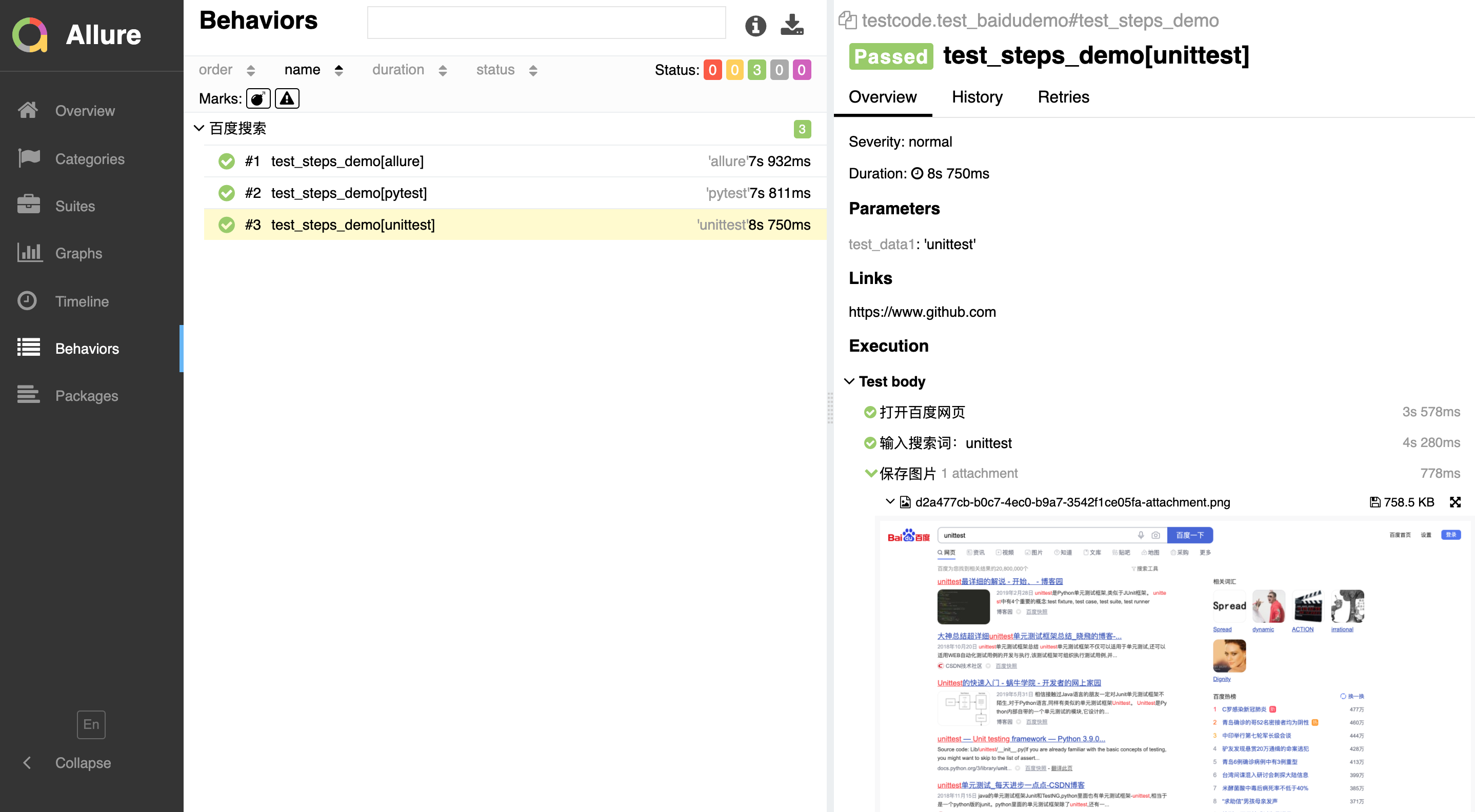
报告:
python自动化之使用allure生成测试报告的更多相关文章
- python + pytest + allure生成测试报告
pytest结合allure生成测试报告 环境搭建 要安装java环境,版本要是jdk1.8的,配置好java环境变量,不然输入allure命令会报错,JAVA_HOME环境,自行配置 安装allur ...
- Pytest测试框架(五):pytest + allure生成测试报告
Allure 是一款轻量级.支持多语言的开源自动化测试报告生成框架,由Java语言开发,可以集成到 Jenkins. pytest 测试框架支持Allure 报告生成. pytest也可以生成juni ...
- pytest(11)-Allure生成测试报告(一)
Allure是一个开源的测试报告生成框架,提供了测试报告定制化功能,相较于我们之前使用过pytest-html插件生成的html格式的测试报告,通过Allure生成的报告更加规范.清晰.美观. pyt ...
- Python&Selenium&pytest借助allure生成自动化测试报告
一.摘要 本篇博文将介绍Python和Selenium进行自动化测试时,如何借助allure生成自动化测试报告 二.环境配置 首先python环境中安装pytest和pytest_allure_ada ...
- pytest+jenkins+allure 生成测试报告发送邮件
前言第一部分:Pycharm for Gitee1. pycharm安装gitee插件2. gitee关联本地Git快速设置- 如果你知道该怎么操作,直接使用下面的地址简易的命令行入门教程:3. Gi ...
- Python单元测试框架unittest之生成测试报告(HTMLTestRunner)
前言 批量执行完用例后,生成的测试报告是文本形式的,不够直观,为了更好的展示测试报告,最好是生成HTML格式的. unittest里面是不能生成html格式报告的,需要导入一个第三方的模块:HTMLT ...
- Python单元测试框架之pytest -- 生成测试报告
继续pytest单元测试框架的学习,pytest可以生成多种类型的测试报告.这一节就来学习pytest如何生成测试报告. 创建test_calss.py 测试用例文件,这里以测试该文件为例. #cod ...
- Python 中 使用 HTMLTestRunner 模块生成测试报告
使用 HTMLTestRunner 模块可以生成测试报告,但是系统自带的报告不详细,不好看,所以找了一份详细的报告 HTMLTestRunner 模板,直接导入就能使用 两种方法生成HTML报告,都 ...
- python+selenium简易自动化框架,包含生成测试报告以及发送结果至Email
Selenium+python环境搭建见虫师的pdf文档,非常详尽 简易框架: 1.文件目录:
随机推荐
- [每日一题]面试官问:谈谈你对ES6的proxy的理解?
[每日一题]面试官问:谈谈你对ES6的proxy的理解? 关注「松宝写代码」,精选好文,每日一题 作者:saucxs | songEagle 一.前言 2020.12.23 日刚立的 flag,每日一 ...
- IE浏览器F12无法使用
原文链接http://zhhll.icu/2020/04/07/windows/IE%E6%B5%8F%E8%A7%88%E5%99%A8F12%E6%97%A0%E6%B3%95%E4%BD%BF% ...
- .NET 云原生架构师训练营(模块二 基础巩固 RabbitMQ Masstransit 介绍)--学习笔记
2.6.6 RabbitMQ -- Masstransit 介绍 Masstransit 是什么 Quickstart 消息 Message Masstransit 是什么 Masstransit 是 ...
- Laya 断点调试
Laya 打断点调试并查看堆栈的方法 发现直接加断点不行没办法调试,直接使用这中方法好像可以,选择F5调试 var camera =this.GameScene.getChildByName(&quo ...
- Memcached Session Manager 共享tomcat session设置
tomcat的lib下添加jar包 修改tomcat的conf目录下的context.xml文件 新增 sessionCookiePath="/" <Manager clas ...
- myisam崩溃后发生损坏的概率比innodb高的原因
myisam崩溃后发生损坏的概率比innodb高的原因
- 【函数分享】每日PHP函数分享(2021-1-19)
substr 函数返回字符串的一部分.注释:如果 start 参数是负数且 length 小于或等于 start,则 length 为 0. string substr (string $string ...
- 力软最新版本与.netCore版本
功能强大,直接上图: 加微信或QQ交流开发技术:25489181 netcore版本 版本优势: .NET Core是适用于 Windows.Linux 和 macOS 的免费.开源托管的计算机软件框 ...
- Mybatis执行流程学习之手写mybatis雏形
Mybatis是目前开发中最常用的一款基于ORM思想的半自动持久层框架,平时我们都仅仅停留在使用阶段,对mybatis是怎样运行的并不清楚,今天抽空找到一些资料自学了一波,自己写了一个mybatis的 ...
- 目标检测的评价指标(TP、TN、FP、FN、Precision、Recall、IoU、mIoU、AP、mAP)
1. TP TN FP FN GroundTruth 预测结果 TP(True Positives): 真的正样本 = [正样本 被正确分为 正样本] TN(True Negatives): 真的 ...