
WordCount (Python)
Github项目地址:https://github.com/w1036933220/WordCount
一、解题思路
- 把项目需求理清楚,画一个思维导图
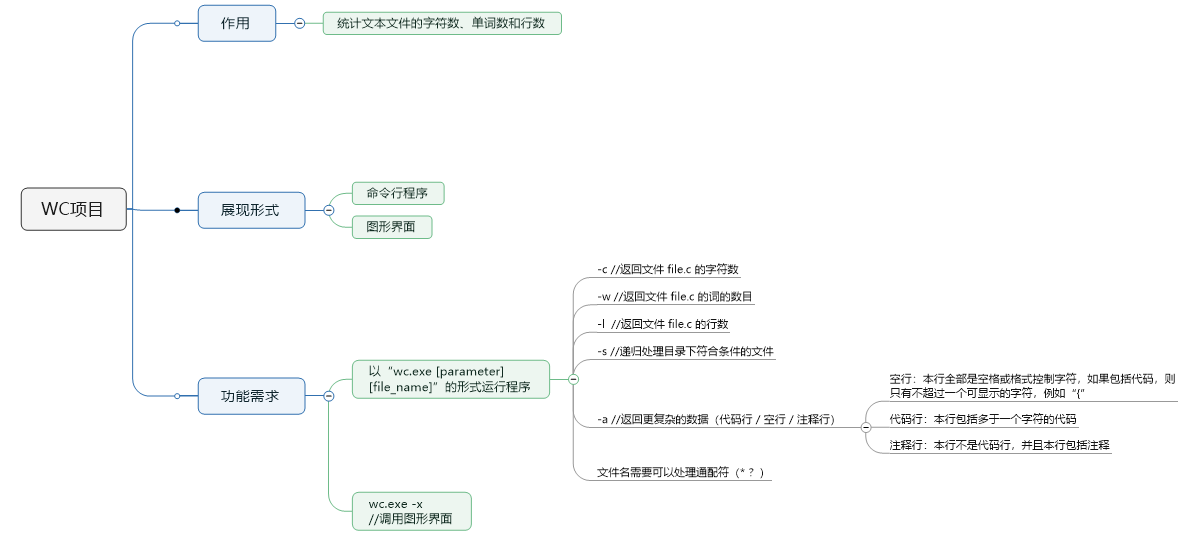
- 考虑各部分功能所需要的大概实现思路
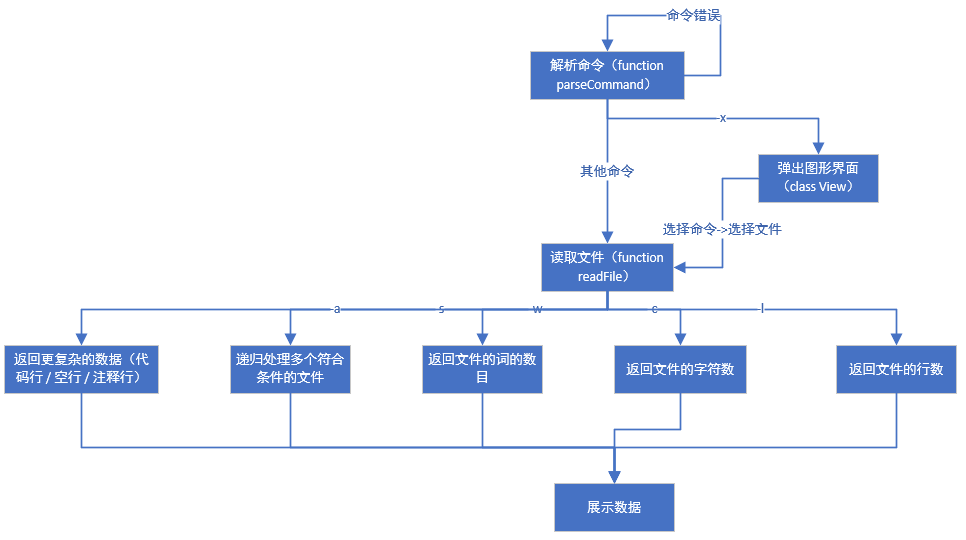
- 然后完成了计算文件属性的算法部分
- 再回头想对指令的解析问题,顺带添加了递归处理多个文件的功能
- 查python的os库文档,最后决定用os.walk读取当前文件夹内的所有文件夹和文件,替换掉输入的*和?通配符,再进行匹配
三、设计实现过程及代码说明
- main.py(入口文件)
from utils.utils import *

if __name__ == '__main__':

    command = input("请输入命令(wc.exe [parameter] {file_name}):\n")

    parse_command(command)
- orders.py
存放指令集,和输出各类数据的函数
from utils.count import *

from views.main_view import *

import tkinter as tk

# 输出字符数

def print_char_num(text):

	print("字符数:" + str(FileProperties(text).count_char_num()))

# 输出单词数

def print_word_num(text):

	print("词数:" + str(FileProperties(text).count_word_num()))

# 输出行数

def print_line_num(text):

	print("行数:" + str(FileProperties(text).count_line_num()))

# 输出代码行/空行/注释行

def print_code_property(text):

    file_properties = FileProperties(text)

    print("空行:" + str(file_properties.count_null_line_num()))

    print("注释行:" + str(file_properties.count_annotation_line_num()))

    print("代码行:" + str(file_properties.count_code_line_num()))

# 调出图形界面

def draw_view():

	root = MainView(tk.Tk())

def print_error():

	print("指令输入错误")

# 单指令命令集

orders = {

    '-c': print_char_num,

    '-w': print_word_num,

    "-l": print_line_num,

    "-a": print_code_property,

    "-s": print_error,

    "-x": draw_view

}
- utils.py
放置解析指令、读取文件、模糊搜素的函数
import os

from utils.orders import *

# description:parse command

# param:order input

# return:[order, [file_list]] / FALSE

def parse_command(command):

    command = command.strip().split(" ")

    # 指令若为空或者起始不为wc.exe则报错

    if command == [] or command[0] != "wc.exe":

        print("指令输入错误")

    # 打开图形界面的指令(一级指令)

    if "-x" in command:

        orders.get("-x")

    elif len(command) > 2:

        order = command[-2]

        file_name = command[-1]

        file_list = get_file_list(file_name)

        # 递归调用的指令

        if "-s" in command:

            if file_list:

                for file in file_list:

                    print(file + ":")

                    text = read_file(file)

                    orders.get(order)(text)

        else:

            print(file_list[0] + ":")

            text = read_file(file_name)

            orders.get(order)(text)

    else:

        print("指令输入错误")

# 读取目录下符合条件的文件名

def get_file_list(file_name):

    # 最终构建的文件列表

    file_list = []

    # 匹配到的文件夹列表、需二次处理

    dir_list = []

    file_name = file_name.replace("?", "\\S").replace("*", "\\S+")

    file_name += "$"

    for root, dirs, files in os.walk(".", topdown=False):

        for name in files:

            if re.match(file_name, name):

                file_list.append(os.path.join(root, name))

        for name in dirs:

            if re.match(file_name, name):

                dir_list.append(os.path.join(os.getcwd() + os.sep, name))

    # 如果文件夹非空,则继续收集

    if dir_list:

        for item in dir_list:

            all_file = os.listdir(item)

            for file in all_file:

                # 文件的完整路径

                file_path = item + os.sep + file

                if os.path.isfile(file_path):

                    file_list.append(file_path)

    print(file_list)

    return file_list

# description:read files

# param:file_list

# return:file content

def read_file(file):

    with open(file, 'r') as f:

        return f.readlines()
- count.py
存放计算文件属性的类
import re

class FileProperties(object):

    def __init__(self, file_text):

        self.file_text = file_text

        # 字符数

        self.char_num = 0

        # 单词数

        self.word_num = 0

        # 行数

        self.line_num = len(file_text)

        # 空行

        self.null_line_num = 0

        # 代码行

        self.code_line_num = 0

        # 注释行数

        self.annotation_line_num = 0

    # 计算字符数

    def count_char_num(self):

        for line in self.file_text:

            self.char_num += len(line.strip())

        return self.char_num

    # 计算单词数

    def count_word_num(self):

        for line in self.file_text:

            # 正则匹配一行中的所有单词,并计算单词数

            self.word_num += len(re.findall(r'[a-zA-Z0-9]+[\-\']?[a-zA-Z]*', line))

        return self.word_num

    # 计算行数

    def count_line_num(self):

        return self.line_num

    # 计算空行数

    def count_null_line_num(self):

        for line in self.file_text:

            # 只有不超过一个可显示的字符

            if len(re.findall(r'\S', line)) <= 1:

                self.null_line_num += 1

        return self.null_line_num

    # 计算代码行

    def count_code_line_num(self):

        return self.line_num - self.null_line_num - self.annotation_line_num

    # 计算注释行

    def count_annotation_line_num(self):

        flag = 0

        for line in self.file_text:

            line = line.strip()

            # 匹配不是代码行且有//

            if re.match(r'^\S?\s*?\/\/', line):

                self.annotation_line_num += 1

            # 匹配不是代码行且有/*

            elif re.match(r'^\S?\s*?\/\*', line):

                flag = 1

                self.annotation_line_num += 1

                if line.endswith('*/'):

                    flag = 0

            elif flag == 1:

                self.annotation_line_num += 1

            elif "*/" in line:

                self.annotation_line_num += 1

                flag = 0

        return self.annotation_line_num
- main_view.py(新增)
import tkinter as tk

from tkinter import ttk

import tkinter.filedialog

from utils.utils import *

from utils.count import *

class MainView(object):

    def __init__(self, window):

        self.window = window

        self.window.title("这是船新的版本!")

        self.window.geometry("540x290")

        self.data_tree = ttk.Treeview(self.window, show="headings")

        self.creat_view()

    def creat_view(self):

        # 选择文件按钮

        btn = tk.Button(self.window, text="选择文件", command=self.file_choose).place(x=240, y=247)

        # 文件数据显示表格

        self.data_tree.place(x=8, y=8)

        # 定义列

        self.data_tree["columns"] = ("文件名", "字符数", "单词数", "行数", "空行数", "代码行数", "注释行数")

        # 设置列属性,列不显示

        self.data_tree.column("文件名", width=100)

        self.data_tree.column("字符数", width=70)

        self.data_tree.column("单词数", width=70)

        self.data_tree.column("行数", width=70)

        self.data_tree.column("空行数", width=70)

        self.data_tree.column("代码行数", width=70)

        self.data_tree.column("注释行数", width=70)

        # 设置表头

        self.data_tree.heading("文件名", text="文件名")

        self.data_tree.heading("字符数", text="字符数")

        self.data_tree.heading("单词数", text="单词数")

        self.data_tree.heading("行数", text="行数")

        self.data_tree.heading("空行数", text="空行数")

        self.data_tree.heading("代码行数", text="代码行数")

        self.data_tree.heading("注释行数", text="注释行数")

        self.window.mainloop()

    def file_choose(self):

        file_list = tk.filedialog.askopenfilenames()

        for index, file in enumerate(file_list):

            text = read_file(file)

            [char_num, word_num, line_num, null_line_num, code_line_num,

             annotation_line_num] = FileProperties(text).all_count()

            file = file.split("/")[-1]

            self.data_tree.insert('', index, values=(file, char_num, word_num, line_num,

                                                 null_line_num, code_line_num, annotation_line_num))
五、PSP表格
| PSP2.1 | Personal Software Process Stages | 预估耗时(分钟) | 实际耗时(分钟) |
|---|---|---|---|
| Planning | 计划 | 10 | 8 |
| · Estimate | · 估计这个任务需要多少时间 | 10 | 8 |
| Development | 开发 | 460 | 610 + 90 |
| · Analysis | · 需求分析 (包括学习新技术) | 120 | 200 |
| · Design Spec | · 生成设计文档 | 90 | 60 |
| · Design Review | · 设计复审 (和同事审核设计文档) | 5 | 5 |
| · Coding Standard | · 代码规范 (为目前的开发制定合适的规范) | 5 | 0 |
| · Design | · 具体设计 | 120 | 100 |
| · Coding | · 具体编码 | 90 | 200 + 90 |
| · Code Review | · 代码复审 | 10 | 30 |
| · Test | · 测试(自我测试,修改代码,提交修改) | 20 | 15 |
| Reporting | 报告 | 30 | 32 |
| · Test Report | · 测试报告 | 10 | 12 |
| · Size Measurement | · 计算工作量 | 10 | 5 |
| · Postmortem & Process Improvement Plan | · 事后总结, 并提出过程改进计划 | 10 | 15 |
| 合计 | 355 | 630 + 90 |
六、测试运行
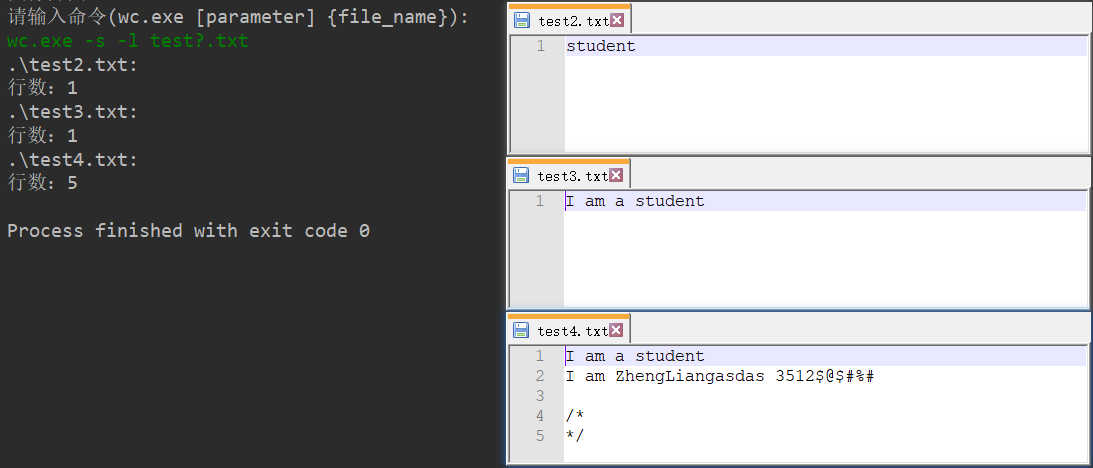

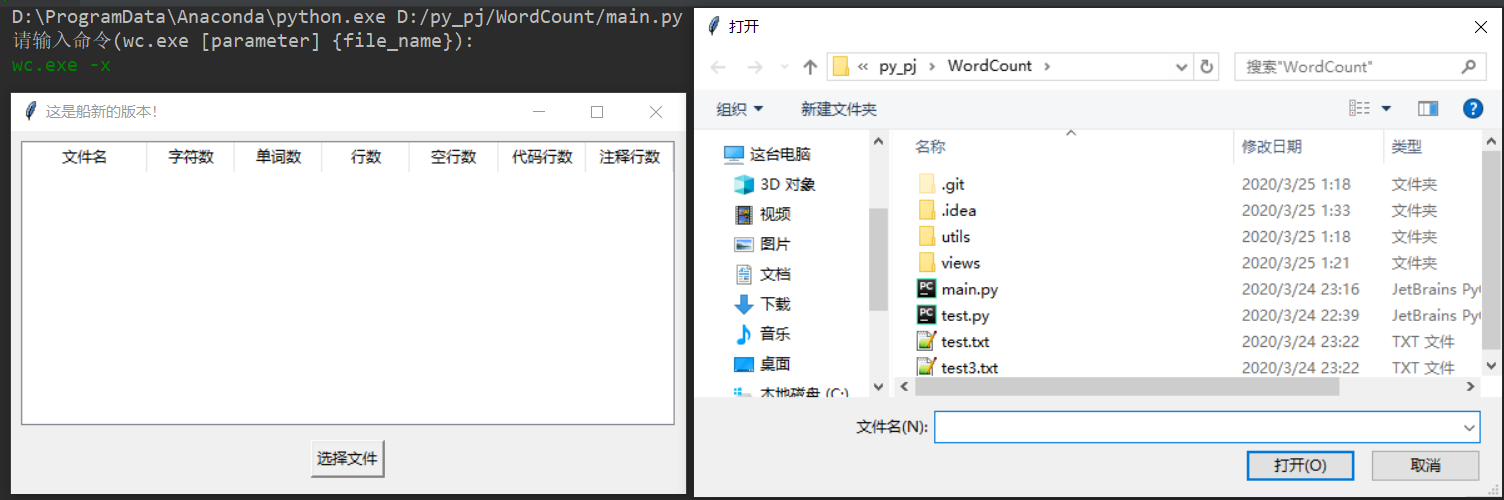
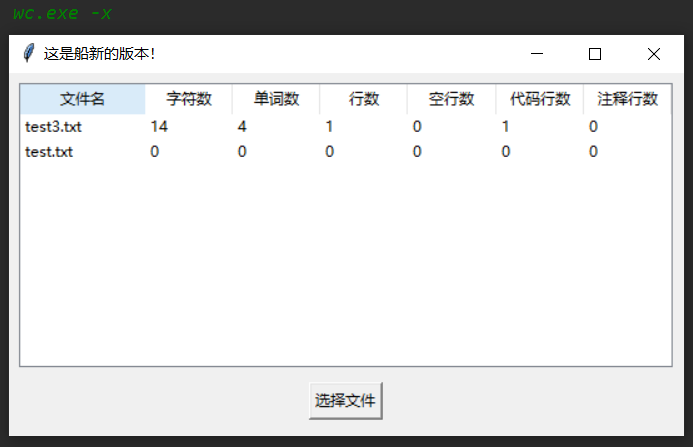
七、总结
- 太久没写python了,发现居然没有switch这个语句,百度查到了表驱动这个东西
- 用时与预计的出入有点大(过了大半年遗忘率确实高)
- 输入验证处理没有做完全
- 写的时候发现python有些问题不知道是bug还是什么
orders = {

    '-c': print_char_num,

    '-w': print_word_num,

    "-l": print_line_num,

    "-a": print_code_property,

    "-s": print_error,

}
这是我的指令集,如果把他写成像js
orders = {

    '-c': function () {

    	// 某些操作

    },

}
python不管会不会用到这个指令集,都会把字典中的值执行一遍,所以只能放函数名,js就不会
WordCount (Python)的更多相关文章
- Python进阶篇四:Python文件和流
摘要: Python对于文件和流的操作与其他编程语言基本差不多,甚至语句上比其他语言更为简洁.文件和流函数针对的对象除了这两者之外还有,类文件(file-like),即python中只支持读却不支持写 ...
- Python3调用Hadoop的API
前言: 上一篇文章 我学习使用pandas进行简单的数据分析,但是各位...... Pandas处理.分析不了TB级别数据的大数据,于是再看看Hadoop. 另附上人心不足蛇吞象 对故事一的感悟: ...
- 大数据并行计算框架Spark
Spark2.1. http://dblab.xmu.edu.cn/blog/1689-2/ 0+入门:Spark的安装和使用(Python版) Spark2.1.0+入门:第一个Spark应用程序: ...
- Python初次实现MapReduce——WordCount
前言 Hadoop 本身是用 Java 开发的,所以之前的MapReduce代码小练都是由Java代码编写,但是通过Hadoop Streaming,我们可以使用任意语言来编写程序,让Hadoop 运 ...
- 利用python操作mrjob实例---wordcount
网上利用java实现mr操作实例相对较多,现将python实现mr操作实例---Wordcount分享如下: 在操作前,需要作如下准备: 1.确保linux系统里安装有python3.5,pyt ...
- Python实现MapReduce,wordcount实例,MapReduce实现两表的Join
Python实现MapReduce 下面使用mapreduce模式实现了一个简单的统计日志中单词出现次数的程序: from functools import reduce from multiproc ...
- hadoop学习笔记——用python写wordcount程序
尝试着用3台虚拟机搭建了伪分布式系统,完整的搭建步骤等熟悉了整个分布式框架之后再写,今天写一下用python写wordcount程序(MapReduce任务)的具体步骤. MapReduce任务以来H ...
- 在Hadoop上用Python实现WordCount
一.简单说明 本例中我们用Python写一个简单的运行在Hadoop上的MapReduce程序,即WordCount(读取文本文件并统计单词的词频).这里我们将要输入的单词文本input.txt和Py ...
- python在mapreduce运行Wordcount程序
首先脚本文件: mapper.py: #!/usr/bin/env python import sys for line in sys.stdin: line = line.strip() words ...
随机推荐
- ken桑带你读源码 之 scrapy_redis
首先更大家说下 正式部署上线的爬虫会有分布式爬虫的需求 而且原本scrapy 的seen (判断重复url的池 不知道用啥词 已抓url吧 ) 保存在磁盘 url 队列 也是保存在磁盘 (保 ...
- 00_02_使用Parallels Desktop创建Windos7虚拟机
准备工作 如果要看图片的准备过程请参考该链接 需要注意的是给CPU配置为一个核,内存分配1024M 硬盘空间划分为60G 操作系统安装设置 注:windows系统设置一般都是"下一步&quo ...
- PHP XML DOM:DOM 是什么?
PHP XML DOM 内建的 DOM 解析器使在 PHP 中处理 XML 文档成为可能. DOM 是什么? W3C DOM 提供了针对 HTML 和 XML 文档的标准对象集,以及用于访问和操作这些 ...
- PHP deg2rad() 函数
实例 把角度转换为弧度: <?phpecho deg2rad("45") . "<br>";echo deg2rad("90&quo ...
- #define IOFFSETOF(TYPE, MEMBER) ((size_t) &((TYPE *)0)->MEMBER)
#include <iostream> #define IOFFSETOF(TYPE, MEMBER) ((size_t) &((TYPE *)0)->MEMBER) usi ...
- AtCoder Beginner Contest 173 E Multiplication 4 分类讨论 贪心
LINK:Multiplication 4 害怕别人不知道我有多菜 那就上张图: 赛时 太慌了 (急着AK 题目不难却暴露我的本性 根本不思考无脑写 wa了还一直停不下来的debug 至少被我发现了1 ...
- [NOI2012]随机数生成器【矩阵快速幂】
NOI2012 随机数生成器 题目描述 栋栋最近迷上了随机算法,而随机数是生成随机算法的基础.栋栋准备使用线性同余法(Linear Congruential Method)来生成一个随机数列,这种方法 ...
- 【六省联考2017】组合数问题 题解(矩阵快速幂优化DP)
题目链接 题目大意:求$(\sum\limits_{i=0}^n C_{nk}^{ik+r})\ mod \ p$的值. --------------------- 讲真,一开始看到这个题我都没往DP ...
- 用Spark进行实时流计算
Spark Streaming VS Structured Streaming Spark Streaming是Spark最初的流处理框架,使用了微批的形式来进行流处理. 提供了基于RDDs的Dstr ...
- Java实现短信验证码
前言 本人使用的是阿里短信服务,一开始尝试了许多不同的第三方短信服务平台,比如秒滴科技.梦网云通讯.当初开始为什么会选择这两个,首先因为,他们注册就送10元钱(#^.^#),但是后来却发现他们都需要认 ...