
uni-app开发经验分享二十一: 图片滑动解锁插件制作解析
在开发用户模块的时候,相信大家都碰到过一个功能,图片滑动解锁后发送验证码,这里分享我用uni-app制作的一个小控件
效果如下:
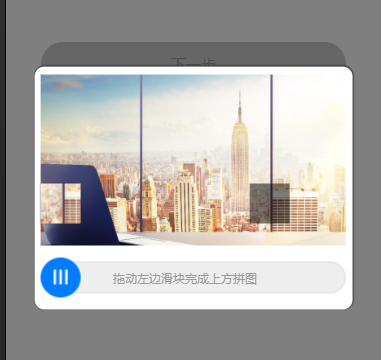
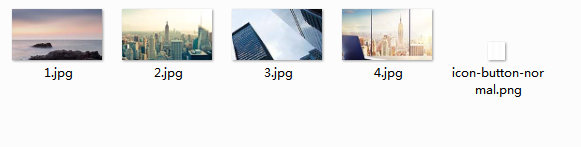
需要如下图片资源
template
<template>

	<view class="zhezhao" v-if="shows" @tap="shows=false">

		<view class="verifyBox" @touchend="onEnd">

			<view class="pintuBox">

				<image :src="imgUrl+'/tfgg-verify/'+img+'.jpg'" class="pintuBg"></image>

			</view>

			<view class="huakuaiBox">

				<view class="yinying" :style="{top:top+'px',left:left+'px'}"></view>

				<movable-area :animation="true">

					<movable-view :x="x" direction="horizontal" @change="onMove">

						<view class="pintukuai" :style="{top:top+'px'}"><image :src="imgUrl+'/tfgg-verify/'+img+'.jpg'" :style="{top:-lefttop+'px',left:-left+'px'}"></image></view>

					</movable-view>

				</movable-area>

				<view class="huadao">拖动左边滑块完成上方拼图</view>

			</view>

		</view>

	</view>

</template>
script
<script>

	import app from "@/api/app.js";

	export default {

		name: 'tfgg-verify',

		data() {

			return {

				imgUrl: app.appImg,

				x: 0,//初始距离

				oldx:0,//移动的距离

				img:'0',//显示哪张图片

				left:'',//随机拼图的最终X轴距离

				top:'',//拼图的top距离

				lefttop:'',//拼图内容的top距离

				shows:false

			};

		},

		mounted() {

			this.shuaxinVerify()

		},

		methods: {

			//刷新验证

			shuaxinVerify(){

				var gl = Math.random();

				this.left = uni.upx2px(500)*gl>uni.upx2px(250)?(uni.upx2px(500)*gl):uni.upx2px(250);//生成随机X轴最终距离

				this.top = -(uni.upx2px(25)+uni.upx2px(343)-(uni.upx2px(263)*gl));//生成随机Y轴初始距离

				this.lefttop = uni.upx2px(263)*gl;//生成随机Y轴初始距离

				if(gl<=0.25){

					this.img=1

				}if(gl>0.25&&gl<=5){

					this.img=2

				}if(gl>0.5&&gl<=0.75){

					this.img=3

				}if(gl>0.75&&gl<=1){

					this.img=4

				}

			},

			/* 滑动中 */

			onMove(e) {

				this.oldx = e.detail.x;

			},

			/* 滑动结束 */

			onEnd() {

				if(Math.abs(this.oldx-this.left)<=5){

					uni.showToast({

						title: '验证成功'

					});

					this.$emit("result",true);

					this.hide();

				}else{

					uni.showToast({

						title: '验证失败'

					});

					this.shuaxinVerify()

					this.reset()

				}

			},

			/* 重置 */

			reset(){

				console.log('重置');

				this.x = 1;

				this.oldx = 1;

				setTimeout(()=>{

					this.x = 0;

					this.oldx = 0;

				},300)

			},

			show(){

				this.shows=true;

			},

			hide(){

				this.shows=false;

			}

		}

	}

</script>
style
<style>

	.zhezhao{

		position: fixed;

		top: 0;

		left: 0;

		width: 100%;

		height: 100%;

		background-color: rgba(0,0,0,.5);

		z-index: 999;

	}

	.verifyBox{

		position: absolute;

		top: 50%;

		left: 50%;

		transform: translate(-50%,-50%);

		width: 85%;

		background-color: #fff;

		border-radius: 20upx;

		box-shadow: 0 0 5upx rgba(0,0,0);

	}

	.pintuBox{

		position: relative;

	}

	.pintuBg{

		width: 610upx;

		height: 343upx;

		display: block;

		margin: 17upx auto;

	}

	.huakuaiBox{

		position: relative;

		height: 80upx;

		width: 610upx;

		margin: 25upx auto;

	}

	.yinying{

		position: absolute;

		width: 80upx;

		height: 80upx;

		background-color: rgba(0,0,0,.5);

	}

	.huakuaiBox movable-area{

		height: 80upx;

		width: 100%;

	}

	.huakuaiBox movable-area movable-view{

		width: 80upx;

		height: 80upx;

		border-radius: 50%;

		background-color: #007cff;

		background-image: url(../../static/images/tfgg-verify/icon-button-normal.png);

		background-repeat: no-repeat;

		background-size: auto 30upx;

		background-position: center;

		position: relative;

		z-index: 100;

	}

	.pintukuai{

		position: absolute;

		top: -105upx;

		left: 0;

		width: 100%;

		height: 100%;

		z-index: 101;

		box-shadow: 0 0 5upx rgba(0,0,0,.3);

		overflow: hidden;

	}

	.pintukuai image{

		max-width: none;

		position: absolute;

		top: 0;

		left: 0;

		width: 610upx;

		height: 343upx;

	}

	.huadao{

		position: absolute;

		width: calc(100% - 35upx);

		height: 65upx;

		line-height: 65upx;

		background: #eee;

		box-shadow: inset 0 0 5upx #ccc;

		border-radius: 60upx;

		color: #999;

		text-align: center;

		top: 50%;

		right: 0;

		transform: translateY(-50%);

		font-size: 18upx;

		padding-right: 35upx;

		z-index: 99;

	}

</style>
调用方法
引入控件
import tfggVerify from "@/components/tfgg-verify/tfgg-verify.vue"
view里加上
<tfgg-verify @result='verifyResult' ref="verifyElement"></tfgg-verify>
components加上
components: {

  "tfgg-verify": tfggVerify

},
方法案例
/* 校验结果回调函数 */

verifyResult(res) {

	if (res) {

		this.$refs.verifyElement.reset(); //校验成功重置插件

		console.log('验证成功')

	}

	console.log(res);

},

/* 显示校验弹窗 */

verifyFasong() {

	this.$refs.verifyElement.show();

},

/* 校验插件重置 */

verifyReset() {

	this.$refs.verifyElement.reset();

},
如果本文章对你有帮助,请点个推荐,欢迎关注我,我会定期更新或分享开发中碰到的问题及解决方法,希望与你共同进步(*^▽^*)。
uni-app开发经验分享二十一: 图片滑动解锁插件制作解析的更多相关文章
- uni-app开发经验分享二: uni-app生命周期记录
应用生命周期(仅可在App.vue中监听) 页面生命周期(在页面中添加) 当页面中需要用到下拉刷新功能时,打开pages.json,在"globalStyle"里设置"e ...
- 【分享】JS图片滑动渐显渐隐插件-附使用方法。
前阵子总监要说做一个邀请函 效果 点击这里 鼠标拖拽进行浏览 它用的是Adobe edge软件生成的,代码量过大,冗余太多. 再加上我也没学过这个软件怎么使用,增加学习成本影响项目进度. 于是就自己写 ...
- uni-app开发经验分享二十: 微信小程序 授权登录 获取详细信息 获取手机号
授权页面 因为微信小程序提供的 权限弹窗 只能通用户确认授权 所以可以 写一个授权页面,让用户点击 来获取用户相关信息 然后再配合后台就可以完成登录 <button class="bt ...
- php分享二十一:mysql语句
一.Join语法概述 JOIN 按照功能大致分为如下三类: INNER JOIN(内连接,或等值连接):取得两个表中存在连接匹配关系的记录. LEFT JOIN(左连接) RIGHT JOIN(右连接 ...
- 简单的图片滑动效果插件 jQuery.iocnSlider.js
近几日在制作一个客户引导页面,其中有一个图片展示而且带滑动的效果.好久没练手了,索性自己写一个插件吧. 依据设计原型,需要满足两套分辨率下图片不同的尺寸,所以在css中使用了media query的相 ...
- 一个不错的图片滑动展示插件 anythingslider
一个不错的图片http://css-tricks.com/anythingslider-jquery-plugin/ DEMO演示: http://css-tricks.github.io/Anyth ...
- jmeter(二十一)jmeter常用插件介绍
jmeter作为一个开源的接口性能测试工具,其本身的小巧和灵活性给了测试人员很大的帮助,但其本身作为一个开源工具,相比于一些商业工具(比如LoadRunner),在功能的全面性上就稍显不足. 这篇博客 ...
- <转>jmeter(二十一)jmeter常用插件介绍
本博客转载自:http://www.cnblogs.com/imyalost/category/846346.html 个人感觉不错,对jmeter讲解非常详细,担心以后找不到了,所以转发出来,留着慢 ...
- [Android教程] Cordova开发App入门(二)使用热更新插件
前言 不知各位遇没遇到过,刚刚发布的应用,突然发现了一个隐藏极深的“碧油鸡(BUG)”,肿么办!肿么办!肿么办!如果被老板发现,一定会让程序员哥哥去“吃鸡”.但是想要修复这个“碧油鸡”,就必须要重新打 ...
随机推荐
- SQL精华总结索引类型优化SQL优化事务大表优化思维导图❤️
索引类型 从数据结构角度: B+树索引, hash索引,基于哈希表实现,只有全值匹配才有效.以链表的形式解决冲突.查找速度非常快 O(1) 全文索引,查找的是文本中的关键词,而不是直接比较索引中的值, ...
- 详解Python Google Protocol Buffer
为什么要使用PB? PB(Protocol Buffer)是 Google 开发的用于结构化数据交换格式,作为腾讯云日志服务标准写入格式.因此用于写入日志数据前,需要将日志原始数据序列化为 PB 数据 ...
- (五)vimscript打印信息
1.打印信息 使用vimscript时,打印信息的命令是echo和echom,可以通过help echo及help echom命令查看帮助文档,而echo与echom有些许的区别, :echom &q ...
- RocketMQ(九):主从同步的实现
分布式系统的三大理论CAP就不说了,但是作为分布式消息系统的rocketmq, 主从功能是最最基础的了.也许该功能现在已经不是很常用了,但是对于我们理解一些分布式系统的常用工作原理还是有些积极意义的. ...
- 关于线程池(ThreadPoolExecutor)参数的浅析
引子 线程池在项目中很常用,需要多个任务异步执行的地方我们都会去创建一个线程池. 我们看到 ThreadPoolExecutor源码中提供了更方便的工厂方法(Executors)使用. 提供方便应该是 ...
- ES标签搜索并解决评分排序问题
一.概述 需求: 最近在做一个新闻项目,有这样一个需求,如下: 用户根据视频内容手动创建标签,标签个数不限 在视频详情页提供根据标签推荐视频功能,即按本视频的标签进行搜索,标签匹配多的排在前面,匹配少 ...
- VS2015配置环境支持opencv3库(网络方法总结)
今天安装了opencv3.4.1的版本,之前一直是在ubuntu上做的,本次在windows10上使用VS2015来开发. VS2015是之前安装的,能正常的编译程序. 1. 安装opencv,下载o ...
- GraduateDesign-给APP添加获取位置信息和天气预报的功能(json)
首先,我的app需要通过网络来获取当前所在的位置.这里我找到了一个json来获取本地位置信息. http://int.dpool.sina.com.cn/iplookup/iplookup.php?f ...
- 第十一章节 BJROBOT PS3 手柄控制【ROS全开源阿克曼转向智能网联无人驾驶车】
1.把小车架空平放在地板上. 2.用 USB 线将 PS3 蓝牙手柄连接至小车主控端,初次连接手柄上的 4 个红色指示灯会同时闪烁; 3.按下手柄中间的圆形配对键,然后等待红灯闪烁至停止. 4.此 ...
- 聊聊并发,进程通信方式,go协程简单应用场景
开篇提问 知道并发,并行,线程,协程概念吗?或者知道大概含义吗? 有线程为什么还要有协程?区别是什么? 『进程』通信方式知道几种?有没有超过3种? golang『协程』通信方式推荐? 使用并发的目的是 ...