
Net Core 网关 Ocelot 简单案例
1、什么是Ocelot
Ocelot是一个用.NET Core实现并且开源的API网关,它功能强大,包括了:路由、请求聚合、服务发现、认证、鉴权、限流熔断、并内置了负载均衡器与Service Fabric、Butterfly Tracing集成。
2、前期准备工作
新建一个Web API,返回IP+Port字符串(有利于我们直观感受)
using System;

using System.Collections.Generic;

using System.Linq;

using System.Threading.Tasks;

using Microsoft.AspNetCore.Mvc;

using Microsoft.Extensions.Configuration;

using Microsoft.Extensions.Logging;

namespace StudyGateway.Controllers

{

    [ApiController]

    [Route("api/[controller]")]

    public class WeatherForecastController : ControllerBase

    {

        private IConfiguration _configuration;

        public WeatherForecastController(IConfiguration configuration)

        {

            this._configuration = configuration;

        }

        [HttpGet]

        public string Get()

        {

            string ip = _configuration["IP"];

            string port = _configuration["Port"];

            return $@"{ip} {port}";

        }

    }

}
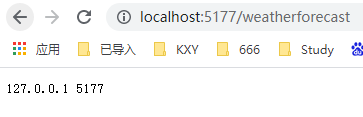
CMD启动该站点
dotnet StudyGateway.dll --urls="http://*:5177" --ip="127.0.0.1" --port=5177
显示截图:
3、开始设计网关(Gateway)
创建一个新的Net Core Api项目,引用Ocelot包(注意版本对应 core 3.x 对应 Ocelot 15)
安装完成后,修改Startup,因为这个站点只是作为网关,所以只需要以下配置
using Microsoft.AspNetCore.Builder;

using Microsoft.AspNetCore.Hosting;

using Microsoft.Extensions.Configuration;

using Microsoft.Extensions.DependencyInjection;

using Ocelot.DependencyInjection;

using Ocelot.Middleware;

namespace MyOcelot

{

    public class Startup

    {

        public Startup(IConfiguration configuration)

        {

            Configuration = configuration;

        }

        public IConfiguration Configuration { get; }

        public void ConfigureServices(IServiceCollection services)

        {

            services.AddOcelot(new ConfigurationBuilder().AddJsonFile("configuration.json").Build());

        }

        public void Configure(IApplicationBuilder app, IWebHostEnvironment env)

        {

            app.UseOcelot();

        }

    }

}
新增一个configuration.json,作为Ocelot的配置文件(记得修改 [复制到输出目录])
配置下游站点
{

  "ReRoutes": [

    {

      "DownstreamPathTemplate": "/api/{url}",

      "DownstreamScheme": "http",

      "DownstreamHostAndPorts": [

        {

          "Host": "127.0.0.1",

          "Port": 5177

        }

      ],

      "UpstreamPathTemplate": "/GateWay/{url}", //这个url会转到上面的url

      "UpstreamHttpMethod": [ "Get", "POST" ]

    }

  ],

  "GlobalConfiguration": {

    "RequestIdKey": "OcRequestId",

    "AdministrationPath": "/administration"

  }

}
启动项目,访问
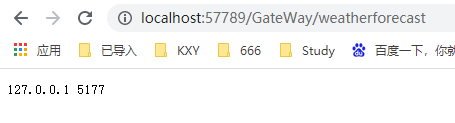
成功转载!!!
4、负载均衡策略
前期准备工作的网站,通过CMD再启动一个新实例
dotnet StudyGateway.dll --urls="http://*:5178" --ip="127.0.0.1" --port=5178
修改Ocelot配置文件,新增一个下游站点
{

  "ReRoutes": [

    {

      "DownstreamPathTemplate": "/api/{url}",

      "DownstreamScheme": "http",

      "DownstreamHostAndPorts": [

        {

          "Host": "127.0.0.1",

          "Port": 5177

        },

        {

          "Host": "127.0.0.1",

          "Port": 5178

        }

      ],

      "UpstreamPathTemplate": "/GateWay/{url}", //这个url会转到上面的url

      "UpstreamHttpMethod": [ "Get", "POST" ],

      "LoadBalancerOptions": {

        "Type": "RoundRobin" //负载均衡类型:轮询(其他类型也有,不一一列举了)

      }

    }

  ],

  "GlobalConfiguration": {

    "RequestIdKey": "OcRequestId",

    "AdministrationPath": "/administration"

  }

}
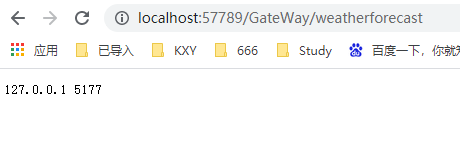
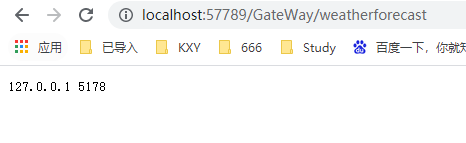
重新生成,访问:
5、缓存策略
安装Nuget包:Ocelot.Cache.CacheManager
修改Ocelot配置文件,添加FileCacheOptions节点
{

  "ReRoutes": [

    {

      "DownstreamPathTemplate": "/api/{url}",

      "DownstreamScheme": "http",

      "DownstreamHostAndPorts": [

        {

          "Host": "127.0.0.1",

          "Port": 5177

        },

        {

          "Host": "127.0.0.1",

          "Port": 5178

        }

      ],

      "UpstreamPathTemplate": "/GateWay/{url}", //这个url会转到上面的url

      "UpstreamHttpMethod": [ "Get", "POST" ],

      "LoadBalancerOptions": {

        "Type": "RoundRobin" //负载均衡类型:轮询(其他类型也有,不一一列举了)

      },

      "FileCacheOptions": {

        "TtlSeconds": 3,

        "Region": "somename"

      }

    }

  ],

  "GlobalConfiguration": {

    "RequestIdKey": "OcRequestId",

    "AdministrationPath": "/administration"

  }

}
刷新
http://localhost:57789/GateWay/weatherforecast
访问后会缓存地址3秒。
比如:第一次访问,转载到Port=5177,3秒内都会访问5177
Net Core 网关 Ocelot 简单案例的更多相关文章
- asp.net core网关Ocelot的简单介绍& Ocelot集成Identity认证
文章简介 Ocelot网关简介 Ocelot集成Idnetity认证处理 Ocelot网关简介 Ocelot是一个基于netcore实现的API网关,本质是一组按特定顺序排列的中间件.Ocelot内 ...
- 服务网关Ocelot 入门Demo系列(01-Ocelot极简单Demo及负载均衡的配置)
[前言] Ocelot是一个用.NET Core实现并且开源的API网关,它功能强大,包括了:路由.请求聚合.服务发现.认证.鉴权.限流熔断.并内置了负载均衡器与Service Fabric.Butt ...
- .Net Core的API网关Ocelot使用 (一)
1.什么是API网关 API网关是微服务架构中的唯一入口,它提供一个单独且统一的API入口用于访问内部一个或多个API.它可以具有身份验证,监控,负载均衡,缓存,请求分片与管理,静态响应处理等.API ...
- .Net Core使用Ocelot网关(一) -负载,限流,熔断,Header转换
1.什么是API网关 API网关是微服务架构中的唯一入口,它提供一个单独且统一的API入口用于访问内部一个或多个API.它可以具有身份验证,监控,负载均衡,缓存,请求分片与管理,静态响应处理等.API ...
- .NET Core 微服务—API网关(Ocelot) 教程 [二]
上篇文章(.NET Core 微服务—API网关(Ocelot) 教程 [一])介绍了Ocelot 的相关介绍. 接下来就一起来看如何使用,让它运行起来. 环境准备 为了验证Ocelot 网关效果,我 ...
- 初探.Net Core API 网关Ocelot(一)
一.介绍 Ocelot 是基于.NetCore实现的开源的API网关,支持IdentityServer认证.Ocelot具有路由.请求聚合.服务发现.认证.鉴权.限流熔断等功能,并内置了负载均衡器与S ...
- .NET Core 微服务—API网关(Ocelot) 教程 [三]
前言: 前一篇文章<.NET Core 微服务—API网关(Ocelot) 教程 [二]>已经让Ocelot和目录api(Api.Catalog).订单api(Api.Ordering)通 ...
- 解决微服务网关Ocelot使用AddStoreOcelotConfigurationInConsul后请求404问题
一个小插曲,最近研究 netcore 微服务网关,在使用AddStoreOcelotConfigurationInConsul将配置存到consul后,任何经过网关的请求都出现404,并且没有任何有用 ...
- 庐山真面目之四微服务架构Consul和Ocelot简单版本实现
庐山真面目之四微服务架构Consul和Ocelot简单版本实现 一.简介 在上一篇文章<庐山真面目之三微服务架构Consul简单版本实现>中,我们已经探讨了如何搭建基于Consu ...
- Consul+Ocelot+Polly在.NetCore中使用(.NET5)-网关Ocelot+Consul
相关文章 Consul+Ocelot+Polly在.NetCore中使用(.NET5)-Consul服务注册,服务发现 Consul+Ocelot+Polly在.NetCore中使用(.NET5)-网 ...
随机推荐
- [常用工具] OpenCV获取网络摄像头实时视频流
所需要硬件及软件环境: python 3/OpenCV3.4 or C++11/OpenCV3.4 1 RTSP协议 RTSP (Real Time Streaming Protocol),是一种语法 ...
- LeetCode-01 两数之和(Two Sum)
题目描述 给定一个整数数组和一个目标值,找出数组中和为目标值的两个数, 你可以假设每个输入只对应一个答案,且同样的元素不能被重复利用. 示例 给定数组 nums = [2, 7, 11, 15], t ...
- Js文件名 排序
参考了别人帖子后,调整之后的排序方法,更加精确.(参考链接在底部) 压缩版 function strCompare(str1,str2){if(str1==undefined&&str ...
- python之路39 前端开始 各种标签
前端前夕 前端三剑客 HTML 网页的骨架 CSS 网页的样式 JavaScript 网页的动态 1.编写服务端 2.浏览器充当客户端访问服务端 3.浏览器无法正常展示服务端内容(因为服务端得数据没用 ...
- 路由分发、名称空间、虚拟环境、视图层三板斧、JsonResponse对象、request对象获取文件、视图层FBV与CBV的源码剖析、模版层简介
今日内容详细 路由分发 django的每一个应用都可以有自己独立的路由层(urls.py)静态文件(static文件夹)模板层(templates文件夹) 基于这个特性多人开发项目就可以完全解 ...
- jQuery查找标签、操作标签、事件和动画效果,Bootstrap页面框架的介绍和使用讲解
今日内容 jQuery查找标签 1.基本选择器: $('#d1') id选择器 $('.c1') class选择器 $('div') 标签选择器 2.组合选择器: $('div#d1') 查找id是d ...
- Docker安装与卸载(基本命令)
Dockers的安装搭建 参考: https://www.cnblogs.com/jxxiaocao/p/12069139.html 采用apt源安装Docker的其他组件时,新组件与已安装的Dock ...
- 前后端分离——使用OSS
1. 第一步:编写OSS的工具类 点击查看代码 aliyun: oss: keyid: 填写自己的 keysecret: 填写自己的 endpoint: 填写自己的 bucketname: 填写自己的 ...
- 关于计算机与常用DOS命令
计算机 计算机 计算机由软件和硬件组成. 能够按照程序运行,自动,高速处理海量数据的现代化智能电子设备. 计算机硬件 CPU 主板 内存 电源.主机箱 硬盘 显卡 键盘.鼠标(输入设备) 显示器(输出 ...
- Python装饰器实例讲解(一)
Python装饰器实例讲解(一) 多种角度讲述这个知识,这是个系列文章 但前后未必有一定的顺承关系 部分参考网络 本文以一个小案例引出装饰器的一些特点,不涉及理论,后面再谈 案例 写一个代码来求一个数 ...