
任务12:Bind读取配置到C#实例
将json文件的配置转换成C#的实体
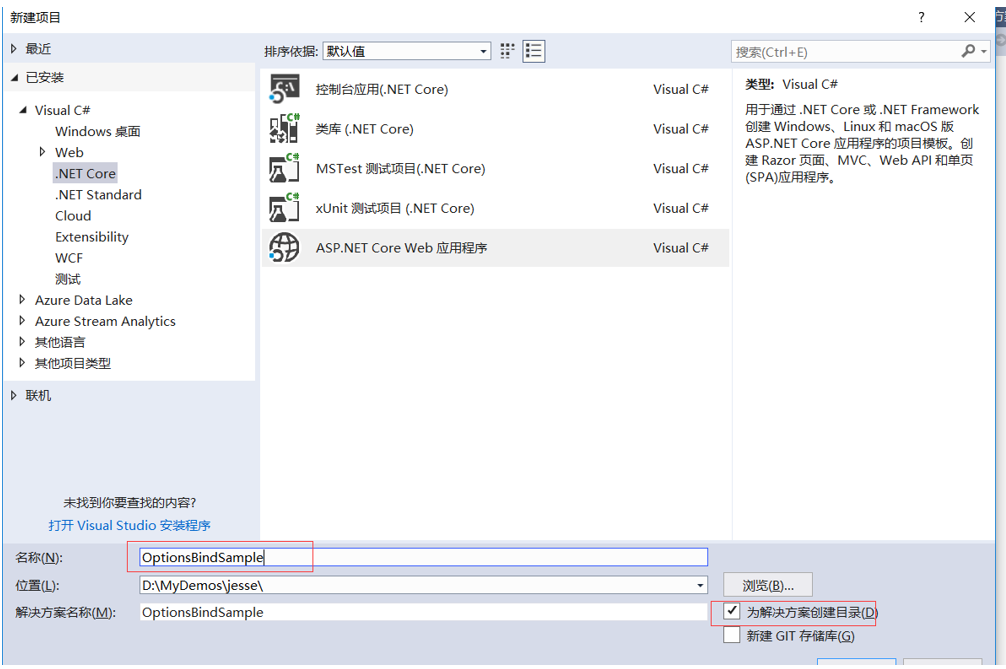
新建项目:
Normal
0
7.8 磅
0
2
false
false
false
EN-US
ZH-CN
X-NONE
/* Style Definitions */
table.MsoNormalTable
{mso-style-name:普通表格;
mso-tstyle-rowband-size:0;
mso-tstyle-colband-size:0;
mso-style-noshow:yes;
mso-style-priority:99;
mso-style-parent:"";
mso-padding-alt:0cm 5.4pt 0cm 5.4pt;
mso-para-margin:0cm;
mso-para-margin-bottom:.0001pt;
mso-pagination:widow-orphan;
font-size:10.5pt;
mso-bidi-font-size:11.0pt;
font-family:等线;
mso-ascii-font-family:等线;
mso-ascii-theme-font:minor-latin;
mso-fareast-font-family:等线;
mso-fareast-theme-font:minor-fareast;
mso-hansi-font-family:等线;
mso-hansi-theme-font:minor-latin;
mso-font-kerning:1.0pt;}
OptionsBindSample
Normal
0
7.8 磅
0
2
false
false
false
EN-US
ZH-CN
X-NONE
/* Style Definitions */
table.MsoNormalTable
{mso-style-name:普通表格;
mso-tstyle-rowband-size:0;
mso-tstyle-colband-size:0;
mso-style-noshow:yes;
mso-style-priority:99;
mso-style-parent:"";
mso-padding-alt:0cm 5.4pt 0cm 5.4pt;
mso-para-margin:0cm;
mso-para-margin-bottom:.0001pt;
mso-pagination:widow-orphan;
font-size:10.5pt;
mso-bidi-font-size:11.0pt;
font-family:等线;
mso-ascii-font-family:等线;
mso-ascii-theme-font:minor-latin;
mso-fareast-font-family:等线;
mso-fareast-theme-font:minor-fareast;
mso-hansi-font-family:等线;
mso-hansi-theme-font:minor-latin;
mso-font-kerning:1.0pt;}
忘了把 https去掉了。下次记住了 就可以了。

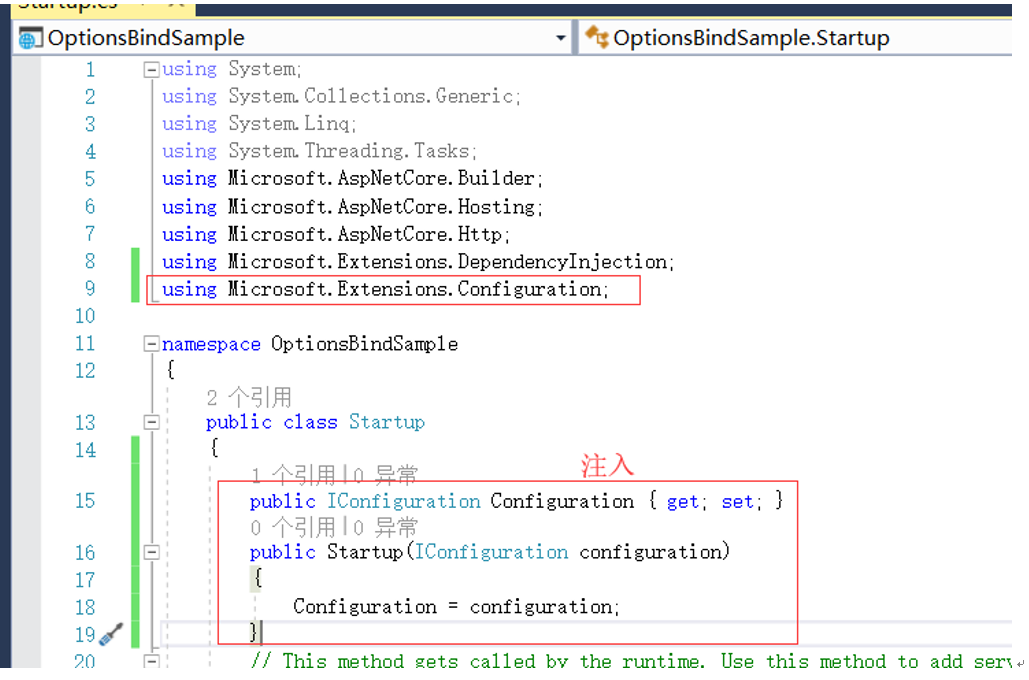
注入Configuration
由于我们要用Configuration所以要用到依赖注入。
我们可以使用IConfiguration的接口。
注意引入命名空间:
using Microsoft.Extensions.Configuration;
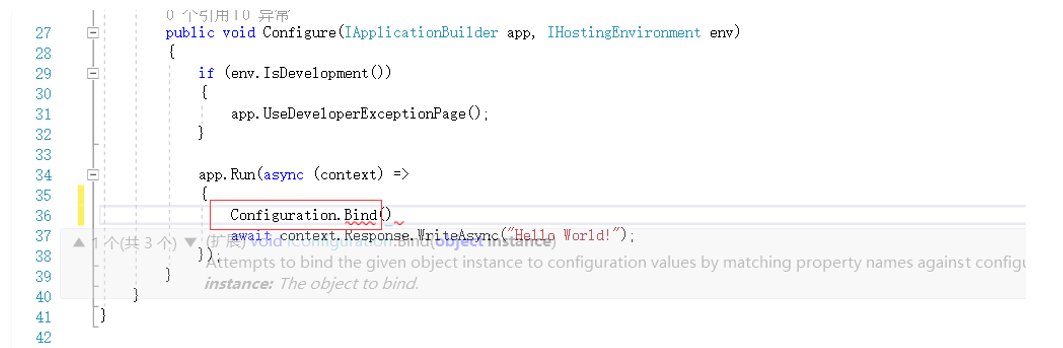
这里调用configuration的bind方法。可以传入一个对象将我们配置信息和对象映射起来。
新建Class的班级类

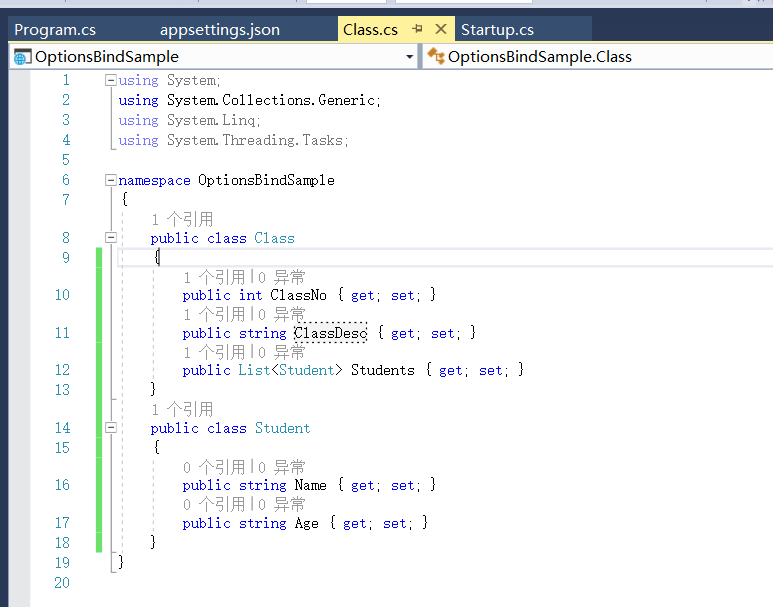
using System;

using System.Collections.Generic;

using System.Linq;

using System.Threading.Tasks;

namespace OptionsBindSample

{

    public class Class

    {

        public int ClassNo { get; set; }

        public string ClassDesc { get; set; }

        public List<Student> Students { get; set; }

    }

    public class Student

    {

        public string Name { get; set; }

        public string Age { get; set; }

    }

}
Class.cs
新建appsetting.json文件
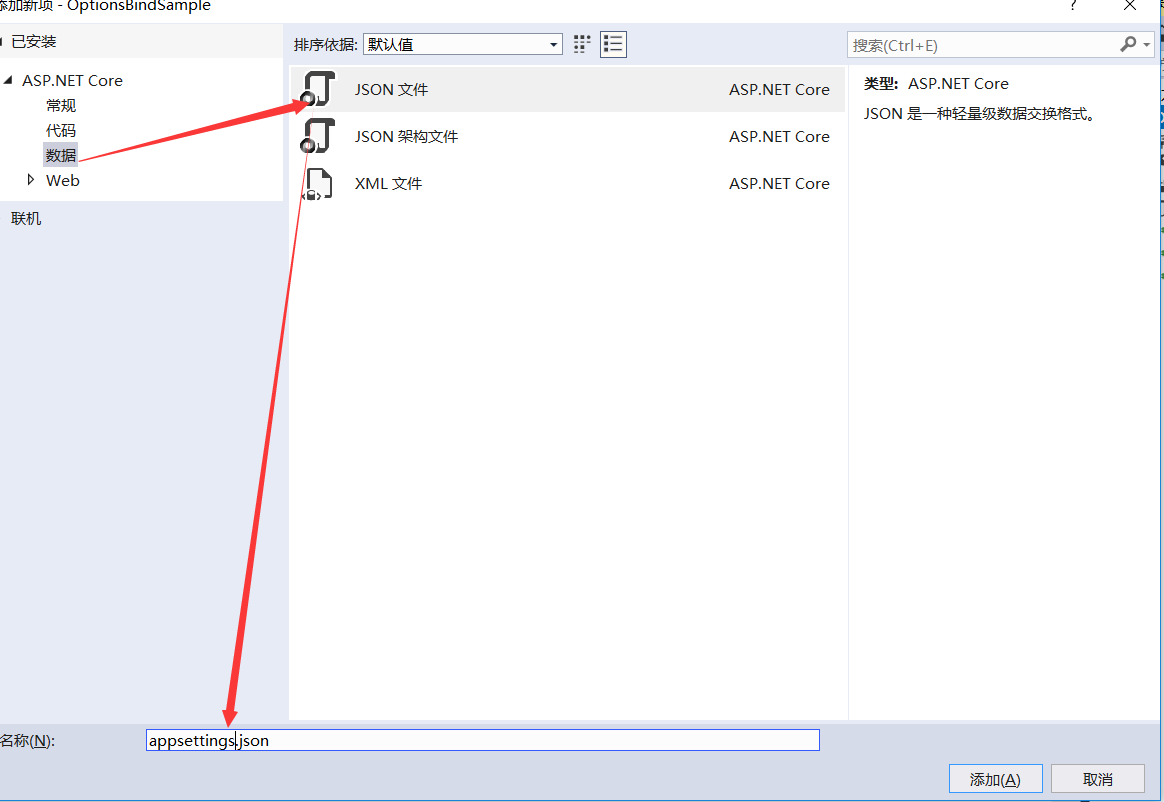
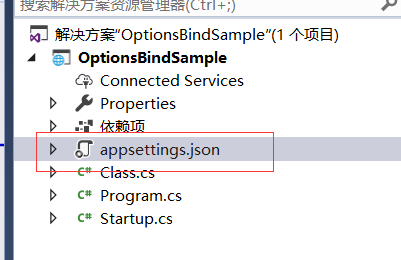
我们在新建项目的时候,默认自带了这个appsettings.json文件了。
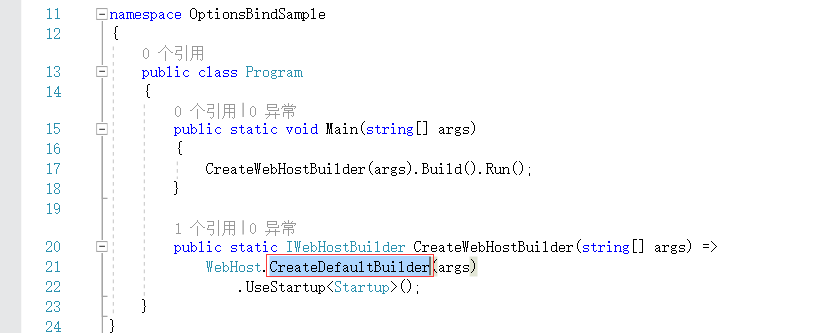
默认webhost启动的时候是没有添加任何配置和启动相关的
我们默认host启动会读取appsetting.json读取我们的configuration里面去。

只要你的名字叫做appsettings.json
它会通过CreateDefaultBuilder这个方法,会把它加载到我们的configuration里面
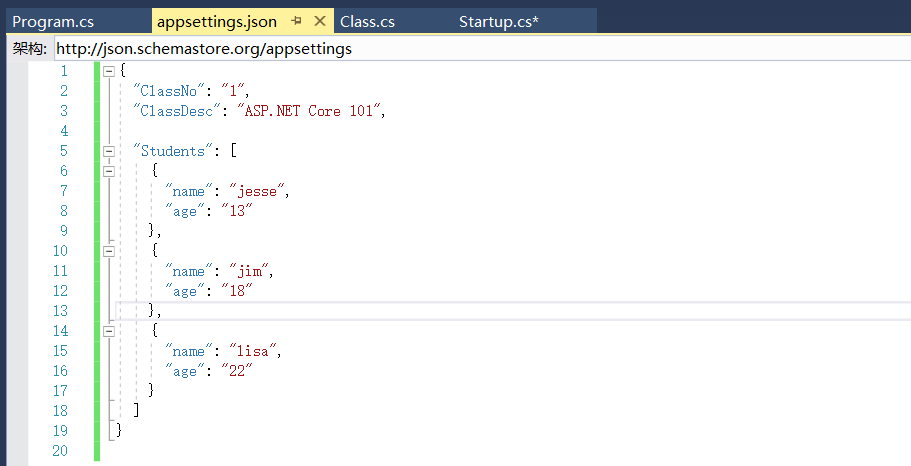
把之前的json文件拷贝过去
{

  "ClassNo": "",

  "ClassDesc": "ASP.NET Core 101",

  "Students": [

    {

      "name": "jesse",

      "age": ""

    },

    {

      "name": "jim",

      "age": ""

    },

    {

      "name": "lisa",

      "age": ""

    }

  ]

}
json
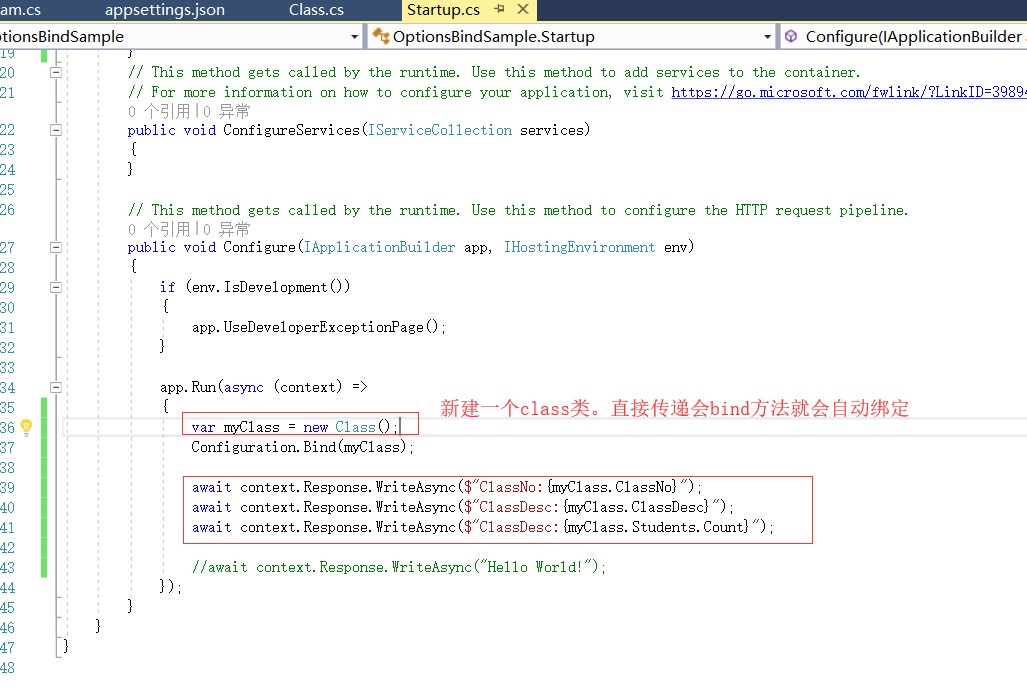
我们使用控制台的方式启动项目

输出结果
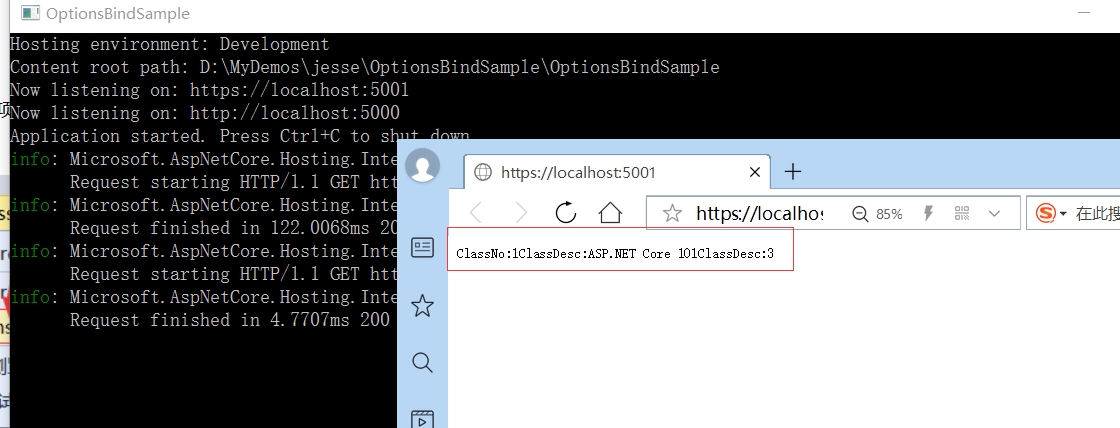
ClassNo:1ClassDesc:ASP.NET Core 101ClassDesc:
Normal
0
7.8 磅
0
2
false
false
false
EN-US
ZH-CN
X-NONE
/* Style Definitions */
table.MsoNormalTable
{mso-style-name:普通表格;
mso-tstyle-rowband-size:0;
mso-tstyle-colband-size:0;
mso-style-noshow:yes;
mso-style-priority:99;
mso-style-parent:"";
mso-padding-alt:0cm 5.4pt 0cm 5.4pt;
mso-para-margin:0cm;
mso-para-margin-bottom:.0001pt;
mso-pagination:widow-orphan;
font-size:10.5pt;
mso-bidi-font-size:11.0pt;
font-family:等线;
mso-ascii-font-family:等线;
mso-ascii-theme-font:minor-latin;
mso-fareast-font-family:等线;
mso-fareast-theme-font:minor-fareast;
mso-hansi-font-family:等线;
mso-hansi-theme-font:minor-latin;
mso-font-kerning:1.0pt;}
任务12:Bind读取配置到C#实例的更多相关文章
- 【ASP.NET Core快速入门】(五)命令行配置、Json文件配置、Bind读取配置到C#实例、在Core Mvc中使用Options
命令行配置 我们通过vs2017创建一个控制台项目CommandLineSample 可以看到现在项目以来的是dotnet core framework 我们需要吧asp.net core引用进来,我 ...
- 菜鸟入门【ASP.NET Core】5:命令行配置、Json文件配置、Bind读取配置到C#实例、在Core Mvc中使用Options
命令行配置 我们通过vs2017创建一个控制台项目CommandLineSample 可以看到现在项目以来的是dotnet core framework 我们需要吧asp.net core引用进来 ...
- Bind读取配置到C#实例
1.创建一个空的ASP.NET Core Web 应用程序 2.程序包管理控制台执行Install-Package Microsoft.AspNetCore -Version 2.0.1 3.创建js ...
- (十二)Bind读取配置到C#实例
继续上一节的,接下来用Options或者Bind把json文件里的配置转成C#的实体,相互之间映射起来.首先新建一个asp.net core mvc项目OptionsBindSample Startu ...
- 使用Bind读取配置到C#的实例
在之前的一篇二级域名绑定的文章<.Net Core 二级域名绑定到指定的控制器>中,有一个小的地方是关于读取Json文件的配置信息的,当时是用了读取文件流的方式,一直以来觉得该方法太Low ...
- Bind,Options读取配置到C#实例
首先创建一个网站 Asp.net Core Mvc 空网站 起名叫做OptionsBindSample 通过Option和Bind将Json文件里面的配置转成C#里面的一个实体,相互之间映射起来 Bi ...
- ASP.NET Core轻松入门Bind读取配置文件到C#实例
首先新建一个ASP.NET Core空项目,命名为BindReader 然后 向项目中添加一个名为appsettings.json的json文件,为什么叫appsettings呢? 打开Progra ...
- asp.net core-6.Bind读取配置文件到C#实例中
1,创建asp.net core web应用程序,选择空网站 2,创建一个appsettings.json文件 为什么要叫appsettings.json呢?因为在Iwebhost启动的时候没有添加任 ...
- Bind安装配置及应用
Bind安装配置及应用 BIND:Berkeley Internet Name Domain ,ISC.org DNS服务的实现: 监听端口:53/UDP , 53/TCP 程 ...
随机推荐
- 创建注记图层C# IFeatureWorkspaceAnno
http://blog.csdn.net/mydriverc/article/details/1675613 //IFeatureWorkspaceAnno Example //The ...
- Deep learning网络调参技巧
参数初始化 下面几种方式,随便选一个,结果基本都差不多.但是一定要做.否则可能会减慢收敛速度,影响收敛结果,甚至造成Nan等一系列问题.n_in为网络的输入大小,n_out为网络的输出大小,n为n_i ...
- Classification and logistic regression
logistic 回归 1.问题: 在上面讨论回归问题时.讨论的结果都是连续类型.但假设要求做分类呢?即讨论结果为离散型的值. 2.解答: 假设: 当中: g(z)的图形例如以下: 由此可知:当hθ( ...
- DW 表格与表单
CSS样式表
- 子结点childNodes
<!DOCTYPE HTML> <html> <head> <meta http-equiv="Content-Type" content ...
- cocos2d-x触摸事件优先级
CCTouchDispatcher是管理cocos2d-x中全部Touch事件派发的类, CCTouchDispatcher中包括了两个CCTouchHandler的列表, 分别存储Standa ...
- 用python编写的定向arp欺骗工具
刚学习了scapy模块的一些用法,非常强大,为了练手,利用此模块编写了一个arp欺骗工具,其核心是构造arp欺骗包.加了一个-a参数用于进行全网欺骗,先暂不实现.代码如下: #--*--coding= ...
- GitExtensions 官方手册(英文)
在线版本(最新版):https://git-extensions-documentation.readthedocs.io/en/latest/ PDF版本(版本号 2.48):http://pan. ...
- CWnd中PreCreateWindow、PreSubclassWindow、SubclassWindow
原文链接:http://blog.chinaunix.net/uid-14607221-id-2794642.html 1. PreCreateWindow: Called by the framew ...
- Struts%$#区别
1.#符号的用途一般有三种.1)访问非根对象属性,例如示例中的#session.msg表达式,由于Struts 2中值栈被视为根对象,所以访问其他非根对象时,需要加#前缀.实际上,#相当于Action ...