
nginx(一)之默认配置文件
首先是nginx.conf
vim /etc/nginx/nginx.conf

user  nginx;                      // 设置nginx服务的系统使用用户

worker_processes  1;       // 工作进程数

error_log  /var/log/nginx/error.log warn;  // nginx的错误日志

pid        /var/run/nginx.pid;      // nginx服务启动时候pid

events {                                                      // 事件模块,nginx优势利用epoll内核模型,在这里可以配置使用哪个内核模型

    worker_connections  1024;               // 每个进程允许最大连接数 ,还有个use是工作进程数

}

http {

    include       /etc/nginx/mime.types;  //设置contentType

    default_type  application/octet-stream;

    log_format  main  '$remote_addr - $remote_user [$time_local] "$request" '     // 定义日志类型

                      '$status $body_bytes_sent "$http_referer" '

                      '"$http_user_agent" "$http_x_forwarded_for"';

    access_log  /var/log/nginx/access.log  main;

    sendfile        on;

    #tcp_nopush     on;

    keepalive_timeout  65;   // 服务端超时时间

    #gzip  on;

    include /etc/nginx/conf.d/*.conf;      // 读到这个地方是加载另一个默认配置配置文件default.conf

}

default.conf

server {

    listen       80;

    server_name  localhost;

    #charset koi8-r;

    #access_log  /var/log/nginx/host.access.log  main;

    location / {

        root   /usr/share/nginx/html;

        index  index.html index.htm;  // 默认加载根路径文件

    }

    #error_page  404              /404.html;

    # redirect server error pages to the static page /50x.html

    #

    error_page   500 502 503 504  /50x.html;

    location = /50x.html {

        root   /usr/share/nginx/html;

    }

    # proxy the PHP scripts to Apache listening on 127.0.0.1:80

    #

    #location ~ \.php$ {

    #    proxy_pass   http://127.0.0.1;

    #}

    # pass the PHP scripts to FastCGI server listening on 127.0.0.1:9000

    #

    #location ~ \.php$ {

    #    root           html;

    #    fastcgi_pass   127.0.0.1:9000;

    #    fastcgi_index  index.php;

    #    fastcgi_param  SCRIPT_FILENAME  /scripts$fastcgi_script_name;

    #    include        fastcgi_params;

    #}

    # deny access to .htaccess files, if Apache's document root

    # concurs with nginx's one

    #

    #location ~ /\.ht {

    #    deny  all;

"/etc/nginx/conf.d/default.conf" 45L, 1093C
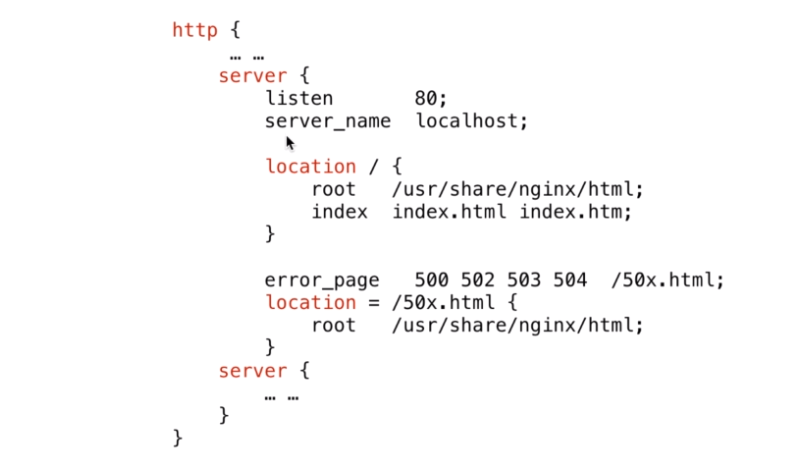
http可以包含多个http服务,一个server配置一个独立的站点。一个http可以有多个server,一个server可以有多个location匹配资源路径
nginx(一)之默认配置文件的更多相关文章
- nginx新建nginx_fzjh.conf文件,不使用默认配置文件
worker_processes 4; events{ worker_connections 1024; } http{ server { listen 80; server_name myserve ...
- nginx默认配置文件解释
nginx默认配置文件 nginx.conf 介绍: 全局配置 user nginx; 设置nginx服务的系统使用用户 worker_processes 1; 工作进程数(建议和CPU核心数保持 ...
- 更改 Nginx 服务的默认用户
为什么要更改 Nginx 服务的默认用户:就像更改 ssh 的默认 22 端口一样,增加安全性,Nginx 服务的默认用户是 nobody ,我们更改为 nginx 1.添加 nginx 用户 use ...
- 【转载】Docker 安装 Nginx 并个性化挂载配置文件 nginx.conf
首先,系统(3.8以上内核的linux)中安装好 Docker 这个运用程序.由于网络原因,我们下载一个Docker官方的镜像需要很长的时间,甚至下载失败.为此,阿里云容器镜像服务提供了官方的镜像站点 ...
- Nginx安装、默认虚拟主机、Nginx用户认证和域名重定向
6月7日任务 12.6 Nginx安装12.7 默认虚拟主机12.8 Nginx用户认证12.9 Nginx域名重定向 扩展nginx.conf 配置详解 http://www.ha97.com/51 ...
- Nginx优化之基本安全优化 (隐藏Nginx软件版本号信息,更改源码隐藏Nginx软件名及版本号,更改Nginx服务的默认用户)
一,隐藏Nginx软件版本号信息 查看版本号 curl -I 192.168.0.220 HTTP/1.1 200 OK Server: nginx/1.6.2 #这里清晰的暴露了Web版本号(1.6 ...
- Linux centosVMware Nginx安装、 默认虚拟主机、Nginx用户认证、Nginx域名重定向
一. Nginx安装 cd /usr/local/src wget http://nginx.org/download/nginx-1.12.1.tar.gz 版本在http://nginx.org/ ...
- struts2默认配置文件 struts-default.xml
注:用的struts2的版本是2.1.6 strtus2的默认配置文件 struts-default.xml ,其中的默认的拦截器,包括其中的拦截器栈. 因为struts2的配置文件struts.xm ...
- nginx转发会 默认忽略 headers 中name带”_”的
昨天遇到一个很蛋疼的问题,在提供的一个 http api中,有定义了一个"X_AUTH_TOKEN"自定义head,可是请求这个api时带上"X_AUTH_TOKEN&q ...
- Windows Redis默认配置文件,Redis配置不生效解决方案
Windows Redis默认配置文件,Redis配置不生效解决方案, Windows Redis自启动配置不生效解决方案,Windows Redis增加自动启动服务 >>>> ...
随机推荐
- GIT原理【摘】
- Coursera, Machine Learning, Anomoly Detection & Recommender system
Algorithm: When to select Anonaly detection or Supervised learning? 总的来说guideline是如果positive e ...
- Coursera, Machine Learning, Unsupervised Learning, K-means, Dimentionality Reduction
Clustering K-means: 基本思想是先随机选择要分类数目的点,然后找出距离这些点最近的training data 着色,距离哪个点近就算哪种类型,再对每种分类算出平均值,把中心点移动到 ...
- Jmeter+Ant+Jenkins 接口自动化之简单demo
之前的文章我们已经分享过了 Jmeter+Ant 的批量执行 ,并且搭建好了Jenkins部署平台,如何再将三者完美结合呢? 1.首先打开Jenkins主页面,进入“系统管理-插件管理”,安装相关的插 ...
- 使用Docker部署javaWeb应用
1. 安装Dcoker http://www.cnblogs.com/zhangqian27/p/9089815.html 2. 查看镜像 $ docker images 3. 搜索镜像 $ dock ...
- 计算价格, java中浮点数精度丢失的解决方案
计算价格, java中浮点数精度丢失的解决方案
- Git——如何将本地项目提交至远程仓库
参考文章:http://blog.csdn.net/dadaxiongdebaobao/article/details/52081826 git 将一个本地文件目录提交到远程仓库的步骤 参考文章: ...
- drozer的使用介绍
0x00. 配置adb环境变量 下载地址:http://pan.baidu.com/s/1o8itZtC 密码:9o6j 如何配置android的adb环境变量 http://jingyan.baid ...
- Javascript - ExtJs - Itemselector
引入扩展文件 Extjs4.2根目录下: examples \ ux \ css \ images (这是选择按钮的图片资源) examples \ ux \ css \ ItemSelector.c ...
- android 组建添加透明度
给TextView添加透明度,起初用的方法是android:alpha = "0.3" 添加后,文字显示也有点透明发虚,后来改成设置background,然后 backgroun ...