
使用跨平台图表控件TeeChart如何从DAT或TEXT文件中导入数据
大多数开发人员在使用TeeChart进行开发的时候,都需要访问包含在文本文档中的一些数据,本次教程将详细讲解如何去实现这一步骤。
文本文件通常包含使用空格键或者是TAB键分隔开的数字和文字:
TeeChart官方最新版免费下载地址
比如下面的文本,包含两个字段,使用空格作为字段分隔:
0.1 24
0.5 143
0.2 321
0.1 100
从一个文本文件读取数据(如果列分隔符是正确的),开发者可以使用TSeriesTextSource组件,可以根据自身的数据设置ileName、Fields和FieldSeparator属性。然后只需通过设置TSeriesTextSource.Series或Series.DataSource属性将系列文本源组件连接到一个图表系列。
1 创建一个新的应用程序。 (File->New->Application)
2 从"Additional"面板选项卡中拖放TChart组件。
3 双击Chart1组件显示TeeChart编辑对话框。(或右键单击Chart1并单击"Edit...")
4 单击"Add..." 按钮,选择"Line"系列风格,单击OK按钮。(或双击"Line"图表)
5 关闭编辑器对话框(或按Esc键关闭它)。
6 找到“TeeChart”组件面板选项卡并拖放SeriesTextSource组件。
7 双击SeriesTextSource1组件显示编辑器对话框,填写以下属性:
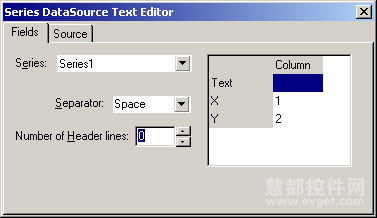
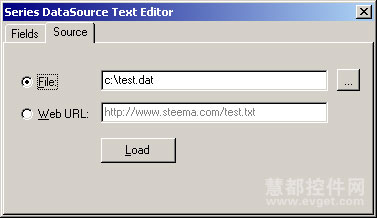
VCL代码:
unit UImportData;

  interface

  uses

    Windows, Messages, SysUtils, Classes, Graphics, Controls, Forms,

    Dialogs, TeEngine, Series, TeeURL, TeeSeriesTextEd, ExtCtrls,

    TeeProcs, Chart, StdCtrls, Buttons;

  type

    TForm1 = class(TForm)

      Chart1: TChart;

      Series1: TLineSeries;

      SeriesTextSource1: TSeriesTextSource;

      Panel1: TPanel;

      BitBtn1: TBitBtn;

      procedure BitBtn1Click(Sender: TObject);

    private

    { Private declarations }

    public

    { Public declarations }

    end;

  var

    Form1: TForm1;

  implementation

  {$R *.dfm}

  procedure TForm1.BitBtn1Click(Sender: TObject);

  begin

    with SeriesTextSource1 do

    begin

      // Setup fields (columns in text file)

      Fields.Clear;

      AddField('X',1);

      AddField('Y',2);

      // Set separators

      FieldSeparator := ' ';

      DecimalSeparator := '.';

      // Set file name containing text data

      FileName := 'test.dat';

      // Series to add data

      Series := Series1;

      // Load data from file into Series

      Active := True;

    end;

    // Example of setting axes scales.

    // Not necessary is axes already have Automatic:=True.

    Series1.GetVertAxis.SetMinMax(,);

    Series1.GetHorizAxis.SetMinMax(3864.90,3865.50);

  end;

  end.

Displaying the SeriesTextSource editor dialog

If you wish to show the SeriesTextSource editor dialog at runtime, simply drop a button and type this code at Button1Click event:

  procedure TForm1.Button1Click(Sender: TObject);

  begin

    // This procedure is located at TeeSeriesTextEd.pas unit:

    TeeEditSeriesTextSource(SeriesTextSource1);

  end;
使用跨平台图表控件TeeChart如何从DAT或TEXT文件中导入数据的更多相关文章
- 跨平台图表控件TeeChart使用教程:导入XML数据
TeeChart的最新版中包含了一个自动加载XML数据的新组件.这个组件的名字叫做TTeeXMLSource,用户可以在TeeXML.pas unit中找到这个组件. 加载XML图表所需的最小属性是& ...
- 跨平台图表控件TeeChart使用教程:将图表数据导出为XML格式
在开发者使用TeeChart进行开发的过程中,不管是在设计时或者运行时都可以使用的图表导出对话框将图表数据轻易地导出为XML格式: TeeChart最新版那下载地址 上图为TeeChart导出对话框的 ...
- 8.5折!图表控件TeeChart特价中...
著名图表控件TeeChart去年除了在优势的.NET方面表现依旧出色外,还推出了通过Xamarin和MONO实现的Android,iOS和Mac OSX的跨平台方案,让C#开发者也能开发移动APP. ...
- Flash图表控件FusionCharts如何高亮显示数据
使用Flash图表控件FusionCharts时,通过改变alpha值是高亮显示数据的最简单方式. XML代码如下: <chart> <set label='John' value= ...
- 图表控件Anychart常见问题
AnyChart控件是一款当前流行的数据可视化解决方案,使客户可以创建交互地.生动的图表.实时仪表和地图.同时支持Flash和HTML5显示,控件提供极好的视觉外观和配色方案能够使客户根据不同的需求设 ...
- ASP.NET Core MVC TagHelper实践HighchartsNET快速图表控件-开源
ASP.NET Core MVC TagHelper最佳实践HighchartsNET快速图表控件支持ASP.NET Core. 曾经在WebForms上写过 HighchartsNET快速图表控件- ...
- 比achartengine更加强大的Android图表控件。
比achartengine更加强大的图表控件MPAndroidChart. 详细使用及demo:http://www.see-source.com/androidwidget/detail.html? ...
- 在AngularJS中的使用Highcharts图表控件
一.Highcharts简介 Highcharts是一款非常好用的前端图表控件,正如其中文网介绍的那样:功能强大.开源.美观.图表丰富.兼容绝大多数浏览器的纯js图表库. 如果你的项目是基于jquer ...
- HighchartsNET快速图表控件-开源
前言: HighchartsNET快速图表控件,基于Highcharts的asp.net web控件.只需几行代码你就能快速生成一个图表. 从此不再担心图表复杂.简单几行代码就可以搞定,节省大量工作时 ...
随机推荐
- 【洛谷2324】[SCOI2005]骑士精神 IDA*
[SCOI2005]骑士精神 描述 在一个\(5×5\)的棋盘上有\(12\)个白色的骑士和\(12\)个黑色的骑士, 且有一个空位.在任何时候一个骑士都能按照骑 士的走法(它可以走到和它横坐标相差为 ...
- 【NOIP 2015】斗地主
题目描述 牛牛最近迷上了一种叫斗地主的扑克游戏.斗地主是一种使用黑桃.红心.梅花.方片的 A 到 K 加上大小王的共 54 张牌来进行的扑克牌游戏.在斗地主中,牌的大小关 系根据牌的数码表示如下: 3 ...
- linux线程切换和进程切换
进程切换分两步: 1.切换页目录以使用新的地址空间 2.切换内核栈和硬件上下文 对于linux来说,线程和进程的最大区别就在于地址空间,对于线程切换,第1步是不需要做的,第2是进程和线程切换都要做的. ...
- HDU - 6416 :Rikka with Seam(DP & 前缀和 & 数学)
pro:给定N*M的矩阵,现在让你在每一行删去一个位置,然后形成新N*(M-1)的矩阵,问有多少种不同的新的矩阵.需要满足相邻行删去的位置不大于K. (题目是01矩阵,其实任意矩阵都可以做,本题算法里 ...
- k8s安装
docker pull mirrorgooglecontainers/kube-scheduler:v1.13.3 安装docker 使用阿里的源https://mirrors.aliyun.com/ ...
- CuteFTP文件列表按名称排序,有中文文件名时,软件死掉的解决办法
看到很多人的解决办法是切换到一个没有中文的文件夹,点击排序后,再切换回来,这个的确是可以解决问题,但是有些繁琐! 直接一步到位的解决办法是: 依次点击菜单:工具->全局选项->导航-> ...
- Ant junitreport with Maven
大家可能都知道在Ant里可以使用junit和junitreport两个task来完成对测试结果生成HTML格式的报告. Maven里的Surefire-report的插件只能对Java测试报告支持的比 ...
- hdu2066一个人的旅行(disjkstra)
一个人的旅行 Time Limit: 1000/1000 MS (Java/Others) Memory Limit: 32768/32768 K (Java/Others)Total Subm ...
- hdu1865 1sting (递归+大数加法)
1sting Time Limit: 5000/1000 MS (Java/Others) Memory Limit: 32768/32768 K (Java/Others)Total Subm ...
- 封装OkHttp,通过改造Callback接口实现
1:实现Callback回调接口import android.os.Handler;import android.os.Looper;import android.os.Message; import ...