
Spring4.x、SpringMVC和DButils整合
tomcat 8、Spring 4.X、JDK1.8
需要jar包:
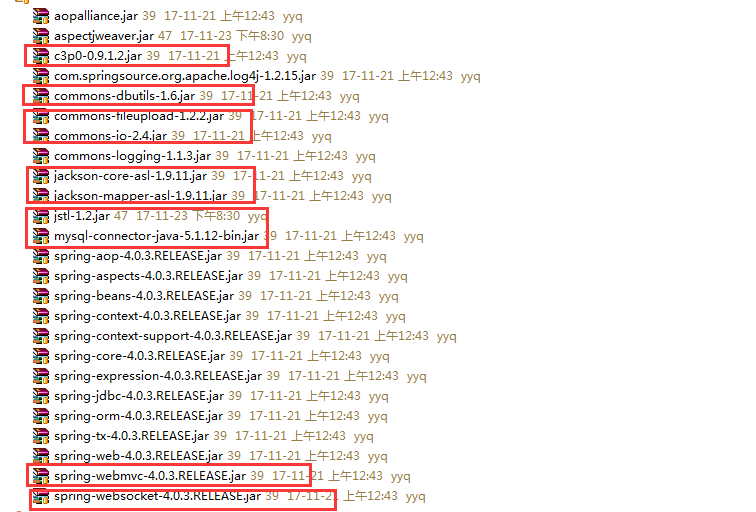
1)日志组件:log4j
 # debug < info < warn < error

 log4j.rootLogger=warn, console, file

 ###################console####################

 log4j.appender.console=org.apache.log4j.ConsoleAppender

 log4j.appender.console.layout=org.apache.log4j.PatternLayout

 log4j.appender.console.layout.ConversionPattern=%d{yyy-MMM-dd HH:mm:ss} %p %m %L %n

 ###################file######################

 log4j.appender.file=org.apache.log4j.RollingFileAppender

 log4j.appender.file.File=../logs/SpuerPPP.log

 log4j.appender.file.MaxFileSize=5kb

 log4j.appender.file.MaxBackupIndex=100

 log4j.appender.file.layout=org.apache.log4j.PatternLayout

 log4j.appender.file.layout.ConversionPattern=%d %c.%M()-%m%n
2)web.xml:注册spring组件为项目启动时加载
 <?xml version="1.0" encoding="UTF-8"?>

 <web-app xmlns:xsi="http://www.w3.org/2001/XMLSchema-instance" xmlns="http://xmlns.jcp.org/xml/ns/javaee" xsi:schemaLocation="http://xmlns.jcp.org/xml/ns/javaee http://xmlns.jcp.org/xml/ns/javaee/web-app_3_1.xsd" id="WebApp_ID" version="3.1">

   <welcome-file-list>

     <welcome-file>index.jsp</welcome-file>

   </welcome-file-list>

   <servlet>

     <servlet-name>springMVC</servlet-name>

     <servlet-class>org.springframework.web.servlet.DispatcherServlet</servlet-class>

     <init-param>

       <param-name>contextConfigLocation</param-name>

       <param-value>classpath:spring.xml</param-value>

     </init-param>

     <load-on-startup>1</load-on-startup>

   </servlet>

   <servlet-mapping>

     <servlet-name>springMVC</servlet-name>

     <url-pattern>*.do</url-pattern>

   </servlet-mapping>

   <filter>

     <filter-name>CharacterEncodingFilter</filter-name>

     <filter-class>org.springframework.web.filter.CharacterEncodingFilter</filter-class>

     <init-param>

       <param-name>encoding</param-name>

       <param-value>UTF-8</param-value>

     </init-param>

   </filter>

   <filter-mapping>

     <filter-name>CharacterEncodingFilter</filter-name>

     <url-pattern>/*</url-pattern>

   </filter-mapping>

 </web-app>
3)spring.xml:整合
 <?xml version="1.0" encoding="UTF-8"?>

 <beans xmlns="http://www.springframework.org/schema/beans"

     xmlns:xsi="http://www.w3.org/2001/XMLSchema-instance"

     xmlns:p="http://www.springframework.org/schema/p"

     xmlns:context="http://www.springframework.org/schema/context"

     xmlns:aop="http://www.springframework.org/schema/aop"

     xmlns:tx="http://www.springframework.org/schema/tx"

     xmlns:mvc="http://www.springframework.org/schema/mvc"

     xsi:schemaLocation="

         http://www.springframework.org/schema/beans

         http://www.springframework.org/schema/beans/spring-beans.xsd

         http://www.springframework.org/schema/context

         http://www.springframework.org/schema/context/spring-context.xsd

         http://www.springframework.org/schema/aop

         http://www.springframework.org/schema/aop/spring-aop.xsd

         http://www.springframework.org/schema/tx

         http://www.springframework.org/schema/tx/spring-tx.xsd

         http://www.springframework.org/schema/mvc

         http://www.springframework.org/schema/mvc/spring-mvc-4.0.xsd">

     <!-- 配置数据源信息-c3p0 -->

     <bean id="dataSource" class="com.mchange.v2.c3p0.ComboPooledDataSource">

         <property name="driverClass" value="com.mysql.jdbc.Driver"></property>

         <property name="jdbcUrl" value="jdbc:mysql://47.93.197.247:3306/SuperPPP"></property>

         <property name="user" value="yyq"></property>

         <property name="password" value="yyq"></property>

         <property name="initialPoolSize" value="5"></property>

         <property name="maxPoolSize" value="10"></property>

         <property name="maxStatements" value="100"></property>

         <property name="acquireIncrement" value="2"></property>

     </bean>

     <!-- DBUtils的queryRunner注入 -->

     <bean id="queryRunner" class="org.apache.commons.dbutils.QueryRunner" scope="prototype">

         <constructor-arg name="ds" ref="dataSource"/>

     </bean>

     <!-- 组件扫描 -->

     <context:component-scan base-package="henu.superppp" />

     <!-- 事务管理器 -->

     <bean id="txManager" class="org.springframework.jdbc.datasource.DataSourceTransactionManager">

         <property name="dataSource" ref="dataSource"/>

     </bean>

     <!-- 注解式事务管理 -->

     <tx:annotation-driven transaction-manager="txManager"/>

     <!-- aop注解方式 -->

     <aop:aspectj-autoproxy/>

     <!-- MVC相关配置 -->

     <!-- 拦截器,进行轻量级访问控制 -->

     <!-- 文件上传 -->

     <bean id="multipartResolver" class="org.springframework.web.multipart.commons.CommonsMultipartResolver">

         <property name="defaultEncoding" value="UTF-8"/>

         <property name="maxUploadSize" value="10000000"/>

     </bean>

  <!-- 处理请求返回json字符串的中文乱码问题 以及映射器、适配器和试图解析器的自动配置-->
    <mvc:annotation-driven>
        <mvc:message-converters>
            <bean class="org.springframework.http.converter.StringHttpMessageConverter">
                <property name="supportedMediaTypes">
                    <list>
                        <value>application/json;charset=UTF-8</value>
                        <value>text/html;charset=UTF-8</value>
                    </list>
                </property>
            </bean>
        </mvc:message-converters>
    </mvc:annotation-driven>

     <!-- 解析器 -->

     <bean class="org.springframework.web.servlet.view.InternalResourceViewResolver">

         <property name="prefix" value="/WEB-INF/jsps/"/>

         <property name="suffix" value=".jsp"/>

     </bean>

 </beans>
Spring4.x、SpringMVC和DButils整合的更多相关文章
- SSM Spring SpringMVC Mybatis框架整合Java配置完整版
以前用着SSH都是老师给配好的,自己直接改就可以.但是公司主流还是SSM,就自己研究了一下Java版本的配置.网上大多是基于xnl的配置,但是越往后越新的项目都开始基于JavaConfig配置了,这也 ...
- SpringBoot+SpringMVC+MyBatis快速整合搭建
作为开发人员,大家都知道,SpringBoot是基于Spring4.0设计的,不仅继承了Spring框架原有的优秀特性,而且还通过简化配置来进一步简化了Spring应用的整个搭建和开发过程.另外Spr ...
- SpringMVC与MyBatis整合之日期格式转换
在上一篇博客<SpringMVC与MyBatis整合(一)——查询人员列表>中遗留了日期格式转换的问题,在这篇记录解决过程. 对于controller形参中pojo对象,如果属性中有日期类 ...
- 3.springMVC+spring+Mybatis整合Demo(单表的增删该查,这里主要是贴代码,不多解释了)
前面给大家讲了整合的思路和整合的过程,在这里就不在提了,直接把springMVC+spring+Mybatis整合的实例代码(单表的增删改查)贴给大家: 首先是目录结构: 仔细看看这个目录结构:我不详 ...
- SpringMVC与mybatis整合
一.逆向工程生成基础信息 <?xml version="1.0" encoding="UTF-8"?> <!DOCTYPE generator ...
- spring-mvc + shiro框架整合(sonne_game网站开发04)
这篇文章讲的内容是在之前spring + mybatis + spring-mvc + freemarker框架整合的代码的基础上.有需要的可以看看我博客的前两篇文章. 另外,本文章所讲相关所有代码都 ...
- Spring+SpringMVC+MyBatis+easyUI整合基础篇(六)maven整合SSM
写在前面的话 承接前文<Spring+SpringMVC+MyBatis+easyUI整合基础篇(五)讲一下maven>,本篇所讲述的是如何使用maven与原ssm项目整合,使得一个普 ...
- Spring+SpringMVC+MyBatis+easyUI整合基础篇(八)mysql中文查询bug修复
写在前面的话 在测试搜索时出现的问题,mysql通过中文查询条件搜索不出数据,但是英文和数字可以搜索到记录,中文无返回记录.本文就是写一下发现问题的过程及解决方法.此bug在第一个项目中点这里还存在, ...
- Spring+SpringMVC+MyBatis+easyUI整合基础篇(十一)SVN服务器进阶
日常啰嗦 上一篇文章<Spring+SpringMVC+MyBatis+easyUI整合基础篇(十)SVN搭建>简单的讲了一下SVN服务器的搭建,并没有详细的介绍配置文件及一些复杂的功能, ...
随机推荐
- loadrunner的四个主要部件
1.VUser Generator :性能脚本开发 2.Controller :提供多线程并发操作 3.Analysis :结果分析 4.Load Generator :负载生成器 ***负载生成器完 ...
- cdh 安装组件 异常总结
hive 启动 要 把mysql的jar包放到/opt/cloudera/parcels/CDH-5.9.3-1.cdh5.9.3.p0.4/lib/hive/lib 下 假设有3个节点就要放3次
- [转载][效率工具推荐]Mathpix – 将图片数学公式转换为 LaTeX
转自小众软件:Mathpix – 将图片数学公式转换为 LaTeX Mathpix 是一款跨平台(Windows.macOS.Linux)的 OCR 工具,它能够识别复杂的数学公式,并将其转换为 La ...
- layui 常用方法 readme
layui样式加载: layui.use(['table', 'element', 'laydate', 'layer'], function () { var table = layui.table ...
- ssh动态转发小记
ssh,一般常用来做远程登录管理,也就是连上远程机器,得到一个shell,然后交互式地在上面敲命令-看结果-再敲命令. 偶尔也会用在脚本里,做些自动化批处理上传下载的操作,但本质上也是用shell来执 ...
- 文件格式——Sam&bam文件
Sam&bam文件 SAM是一种序列比对格式标准, 由sanger制定,是以TAB为分割符的文本格式.主要应用于测序序列mapping到基因组上的结果表示,当然也可以表示任意的多重比对结果.当 ...
- CodeForces 489D Unbearable Controversy of Being (不知咋分类 思维题吧)
D. Unbearable Controversy of Being time limit per test 1 second memory limit per test 256 megabytes ...
- 嵌入式linux环境搭建
花了两天时间,终于搭建好了板子上的linux驱动开发环境,不容易呀,做个笔记. 首先搭建PC上的编译环境,因为编译的驱动是在板子上运行的,第一步当然需要安装交叉编译器,即arm-none-linux- ...
- Linux 静态库(.a)转换为动态库(.so)
Linux 静态库转换为动态库 参考 http://blog.csdn.net/moxuansheng/article/details/5812410 首先将.a文件转为.so文件是可以实现的 原因是 ...
- node安装和配置
windows 环境 安装node node下载地址 下载后点击安装,默认下一步即可(安装路径可更改为d:盘) 检测PATH环境变量是否配置了Node.js 点击开始=>运行=>输入&qu ...