
Unity3D学习笔记(九):摄像机
3D数学复习
using System.Collections;

using System.Collections.Generic;

using UnityEngine;

public class w07d1 : MonoBehaviour {

    public Quaternion result1;

    public Quaternion result2;

    public Quaternion result3;

    // 什么是单位四元数?

    // [0, 0, 0, 1]        表示无旋转

    // [n.x * sin<theta/2>, n.y * sin<theta/2>, n.z * sin<theta/2>, cos<theta/2>]   绕y轴旋转0度    [0, 0, 0, 1]    绕y轴旋转360度  [0, 0, 0, -1]

    // 什么是标准四元数?

    // 模长为1的四元数

    // 模长 = Mathf.Sqrt(x*x + y*y + z*z * w*w)

    // 什么是共轭四元数?

    // 虚数部分取负

    // 四元数 * 共轭四元数 = 单位四元数

    // 什么是四元数的逆?

    // q^-1 = q^* / |q|     如果q是标准四元数    q^-1 = q^*

    // 如果一个 四元数 * 向量 = 向量 (模长一样,方向不一样,相当于旋转一个向量)

    void Start () {

        // 绕 (1, 1, 0)轴 旋转45度

        result1 = Quaternion.AngleAxis(, new Vector3(, , ));

        // 绕 (2, 2, 0)轴 旋转45度

        result2 = Quaternion.AngleAxis(, new Vector3(, , ));        // 对轴 标准化

        Quaternion ge = new Quaternion(-result1.x, -result1.y, -result1.z, result1.w);

        result3 = result1 * ge;

        Quaternion q = Quaternion.AngleAxis(, Vector3.up);

        Vector3 v = new Vector3(, , );

        Debug.DrawLine(Vector3.zero, v, Color.green, );

        v = q * v;

        Debug.DrawLine(Vector3.zero, v, Color.red, );

    }

}
RotateAround
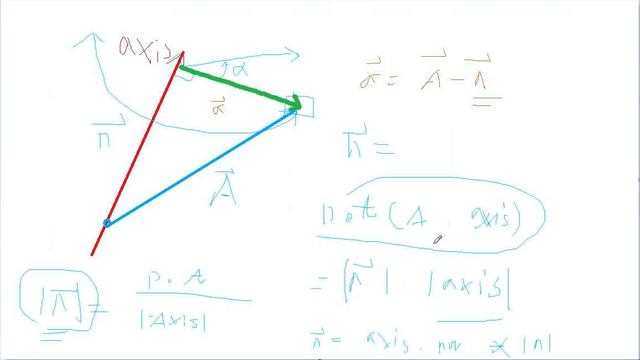
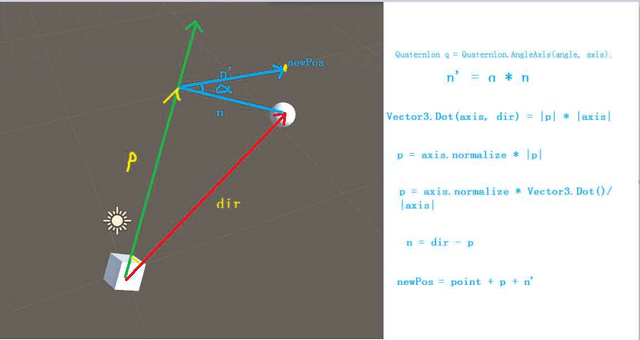
using System.Collections;

using System.Collections.Generic;

using UnityEngine;

public class MyRotateAroundTest : MonoBehaviour {

    public Transform target;

    public float rotSpeed = ;

    void Start () {

       }

       void Update () {

        MyRotateAround(target.position, target.up, rotSpeed * Time.deltaTime);

       }

    void MyRotateAround(Vector3 pos, Vector3 axis, float angle)

    {

        Quaternion q = Quaternion.AngleAxis(angle, axis);

        Vector3 dir = transform.position - pos;

        Vector3 projectV = (Vector3.Dot(axis, dir) / axis.magnitude) * axis.normalized;

        Vector3 n = dir - projectV;

        Vector3 newN = q * n;

        Vector3 newPos = pos + projectV + newN;

        transform.position = newPos;

        transform.rotation *= q;

    }

}
摄像机
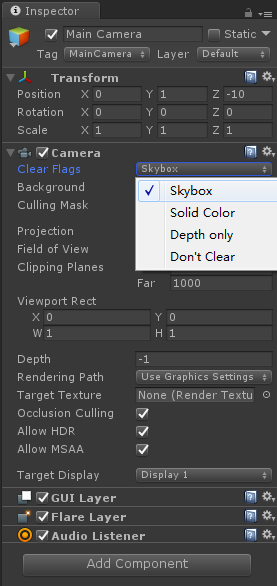
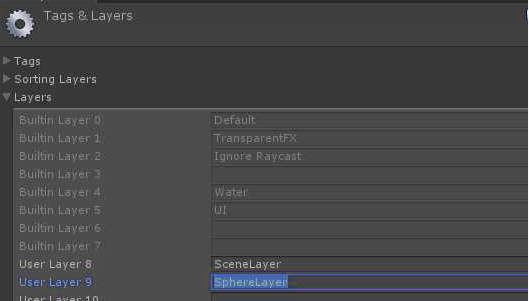
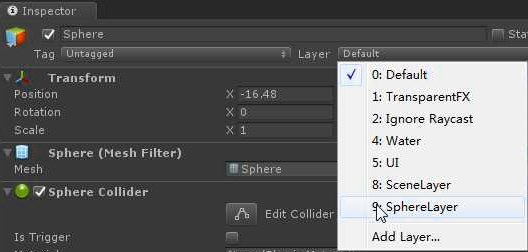
、给Plane和Sphere添加层级

、辅摄像机添加Depth only,Depth改为1,比主摄像机Depth0要大

、主摄像机剔除小球,辅摄像机只保留小球

1方块=1米=100像素

Size = 屏幕分辨率 / (unity默认一个方格的像素) / (屏幕高度的一半)

正好可以把背景投射完整
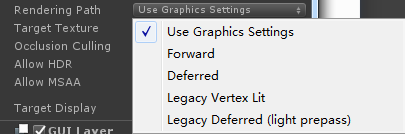
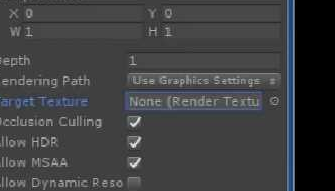
补充内容-查找篇:

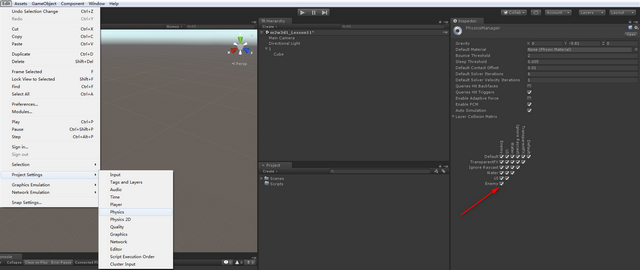
更换天空球的材质

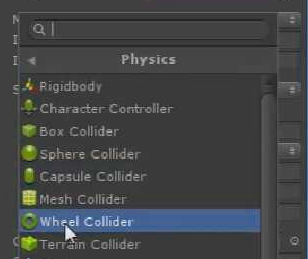
第三人称视角:人
using System.Collections;

using System.Collections.Generic;

using UnityEngine;

public class ThirdPersonalCameraControl : MonoBehaviour {

    public float moveSpeed = ;

    public float rotateSpeed = ;

    private float keyboard_h;

    private float keyboard_v;

    private Camera camera;

    // Use this for initialization

    void Start () {

        camera = Camera.main;

    }

       // Update is called once per frame

       void Update () {

        keyboard_h = Input.GetAxis("Horizontal");

        keyboard_v = Input.GetAxis("Vertical");

        PlayerMove();

    }

    void PlayerMove()

    {

        Vector3 cameraForward = Vector3.ProjectOnPlane(camera.transform.forward,Vector3.up).normalized;

        Vector3 cameraRight = Vector3.ProjectOnPlane(camera.transform.right, Vector3.up).normalized;

        transform.Translate(cameraForward * Time.deltaTime * moveSpeed * keyboard_v);

        transform.Translate(cameraRight * Time.deltaTime * moveSpeed * keyboard_h);

    }

}
using System.Collections;

using System.Collections.Generic;

using UnityEngine;

public class ThirdCameraControl : MonoBehaviour {

    public Transform player;

    public float rotateSpeed = ;

    private float mouse_h;

    private float mouse_v;

    private float mouseWheel;

    private Vector3 player2CameraVector;

    // Use this for initialization

    void Start () {

        player2CameraVector = transform.position - player.position;

    }

       // Update is called once per frame

       void Update () {

        mouse_h = Input.GetAxis("Mouse X") * rotateSpeed;

        mouse_v = -Input.GetAxis("Mouse Y") * rotateSpeed;

        mouseWheel = Input.GetAxis("Mouse ScrollWheel") * rotateSpeed;

        PlayeRotate();

        MouseScrollWheel();

    }

    void PlayeRotate()

    {

        //一个控制人物(左右转向,放人物身上)

        transform.Rotate(Vector3.up * Time.deltaTime * rotateSpeed * mouse_h);

        Vector3 eulurVector3 = new Vector3(mouse_v, mouse_h, );

        Quaternion targetQ = Quaternion.Euler(eulurVector3);

        Vector3 newVector3 = targetQ * player2CameraVector;

        transform.position = player.position + newVector3;

        transform.LookAt(player);

        //思考题:上下无法移动

    }

    void MouseScrollWheel()

    {

        player2CameraVector = player2CameraVector + player2CameraVector.normalized * mouseWheel;

        Vector3 eulurVector3 = new Vector3(mouse_v, mouse_h, );

        Quaternion targetQ = Quaternion.Euler(eulurVector3);

        Vector3 newVector3 = targetQ * player2CameraVector;

        transform.position = player.position + newVector3;

        transform.LookAt(player);

        //限制

    }

}
第一人称视角:人
using System.Collections;

using System.Collections.Generic;

using UnityEngine;

public class FirstPersonalCameraControl : MonoBehaviour {

    public float moveSpeed = ;

    public float rotateSpeed = ;

    private float keyboard_h;

    private float keyboard_v;

    private float mouse_h;

    private float mouse_v;

    // Use this for initialization

    void Start () {

       }

       // Update is called once per frame

       void Update () {

        keyboard_h = Input.GetAxis("Horizontal");

        keyboard_v = Input.GetAxis("Vertical");

        mouse_h = Input.GetAxis("Mouse X");

        mouse_v = Input.GetAxis("Mouse Y");

        PlayerMove();

        PlayeRotate();

    }

    void PlayerMove()

    {

        //写两个代码:一个控制人物(左右转向,放人物身上),一个控制摄像机(上下转向,放摄像机身上)

        transform.Translate(Vector3.forward * Time.deltaTime * moveSpeed * keyboard_v);

        transform.Translate(Vector3.right * Time.deltaTime * moveSpeed * keyboard_h);

    }

    void PlayeRotate()

    {

        //一个控制人物(左右转向,放人物身上)

        transform.Rotate(Vector3.up * Time.deltaTime * rotateSpeed * mouse_h);

    }

}
第一人称视角:摄像机
using System.Collections;

using System.Collections.Generic;

using UnityEngine;

public class FirstCameraControl : MonoBehaviour {

    //上下转动(180)要比左右转动(360)角度小

    public float rotateSpeed = ;

    private float mouse_v;

    // Use this for initialization

    void Start () {

       }

       // Update is called once per frame

       void Update () {

        mouse_v = Input.GetAxis("Mouse Y");

        PlayeRotate();

    }

    void PlayeRotate()

    {

        //一个控制摄像机(上下转动,放摄像机身上)

        transform.Rotate(Vector3.right * Time.deltaTime * rotateSpeed * -mouse_v);

        //限制摄像机上下转动幅度

    }

}
汽车
using System.Collections;

using System.Collections.Generic;

using UnityEngine;

public class CarMove : MonoBehaviour {

    public float moveSpeed = ;

    public float rotateSpeed = ;

    private float keyboard_h;

    private float keyboard_v;

    // Use this for initialization

    void Start()

    {

    }

    // Update is called once per frame

    void Update()

    {

        keyboard_h = Input.GetAxis("Horizontal");

        keyboard_v = Input.GetAxis("Vertical");

        transform.Translate(Vector3.forward * Time.deltaTime * moveSpeed * keyboard_v);

        transform.Rotate(Vector3.up * Time.deltaTime * rotateSpeed * keyboard_h);

    }

}
using System.Collections;

using System.Collections.Generic;

using UnityEngine;

public class CarCameraController : MonoBehaviour {

    public Transform car;

    public Transform lookTrans;

    public float followTime = 0.5f;

    private Vector3 currentVelocity;

    // Use this for initialization

    void Start()

    {

    }

    // Update is called once per frame

    void Update()

    {

        transform.position = Vector3.SmoothDamp(transform.position, car.position, ref currentVelocity, followTime);

        Vector3 dir = lookTrans.position - transform.position;

        Quaternion targetQuat = Quaternion.LookRotation(dir);

        transform.rotation = Quaternion.Slerp(transform.rotation, targetQuat, 0.1f);

    }

}
对象池
using System.Collections;

using System.Collections.Generic;

using UnityEngine;

public class PlayerControl : MonoBehaviour {

    public float moveSpeed = ;

    Transform firePos;

    private void Awake()

    {

        firePos = transform.Find("firePos");

    }

       void Update () {

        Vector3 moveDir = new Vector3(Input.GetAxis("Horizontal"), Input.GetAxis("Vertical"), );

        transform.Translate(moveDir * Time.deltaTime * moveSpeed);

        if(Input.GetKeyDown(KeyCode.Space))

        {

            // 通过实例化创建子弹   替换成对象池管理

            //Instantiate(bulletPrefab, firePos.position, Quaternion.identity);

            PoolManager.Instance.Spawn(firePos.position, Quaternion.identity);//从对象池中取出游戏物体,要记得给对象赋于位置和方向

        }

       }

}
using System.Collections;

using System.Collections.Generic;

using UnityEngine;

public class BossControl : MonoBehaviour {

    public int hp = ;

       void Start () {

       }

       void Update () {

       }

    private void OnTriggerEnter(Collider other)

    {

        if(other.gameObject.tag == "Bullet")

        {

            hp -= ;

            // 子弹销毁        替换成对象池管理

            //Destroy(other.gameObject);

            PoolManager.Instance.Push(other.gameObject);

            if(hp <= )

            {

                Destroy(this.gameObject);

            }

        }

    }

}
using System.Collections;

using System.Collections.Generic;

using UnityEngine;

public class PoolManager : MonoBehaviour

{

    private static PoolManager instance = null;

    public static PoolManager Instance { get { return instance; } }

    public GameObject bulletPrefab;

    public List<GameObject> bulletPool = new List<GameObject>();

    // 列表来管理

    // 创建的时候 从列表中取一个出来 激活

    // 销毁的时候 把这个要销毁的游戏物体 失活, 放到列表中

    // 把游戏物体 激活、失活

    void Awake()

    {

        instance = this;

    }

    // 从对象池中取游戏物体

    public GameObject Spawn(Vector3 pos, Quaternion qua)

    {

        GameObject go;

        if (bulletPool.Count == )

        {

            go = Instantiate(bulletPrefab, pos, qua);

        }

        else

        {

            go = bulletPool[bulletPool.Count - ];

            go.SetActive(true);

            bulletPool.RemoveAt(bulletPool.Count - );

            go.transform.position = pos;

            go.transform.rotation = qua;

        }

          //粒子特效的拖尾问题处理

        //ParticleSystem ps = go.GetComponent<ParticleSystem>();

        //if (ps) ps.Clear();

        //ParticleSystem[] pses = go.GetComponentsInChildren<ParticleSystem>();

        //foreach (var item in pses)

        //{

        //    item.Clear();

        //}

        TrailRenderer tr = go.GetComponent<TrailRenderer>();//TrailRenderer的拖尾问题处理

        tr.Clear();

        //ps.Play();

        //ps.Pause();

        return go;

    }

    // 把游戏物体放回对象池

    public void Push(GameObject go)

    {

        go.SetActive(false);

        bulletPool.Add(go);

    }

}
Invoke,延时调用函数
using System.Collections;

using System.Collections.Generic;

using UnityEngine;

public class BulletMove : MonoBehaviour {

    public float moveSpeed = ;

       void Start () {

        // 销毁     替换成对象池管理

        //Destroy(this.gameObject, 5f);

        Invoke("PushBack", 5f);  // 延迟调用

       }

       void Update () {

        transform.Translate(Vector3.forward * Time.deltaTime * moveSpeed);

       }

    void PushBack()

    {

        PoolManager.Instance.Push(this.gameObject);

    }

}
Unity3D学习笔记(九):摄像机的更多相关文章
- unity3d学习笔记(一) 第一人称视角实现和倒计时实现
unity3d学习笔记(一) 第一人称视角实现和倒计时实现 1. 第一人称视角 (1)让mainCamera和player(视角对象)同步在一起 因为我们的player是生成的,所以不能把mainCa ...
- Unity3D学习笔记2——绘制一个带纹理的面
目录 1. 概述 2. 详论 2.1. 网格(Mesh) 2.1.1. 顶点 2.1.2. 顶点索引 2.2. 材质(Material) 2.2.1. 创建材质 2.2.2. 使用材质 2.3. 光照 ...
- 多线程学习笔记九之ThreadLocal
目录 多线程学习笔记九之ThreadLocal 简介 类结构 源码分析 ThreadLocalMap set(T value) get() remove() 为什么ThreadLocalMap的键是W ...
- MDX导航结构层次:《Microsoft SQL Server 2008 MDX Step by Step》学习笔记九
<Microsoft SQL Server 2008 MDX Step by Step>学习笔记九:导航结构层次 SQL Server 2008中SQL应用系列及BI笔记系列--目录索 ...
- python3.4学习笔记(九) Python GUI桌面应用开发工具选择
python3.4学习笔记(九) Python GUI桌面应用开发工具选择 Python GUI开发工具选择 - WEB开发者http://www.admin10000.com/document/96 ...
- Go语言学习笔记九: 指针
Go语言学习笔记九: 指针 指针的概念是当时学C语言时了解的.Go语言的指针感觉与C语言的没啥不同. 指针定义与使用 指针变量是保存内存地址的变量.其他变量保存的是数值,而指针变量保存的是内存地址.这 ...
- go微服务框架kratos学习笔记九(kratos 全链路追踪 zipkin)
目录 go微服务框架kratos学习笔记九(kratos 全链路追踪 zipkin) zipkin使用demo 数据持久化 go微服务框架kratos学习笔记九(kratos 全链路追踪 zipkin ...
- Unity3D学习笔记3——Unity Shader的初步使用
目录 1. 概述 2. 详论 2.1. 创建材质 2.2. 着色器 2.2.1. 名称 2.2.2. 属性 2.2.3. SubShader 2.2.3.1. 标签(Tags) 2.2.3.2. 渲染 ...
- Unity3D学习笔记4——创建Mesh高级接口
目录 1. 概述 2. 详论 3. 其他 4. 参考 1. 概述 在文章Unity3D学习笔记2--绘制一个带纹理的面中使用代码的方式创建了一个Mesh,不过这套接口在Unity中被称为简单接口.与其 ...
- Unity3D学习笔记6——GPU实例化(1)
目录 1. 概述 2. 详论 3. 参考 1. 概述 在之前的文章中说到,一种材质对应一次绘制调用的指令.即使是这种情况,两个三维物体使用同一种材质,但它们使用的材质参数不一样,那么最终仍然会造成两次 ...
随机推荐
- 杀死正在运行的进程: linux
1:杀死正在运行的进程:使用ps -aux|grep labor 查出进程PID 2:使用kill PID 将进程杀死.
- Spark SQL metaData配置到Mysql
构造以spark为核心的数据仓库: 0.说明 在大数据领域,hive作为老牌的数据仓库比较流行,spark可以考虑兼容hive.但是如果不想用hive做数据仓库也无妨,大不了我们用spark建 ...
- Python3之socket编程
一.socket的定义 Socket是应用层与TCP/IP协议族通信的中间软件抽象层,它是一组接口.在设计模式中,Socket其实就是一个门面模式,它把复杂的TCP/IP协议族隐藏在Socket接口后 ...
- HDU5012:Dice(bfs模板)
http://acm.hdu.edu.cn/showproblem.php?pid=5012 Problem Description There are 2 special dices on the ...
- [LeetCode] 197. Rising Temperature_Easy tag: SQL
Given a Weather table, write a SQL query to find all dates' Ids with higher temperature compared to ...
- Header实现文件下载
function download($file){ //文件根路径 $filename=$_SERVER['DOCUMENT_ROOT'].__ROOT__.'/'.$file; //下载文件 if( ...
- js 参数声明用var和不用var的区别
var 声明的变量,作用域是当前 function 没有声明的变量,直接赋值的话, 会自动创建变量 ,但作用域是全局的. //----------------- function doSth() { ...
- Matlab中图像处理实例:灰度变换,空域滤波,频域滤波,傅里叶变换的实现
http://blog.sciencenet.cn/blog-95484-803140.html % %图像灰度变换 % f = imread('E:\2013第一学期课程\媒体计算\实验一\Img\ ...
- VUE滚动条插件——vue-happy-scroll
最近自己在自学vue2.0,然后就自己摸索做一个简单的后台管理系统,在做的过程中,总感觉不同浏览器自带的滚动条样式不统一,也很难看,所以就在网上找一些使用vue的滚动条插件.最开始用的是Easy-sc ...
- JS参差不齐的数组
<html><head> <title>参差不齐的数组</title> <meta charset="utf-8"> & ...