
爆破root密码hash John the Ripper和hydra爆破ssh密码
官方网站:http://www.openwall.com/john/
下载:wget http://www.openwall.com/john/j/john-1.8.0.tar.gz
解压:tar -xvf john-1.8.0.tar.gz
进入src目录:
cd john-1.8.0 && cd src
- root@ubuntu:/usr/local/john/john-1.8.0/src# make
- To build John the Ripper, type:
- make clean SYSTEM
- where SYSTEM can be one of the following:
- linux-x86-64-avx Linux, x86-64 with AVX (2011+ Intel CPUs)
- linux-x86-64-xop Linux, x86-64 with AVX and XOP (2011+ AMD CPUs)
- linux-x86-64 Linux, x86-64 with SSE2 (most common)
- linux-x86-avx Linux, x86 32-bit with AVX (2011+ Intel CPUs)
- linux-x86-xop Linux, x86 32-bit with AVX and XOP (2011+ AMD CPUs)
- linux-x86-sse2 Linux, x86 32-bit with SSE2 (most common, if 32-bit)
- linux-x86-mmx Linux, x86 32-bit with MMX (for old computers)
- linux-x86-any Linux, x86 32-bit (for truly ancient computers)
- linux-alpha Linux, Alpha
- linux-sparc Linux, SPARC 32-bit
- linux-ppc32-altivec Linux, PowerPC w/AltiVec (best)
- linux-ppc32 Linux, PowerPC 32-bit
- linux-ppc64 Linux, PowerPC 64-bit
- linux-ia64 Linux, IA-64
- freebsd-x86-64 FreeBSD, x86-64 with SSE2 (best)
- freebsd-x86-sse2 FreeBSD, x86 with SSE2 (best if 32-bit)
- freebsd-x86-mmx FreeBSD, x86 with MMX
- freebsd-x86-any FreeBSD, x86
- freebsd-alpha FreeBSD, Alpha
- openbsd-x86-64 OpenBSD, x86-64 with SSE2 (best)
- openbsd-x86-sse2 OpenBSD, x86 with SSE2 (best if 32-bit)
- openbsd-x86-mmx OpenBSD, x86 with MMX
- openbsd-x86-any OpenBSD, x86
- openbsd-alpha OpenBSD, Alpha
- openbsd-sparc64 OpenBSD, SPARC 64-bit (best)
- openbsd-sparc OpenBSD, SPARC 32-bit
- openbsd-ppc32 OpenBSD, PowerPC 32-bit
- openbsd-ppc64 OpenBSD, PowerPC 64-bit
- openbsd-pa-risc OpenBSD, PA-RISC
- openbsd-vax OpenBSD, VAX
- netbsd-sparc64 NetBSD, SPARC 64-bit
- netbsd-vax NetBSD, VAX
- solaris-sparc64-cc Solaris, SPARC V9 64-bit, cc (best)
- solaris-sparc64-gcc Solaris, SPARC V9 64-bit, gcc
- solaris-sparcv9-cc Solaris, SPARC V9 32-bit, cc
- solaris-sparcv8-cc Solaris, SPARC V8 32-bit, cc
- solaris-sparc-gcc Solaris, SPARC 32-bit, gcc
- solaris-x86-64-cc Solaris, x86-64 with SSE2, cc (best)
- solaris-x86-64-gcc Solaris, x86-64 with SSE2, gcc
- solaris-x86-sse2-cc Solaris 9 4/04+, x86 with SSE2, cc
- solaris-x86-sse2-gcc Solaris 9 4/04+, x86 with SSE2, gcc
- solaris-x86-mmx-cc Solaris, x86 with MMX, cc
- solaris-x86-mmx-gcc Solaris, x86 with MMX, gcc
- solaris-x86-any-cc Solaris, x86, cc
- solaris-x86-any-gcc Solaris, x86, gcc
- sco-x86-any-gcc SCO, x86, gcc
- sco-x86-any-cc SCO, x86, cc
- tru64-alpha Tru64 (Digital UNIX, OSF/1), Alpha
- aix-ppc32 AIX, PowerPC 32-bit
- macosx-x86-64 Mac OS X 10.5+, Xcode 3.0+, x86-64 with SSE2 (best)
- macosx-x86-sse2 Mac OS X, x86 with SSE2
- macosx-ppc32-altivec Mac OS X, PowerPC w/AltiVec (best)
- macosx-ppc32 Mac OS X, PowerPC 32-bit
- macosx-ppc64 Mac OS X 10.4+, PowerPC 64-bit
- macosx-universal Mac OS X, Universal Binary (x86 + x86-64 + PPC)
- hpux-pa-risc-gcc HP-UX, PA-RISC, gcc
- hpux-pa-risc-cc HP-UX, PA-RISC, ANSI cc
- irix-mips64-r10k IRIX, MIPS 64-bit (R10K) (best)
- irix-mips64 IRIX, MIPS 64-bit
- irix-mips32 IRIX, MIPS 32-bit
- dos-djgpp-x86-mmx DOS, DJGPP, x86 with MMX
- dos-djgpp-x86-any DOS, DJGPP, x86
- win32-cygwin-x86-sse2 Win32, Cygwin, x86 with SSE2 (best)
- win32-cygwin-x86-mmx Win32, Cygwin, x86 with MMX
- win32-cygwin-x86-any Win32, Cygwin, x86
- beos-x86-sse2 BeOS, x86 with SSE2 (best)
- beos-x86-mmx BeOS, x86 with MMX
- beos-x86-any BeOS, x86
- generic Any other Unix-like system with gcc
- root@ubuntu:/usr/local/john/john-1.8.0/src#
根据自己系统版本选择。
make clean linux-x86-64
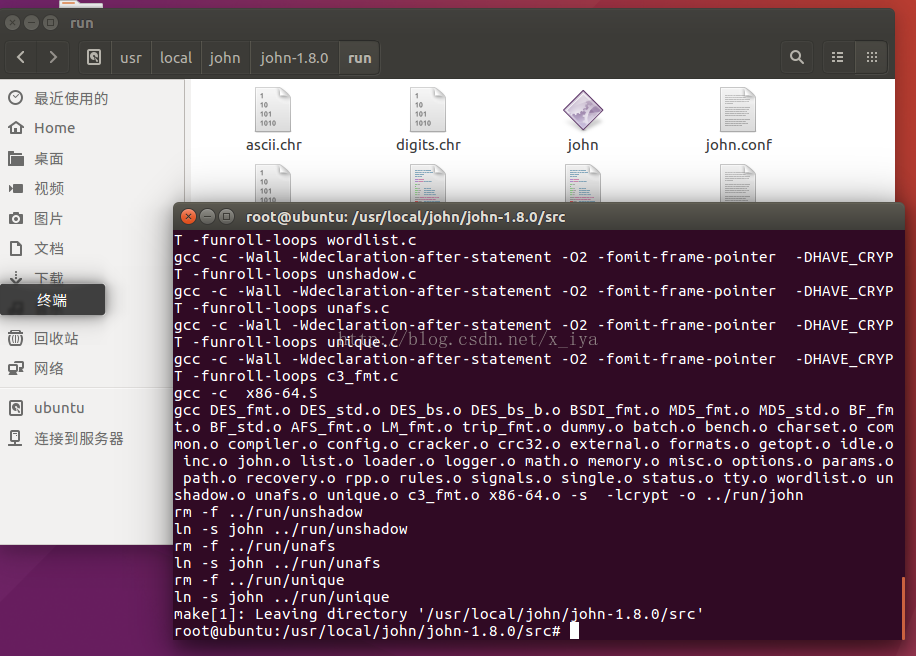
编译成功会在run目录下生成john可执行文件。
把想破解的/etc/shadow放在shadow.txt文件夹下:
执行:./john shadow.txt
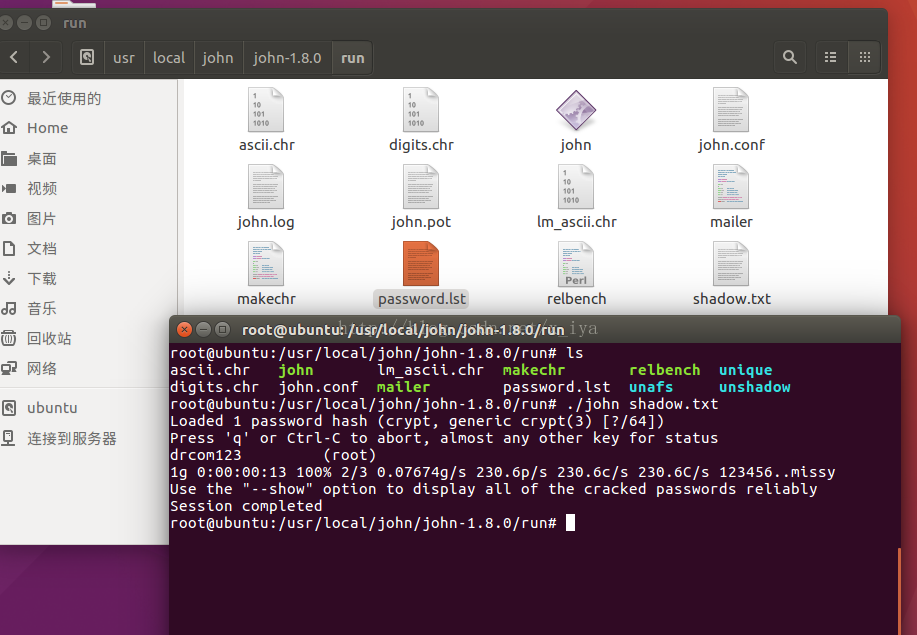
但凡是暴力破解密码,都需要一个足够强悍的密码字典。
John the Ripper的默认密码字典为run目录下的password.lst。
而密码字典的构造就看自己收集信息的能力了。
hydra爆破ssh
这款暴力密码破解工具相当强大,支持几乎所有协议的在线密码破解,其密码能否被破解关键在于字典是否足够强大。对于社会工程型渗透来说,有时能够得到事半功倍的效果。本文仅从安全角度去探讨测试,使用本文内容去做破坏者,与本人无关。
一、简介
hydra是著名黑客组织thc的一款开源的暴力密码破解工具,可以在线破解多种密码。官网:http://www.thc.org/thc-hydra,可支持AFP, Cisco AAA, Cisco auth, Cisco enable, CVS, Firebird, FTP, HTTP-FORM-GET, HTTP-FORM-POST, HTTP-GET, HTTP-HEAD, HTTP-PROXY, HTTPS-FORM-GET, HTTPS-FORM-POST, HTTPS-GET, HTTPS-HEAD, HTTP-Proxy, ICQ, IMAP, IRC, LDAP, MS-SQL, MYSQL, NCP, NNTP, Oracle Listener, Oracle SID, Oracle, PC-Anywhere, PCNFS, POP3, POSTGRES, RDP, Rexec, Rlogin, Rsh, SAP/R3, SIP, SMB, SMTP, SMTP Enum, SNMP, SOCKS5, SSH (v1 and v2), Subversion, Teamspeak (TS2), Telnet, VMware-Auth, VNC and XMPP等类型密码。
二、安装
如果是Debian和Ubuntu发行版,源里自带hydra,直接用apt-get在线安装:sudo apt-get install libssl-dev libssh-dev libidn11-dev libpcre3-dev libgtk2.0-dev libmysqlclient-dev libpq-dev libsvn-dev firebird2.1-dev libncp-dev hydra
Redhat/Fedora发行版的下载源码包编译安装,先安装相关依赖包:yum install openssl-devel pcre-devel ncpfs-devel postgresql-devel libssh-devel subversion-devel
hydra下载地址:http://www.thc.org/releases/hydra-7.3.tar.gz
# tar zxvf hydra-7.0-src.tar.gz
# cd hydra-7.0-src
# ./configure
# make
# make install
hydra支持GUI图形界面,不过习惯还是命令好用。
三、参数说明
hydra [[[-l LOGIN|-L FILE] [-p PASS|-P FILE]] | [-C FILE]] [-e ns]
[-o FILE] [-t TASKS] [-M FILE [-T TASKS]] [-w TIME] [-f] [-s PORT] [-S] [-vV] server service [OPT]
-R 继续从上一次进度接着破解。
-S 采用SSL链接。
-s PORT 可通过这个参数指定非默认端口。
-l LOGIN 指定破解的用户,对特定用户破解。
-L FILE 指定用户名字典。
-p PASS 小写,指定密码破解,少用,一般是采用密码字典。
-P FILE 大写,指定密码字典。
-e ns 可选选项,n:空密码试探,s:使用指定用户和密码试探。
-C FILE 使用冒号分割格式,例如“登录名:密码”来代替-L/-P参数。
-M FILE 指定目标列表文件一行一条。
-o FILE 指定结果输出文件。
-f 在使用-M参数以后,找到第一对登录名或者密码的时候中止破解。
-t TASKS 同时运行的线程数,默认为16。
-w TIME 设置最大超时的时间,单位秒,默认是30s。
-v / -V 显示详细过程。
server 目标ip
service 指定服务名,支持的服务和协议:telnet ftp pop3[-ntlm] imap[-ntlm] smb smbnt http-{head|get} http-{get|post}-form http-proxy cisco cisco-enable vnc ldap2 ldap3 mssql mysql oracle-listener postgres nntp socks5 rexec rlogin pcnfs snmp rsh cvs svn icq sapr3 ssh smtp-auth[-ntlm] pcanywhere teamspeak sip vmauthd firebird ncp afp等等。
OPT 可选项
四、各种用法实例
简单演示:
破解成功,直接显示结果,上图画红线的地方就是破解出来的密码,也可以通过参数-o输出到文件里。如果字典够强大,结合社工,密码不用很久就出来。
1、破解ssh:
hydra -l 用户名 -p 密码字典 -t 线程 -vV -e ns ip ssh
hydra -l 用户名 -p 密码字典 -t 线程 -o save.log -vV ip ssh
2、破解ftp:
hydra ip ftp -l 用户名 -P 密码字典 -t 线程(默认16) -vV
hydra ip ftp -l 用户名 -P 密码字典 -e ns -vV
3、get方式提交,破解web登录:
hydra -l 用户名 -p 密码字典 -t 线程 -vV -e ns ip http-get /admin/
hydra -l 用户名 -p 密码字典 -t 线程 -vV -e ns -f ip http-get /admin/index.php
4、post方式提交,破解web登录:
hydra -l 用户名 -P 密码字典 -s 80 ip http-post-form "/admin/login.php:username=^USER^&password=^PASS^&submit=login:sorry password"
hydra -t 3 -l admin -P pass.txt -o out.txt -f 10.36.16.18 http-post-form "login.php:id=^USER^&passwd=^PASS^:<title>wrong username or password</title>"
(参数说明:-t同时线程数3,-l用户名是admin,字典pass.txt,保存为out.txt,-f 当破解了一个密码就停止, 10.36.16.18目标ip,http-post-form表示破解是采用http的post方式提交的表单密码破解,<title>中的内容是表示错误猜解的返回信息提示。)
5、破解https:
hydra -m /index.php -l muts -P pass.txt 10.36.16.18 https
6、破解teamspeak:
hydra -l 用户名 -P 密码字典 -s 端口号 -vV ip teamspeak
7、破解cisco:
hydra -P pass.txt 10.36.16.18 cisco
hydra -m cloud -P pass.txt 10.36.16.18 cisco-enable
8、破解smb:
hydra -l administrator -P pass.txt 10.36.16.18 smb
9、破解pop3:
hydra -l muts -P pass.txt my.pop3.mail pop3
10、破解rdp:
hydra ip rdp -l administrator -P pass.txt -V
11、破解http-proxy:
hydra -l admin -P pass.txt http-proxy://10.36.16.18
12、破解imap:
hydra -L user.txt -p secret 10.36.16.18 imap PLAIN
hydra -C defaults.txt -6 imap://[fe80::2c:31ff:fe12:ac11]:143/PLAIN
爆破root密码hash John the Ripper和hydra爆破ssh密码的更多相关文章
- 利用 John the Ripper 破解用户登录密码
一.什么是 John the Ripper ? 看到这个标题,想必大家都很好奇,John the Ripper 是个什么东西呢?如果直译其名字的话就是: John 的撕裂者(工具). 相比大家都会觉得 ...
- John the Ripper破解密码
目录 John the Ripper 破解Linux系统密码 破解Windows系统密码 John the Ripper John the Ripper是一个快速的密码破解工具,用于在已知密文的情况下 ...
- [原创]内网SSH密码爆破工具sshcrack(配合Cscan批量弱口令检测)
0x000 前言 sshcrack是一个命令行下的SSH密码爆破工具,适用于内渗中SSH密码检测 当然也可用于外网SSH密码爆破,支持Windows/Linux,其它系统未测.Tip1 0x001 目 ...
- 如何破解密码的哈希值,破解双MD5密码值
这是关于我如何破解密码的哈希值1亿2200万* John the Ripper和oclHashcat-plus故事. 这是几个月前,当我看到一条推特:从korelogic约含共1亿4600万个密码的密 ...
- 关闭ssh密码登录
我们经常使用SSH登录管理服务器,在享受便利的同时也会遇到一些安全隐患,最常见的就是SSH密码被暴力破解.如果我们将SSH密码设置的过于复杂,又不容易记,因此限制SSH登录方式,只能使用key登录是一 ...
- 使用BurpSuite和Hydra爆破相关的服务(9.25 第十一天)
使用BP和Hydra爆破相关的服务 Hydra:九头蛇,开源的功能强大的爆破工具,支持的服务有很多,使用Hydra爆破C/S架构的服务. 使用BurpSuite爆破web服务 DVWA:web应用程序 ...
- 密码破解工具John the Ripper使用说明
John the Ripper John 包描述 John the Ripper 既功能丰富又运行快速. 它在一个程序中结合了几种破解模式,并且可以根据您的特定需求进行全面地配置(你甚至可以使用支持C ...
- 使用John the ripper工具来尝试破解Linux密码
这篇文章主要介绍了使用John the ripper工具来尝试破解Linux密码的方法,这款工具可能主要被用来破解系统用户的密码以获得文件操作权限,需要的朋友可以参考下 John有别于Hdra之类的工 ...
- John the Ripper快速密码破解工具简单使用
在某场比赛中师傅们说需要用到该工具,学习之 题目给了我们一个流量包,分析 发现 .hint.php.swp文件 该文件是使用 vim 编辑文件时异常退出而产生的,可以通过 vim -r 文件名 进行相 ...
随机推荐
- HandlerSocket介绍
HandlerSocket的原理 HandlerSocket的应用场景: MySQL自身的局限性,很多站点都采用了MySQL+Memcached的经典架构,甚至一些网站放弃MySQL而采用NoSQL产 ...
- Win10配置分屏显示
新买的电脑是17.3的,单独打开一个界面总是感觉地方有点浪费,研究了下分屏使用. 以下是现在分屏后的电脑界面. 设置说明 目的:将三个窗口分屏布满屏幕,便于多任务操作. 步骤: 1.按住鼠标左键,将w ...
- 关于JS获取某月最后一天
发现网上用js获取某月最后一个的方式大多比较复杂,上个简单的: new Date(2013,4).toJSON().substring(0,10) new Date(2013,4,0).toLocal ...
- python----流程控制
计算机程序在解决某个具体问题时,包括三种情形,即顺序执行所有的语句.选择执行部分的语句和循环执行部分语句,这正好对应着程序设计中的三种程序执行结构流程:顺序结构.选择结构和循环结构. 事实证明,任何一 ...
- 专访姚冬:All-in-One,智能时代下企业需要更快速的变革
2017年,msup将咨询服务列入公司发展战略目标,并邀请前IBM大中华区技术总监姚冬成为咨询合伙人.近一年来,msup在咨询服务方面持续发力,与包括百度.平安科技.用友等在内的大型公司形成企业合作联 ...
- [No0000125]WCF安全体系
WCF的安全体系主要包括三个方面:传输安全(Transfer Security).授权或者访问控制(Authorization OR Access Control)以及审核(Auditing).而传输 ...
- dos基本指令
目录操作 dir 操作磁盘文件目录 md / mkdir <folder name> 创建子目录make directory cd 改变当前工作目录,返回上一级 cd .. rd 删 ...
- Only the storage referenced by ptr is modified. No other storage locations are accessed by the call.
free - C++ Reference http://www.cplusplus.com/reference/cstdlib/free/ Data races Only the storage re ...
- JavaScript面向对象之创建类和方法
一,js使用函数来定义类而不是像别的编程语言一样通过关键字class来定义,通过类本身(this)和原型(prototype)来完成面对对象编程! 示例1, //创建ElectronicSignatu ...
- [hyperscan][pkg-config] hyperscan 从0到1路线图
经过一系列的研究学习,知识储备之后,终于,可以开始研究hyperscan了. [knowledge][模式匹配] 字符匹配/模式匹配 正则表达式 自动机 [knowledge][perl][pcre] ...