
WCF错误远程服务器返回了意外响应: (413) Request Entity Too Large。解决方案
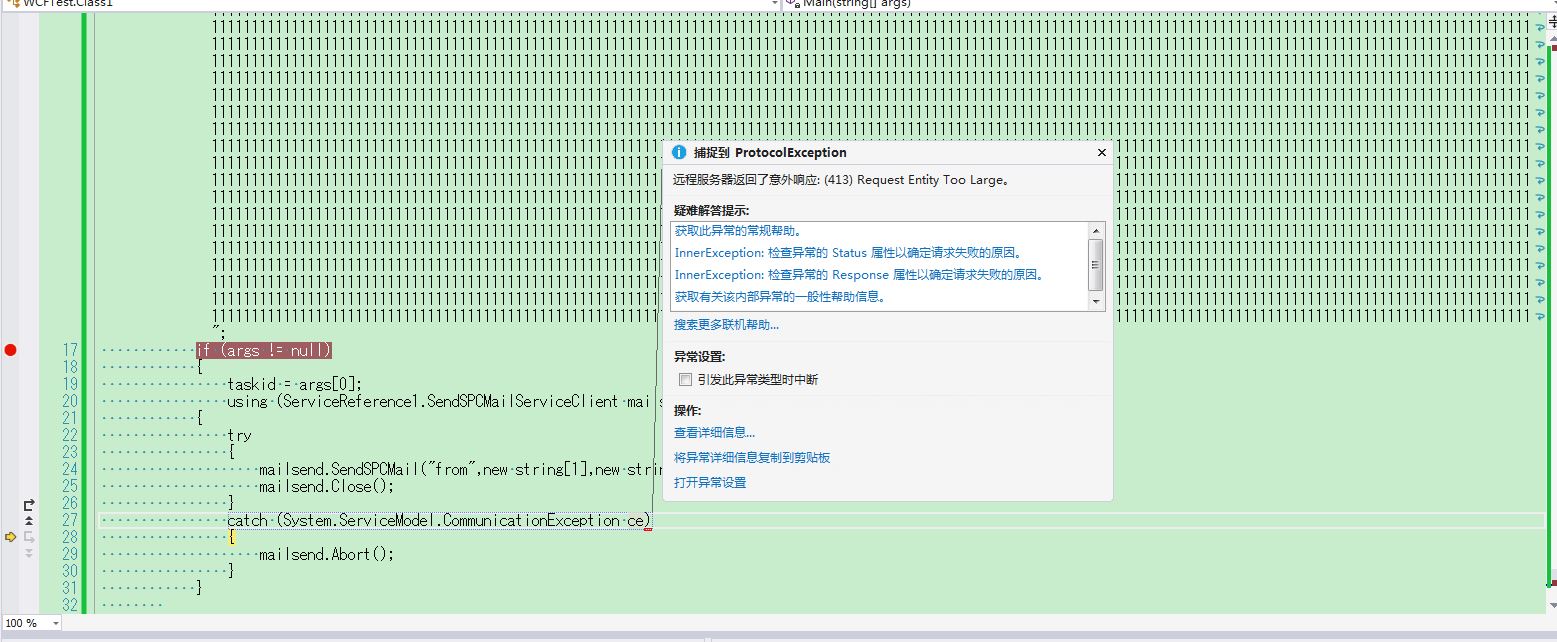
这个问题出现的原因是 调用wcf服务的时候传递的参数 长度太大 wcf数据传输采用的默认的大小是65535字节。
----------------------------------------------------------------------------------------------------------
解决方法就是改服务端的webconfig文件 没改之前的文件内容如下
<?xml version="1.0" encoding="utf-8"?>

<!--

  有关如何配置 ASP.NET 应用程序的详细信息,请访问

  http://go.microsoft.com/fwlink/?LinkId=169433

  -->

<configuration>

  <appSettings>

    <add key="Encoding" value="Shift-JIS"/>

  </appSettings>

  <system.web>

    <compilation debug="true" targetFramework="4.5" />

    <httpRuntime targetFramework="4.5" />

  </system.web>

  <system.serviceModel>

    <behaviors>

      <serviceBehaviors>

        <behavior name="">

          <serviceMetadata httpGetEnabled="true" httpsGetEnabled="true" />

          <serviceDebug includeExceptionDetailInFaults="true" />

        </behavior>

      </serviceBehaviors>

    </behaviors>

    <serviceHostingEnvironment aspNetCompatibilityEnabled="true"

        multipleSiteBindingsEnabled="true" />

  </system.serviceModel>

</configuration>
修改之后:
<?xml version="1.0" encoding="utf-8"?>
<!--
有关如何配置 ASP.NET 应用程序的详细信息,请访问
http://go.microsoft.com/fwlink/?LinkId=169433
-->
<configuration>
<appSettings>
<add key="Encoding" value="Shift-JIS"/>
</appSettings>
<system.web>
<compilation debug="true" targetFramework="4.5" />
<httpRuntime targetFramework="4.5" />
</system.web>
<system.serviceModel>
<bindings>
<basicHttpBinding>
<!--其实要修改所有的服务,不管是服务端还是客户端,Binding那边增加一个没有设置名字的默认配置就OK了-->
<binding closeTimeout="00:10:00" receiveTimeout="00:20:00" sendTimeout="00:20:00"
maxBufferSize="2147483647" maxReceivedMessageSize="2147483647">
</binding >
</basicHttpBinding>
</bindings>
<behaviors>
<serviceBehaviors>
<behavior name="">
<!-- 为避免泄漏元数据信息,请在部署前将以下值设置为 false -->
<serviceMetadata httpGetEnabled="true" httpsGetEnabled="true" />
<!-- 要接收故障异常详细信息以进行调试,请将以下值设置为 true。在部署前设置为 false 以避免泄漏异常信息 -->
<serviceDebug includeExceptionDetailInFaults="True" />
<dataContractSerializer maxItemsInObjectGraph="2147483647" />
</behavior>
</serviceBehaviors>
</behaviors>
<serviceHostingEnvironment aspNetCompatibilityEnabled="true" multipleSiteBindingsEnabled="true" minFreeMemoryPercentageToActivateService="1" />
</system.serviceModel>
</configuration>
WCF错误远程服务器返回了意外响应: (413) Request Entity Too Large。解决方案的更多相关文章
- wcf 远程服务器返回了意外响应: (413) Request Entity Too Large。
我遇到这个问题的原因是:我使用asp.net 网站调用wcf服务后,通过方法提交数据产生的.我提交的数据是一个实体,包含很多字符串和图片格式的二进制数据超过4M 就报个错误. 后来同事帮忙解决了.他说 ...
- WCF 远程服务器返回了意外响应: (400) Bad Request。
WCF 端 <system.web> <httpRuntime maxRequestLength="2147483647" /> </system. ...
- visual studio 远程服务器返回了意外响应:(417)expectation failed
解决方法: 修改devenv.exe.config文件,添加 <servicePointManager expect100Continue="false" /> C:\ ...
- WCF (413) Request Entity Too Large
有网友碰到过这样的问题:wcf 远程服务器返回了意外响应: (413) Request Entity Too Large. - wsx_net,问题详细内容为:挺不错的博文:wcf 远程服务器返回了意 ...
- WCF错误:413 Request Entity Too Large 的一个解决方法
在我们用WCF传输数据的时候,如果启用默认配置,传输的数据量过大,经常会出这个WCF:413 Request Entity Too Large的错误. WCF包含服务端与客户端,所以这个错误可能出现在 ...
- nginx解决超长请求串(413 request Entity too Large错误解决办法)
<div class="hide-article-box text-center" style="display: block;"> <a c ...
- Nginx解决错误413 Request Entity Too Large
最近一个项目当中,要求上传图片,并且限制图片大小,虽然在laravel当中已经添加了相关的表单验证来阻止文件过大的上传,然而当提交表单时,还没轮到laravel处理,nginx就先报错了.当你仔细看报 ...
- 【Azure 应用服务】PHP应用部署在App Service for Linux环境中,上传文件大于1MB时,遇见了413 Request Entity Too Large 错误的解决方法
问题描述 在PHP项目部署在App Service后,上传文件如果大于1MB就会遇见 413 Request Entity Too Large 的问题. 问题解决 目前这个问题,首先需要分析应用所在的 ...
- Nginx出现413 Request Entity Too Large错误解决方法
Nginx出现的413 Request Entity Too Large错误,这个错误一般在上传文件的时候出现,打开nginx主配置文件nginx.conf,找到http{}段,添加 解决方法就是 打 ...
随机推荐
- Shell基础知识(五)
shell中同样有数组的概念,获取数组中的元素要使用下标[],并且下标的值必须大于等于0.数据的各项特性见下例: #!/bin/bash array1=(1 2 3 999) echo ${array ...
- 【uoj207】 共价大爷游长沙
http://uoj.ac/problem/207 (题目链接) 题意 给出一棵无根树,4种操作:在路径集合中加入一条路径,在路径集合中删除一条路径,删一条边加一条边,查询一条边是否被集合中所有路径经 ...
- 部署kubernetes1.8.3高可用集群
Kubernetes作为容器应用的管理平台,通过对pod的运行状态进行监控,并且根据主机或容器失效的状态将新的pod调度到其他node上,实现了应用层的高可用. 针对kubernetes集群,高可用性 ...
- 使用selenium模拟登陆oschina
Selenium把元素定位接口封装得更简单易用了,支持Xpath.CSS选择器.以及标签名.标签属性和标签文本查找. from selenium.webdriver import PhantomJS ...
- (转)JVM——自定义类加载器
背景:为什么要自定义,如何自定义,实现过程 转载:http://blog.csdn.net/SEU_Calvin/article/details/52315125 0. 为什么需要自定义类加载器 网上 ...
- 投票wchat
https://jingyan.baidu.com/article/0964eca27d3c8d8285f5363f.html 打开微信,进入“通讯录”,如下图中1对应位置. 2 在微信中“添加好友” ...
- 类的初始化过程(难点)--------java基础总结
前言:看到这么好的东西,忍不住又写到了博客上面 Student s = new Student();在内存中究竟做了哪些事情呢? ①加载student.class文件进内存. ②为栈内存s开辟空间. ...
- 决策树--信息增益,信息增益比,Geni指数的理解
决策树 是表示基于特征对实例进行分类的树形结构 从给定的训练数据集中,依据特征选择的准则,递归的选择最优划分特征,并根据此特征将训练数据进行分割,使得各子数据集有一个最好的分类的过程. ...
- range与xrange的区别
一.Python中range()与xrange()有什么区别 range([start,] stop[, step]),根据start与stop指定的范围以及step设定的步长,生成一个序列 rang ...
- Linux命令之如何从普通用户切换至管理员用户
普通用户,标志是一个$符号 管理员用户,标志是一个#符号 我要切换,敲打命令 sudo su - 然后输入你的管理员用户的密码(输入密码的时候是不可见的) 然后你就切换到#状态了.