
WCF错误远程服务器返回了意外响应: (413) Request Entity Too Large。解决方案
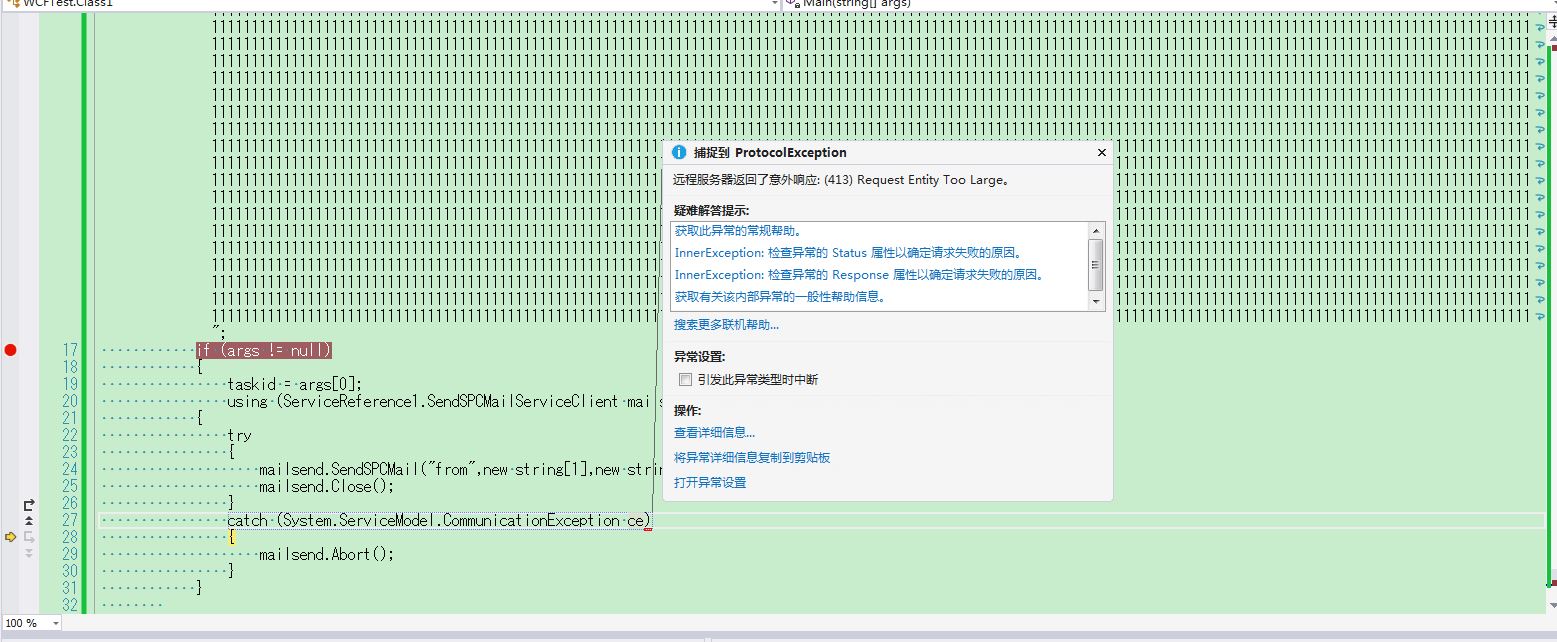
这个问题出现的原因是 调用wcf服务的时候传递的参数 长度太大 wcf数据传输采用的默认的大小是65535字节。
----------------------------------------------------------------------------------------------------------
解决方法就是改服务端的webconfig文件 没改之前的文件内容如下
<?xml version="1.0" encoding="utf-8"?>

<!--

  有关如何配置 ASP.NET 应用程序的详细信息,请访问

  http://go.microsoft.com/fwlink/?LinkId=169433

  -->

<configuration>

  <appSettings>

    <add key="Encoding" value="Shift-JIS"/>

  </appSettings>

  <system.web>

    <compilation debug="true" targetFramework="4.5" />

    <httpRuntime targetFramework="4.5" />

  </system.web>

  <system.serviceModel>

    <behaviors>

      <serviceBehaviors>

        <behavior name="">

          <serviceMetadata httpGetEnabled="true" httpsGetEnabled="true" />

          <serviceDebug includeExceptionDetailInFaults="true" />

        </behavior>

      </serviceBehaviors>

    </behaviors>

    <serviceHostingEnvironment aspNetCompatibilityEnabled="true"

        multipleSiteBindingsEnabled="true" />

  </system.serviceModel>

</configuration>
修改之后:
<?xml version="1.0" encoding="utf-8"?>
<!--
有关如何配置 ASP.NET 应用程序的详细信息,请访问
http://go.microsoft.com/fwlink/?LinkId=169433
-->
<configuration>
<appSettings>
<add key="Encoding" value="Shift-JIS"/>
</appSettings>
<system.web>
<compilation debug="true" targetFramework="4.5" />
<httpRuntime targetFramework="4.5" />
</system.web>
<system.serviceModel>
<bindings>
<basicHttpBinding>
<!--其实要修改所有的服务,不管是服务端还是客户端,Binding那边增加一个没有设置名字的默认配置就OK了-->
<binding closeTimeout="00:10:00" receiveTimeout="00:20:00" sendTimeout="00:20:00"
maxBufferSize="2147483647" maxReceivedMessageSize="2147483647">
</binding >
</basicHttpBinding>
</bindings>
<behaviors>
<serviceBehaviors>
<behavior name="">
<!-- 为避免泄漏元数据信息,请在部署前将以下值设置为 false -->
<serviceMetadata httpGetEnabled="true" httpsGetEnabled="true" />
<!-- 要接收故障异常详细信息以进行调试,请将以下值设置为 true。在部署前设置为 false 以避免泄漏异常信息 -->
<serviceDebug includeExceptionDetailInFaults="True" />
<dataContractSerializer maxItemsInObjectGraph="2147483647" />
</behavior>
</serviceBehaviors>
</behaviors>
<serviceHostingEnvironment aspNetCompatibilityEnabled="true" multipleSiteBindingsEnabled="true" minFreeMemoryPercentageToActivateService="1" />
</system.serviceModel>
</configuration>
WCF错误远程服务器返回了意外响应: (413) Request Entity Too Large。解决方案的更多相关文章
- wcf 远程服务器返回了意外响应: (413) Request Entity Too Large。
我遇到这个问题的原因是:我使用asp.net 网站调用wcf服务后,通过方法提交数据产生的.我提交的数据是一个实体,包含很多字符串和图片格式的二进制数据超过4M 就报个错误. 后来同事帮忙解决了.他说 ...
- WCF 远程服务器返回了意外响应: (400) Bad Request。
WCF 端 <system.web> <httpRuntime maxRequestLength="2147483647" /> </system. ...
- visual studio 远程服务器返回了意外响应:(417)expectation failed
解决方法: 修改devenv.exe.config文件,添加 <servicePointManager expect100Continue="false" /> C:\ ...
- WCF (413) Request Entity Too Large
有网友碰到过这样的问题:wcf 远程服务器返回了意外响应: (413) Request Entity Too Large. - wsx_net,问题详细内容为:挺不错的博文:wcf 远程服务器返回了意 ...
- WCF错误:413 Request Entity Too Large 的一个解决方法
在我们用WCF传输数据的时候,如果启用默认配置,传输的数据量过大,经常会出这个WCF:413 Request Entity Too Large的错误. WCF包含服务端与客户端,所以这个错误可能出现在 ...
- nginx解决超长请求串(413 request Entity too Large错误解决办法)
<div class="hide-article-box text-center" style="display: block;"> <a c ...
- Nginx解决错误413 Request Entity Too Large
最近一个项目当中,要求上传图片,并且限制图片大小,虽然在laravel当中已经添加了相关的表单验证来阻止文件过大的上传,然而当提交表单时,还没轮到laravel处理,nginx就先报错了.当你仔细看报 ...
- 【Azure 应用服务】PHP应用部署在App Service for Linux环境中,上传文件大于1MB时,遇见了413 Request Entity Too Large 错误的解决方法
问题描述 在PHP项目部署在App Service后,上传文件如果大于1MB就会遇见 413 Request Entity Too Large 的问题. 问题解决 目前这个问题,首先需要分析应用所在的 ...
- Nginx出现413 Request Entity Too Large错误解决方法
Nginx出现的413 Request Entity Too Large错误,这个错误一般在上传文件的时候出现,打开nginx主配置文件nginx.conf,找到http{}段,添加 解决方法就是 打 ...
随机推荐
- SharePoint 错误集 2
1 Run command “New-SPConfigurationDatabase" Feature Description: error message popup after run ...
- 震惊!1MB == 1000KB??
稍微对电脑了解一点的同学可能都知道,电脑中的单位换算是: 1KB = 1024B 1MB = 1024KB 1GB = 1024MB ... 以前,我也是这么认为的.... 最近我在Linux解压某个 ...
- 哈夫曼树Huffman
哈夫曼树处理这样的一种问题: 给出一棵n个叶子的k叉树,每个叶子有一个权值wi,要求最小化∑wi*di di表示,第i个叶子节点到根节点的距离.(一般是边数) 处理方法比较固定. 贪心的思路:我们让权 ...
- eclipse启动速度优化
1. 在eclipse.ini文件中添加如下参数(红色部分) -startup plugins/org.eclipse.equinox.launcher_1.3.0.v20140415-2008.ja ...
- C# winform C/S WebBrowser qq第三方授权登录
qq的授权登录,跟微信相似,不同的地方是: 1 申请appid与appkey的时候,注意填写回调地址. 2 这里可以在WebBrowser的是Navigated事件中直接得到Access Token, ...
- 服务器内存占用不断的增加 & 任务管理器(PF使用率)不断的增加:关注句柄数
最近一二个月以来,我发现服务器的内存占用正按着每天60M的速度增加. 一台windows 2003的服务器(2G内存),刚刚启起时占用内存:600M左右. 运行20天后,内存占用(PF使用):1.8G ...
- dedecms 5.7 采集目标文章的发布时间 采集后变成当前本地时间
我已经解决了.现在把方法告诉你.都是我自己摸索出来的..虽然我不知道什么意思...下面是步骤: 1:找到 co_export.php然后找到这段代码: else if($itemName == 'pu ...
- echarts 取消图例上的点击事件和图表上鼠标滑过点击事件
备注:标黄的代码是起作用的代码,其他的不需要借鉴!!! //取消 鼠标滑过的提示框 tooltip : { trigger: 'item', show:false, ...
- P2569 [SCOI2010]股票交易
最近 \(lxhgww\) 又迷上了投资股票,通过一段时间的观察和学习,他总结出了股票行情的一些规律. 通过一段时间的观察,\(lxhgww\) 预测到了未来 \(T\) 天内某只股票的走势,第 \( ...
- 51Nod1376 (dp + BIT // cdq分治)
https://www.51nod.com/onlineJudge/questionCode.html#!problemId=1376 求LIS的数量. 乍一看觉得还是dp,仔细一看确实可以用dp做. ...