
Quartz.Net系列(五):Quartz五大构件Job之JobBuilder解析
所有方法图:
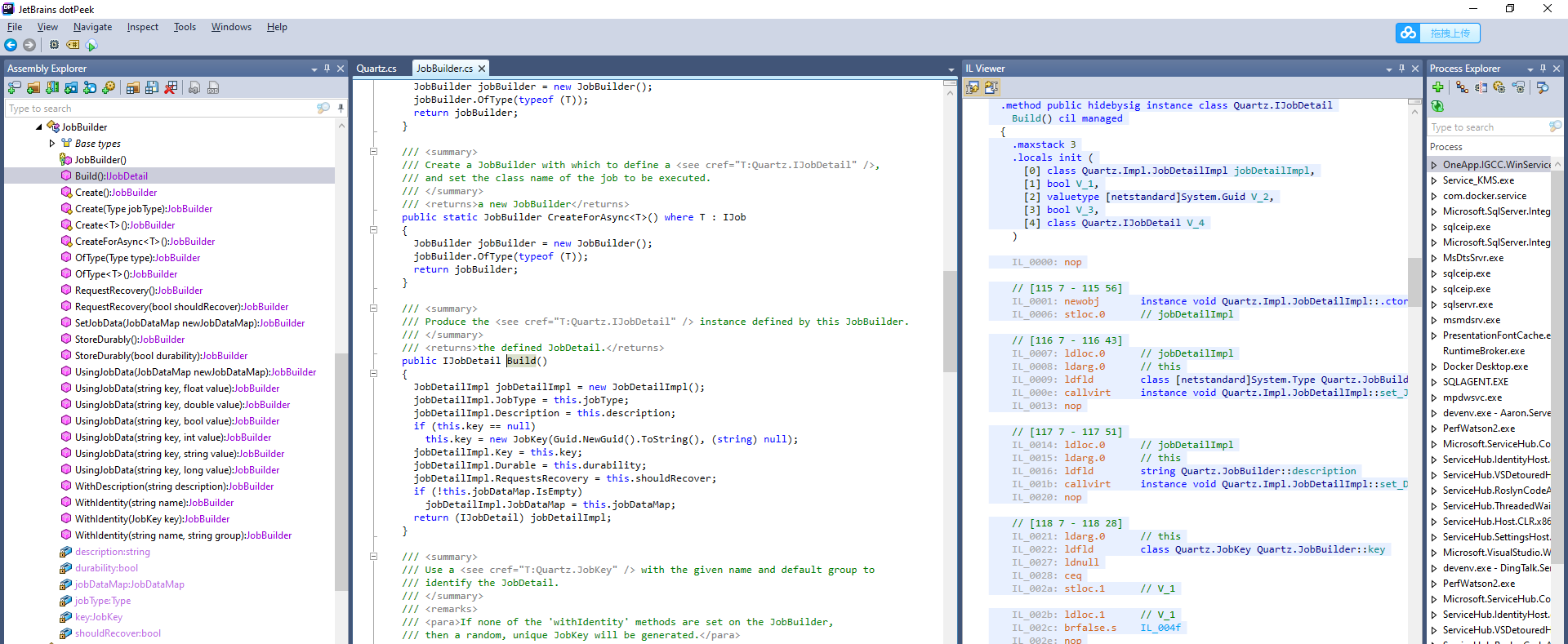
1.Create,OfType
在JobBuilder中有五种方法执行Action:
            var job1 = JobBuilder.Create().OfType<FirstJob>().Build();

            var job2 = JobBuilder.Create<FirstJob>().Build();

            var job3 = JobBuilder.CreateForAsync<FirstJob>().Build();

            var job4 = JobBuilder.Create(typeof(FirstJob));

            var job5 = JobBuilder.Create().OfType(typeof(FirstJob));
底层都是调用OfType方法来获取Type
    public JobBuilder OfType<T>()

    {

      return this.OfType(typeof (T));

    }

    /// <summary>

    /// Set the class which will be instantiated and executed when a

    /// Trigger fires that is associated with this JobDetail.

    /// </summary>

    /// <returns>the updated JobBuilder</returns>

    /// <seealso cref="P:Quartz.IJobDetail.JobType" />

    public JobBuilder OfType(Type type)

    {

      this.jobType = type;

      return this;

    }
2.RequestRecovery
请求恢复,也就是说当应用发生故障的时候,是否重新执行默认是false
            var job = JobBuilder.Create<FirstJob>()

                                .RequestRecovery()//请求恢复,也就是说当应用发生故障的时候,是否重新执行

                                .Build();
    public JobBuilder RequestRecovery()

    {

      return this.RequestRecovery(true);

    }

    /// <summary>

    /// Instructs the <see cref="T:Quartz.IScheduler" /> whether or not the job

    /// should be re-executed if a 'recovery' or 'fail-over' situation is

    /// encountered.

    /// </summary>

    /// <remarks>

    /// If not explicitly set, the default value is <see langword="false" />.

    /// </remarks>

    /// <param name="shouldRecover"></param>

    /// <returns>the updated JobBuilder</returns>

    public JobBuilder RequestRecovery(bool shouldRecover)

    {

      this.shouldRecover = shouldRecover;

      return this;

    }
3.WithDescription
设置描述
            var job = JobBuilder.Create<FirstJob>()

                                .RequestRecovery()//请求恢复,也就是说当应用发生故障的时候,是否重新执行

                                .WithDescription("描述") //设置描述

                                .Build();
    public JobBuilder WithDescription(string description)

    {

      this.description = description;

      return this;

    }
4.WithIdentity
给JobDetail起一个Id,方便后面检索
WithIdentity的三种写法
            var job = JobBuilder.Create<FirstJob>()

                                .RequestRecovery()//请求恢复,也就是说当应用发生故障的时候,是否重新执行

                                .WithDescription("描述") //设置描述

                                .WithIdentity("myJob","myJobGroup")

                                .WithIdentity("myJob")

                                .WithIdentity(JobKey.Create("myJob"))

                                .Build();
  public JobBuilder WithIdentity(string name)

    {

      this.key = new JobKey(name, (string) null);

      return this;

    }

    /// <summary>

    /// Use a <see cref="T:Quartz.JobKey" /> with the given name and group to

    /// identify the JobDetail.

    /// </summary>

    /// <remarks>

    /// <para>If none of the 'withIdentity' methods are set on the JobBuilder,

    /// then a random, unique JobKey will be generated.</para>

    /// </remarks>

    /// <param name="name">the name element for the Job's JobKey</param>

    /// <param name="group"> the group element for the Job's JobKey</param>

    /// <returns>the updated JobBuilder</returns>

    /// <seealso cref="T:Quartz.JobKey" />

    /// <seealso cref="P:Quartz.IJobDetail.Key" />

    public JobBuilder WithIdentity(string name, string group)

    {

      this.key = new JobKey(name, group);

      return this;

    }

    /// <summary>

    /// Use a <see cref="T:Quartz.JobKey" /> to identify the JobDetail.

    /// </summary>

    /// <remarks>

    /// <para>If none of the 'withIdentity' methods are set on the JobBuilder,

    /// then a random, unique JobKey will be generated.</para>

    /// </remarks>

    /// <param name="key">the Job's JobKey</param>

    /// <returns>the updated JobBuilder</returns>

    /// <seealso cref="T:Quartz.JobKey" />

    /// <seealso cref="P:Quartz.IJobDetail.Key" />

    public JobBuilder WithIdentity(JobKey key)

    {

      this.key = key;

      return this;

    }
5.StoreDurably
保留存储,也就是说当执行完后,保留Job
            var job = JobBuilder.CreateForAsync<FirstJob>()

                                .StoreDurably()

                                .Build();

    /// <summary>

    /// Whether or not the job should remain stored after it is

    /// orphaned (no <see cref="T:Quartz.ITrigger" />s point to it).

    /// </summary>

    /// <remarks>

    /// If not explicitly set, the default value is <see langword="false" />

    /// - this method sets the value to <code>true</code>.

    /// </remarks>

    /// <returns>the updated JobBuilder</returns>

    /// <seealso cref="P:Quartz.IJobDetail.Durable" />

    public JobBuilder StoreDurably()

    {

      return this.StoreDurably(true);

    }

    /// <summary>

    /// Whether or not the job should remain stored after it is

    /// orphaned (no <see cref="T:Quartz.ITrigger" />s point to it).

    /// </summary>

    /// <remarks>

    /// If not explicitly set, the default value is <see langword="false" />.

    /// </remarks>

    /// <param name="durability">the value to set for the durability property.</param>

    /// <returns>the updated JobBuilder</returns>

    /// <seealso cref="P:Quartz.IJobDetail.Durable" />

    public JobBuilder StoreDurably(bool durability)

    {

      this.durability = durability;

      return this;

    }
6.UsingJobData,SetJobData
添加Job数据
每个JobDetail内都有一个JobDataMap,包含了关联到这个Job的数据,在Job类中,可以通过context取出该数据,进行业务流程处理。
jec = new JobExecutionContextImpl(scheduler, firedTriggerBundle, job);
            Dictionary<string, string> dict = new Dictionary<string, string>();

            dict.Add("UserName","Jack");

            var job = JobBuilder.CreateForAsync<FirstJob>()

                                //.StoreDurably()

                                .SetJobData(new JobDataMap(dict))

                                .UsingJobData("Password","123456")

                                .Build();
    public class FirstJob : IJob

    {

        public async Task Execute(IJobExecutionContext context)

        {

              await Task.Run(() =>

             {

                 var userName=context.MergedJobDataMap.GetString("UserName");

                 var password = context.MergedJobDataMap.GetString("Password");

                 Console.WriteLine(userName);

                 Console.WriteLine(password);

                 //Console.WriteLine("Hello World !");

             });

        }

    }

        public JobBuilder UsingJobData(string key, double value)

        {

            jobDataMap.Put(key, value);

            return this;

        }

        /// <summary>

        /// Add the given key-value pair to the JobDetail's <see cref="JobDataMap" />.

        /// </summary>

        ///<returns>the updated JobBuilder</returns>

        /// <seealso cref="IJobDetail.JobDataMap" />

        public JobBuilder UsingJobData(string key, bool value)

        {

            jobDataMap.Put(key, value);

            return this;

        }

        /// <summary>

        /// Add all the data from the given <see cref="JobDataMap" /> to the

        /// <see cref="IJobDetail" />'s <see cref="JobDataMap" />.

        /// </summary>

        ///<returns>the updated JobBuilder</returns>

        /// <seealso cref="IJobDetail.JobDataMap" />

        public JobBuilder UsingJobData(JobDataMap newJobDataMap)

        {

            jobDataMap.PutAll(newJobDataMap);

            return this;

        }

        /// <summary>

        /// Replace the <see cref="IJobDetail" />'s <see cref="JobDataMap" /> with the

        /// given <see cref="JobDataMap" />.

        /// </summary>

        /// <param name="newJobDataMap"></param>

        /// <returns></returns>

        public JobBuilder SetJobData(JobDataMap newJobDataMap)

        {

            jobDataMap = newJobDataMap;

            return this;

        }
Quartz.Net系列(五):Quartz五大构件Job之JobBuilder解析的更多相关文章
- Quartz.Net系列(六):Quartz五大构件Trigger之TriggerBuilder解析
所有方法图: 1.Create.Build Create:创建一个TriggerBuilder Build:生成Trigger var trigger = TriggerBuilder.Create( ...
- 第九节: 利用RemoteScheduler实现Sheduler的远程控制 第八节: Quartz.Net五大构件之SimpleThreadPool及其四种配置方案 第六节: 六类Calander处理六种不同的时间场景 第五节: Quartz.Net五大构件之Trigger的四大触发类 第三节: Quartz.Net五大构件之Scheduler(创建、封装、基本方法等)和Job(创建、关联
第九节: 利用RemoteScheduler实现Sheduler的远程控制 一. RemoteScheduler远程控制 1. 背景: 在A服务器上部署了一个Scheduler,我们想在B服务器上 ...
- 第三节: Quartz.Net五大构件之Scheduler(创建、封装、基本方法等)和Job(创建、关联等)
一. 五大构件 引言: Quartz.Net的五大构件 1. 调度器:Scheduler 2. 作业任务:Job 3. 触发器: Trigger 4. 线程池: SimpleThreadPoo ...
- Quartz.NET开源作业调度框架系列(五):AdoJobStore保存job到数据库
Quartz.NET 任务调度的核心元素是 scheduler, trigger 和 job,其中 trigger(用于定义调度时间的元素,即按照什么时间规则去执行任务) 和 job 是任务调度的元数 ...
- 定时调度系列之Quartz.Net详解
一. 背景 我们在日常开发中,可能你会遇到这样的需求:"每个月的3号给用户发信息,提醒用户XXX "."每天的0点需要统计前一天的考勤记录"."每个月 ...
- 定时调度系列之Quartz.Net详解(转)
出处:https://www.cnblogs.com/yaopengfei/p/9216229.html 一. 背景 我们在日常开发中,可能你会遇到这样的需求:"每个月的3号给用户发信息,提 ...
- iPhone之Quartz 2D系列--图形上下文(2)(Graphics Contexts)
以下几遍关于Quartz 2D博文都是转载自:http://www.cocoachina.com/bbs/u.php?action=topic&uid=38018 iPhone之Quartz ...
- iPhone之Quartz 2D系列--编程指南(1)概览
以下几遍关于Quartz 2D博文都是转载自:http://www.cocoachina.com/bbs/u.php?action=topic&uid=38018 iPhone之Quartz ...
- 定时组件quartz系列<三>quartz调度机制调研及源码分析
quartz2.2.1集群调度机制调研及源码分析引言quartz集群架构调度器实例化调度过程触发器的获取触发trigger:Job执行过程:总结:附: 引言 quratz是目前最为成熟,使用最广泛的j ...
- 定时组件quartz系列<二>quartz的集群原理
1.基本信息: Quartz是一个开源的作业调度框架,它完全由java写成,并设计用于J2Se和J2EE应用中.它提供了巨大的灵活性而不牺牲简单性.你能够用它 来为执行一个作业而创建简单的或 ...
随机推荐
- MySQL5.7版本单节点大数据量迁移到PXC8.0版本集群全记录-2
本文主要记录57版本升级80版本的过程,供参考. ■ 57版本升级80版本注意事项 默认字符集由latin1变为utf8mb4 MyISAM系统表全部换成InnoDB表 sql_mode参数默认值变化 ...
- 【RocketMQ】RocketMQ 5.0新特性(三)- Controller模式
在RocketMQ 5.0以前,有两种集群部署模式,分别为主从模式(Master-Slave模式)和Dledger模式. 主从模式 主从模式中分为Master和Slave两个角色,集群中可以有多个Ma ...
- Java线程安全详解
并发与多线程 blog:https://devonmusa.github.io 1 常见概念 1.1 操作系统线程运行状态 NEW RUNNABLE RUNNING BLOCKED 1.2 Java虚 ...
- Xmind思维导图工具2023最新专业版破解思路
工具介绍 XMind 是一款最为流行的专业级思维_导图_制作与编辑软件,它现在在全球范围内都已极具名气,可谓是办公.学习.团队交流必备工具之一. 准备工作 1,官方Xmind软件 2,一个心意的编辑器 ...
- 通过mybatis-plus的自定义拦截器实现控制 mybatis-plus的全局逻辑删除字段的控制 (修改其最终执行的sql中的where条件)
需求:过滤部分请求不实现mybatis-plus的逻辑删除 看到网上关于mybatis-plus的自定义拦截器的文章有的少 想了想自己写了一篇 欢迎参考 指正 通过springboot的拦截器 在请求 ...
- 彻底掌握Python中 * 号
Python中的 *号是一个特殊的符号,在其他编程语言中,它最广为人知的用途就是作为乘法运算的符号.而在Python中,它的用途远不止如此. 本文总结了Python中*号的所有用途,以供参考. 1. ...
- L3-009 长城
#include <bits/stdc++.h> using namespace std; using pii = pair<int, int>; using ll = lon ...
- Numpy理解
目录 什么是numpy numpy的安装 numpy数组 定义numpy数组 numpy数组的相关功能 基本操作 0数组和1数组 随机数组 二维数组 numpy的数组操作 我们再平常学习python和 ...
- 从管易云到MySQL通过接口配置打通数据
从管易云到MySQL通过接口配置打通数据 数据源平台:管易云 管易云是金蝶旗下专注提供电商企业管理软件服务的子品牌,先后开发了C-ERP.EC-OMS.EC-WMS.E店管家.BBC.B2B.B2C商 ...
- JavaWeb开发-HTML基础学习
1.HTML的基本语法 HTML是什么?:HTML是一种超文本标记语言,负责网页的结构,设计页面的元素内容等 超文本:超越文本限制,除了文本信息,还可以定义图片,音频,视频等 标记语言:由标签构成的语 ...